Page 120 of 177
Setting the “My Best” Group 8-15
Music Server
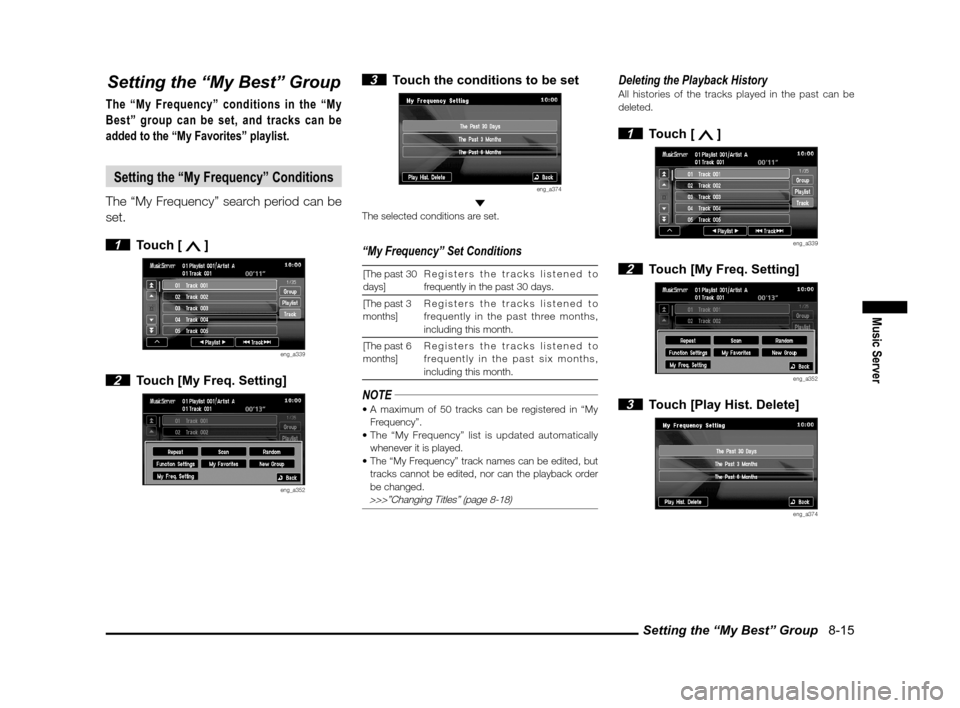
Setting the “My Best” Group
The “My Frequency” conditions in the “My
Best” group can be set, and tracks can be
added to the “My Favorites” playlist.
Setting the “My Frequency” Conditions
The “My Frequency” search period can be
set.
1 Touch [ ]
eng_a339
2 Touch [My Freq. Setting]
eng_a352
3 Touch the conditions to be set
eng_a374
The selected conditions are set.
“My Frequency” Set Conditions
[The past 30
days]Registers the tracks listened to
frequently in the past 30 days.
[The past 3
months] Registers the tracks listened to
frequently in the past three months,
including this month.
[The past 6
months] Registers the tracks listened to
frequently in the past six months,
including this month.
NOTE
Frequency”.
whenever it is played.
tracks cannot be edited, nor can the playback order
be changed.
>>>”Changing Titles” (page 8-18)
Deleting the Playback HistoryAll histories of the tracks played in the past can be
deleted.
1 Touch [ ]
eng_a339
2 Touch [My Freq. Setting]
eng_a352
3 Touch [Play Hist. Delete]
eng_a374
������\b ���\b
��\f�� \
����� ��
����� �\b �\b
�
Page 121 of 177
Setting the “My Best” Group 8-16
4 Touch [Yes]
eng_a375
All histories of the tracks played in the past are
deleted.
Adding to “My Favorites”
Favorite tracks can be added to “My
Favorites” while being played by the Music
Server.
1 Touch [ ]
eng_a339
2 Touch [My Favorites]
eng_a352
3 Touch [Yes]
eng_a376
The track being played is added to the “My Favorites”
playlist.
NOTE
Favorites”.
changed or deleted.
>>>”Changing Titles” (page 8-18) >>> “Changing the Track Playback Order” (page 8-22) >>> “Deleting One Item” (page 8-23)
������\b ���\b
��\f�� \
����� ��
������ �\b �\b
�
Page 122 of 177
Editing Detailed Information 8-17
Music Server
Editing Detailed Information
The information for registered playlists or
tracks can be edited.
NOTE
cannot be edited, so the track edit screen is
displayed.
changed, they return to as they were before when
the title information is obtained.
>>>”Obtaining Title
Information” (page 7-25)
1 Touch [ ]
eng_a339
2 Touch [Function Settings]
eng_a352
3 Touch [Title Edit]
eng_a363
4 Touch the playlist name or track
name to be edited
>>>”Selecting Tracks from the List Screen” (page 8-7)
eng_a377
The edit screen is displayed.
Original Playlist Edit Screen
eng_a378
User Playlist Edit Screen
eng_a379
Track Edit Screen
eng_a326
������\b ���\b
��\f�� \
����� ��
������ �\b �\b
�
Page 124 of 177
Editing Detailed Information 8-19
Music Server
3 Enter the group name>>> “How to Enter Text” (page 2-13)
eng_a385
4 Touch [Set] Group name is changed.
Changing Categories
NOTE
1 Touch the [Edit] button in “Category”
eng_a378
2 Touch the category to be selected
eng_a387
The category is changed.
Category Types
Alternative & Punk Blues
Books & Spoken Children’s Music
ClassicalCountry
Date Easy Listening
Electronic / Dance Folk
Gospel & Religious Hip Hop/Rap
Holiday Industrial
Jazz Latin
Metal New Age
Pop R&B
Reggae Rock
Soundtrack Unclassi able
World
������\b ���\b
��\f�� \
����� ��
������ �\b �\b
�
Page 126 of 177
Changing the Playback Order 8-21
Music Server
6 Touch [ ] and [ ] to move
the position
eng_a392
NOTE
automatically.
touching the location to be moved to.
7 Touch [Set]
eng_a393
The playback order is changed.
Changing the Playlist Playback Order
Auto Changing
1 Touch [Order Change of Playlist]
eng_a373
2 Touch one of the conditions
eng_a388
The playback order is changed.
Playback Order Types
[Old Order
of Recording]Changes to the old order at the time of
recording.
[New Order of
Recording] Changes order to from newest
recording time.
[Order of
Playlist Name] The order is changed to alphabetical
order.
Manual Changing
1 Touch [Order Change of Playlist]
eng_a373
2 Touch [Transpose]
eng_a388
3 Touch the playlist whose order is
to be changed
eng_a394
������\b ���\b
��\f�� \
����� ���
����� �\b �\b�
�
Page 128 of 177
Deleting 8-23
Music Server
Deleting
Deleting One Item
User groups, original playlists, user
playlists, and all tracks can be deleted one
at a time.
NOTE
track is also deleted simultaneously from the My
Best group and user group.
playlist is also deleted automatically.
deleted.
not deleted, and even if all user playlists are deleted,
the user group is not deleted.
1 Touch [ ]
eng_a339
2 Touch [Function Settings]
eng_a352
3 Touch [Delete]
eng_a363
4 Touch [Group], [Playlist], or [Track]
eng_a400
5 Touch the group, playlist, or track
to be deleted
eng_a401
6 Touch [Yes]
eng_a402
The selected group, playlist, or track is deleted.
������\b ���\b
��\f�� \
����� ��������� �\b �\b�
�
![MITSUBISHI iMiEV 2012 1.G MMCS Manual Setting the “My Best” Group 8-16
4 Touch [Yes]
eng_a375
All histories of the tracks played in the past are
deleted.
Adding to “My Favorites”
Favorite tracks can be added to “My
Favorit](/manual-img/19/7551/w960_7551-120.png "MITSUBISHI iMiEV 2012 1.G MMCS Manual Setting the “My Best” Group 8-16
4 Touch [Yes]
eng_a375
All histories of the tracks played in the past are
deleted.
Adding to “My Favorites”
Favorite tracks can be added to “My
Favorit")

![MITSUBISHI iMiEV 2012 1.G MMCS Manual Editing Detailed Information 8-19
Music Server
3 Enter the group name>>> “How to Enter Text” (page 2-13)
eng_a385
4 Touch [Set] Group name is changed.
Changing Categories
NOTE
1 Touch the [E](/manual-img/19/7551/w960_7551-123.png "MITSUBISHI iMiEV 2012 1.G MMCS Manual Editing Detailed Information 8-19
Music Server
3 Enter the group name>>> “How to Enter Text” (page 2-13)
eng_a385
4 Touch [Set] Group name is changed.
Changing Categories
NOTE
1 Touch the [E")
![MITSUBISHI iMiEV 2012 1.G MMCS Manual Changing the Playback Order 8-21
Music Server
6 Touch [ ] and [ ] to move
the position
eng_a392
NOTE
automatically.
touching the location to be moved to.
7 Touch [Set]
eng_a393
The playback o](/manual-img/19/7551/w960_7551-125.png "MITSUBISHI iMiEV 2012 1.G MMCS Manual Changing the Playback Order 8-21
Music Server
6 Touch [ ] and [ ] to move
the position
eng_a392
NOTE
automatically.
touching the location to be moved to.
7 Touch [Set]
eng_a393
The playback o")
