Page 174 of 424

Features and controls
3-85
3
NOTE�A light in the instrument panel flashes to show when the
front and rear turn signal lights are working properly.
If this light flashes faster than usual, check for a burned
out lamp bulb or malfunctioning connection.
If the panel light does not come on when the lever is
moved, check for a blown fuse or a burned out bulb in the
panel.
Have the vehicle inspected by an authorized Mitsubishi
Motors dealer or a repair facility of your choice.
�For vehicles equipped with the Mitsubishi Multi-Commu-
nication System, Mitsubishi Multi-Communication Sys-
tem can be used to select whether the tone will sound or
not sound when the turn signal lights are activated.
For details, refer to the separate owner’s manual.
Hazard warning flasher switch
N00522700262
If you press the flasher switch, the front and rear turn signals
will flash intermittently, and so will the hazard warning lights.
This is an emergency warning system and should not be used
when the vehicle is in motion, except for emergencies.
If you need to leave your vehicle, the flashers will keep work-
ing after the ignition key is removed. NOTE�If you keep the flashers on for several hours with the
engine turned off, the battery will run down.
�For vehicles equipped with the Mitsubishi Multi-Commu-
nication System, Mitsubishi Multi-Communication Sys-
tem can be used to select whether the tone will sound or
not sound when the hazard warning flashers are activated.
For details, refer to the separate owner’s manual.
BK0139500US.book 85 ページ 2011年4月19日 火曜日 午後1時48分
Page 176 of 424
Features and controls
3-87
3 Instrument panel light dimmer control
N00522900176
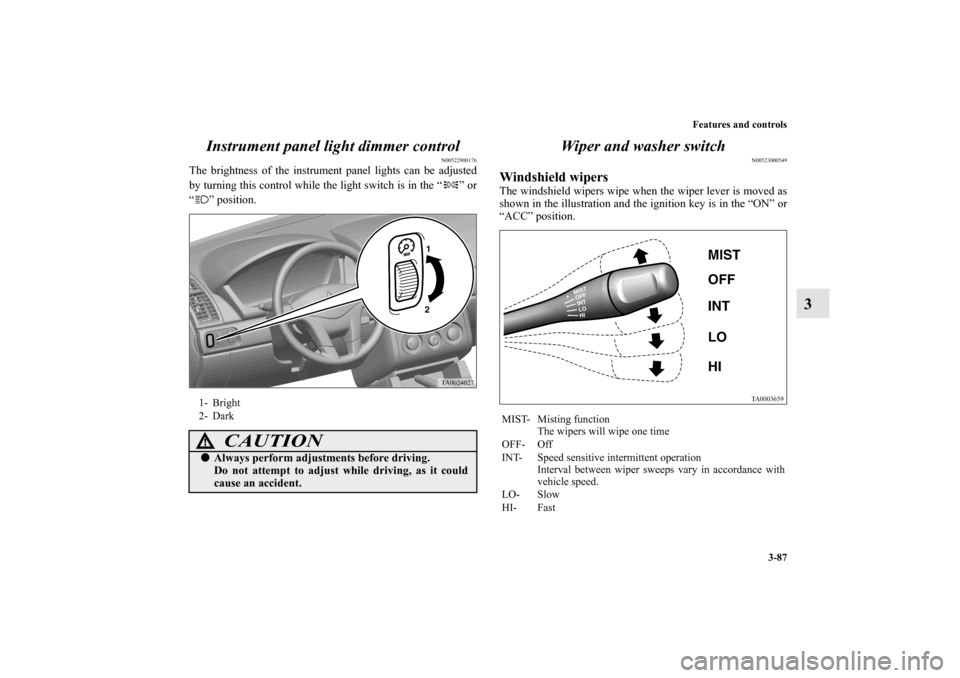
The brightness of the instrument panel lights can be adjusted
by turning this control while the light switch is in the “ ” or
“ ” position.
Wiper and washer switch
N00523000549
Windshield wipersThe windshield wipers wipe when the wiper lever is moved as
shown in the illustration and the ignition key is in the “ON” or
“ACC” position.
1- Bright
2- Dark
CAUTION
!�Always perform adjustments before driving.
Do not attempt to adjust while driving, as it could
cause an accident.
MIST- Misting function
The wipers will wipe one time
OFF- Off
INT- Speed sensitive intermittent operation
Interval between wiper sweeps vary in accordance with
vehicle speed.
LO- Slow
HI- Fast
BK0139500US.book 87 ページ 2011年4月19日 火曜日 午後1時48分
Page 178 of 424
Features and controls
3-89
3
Windshield washer
N00504600025
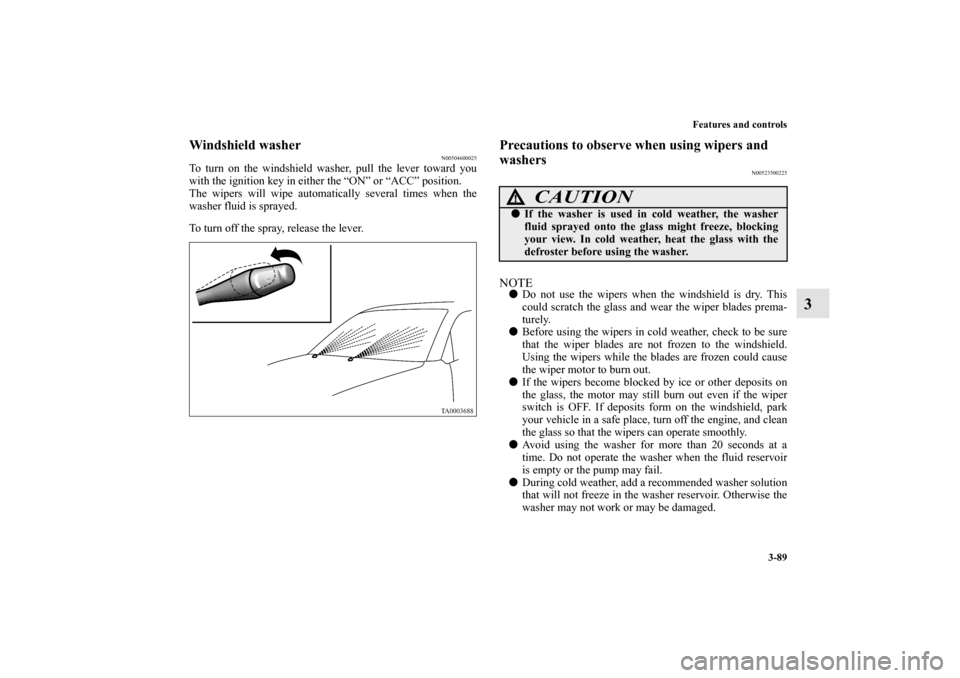
To turn on the windshield washer, pull the lever toward you
with the ignition key in either the “ON” or “ACC” position.
The wipers will wipe automatically several times when the
washer fluid is sprayed.
To turn off the spray, release the lever.
Precautions to observe when using wipers and
washers
N00523500225
NOTE�Do not use the wipers when the windshield is dry. This
could scratch the glass and wear the wiper blades prema-
turely.
�Before using the wipers in cold weather, check to be sure
that the wiper blades are not frozen to the windshield.
Using the wipers while the blades are frozen could cause
the wiper motor to burn out.
�If the wipers become blocked by ice or other deposits on
the glass, the motor may still burn out even if the wiper
switch is OFF. If deposits form on the windshield, park
your vehicle in a safe place, turn off the engine, and clean
the glass so that the wipers can operate smoothly.
�Avoid using the washer for more than 20 seconds at a
time. Do not operate the washer when the fluid reservoir
is empty or the pump may fail.
�During cold weather, add a recommended washer solution
that will not freeze in the washer reservoir. Otherwise the
washer may not work or may be damaged.
CAUTION
!�If the washer is used in cold weather, the washer
fluid sprayed onto the glass might freeze, blocking
your view. In cold weather, heat the glass with the
defroster before using the washer.
BK0139500US.book 89 ページ 2011年4月19日 火曜日 午後1時48分
Page 179 of 424
3-90 Features and controls
3
�Replace the wiper blades when they are worn. Use the
proper size replacement blades. If you have questions, ask
your authorized Mitsubishi Motors dealer.
Electric rear window defogger switch
N00523700357
The electric rear window defogger can be used with the igni-
tion key in the “ON” position.
The indicator light (A) will come on when you press the elec-
tric rear window defogger switch. Electric current will flow
through the heating wires on the rear window to help clear
away moisture or frost.
After about 17 minutes of operation, the system will shut off
automatically.
To switch the defogger OFF before 17 minutes have passed,
press the switch again. The indicator light will go out and the
defogger will turn off.
If you need the defogger for more than 17 minutes, press the
switch again. This will add 17 more minutes.
BK0139500US.book 90 ページ 2011年4月19日 火曜日 午後1時48分
Page 190 of 424

Features and controls
3-101
3
7. After the voice guide says “Please say a 4-digit pairing
code,” say a 4-digit code. The 4-digit code will be regis-
tered as a pairing code for the phone.
When the confirmation function is on, the system will
confirm whether the code said is acceptable. To continue
with the code, answer “Yes.”
Say “No” to return to pairing code selection.NOTE�The pairing code entered here is only used for the Blue-
tooth
® connection certification. It is any 4-digit code the
user would like to select.
Remember the pairing code as it needs to be keyed into
the phone later in the pairing process.
Depending on the Bluetooth
® connection settings
selected, entry of this code may be required each time the
phone attempts to “connect” to the Bluetooth
® HFP. Refer
to your cellular phone owner’s manual for connection
defaults and settings.
8. The voice guide will say “Start pairing procedure on
phone. See phone’s manual for instructions.” Refer to the
owner’s manual for your cellular phone and enter into the
phone the pairing code that was registered in Step 7.9. When the system finds a Bluetooth
® compatible cellular
phone, the voice guide will say “Please say the name of
the phone after the beep.” After you hear the beep, name
the phone by saying a name of your preference.
When the confirmation function is on, the system will say
“Adding , is this correct?”
Answer “Yes” to accept that name or “No” to reenter a
new name.
NOTE�When the system cannot recognize the Bluetooth
® com-
patible cellular phone, the pairing process will end and the
system will beep and then return to normal status.
Try the pairing process again after reconfirming whether
or not the Bluetooth
® HFP supports your Bluetooth
®
compatible cellular phone.
10. The voice guide will say “Assign a priority for this phone
between 1 and 7 where 1 is the phone used most often.”
Say a number between 1 and 7 to set a priority level for
the cellular phone.
NOTE�If you selected a priority level that has already been set for
a different phone, the system will ask you whether you
wish to override that priority level.
To override the priority level, answer “Yes.”
Answer “No” to return to the priority level selection in
Step 10.
BK0139500US.book 101 ページ 2011年4月19日 火曜日 午後1時48分
Page 217 of 424
3-128 Features and controls
3Interior lights
N00525300445
Reading lights
N00525700175
Push the reading light switch (A) to turn on the light. This light
produces a spot beam for convenient use as a map light.
Push the reading light switch again to turn the light off.
The reading light comes on when any door is opened.
When all the doors are closed, the reading light is dimmed
gradually for 30 seconds then goes off. However, the light goes
off immediately without being dimmed if:
�The ignition switch is turned to the “ON” position.
�All the doors are locked using the power door lock switch,
or the keyless entry remote transmitter.
Reading lights
→ P.3-128 Dome light
→ P. 3 - 1 2 9
BK0139500US.book 128 ページ 2011年4月19日 火曜日 午後1時48分
Page 218 of 424
Features and controls
3-129
3
NOTE�If the ignition key is removed with the doors closed, the
interior lights come on for 30 seconds, then go off.
�The time until the light goes off can be adjusted. See your
authorized Mitsubishi Motors dealer for details.
For vehicles equipped with the Mitsubishi Multi-Commu-
nication System, adjustments can be made using screen
operations. For details, refer to the separate owner’s man-
ual.
Dome light
N00525400374
The dome light can be operated by pushing the rear side of the
light.
The dome light comes on when any door is opened.
When all the doors are closed, the dome light is dimmed gradu-
ally for 30 seconds then goes off. However, the light goes off
immediately without being dimmed if:
�The ignition switch is turned to the “ON” position.
�All the doors are locked using the power door lock switch,
or the keyless entry remote transmitter.
BK0139500US.book 129 ページ 2011年4月19日 火曜日 午後1時48分
Page 219 of 424

3-130 Features and controls
3
NOTE�If the ignition key is removed with the doors closed, the
interior lights come on for 30 seconds, then go off.
�The time until the light goes off can be adjusted. See your
authorized Mitsubishi Motors dealer for details.
For vehicles equipped with the Mitsubishi Multi-Commu-
nication System, adjustments can be made using screen
operations. For details, refer to the separate owner’s man-
ual.
Interior light auto-cutout function (dome light
and reading light)
N00526300413
If any of the interior lights are left on with the ignition switch
in the “LOCK” position, the lights go off automatically after
about 30 minutes.
The lights come on again if the ignition switch is turned to the
“ON” or “ACC” position, any door is opened and closed or the
keyless entry system is operated.NOTE�The interior light auto-cutout function can be deactivated.
The time until the lights automatically go off can be
adjusted. See your authorized Mitsubishi Motors dealer
for details.
For vehicles equipped with the Mitsubishi Multi-Commu-
nication System, adjustments can be made using screen
operations. For details, refer to the separate owner’s man-
ual.
BK0139500US.book 130 ページ 2011年4月19日 火曜日 午後1時48分