Page 171 of 424

3-82 Features and controls
3
�When it rains, or when the vehicle has been washed, the
inside of the lens sometimes becomes foggy. This is the
same as when window glass mists up on a humid day, and
does not indicate a problem. When the light is switched
on, the heat will dry out the fog. However, if water col-
lects inside the light, have it checked by an authorized
Mitsubishi Motors dealer or a repair facility of your
choice. Light auto-cutout function (headlights and other
lights)
N00532600495
�If the ignition key is turned to “LOCK” or “ACC” posi-
tion or removed from the ignition switch and the driver’s
door is opened with the light switch in the “ ” or “ ”
position, the lights automatically turn off.
• If the driver’s door is opened after the key is removed
from the ignition switch, a high-pitched constant tone
will sound to remind you to turn off the lights.
• If the driver’s door is opened with the key in the ignition
switch, a low-pitched tone will sound to remind you to
remove the key.
�If the ignition key is turned to “LOCK” or “ACC” posi-
tion or removed from the ignition switch with the driver’s
door closed and the light switch in the “ ” or “ ”
position, the lights will stay on for about 3 minutes and
then turn off automatically.
NOTE�For vehicles equipped with the Mitsubishi Multi-Commu-
nication System, Mitsubishi Multi-Communication Sys-
tem can be used to deactivate the light auto-cutout
function.
For details, refer to the separate owner’s manual.When you want to keep the lights on: If the light switch is turned to the “ ” or “ ” position again
after the engine is turned off, the 3 minute auto-cutout function
described above will not work. The lights (the parking lights,
tail lights and license plate lights) will stay on and will not turn
off automatically. NOTE�For vehicles equipped with the Mitsubishi Multi-Commu-
nication System, Mitsubishi Multi-Communication Sys-
tem can be used to keep the light on for approximately 3
minutes after you leave the vehicle.
For details, refer to the separate owner’s manual.
If the light auto-cutout function is reprogrammed, the 3 min-
utes auto-cutout function can be activated using the following
steps.
1. After turning the ignition key to the “LOCK” or “ACC”
position or removing it from the ignition switch, set the
light switch to the “OFF” position.
2. Put the light switch back to the “ ” or “ ” position
again and get out of the vehicle.
BK0139500US.book 82 ページ 2011年4月19日 火曜日 午後1時48分
Page 172 of 424

Features and controls
3-83
3
3. The light will automatically turn off after 3 minutes.NOTE�When the driver’s door is opened, a continuous high-
pitched tone will sound if the key has been removed; a
continuous low-pitched tone will sound if the key is in the
ignition switch.
The tone stops sounding when the driver’s door is closed.Headlight reminder buzzer
N00549800141
If the driver’s door is opened with the key in the “LOCK” or
“ACC” position or removed from the ignition switch while the
lights are on, the tone will sound to remind you to turn off the
lights. The lights will turn off automatically and so will the
tone. Or you can turn the light switch to the “OFF” position to
stop the tone.
Dimmer (high/low beam change)
N00549900126
To change the headlights from high beam to low beam and vice
versa, pull the turn signal lever to fully toward you (1). Switch
the headlights to low beam as a courtesy whenever there are
oncoming vehicles, or when there is traffic moving ahead of
you. An illuminated blue light in the instrument cluster indi-
cates when the headlights are on high beam.
BK0139500US.book 83 ページ 2011年4月19日 火曜日 午後1時48分
Page 173 of 424

3-84 Features and controls
3
Headlight flasher
N00550000169
You can flash the high beams by pulling the lever gently
toward you (2). The lights will go back to normal when you let
go. While the high beam is on, you will see a blue light on the
instrument panel.NOTE�You can flash the high beams by pulling the lever toward
you, even if the light switch is off.
�If you turn the lights off with the headlights set to high-
beam illumination, the headlights are automatically
returned to their low-beam setting when the light switch is
next turned to the “ ” position.
Turn signal lever
N00522600434
When changing lanes, or to making a gradual turn, hold the
lever in the “lane change” position (1). It will return to the neu-
tral position when you let go. Use the full position (2) when
making a normal turn. The lever will return to the neutral posi-
tion when the turn is complete. There may be times when the
lever does not return to the neutral position. This usually hap-
pens when the steering wheel is turned only slightly. You can
easily return the lever by hand.
BK0139500US.book 84 ページ 2011年4月19日 火曜日 午後1時48分
Page 174 of 424

Features and controls
3-85
3
NOTE�A light in the instrument panel flashes to show when the
front and rear turn signal lights are working properly.
If this light flashes faster than usual, check for a burned
out lamp bulb or malfunctioning connection.
If the panel light does not come on when the lever is
moved, check for a blown fuse or a burned out bulb in the
panel.
Have the vehicle inspected by an authorized Mitsubishi
Motors dealer or a repair facility of your choice.
�For vehicles equipped with the Mitsubishi Multi-Commu-
nication System, Mitsubishi Multi-Communication Sys-
tem can be used to select whether the tone will sound or
not sound when the turn signal lights are activated.
For details, refer to the separate owner’s manual.
Hazard warning flasher switch
N00522700262
If you press the flasher switch, the front and rear turn signals
will flash intermittently, and so will the hazard warning lights.
This is an emergency warning system and should not be used
when the vehicle is in motion, except for emergencies.
If you need to leave your vehicle, the flashers will keep work-
ing after the ignition key is removed. NOTE�If you keep the flashers on for several hours with the
engine turned off, the battery will run down.
�For vehicles equipped with the Mitsubishi Multi-Commu-
nication System, Mitsubishi Multi-Communication Sys-
tem can be used to select whether the tone will sound or
not sound when the hazard warning flashers are activated.
For details, refer to the separate owner’s manual.
BK0139500US.book 85 ページ 2011年4月19日 火曜日 午後1時48分
Page 175 of 424
3-86 Features and controls
3Fog light switch
(if so equipped)
N00522800364
The fog lights illuminate only when the headlights are on low
beam. Press the switch to illuminate. Press the switch again to
turn the lights off.
The indicator in the instrument cluster will illuminate while the
fog lights are on.NOTE�If the headlights are switched to high beam, the fog lights
will go out; they will illuminate again when the headlights
are switched back to low beam.
�If the light switch is rotated to the “OFF” or “ ” posi-
tion while the front fog lights are illuminated, they will
automatically turn off. They can be turned back on again
by rotating the light switch back to “ ” position, and
pressing the front fog light switch once again.�Do not use fog lamps except in conditions of fog, other-
wise excessive lamp glare may temporarily blind oncom-
ing vehicle drivers.
BK0139500US.book 86 ページ 2011年4月19日 火曜日 午後1時48分
Page 176 of 424
Features and controls
3-87
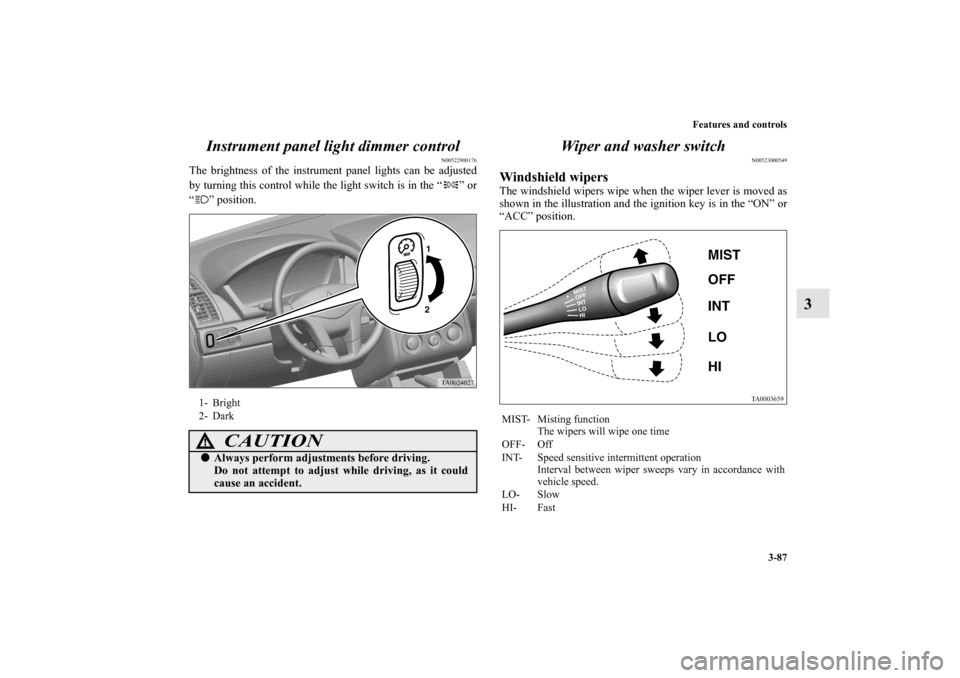
3 Instrument panel light dimmer control
N00522900176
The brightness of the instrument panel lights can be adjusted
by turning this control while the light switch is in the “ ” or
“ ” position.
Wiper and washer switch
N00523000549
Windshield wipersThe windshield wipers wipe when the wiper lever is moved as
shown in the illustration and the ignition key is in the “ON” or
“ACC” position.
1- Bright
2- Dark
CAUTION
!�Always perform adjustments before driving.
Do not attempt to adjust while driving, as it could
cause an accident.
MIST- Misting function
The wipers will wipe one time
OFF- Off
INT- Speed sensitive intermittent operation
Interval between wiper sweeps vary in accordance with
vehicle speed.
LO- Slow
HI- Fast
BK0139500US.book 87 ページ 2011年4月19日 火曜日 午後1時48分
Page 211 of 424

3-122 Features and controls
3Vanity mirror
N00524700211
The vanity mirror is located on the back of the sun visor.
If your vehicle is equipped with mirror lights, opening the lid
(A) of the vanity mirror will automatically turn on the mirror
lights (B).
Power outlet
N00525000442
To use a “plug-in” type accessory, open the cover located in
front of the floor console, then insert the plug in the socket.
The accessory can be operated when the ignition switch is in
the “ON” or “ACC” position.
CAUTION
!�If the lid of the lighted vanity mirror is kept open for
prolonged periods of time, the battery may be dis-
charged.
CAUTION
!�Be aware that using electronic equipment with the
engine off may run the battery down.�Be sure to use a “plug-in” type accessory operating
at 12 V and 120 W or less.�When the power outlet is not in use, be sure to close
the power outlet cover. This will prevent the power
outlet from becoming dirty and possibly short-cir-
cuiting.
BK0139500US.book 122 ページ 2011年4月19日 火曜日 午後1時48分
Page 217 of 424
3-128 Features and controls
3Interior lights
N00525300445
Reading lights
N00525700175
Push the reading light switch (A) to turn on the light. This light
produces a spot beam for convenient use as a map light.
Push the reading light switch again to turn the light off.
The reading light comes on when any door is opened.
When all the doors are closed, the reading light is dimmed
gradually for 30 seconds then goes off. However, the light goes
off immediately without being dimmed if:
�The ignition switch is turned to the “ON” position.
�All the doors are locked using the power door lock switch,
or the keyless entry remote transmitter.
Reading lights
→ P.3-128 Dome light
→ P. 3 - 1 2 9
BK0139500US.book 128 ページ 2011年4月19日 火曜日 午後1時48分