Page 178 of 424
Features and controls
3-89
3
Windshield washer
N00504600025
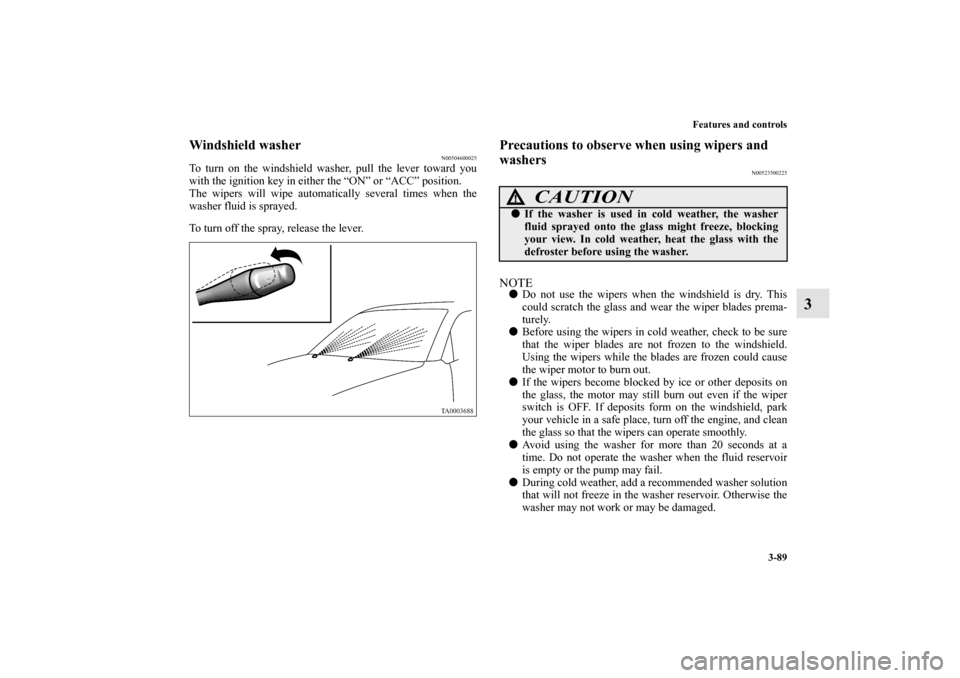
To turn on the windshield washer, pull the lever toward you
with the ignition key in either the “ON” or “ACC” position.
The wipers will wipe automatically several times when the
washer fluid is sprayed.
To turn off the spray, release the lever.
Precautions to observe when using wipers and
washers
N00523500225
NOTE�Do not use the wipers when the windshield is dry. This
could scratch the glass and wear the wiper blades prema-
turely.
�Before using the wipers in cold weather, check to be sure
that the wiper blades are not frozen to the windshield.
Using the wipers while the blades are frozen could cause
the wiper motor to burn out.
�If the wipers become blocked by ice or other deposits on
the glass, the motor may still burn out even if the wiper
switch is OFF. If deposits form on the windshield, park
your vehicle in a safe place, turn off the engine, and clean
the glass so that the wipers can operate smoothly.
�Avoid using the washer for more than 20 seconds at a
time. Do not operate the washer when the fluid reservoir
is empty or the pump may fail.
�During cold weather, add a recommended washer solution
that will not freeze in the washer reservoir. Otherwise the
washer may not work or may be damaged.
CAUTION
!�If the washer is used in cold weather, the washer
fluid sprayed onto the glass might freeze, blocking
your view. In cold weather, heat the glass with the
defroster before using the washer.
BK0139500US.book 89 ページ 2011年4月19日 火曜日 午後1時48分
Page 179 of 424
3-90 Features and controls
3
�Replace the wiper blades when they are worn. Use the
proper size replacement blades. If you have questions, ask
your authorized Mitsubishi Motors dealer.
Electric rear window defogger switch
N00523700357
The electric rear window defogger can be used with the igni-
tion key in the “ON” position.
The indicator light (A) will come on when you press the elec-
tric rear window defogger switch. Electric current will flow
through the heating wires on the rear window to help clear
away moisture or frost.
After about 17 minutes of operation, the system will shut off
automatically.
To switch the defogger OFF before 17 minutes have passed,
press the switch again. The indicator light will go out and the
defogger will turn off.
If you need the defogger for more than 17 minutes, press the
switch again. This will add 17 more minutes.
BK0139500US.book 90 ページ 2011年4月19日 火曜日 午後1時48分
Page 180 of 424
Features and controls
3-91
3
NOTE�If your vehicle is equipped with heated mirrors, mist can
also be removed from the outside rearview mirrors when
the rear window defogger switch is pressed. (Refer to
“Heated mirror” on page 3-33.)
Horn switch
N00523800101
To honk the horn, press near the “ ” mark on the steering
wheel.
CAUTION
!�The rear window defogger is not designed to melt
snow. Remove any snow manually before using the
rear window defogger.�Use the rear window defogger only after the engine
has started and is running. Be sure to turn the
defogger switch off immediately after the window is
clear to save on battery power.�Do not place stickers, tape, or other items that are
attached with adhesive over the grid wires on the
rear window.�When cleaning the inside rear window, use a soft
cloth and wipe lightly over the grid wires.
BK0139500US.book 91 ページ 2011年4月19日 火曜日 午後1時48分
Page 230 of 424

Driving safety
4-7
4
�Check the engine antifreeze.
If there is not enough coolant because of a leak or from
engine overheating, add high-quality ethylene glycol anti-
freeze and water. The recommended blend is about 50 %
water and 50 % anti-freeze. Use a higher concentration
(not over 60 %) when the outside temperature is -31 °F
(-35 °C) or lower. When the engine is working very hard
(for example, during mountain driving and/or when the
outside temperature is high), use a 50 % concentration.
This blend will provide adequate protection from corro-
sion and boiling.
Braking
N00629500260
All the parts of the brake system are critical to safety. Have the
vehicle serviced by an authorized Mitsubishi Motors dealer or
a repair facility of your choice at regular intervals according to
the “WARRANTY AND MAINTENANCE MANUAL”.When brakes are wetCheck the brake system while driving at a low speed immedi-
ately after starting, especially when the brakes are wet, to con-
firm they work normally.
A film of water can be formed on the brake discs and prevent
normal braking after driving in heavy rain or through large
puddles, or after the vehicle is washed. If this occurs, dry the
brakes out by driving slowly while lightly depressing the brake
pedal.When driving in cold weatherOn snowy roads, ice can form on the braking system, making
the brakes less effective. While driving in such conditions, pay
close attention to preceding and following vehicles and to the
condition of the road surface. From time to time, lightly
depress the brake pedal and check how effective the brakes are.When driving downhillIt is important to take advantage of the engine braking by shift-
ing to a lower gear while driving on steep downhill roads in
order to prevent the brakes from overheating.
WA R N I N G
!�Never open the radiator cap when the radiator is
hot. You could be seriously burned.
BK0139500US.book 7 ページ 2011年4月19日 火曜日 午後1時48分
Page 232 of 424

Driving safety
4-9
4 Loading information
N00629900381
It is very important to know how much weight your vehicle can
carry. This weight is called the vehicle capacity weight and
includes the weight of all occupants, cargo and non-factory-
installed options. The tire and loading information placard
located on the driver’s door sill of your vehicle will show how
much weight it may properly carry.
It is important to familiarize yourself with the following terms
before loading your vehicle:
�Vehicle maximum load on the tire: load on an individual
tire that is determined by distributing to each axle its share
of the maximum loaded vehicle weight and dividing by
two.
�Vehicle normal load on the tire: load on an individual tire
that is determined by distributing to each axle its share of
the curb weight, accessory weight, and normal occupant
weight and dividing by two.
�Maximum loaded vehicle weight: the sum of -
(a) Curb weight;
(b) Accessory weight;
(c) Vehicle capacity weight; and
(d) Production options weight.�Curb weight: the weight of a motor vehicle with standard
equipment including the maximum capacity of fuel, oil,
and coolant.
�Accessory weight: the combined weight (in excess of
those standard items which may be replaced) of automatic
transmission, power steering, power brakes, power win-
dows, power seats, radio, and heater, to the extent that
these items are available as factory- installed equipment
(whether installed or not).
�Vehicle capacity weight: the rated cargo and luggage load
plus 150 lbs (68 kg) times the vehicle’s designated seating
capacity.
�Production options weight: the combined weight of those
installed regular production options weighing over 5 lbs
(2.3 kg) in excess of those standard items which they
replace, not previously considered in curb weight or
accessory weight, including heavy duty brakes, ride level-
ers, roof rack, heavy duty battery, and special trim.
�Normal occupant weight: 150 lbs (68 kg) times the num-
ber of specified occupants. (In your vehicle the number is
3)
�Occupant distribution: distribution of occupants in a vehi-
cle as specified. (In your vehicle the distribution is 2 in
front, 1 in second seat)
WA R N I N G
!�Never overload your vehicle. Overloading can dam-
age your vehicle, adversely affect vehicle perfor-
mance, including handling and braking, cause tire
failure, and result in an accident.
*: 150 lbs (68 kg) is the weight of one person as defined by
U.S.A. and Canadian regulations.
BK0139500US.book 9 ページ 2011年4月19日 火曜日 午後1時48分
Page 243 of 424
5-6 Comfort controls
5
Blower speed selection dial
N00736500159
When the ignition key is in the ON position, select the blower
speed by turning the blower speed selection dial. The blower
speed will gradually increase as the dial is turned to the right.
When the blower speed selection dial is set to the “OFF” posi-
tion, all fan-driven airflow will stop.
Temperature control dial
N00736600118
Turn the temperature control dial clockwise to make the air
warmer. Turn it counterclockwise to make the air cooler. NOTE�While the engine coolant temperature is low, the tempera-
ture of the air from the heater will be cool/cold until the
engine warms up, even if you have selected warm air with
the dial.
�For instructions on how to use the “MAX A/C” position
(A), see “Cooling” on page 5-10.
BK0139500US.book 6 ページ 2011年4月19日 火曜日 午後1時48分
Page 246 of 424

Comfort controls
5-9
5
NOTE�If a problem is detected in the air conditioning compres-
sor, the air conditioning indicator light (A) blinks. Press
the air conditioning switch once to turn it off, then once
more to turn it back on. If the air conditioning indicator
light does not blink, there is no problem. If it does blink,
have it checked at an authorized Mitsubishi Motors dealer
or a repair facility of your choice.
�Sometimes, for example after using a high-pressure car
wash, the condenser can get wet, and the air conditioning
indicator light (A) blinks temporarily. In this case there is
nothing wrong. Wait for a while, press the air conditioning
switch once to turn the system off, then once more to turn
it back on. Once the water evaporates, the blinking will
stop.
Operating the air conditioning system
N00731100235
Heating Set the mode selection dial to the “ ” position and set the air
selection switch (A) to the outside position.
Turn the temperature control dial clockwise or counterclock-
wise to the desired temperature. Select the desired blower
speed.
BK0139500US.book 9 ページ 2011年4月19日 火曜日 午後1時48分
Page 248 of 424

Comfort controls
5-11
5
For quick cooling
1. Set the mode selection dial to the “ ” position.
2. Set the temperature control dial to the “MAX A/C” posi-
tion.
3. Set the blower to the maximum speed.NOTE�When the temperature control dial is set to the “MAX
A/C” position, the air conditioning compressor will run
automatically and the light will come on. The recircula-
tion position will be selected automatically. In this case,
you cannot turn the air conditioning off or select the out-
side position.
�When the temperature control dial is set to a position other
than “MAX A/C”, the air selection will automatically
change to outside air. The air conditioning compressor
will continue running.
Combination of unheated air and heated air
N00731300237
Select the mode selection dial to the positions shown in the
illustration and set the air selection switch (A) to the outside
position.
The air flow will be directed to the leg area and the upper part
of the passenger compartment. Select the desired blower speed.
Warm air flows to the leg area and unheated or slightly warm
air (depending upon temperature setting) flows to the upper
part of the passenger compartment.
BK0139500US.book 11 ページ 2011年4月19日 火曜日 午後1時48分


