Page 99 of 494
3-4 Features and controls
3
NOTE�In the following cases, the vehicle may not be able to rec-
ognize the registered ID code from the key. This means
the engine will not start even when the registered key is
turned to the “START” position.
• When the key contacts a key ring or other metallic or
magnetic object (Type A)
• When the key grip contacts metal of another key
(Type B)
• When the key contacts or is close to other immobilizing
keys (including keys of other vehicles) (Type C)
�In cases like the above, move the offending object(s) away
from the key and turn the key back to the “ACC” or
“LOCK” position. Then try to start the engine again. If the
engine does not start, contact an authorized Mitsubishi
Motors dealer.
BK0132701US.book 4 ページ 2010年12月6日 月曜日 午後2時3分
Page 100 of 494

Features and controls
3-5
3
NOTE�Electronic immobilizer is not compatible with commer-
cially available remote starting systems. Use of commer-
cially available remote starting systems may result in
vehicle starting problems and a loss of security protection.
�A system failure is suspected when the ignition key is
turned to the “START” position, and the engine does not
start. In such a case, contact an authorized Mitsubishi
Motors dealer.Replacement keysOnly keys that have been programmed to the vehicle electron-
ics can be used to start the vehicle.
If you lose a key, you can order a key from your authorized
Mitsubishi Motors dealer by referring to the key number.
To prevent vehicle theft, the ID code for the vehicle keys must
be changed.
Take your vehicle and all remaining keys to your authorized
Mitsubishi Motors dealer to have your ID code changed.
Additional keysTo add a key, you need to register the ID code to the vehicle.
Registering the ID code can be done by your authorized
Mitsubishi Motors dealer. Or it can be done by yourself (except
for vehicles sold in Canada).
For you to register the ID code yourself, follow the “Customer
key programming” procedure below.
If you choose to have your authorized Mitsubishi Motors
dealer register the ID code, take your vehicle and any remain-
ing keys to your authorized Mitsubishi Motors dealer.NOTE�You are provided with 2 keys, but you may add up to 6
more keys.Customer key programming (Except for vehicles
sold in Canada)You can program new keys to the system if you have two valid
(already registered) keys and blank (not registered) immobi-
lizer key (specially cut for your vehicle at your Mitsubishi
Motors dealer) by doing the following:
1. Insert the first valid key into the ignition and turn the igni-
tion to the “ON” position for 5 seconds.
2. Turn the ignition to the “LOCK” position and remove the
first key.
3. Within 30 seconds of turning the first key to the “LOCK”
position, insert the second valid key into the ignition and
turn it to the “ON” position. About 10 seconds later, the
immobilizer indicator will start blinking.
CAUTION
!�Do not make any alterations or additions to the
immobilizer system. Alterations or additions could
cause failure of the immobilizer.
BK0132701US.book 5 ページ 2010年12月6日 月曜日 午後2時3分
Page 101 of 494

3-6 Features and controls
3
4. When the immobilizer indicator starts blinking, turn the
second valid key to the “LOCK” position and remove it.
Within 30 seconds after doing so, insert a blank immobi-
lizer key into the ignition and turn it to the “ON” position.
Perform this operation no more than 30 seconds after the
immobilizer indicator starts blinking. When registration
of the ID code is complete, the immobilizer indicator will
come on for 3 seconds then go off. If an error occurs, the
immobilizer indicator will go off during the procedure.
5. If you wish to register another key, perform the process
again from step 1.
NOTE�It is not possible to register a key if:
• the immobilizer indicator goes off during the procedure
• the immobilizer indicator does not come on for 3 sec-
onds after turning the ignition to the “ON” position with
a blank immobilizer key
�The procedure will be terminated automatically if:
• a period of 30 seconds or longer elapses from the
moment when the first key is turned to the “LOCK”
position to the moment when the second key is turned to
the “ON” position
• a period of 30 seconds or longer elapses from the
moment when the second key is turned to the “LOCK”
position to the moment when the blank immobilizer key
(specially cut for your vehicle at your Mitsubishi Motors
dealer) is turned to the “ON” position
• more than 30 seconds elapse after the immobilizer indi-
cator starts blinking
BK0132701US.book 6 ページ 2010年12月6日 月曜日 午後2時3分
Page 103 of 494

3-8 Features and controls
3
To l o c k Press the LOCK button (1) to lock all the doors and the rear
hatch or trunk lid.
If the dome light switch is in the door position, the dome light
will blink once. The turn signal lights will also blink once. NOTE�If you press the LOCK button (1) after locking the doors
and the rear hatch or trunk lid, the horn will sound once to
confirm that they are locked.To unlock Press the UNLOCK button (2) to unlock the driver’s door only.
Press the UNLOCK button one more time to unlock all the
doors and the rear hatch or trunk lid.
If the dome light switch is in the door position, the dome light
will turn on for 15 seconds. The turn signal lights will also
blink twice.
To open the rear hatch (ECLIPSE) or trunk lid
(ECLIPSE SPYDER)Press the rear hatch or trunk button (3) twice within 5 seconds
and the rear hatch or trunk lid will be opened. The rear hatch or
trunk lid must be closed manually after it has been opened.Answerback function The keyless entry system answerback functions from the horn
and turn signal lights can each be turned on or off as desired.
This is done with the key removed from the ignition switch. NOTE�The answerback function will not operate when the key is
in the ignition switch.
BK0132701US.book 8 ページ 2010年12月6日 月曜日 午後2時3分
Page 106 of 494
Features and controls
3-11
3
Procedure for replacing the remote control trans-
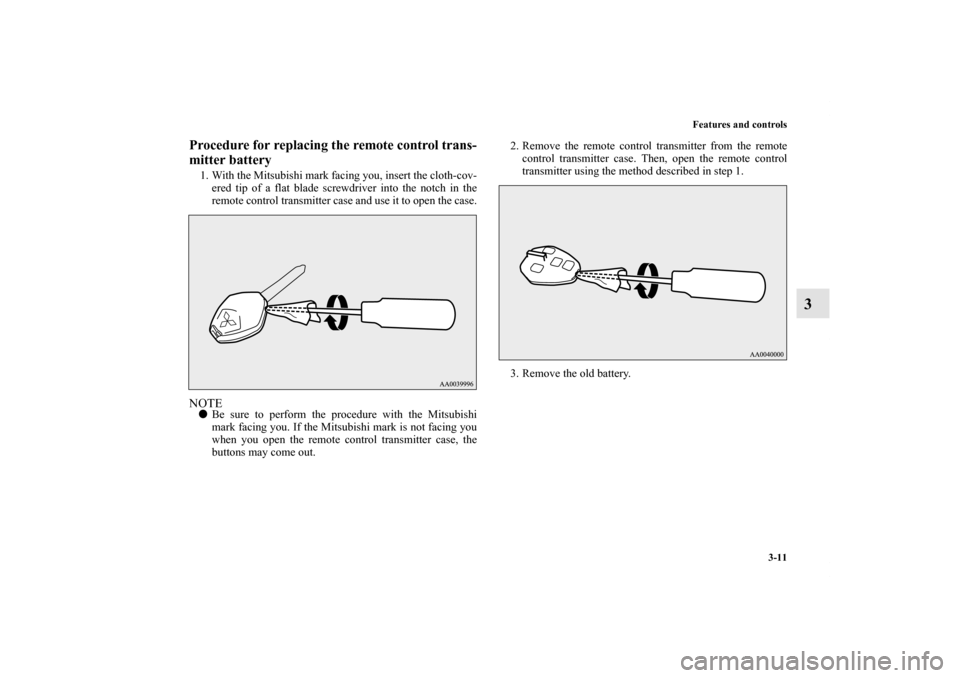
mitter battery1. With the Mitsubishi mark facing you, insert the cloth-cov-
ered tip of a flat blade screwdriver into the notch in the
remote control transmitter case and use it to open the case.NOTE�Be sure to perform the procedure with the Mitsubishi
mark facing you. If the Mitsubishi mark is not facing you
when you open the remote control transmitter case, the
buttons may come out.2. Remove the remote control transmitter from the remote
control transmitter case. Then, open the remote control
transmitter using the method described in step 1.
3. Remove the old battery.
BK0132701US.book 11 ページ 2010年12月6日 月曜日 午後2時3分
Page 108 of 494

Features and controls
3-13
3 Door locks
N00509200202
To lock or unlock the door with the key (driver’s
door only)Turn the key toward the front of the vehicle to lock the door.
After checking that the door is locked, turn the key back to the
center and remove it.
WA R N I N G
!�Make sure all doors are tightly closed and locked
while driving.
• Locked doors, in combination with the use of seat
belts, can help reduce the risk of ejection in an
accident.
• Locked doors can help keep passengers, especially
small children, from opening doors and falling out
of moving vehicles.
• Locked doors can help prevent outsiders from
gaining access to your vehicle when you slow or
come to a stop.
�Lock your vehicle whenever you leave it. Children
who get into unlocked vehicles may not be able to
get out. Children trapped inside vehicles can quickly
be overcome by heat and suffer serious injury or
death due to heat stroke.�Never leave children unattended inside a vehicle. In
addition to the risk of heat stroke, children can acti-
vate switches and controls, resulting in an injury or
fatal accident.
1- Insert or remove the key
2- Lock
3- Unlock
BK0132701US.book 13 ページ 2010年12月6日 月曜日 午後2時3分
Page 109 of 494
3-14 Features and controls
3
To lock or unlock the door from the inside Move the lock knob to the lock position to lock the door.
All doors should be kept locked while driving.
The driver’s door can be unlocked without using the lock knob
by pulling on the inside door handle.
To lock the door without using the key 1. Move the inside lock knob to the locked position.
2. Be sure the keys are not inside the vehicle. Close the door. Key reminder buzzer
N00549600035
If you open the driver’s door while the ignition key is in the
“LOCK” or “ACC” position, a tone will sound, reminding you
to remove the key. Lock out protection
N00549700153
If the key is in the ignition switch when you push the lock knob
forward with the driver’s door or passenger’s door open, the
lock knob will automatically return to the unlocked position.
1- Lock
2- Unlock
BK0132701US.book 14 ページ 2010年12月6日 月曜日 午後2時3分
Page 113 of 494
3-18 Features and controls
3Inside rear hatch/trunk lid release
N00509800149
ECLIPSEThe inside rear hatch release provides a way to open the rear
hatch in the case of a discharged battery.
The rear hatch release lever (see illustration) is mounted in the
cargo area.
You and your family should familiarize yourselves with the
location and operation of the rear hatch release lever.1. Open the lid (A) inside of the cargo area.
2. Move the lever (B) up to unlock the rear hatch.BK0132701US.book 18 ページ 2010年12月6日 月曜日 午後2時3分