2012 MERCEDES-BENZ SLK350 comand
[x] Cancel search: comandPage 2 of 334

Publication details
Internet
Further information about Mercedes-Benz
vehicles and about Daimler AG can be found
on the following websites:
http://www.mbusa.com (USA only)
http://www.mercedes-benz.ca (Canada
only) Editorial office
Not to be reprinted, translated or otherwise
reproduced, in whole or in part, without the
written permission of Daimler AG.
Symbols
Registered trademarks:
R
Bluetooth ®
is a registered trademark of
Bluetooth SIG Inc.
R DTS is a registered trademark of DTS, Inc.
R Dolby and MLP are registered trademarks
of DOLBY Laboratories.
R BabySmart™, ESP ®
and PRE-SAFE ®
are
registered trademarks of Daimler AG.
R HomeLink ®
is a registered trademark of
Prince.
R iPod ®
and iTunes ®
are registered
trademarks of Apple Inc.
R Logic 7 ®
is a registered trademark of
Harman International Industries.
R Microsoft ®
and Windows media ®
are
registered trademarks of Microsoft
Corporation.
R SIRIUS is a registered trademark of Sirius
XM radio Inc.
R HD Radio is a registered trademark of
iBiquity Digital Corporation.
R Gracenote ®
is a registered trademark of
Gracenote, Inc.
R ZAGATSurvey ®
and related brands are
registered trademarks of ZagatSurvey,
LLC.
In this Operator's Manual, you will find the
following symbols: G
WARNING
Warning notes draw your attention to hazards
that endanger your health or life, or the health
or life of others.
! Notes on material damage alert you to
dangers that could lead to damage to your
vehicle.
i This symbol indicates useful instructions
or further information that could be helpful
to you. X
This symbol designates an
instruction you must follow.
X Several consecutive symbols
indicate an instruction with several
steps.
(Y page) This symbol tells you where you
can find further information on a
topic.
YY This symbol indicates a warning or
an instruction that is continued on
the next page.
Display Display This font indicates a display
message in the multifunction
display/COMAND display.
Parts of the software in the vehicle are
protected by copyright ©
2005
The FreeType Project
http://www.freetype.org. All rights
reserved.
As at 07.09.2011
Page 8 of 334

Wiper blades
.................................. 268
Wooden trim .................................. 270
Car wash (care) ................................. 265
CD player/CD changer (on-board
computer) .......................................... 188
Center console Lowe rsection .................................. 31
Uppe rsection .................................. 30
Central locking
Automatic locking (on-board
computer) ...................................... 193
Locking/unlocking (SmartKey) ........68
Changing bulbs
High-beam headlamps ...................111
Important safety notes ..................109
Low-beam headlamps ....................111
Overview of bul btypes .................. 110
Parking lamps ................................ 112
Removing/replacing the cover
(front wheel arch) .......................... 111
Reversing lamps ............................ 112
Standing lamps (front) ...................112
Turn signals (front) ......................... 112
Children
In the vehicle ................................... 53
Restraint systems ............................ 53
Child seat
Specia lseat belt retractor ...............55
Cigarette lighter ................................ 247
Cleaning Mirro rturn signal ........................... 268
Climate control
Air-conditioning system .................117
Automatic climate control (dual-
zone) .............................................. 119
Controlling automatically ...............122
Cooling with aird ehumidification..121
Defrosting the windshield ..............124
Important safety notes ..................116
Indicator lamp ................................ 122
Maximum cooling .......................... 124
Notes on using automatic climate
control ........................................... 120
Notes on using the air-
conditioning system ....................... 118
Overview of systems ......................116
Problems with cooling with air
dehumidification ............................ 122Problem with the rear window
defroster
........................................ 125
Setting the aird istribution.............123
Setting the airflow .........................123
Setting the airv ents...................... 126
Setting the temperature ................122
Switching air-recirculation mode
on/off ............................................ 125
Switching on/off ........................... 121
Switching residual hea ton/off ......125
Switching the rear window
defroster on/off ............................ 124
Switching the ZONE function on/
off .................................................. 123
Cockpit
Overview .......................................... 26
see Instrument cluster
Collapsible spare wheel
Inflating ......................................... 280
see Emergency spare wheel
COMAND
see separate operating instructions
Combination switch ..........................107
Consumption statistics (on-board
computer) .......................................... 185
Convenience closing feature ..............81
Convenience opening feature see Opening/closing the side
windows (all)
Coolan t(engine)
Checkin gthe level ......................... 262
Display message ............................ 216
Filling capacity ............................... 328
Notes ............................................. 327
Temperature (on-board computer) .195
Temperature gauge ........................ 181
Warning lamp ................................. 235
Cooling
see Climate control
Cornering light (display message) ...213
Cornering light function Function/notes ............................. 108
Crash-responsive emergency
lighting ............................................... 109
Cruise control Cruise control leve r....................... 156
Deactivating ................................... 158
Display message ............................ 2226
Index
Page 14 of 334
Downloading destinations
(COMAND)
..................................... 252
Emergency call .............................. 249
Important safety notes ..................248
Locating astolen vehicl e............... 254
MB info call button ........................251
Remote vehicle locking ..................254
Roadside Assistance button ..........251
Search &Send ............................... 253
Self-test ......................................... 249
System .......................................... 249
Vehicle remote unlocking ..............253
Mechanical key
Function/notes ................................ 70
Locking vehicle ................................ 76
Unlocking the driver's door ..............76
Memory card (audio) .........................188
Memory function ............................... 100
Message memory (on-board
computer) .......................................... 199
Messages see Display messages
Mirrors
see Exterior mirrors
see Rear-view mirror
see Vanity mirror
Mobile phone
Menu (on-board computer) ............189
see Phone
Modifying the programming
(SmartKey) ........................................... 70
MOExtended run-flat system ...........281
MP3 Operation ....................................... 188
see separate operating instructions
Multifunction display
Function/notes ............................. 183
Permanent displa y......................... 192
Multifunction steering wheel
Operating the on-board computer .181
Overview .......................................... 29 N
Navigation Menu (on-board computer) ............186
On-board computer .......................186
see separate operating instructions
Neck level heating
see AIRSCARF
NECK-PRO head restraints
Operation ........................................ .47
Resetting after being triggered ........48
Notes on breaking-in anew
vehicle ................................................ 130 O
Occupant Classification System
(OCS) Faults ............................................... 46
Operation ........................................ .42
System self-test ............................... 45
Occupant safety
Childre ninthe vehicle ..................... 53
System overview .............................. 36
OCS
Faults ............................................... 46
Operation ........................................ .42
System self-test ............................... 45
Odometer ........................................... 185
see Trip odometer
Oil
see Engine oil
On-board computer
AMG menu ..................................... 195
Assistance menu ........................... 190
Audi omenu ................................... 188
Convenience submenu ..................194
Displaying a service message ........264
Display messages ..........................199
DISTRONI CPLUS ........................... 165
Factory settings submenu .............195
Important safety notes ..................180
Instrument cluster submenu ..........191
Lighting submenu .......................... 192
Menu overview .............................. 184
Message memory .......................... 199
Navigation menu ............................ 186
Operation ....................................... 181 12
Index
Page 18 of 334

Stowage compartments
Armrest (front). .............................. 243
Armrest (under) ............................. 243
Center console .............................. 243
Cuph olders ................................... 245
Door ............................................... 244
Eyeglasses compartment ...............243
Glove box ...................................... .242
Important safety information .........242
Parce lnet ...................................... 244
Rea rwall........................................ 244
Summer opening
see Convenience opening feature
Summer tires ..................................... 296
Sun visor ............................................ 246
Supplemental Restraint System see SRS (Supplemental Restraint
System)
Surround lighting (on-board
computer) .......................................... 193
Switching air-recirculation mode
on/off ................................................. 125
Switching off the alarm (ATA) ............65 T
Tachometer ........................................ 181
Tail lamps Display message ............................ 214
see Lights
Tank
see Fuel tank
Tank content
Fuel gauge ....................................... 27
Technical data
Notes ............................................. 322
Tires/wheels ................................. 316
Vehicle data ................................... 329
TELEAID
Call priority .................................... 252
Display message ............................ 207
Downloading destinations
(COMAND) ..................................... 252
Emergency call .............................. 249
Important safety notes ..................248
Locating astolen vehicl e............... 254
MB info call button ........................251
Remote vehicle locking ..................254Roadside Assistance button
..........251
Search &Send ............................... 253
Self-test ......................................... 249
System .......................................... 249
Vehicle remote unlocking ..............253
Telephone
Accepting acall............................. 189
Display message ............................ 225
Menu (on-board computer) ............189
Number from the phone book ....... .190
Redialing ........................................ 190
Rejecting/ending acall................. 190
Temperature
Coolant .......................................... 181
Coolant (on-board computer) ......... 195
Engine oil (on-board computer) ...... 195
Outside temperature ..................... .181
Setting (climate control) ................122
Theft deterrent systems
ATA (Anti-Theft Alarm system) .........65
Immobilize r...................................... 64
Time
see Separate Operator's Manual
Timing (RACETIMER) .........................196
Tiredness assistant see ATTENTION ASSIST
Tire pressure
Calling up (on-board computer) .....301
Checking manually ........................301
Display message ............................ 222
Maximum ....................................... 300
Notes ............................................. 299
Recommended ............................... 297
Tire pressure monitoring system
Function/notes ............................. 301
Restarting ...................................... 303
Warning lamp ................................. 238
Tires
Aspect ratio (definition) .................314
Average weight of the vehicle
occupants (definition) ....................313
Bar (definition) ............................... 312
Characteristics .............................. 312
Checking ........................................ 295
Definition of terms .........................312
Direction of rotatio n...................... 316
Display message ............................ 22216
Index
Page 31 of 334
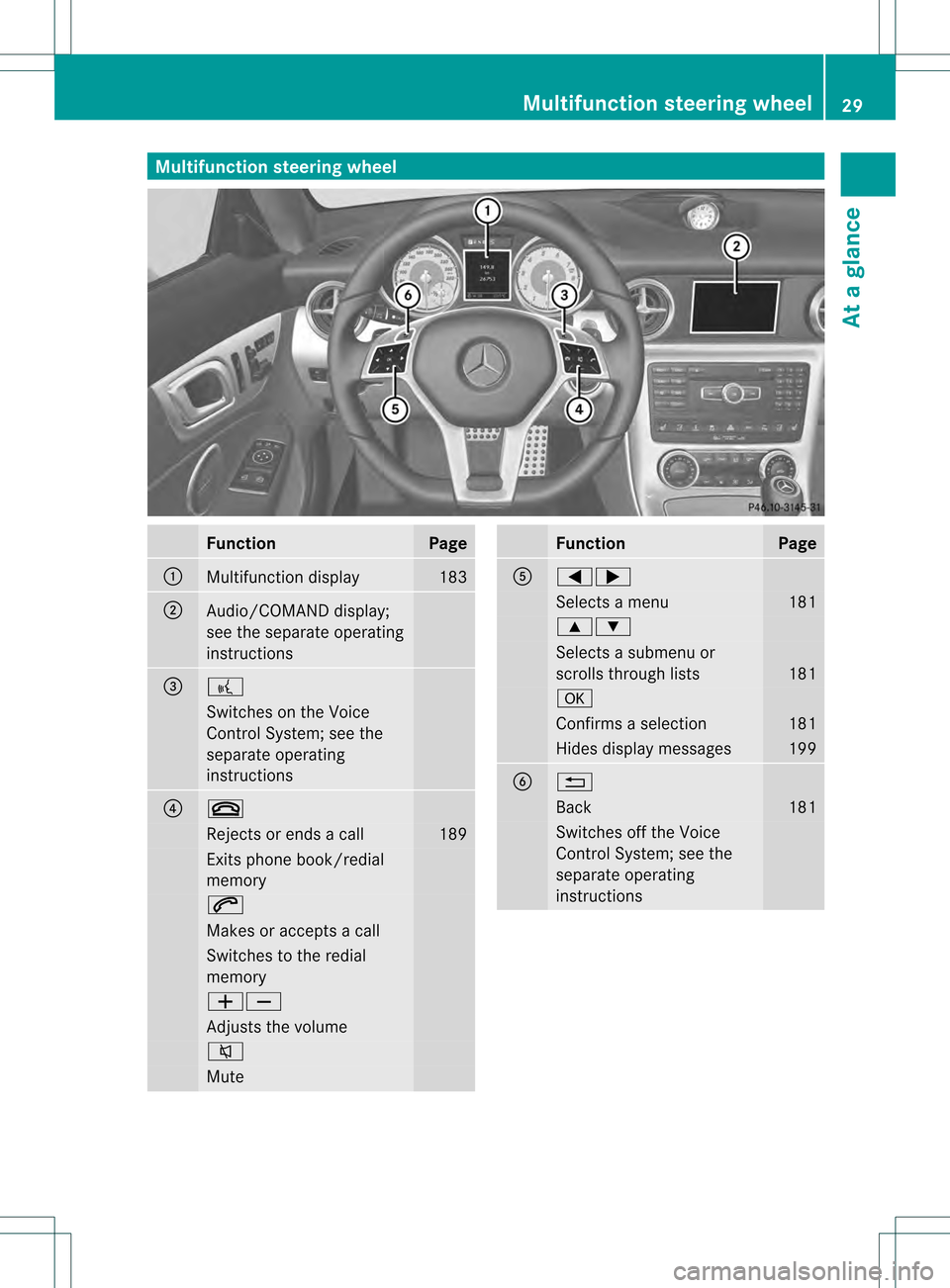
Multifunction steering wheel
Function Page
0002
Multifunction display 183
0003
Audio/COMAND display;
see the separate operating
instructions
0023
0003
Switches on the Voice
Control System; see the
separate operating
instructions
0022
0004
Rejects or ends a call 189
Exits phone book/redial
memory
0005
Makes or accepts a call
Switches to the redial
memory
000A000B
Adjusts the volume
0007
Mute Function Page
0020
00020005
Selects a menu 181
00030004
Selects a submenu or
scrolls through lists
181
000C
Confirms a selection 181
Hides display messages 199
0021
0001
Back 181
Switches off the Voice
Control System; see the
separate operating
instructionsMultifunction steering wheel
29At a glance
Page 32 of 334
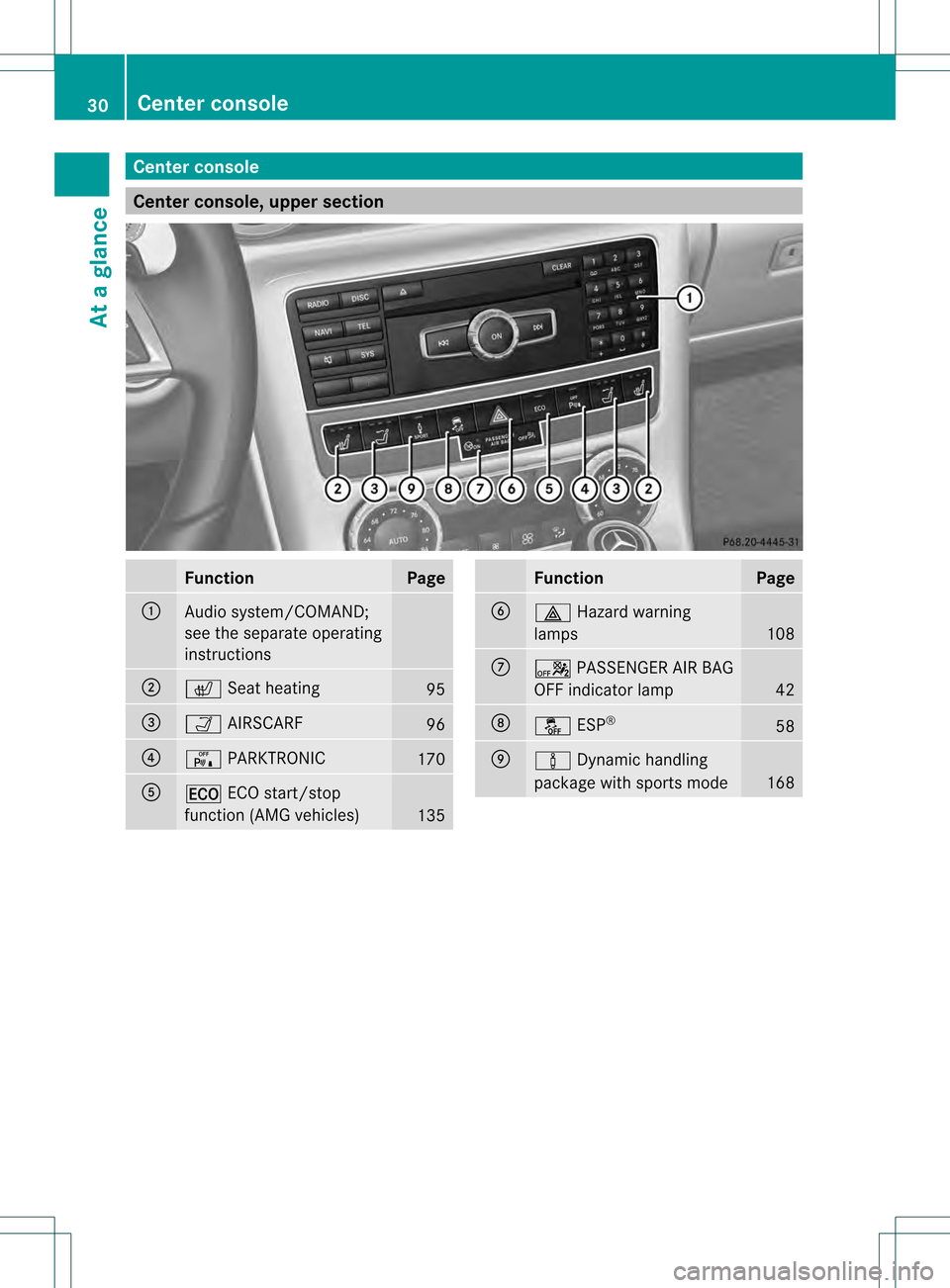
Center console
Center console, upper section
Function Page
0002
Audio system/COMAND;
see the separate operating
instructions
0003
000E
Seat heating 95
0023
0002
AIRSCARF 96
0022
0006
PARKTRONIC 170
0020
000E
ECO start/stop
function (AMG vehicles) 135 Function Page
0021
0016
Hazard warning
lamps 108
0014
0005
PASSENGER AI RBAG
OFF indicator lamp 42
0015
0012
ESP® 58
0016
000B
Dynamic handling
package with sports mode 16830
Cente
rconsoleAt a glance
Page 33 of 334
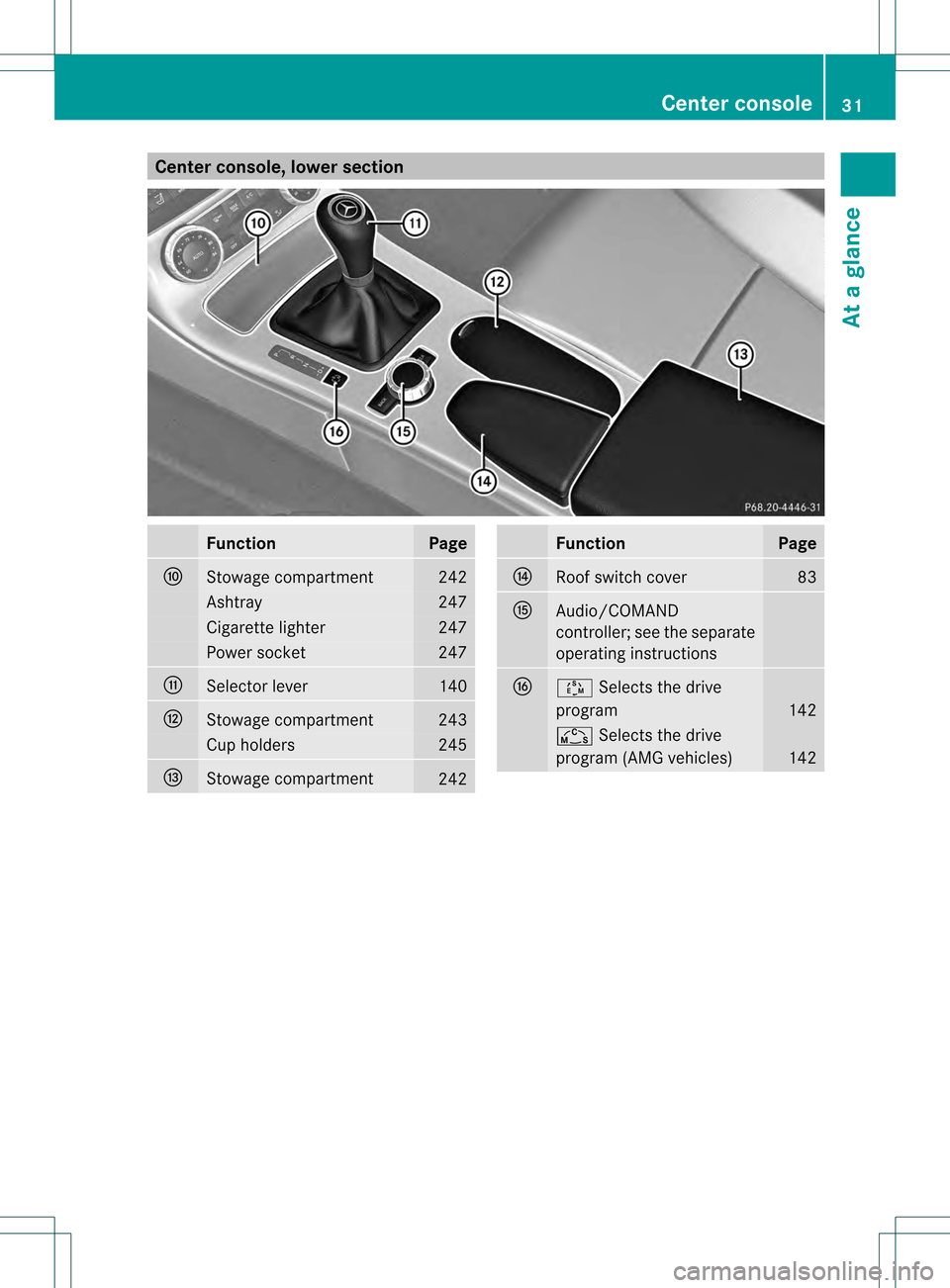
Center console, lower section
Function Page
0017
Stowage compartment 242
Ashtray 247
Cigarette lighter 247
Power socket 247
0018
Selector lever 140
0019
Stowage compartment 243
Cup holders 245
001A
Stowage compartment
242 Function Page
001B
Roof switch cover 83
001C
Audio/COMAND
controller; see the separate
operating instructions
001E
0004
Selects the drive
program 142
0001
Selects the drive
program (AMG vehicles) 142Center console
31At a glance
Page 154 of 334
Driving tips
General driving tips
Important safety notes G
WARNING
Always remember that you mus tconcentrate
primarily on driving the vehicle. The driver's
concentration must always be directed
primarily at road traffic. For your own safety
and that of others, we recommend that you
stop the vehicle at a safe place and in
accordance with the traffic conditions before
making or accepting a phone call.
Comply with all legal requirements if you use
the telephone while driving. Use the hands-
free system and only use the telephone when
road, weather and traffic conditions permit. In
some jurisdictions, it is forbidden for drivers
to use mobile phones while driving.
Only operate the audio system or COMAND
(Cockpit Management and Data System) in
compliance with all legal requirements and
when the road, weather and traffic conditions
permit. You may otherwise not be able to
observe the traffic conditions, endangering
yourself and others.
Remember that your vehicle covers a distance
of 44 ft (approximately 14 m)a second when
it is traveling at only 30 mph (approximately
50 km/h).
Drive sensibly –save fuel Observe the following tips to save fuel:
X
The tires should always be inflated to the
recommended tire pressure.
X Remove unnecessary loads.
X War mup the engine at low engine speeds.
X Avoid frequen tacceleration or braking.
X Have all maintenance work carried out as
indicated by the service intervals in the
Maintenance Booklet or by the service
interval display. Fuel consumption also increases when
driving in cold weather, in stop-and-go traffic
and in mountainous terrain.
Drinking and driving G
WARNING
Drinking and driving and/or taking drugs and
driving are very dangerous combinations.
Even a small amount of alcohol or drugs can
affect your reflexes, perceptions and
judgment.
The possibility of a serious or eve nfatal
acciden tare greatly increased when you drink
or take drugs and drive.
Do not drink or take drugs and drive or allow
anyone to drive who has been drinking or
taking drugs.
Pedals G
WARNING
Make sure absolutely no objects are
obstructing the pedals' range of movement.
Keep the driver's footwell clea rofall
obstacles. If there are any floormats or
carpets in the footwell, make sure that the
pedals still have sufficient clearance.
During sudden driving or braking maneuvers,
the objects could get caught betwee nthe
pedals. You could then no longer brake or
accelerate. This could lead to accidents and
injury.
Rolling with the engine switched off G
WARNING
There is no power assistance for the steering
and the brake when the engine is not running.
Steering and braking requires significantly
more effort and you could lose control of the
vehicle and cause an accident as a result.
Do not turn off the engine while the vehicle is
in motion. 152
Driving tipsDriving and parking