2012 MERCEDES-BENZ SLK350 Driving mode
[x] Cancel search: Driving modePage 6 of 334

1, 2, 3 ...
12 Vsocket
see Sockets A
ABS (Anti-lock Braking System) Display message ............................ 200
Function/notes ................................ 56
Important safety notes ....................56
Warning lamp ................................. 230
Activating/deactivating cooling
with air dehumidification .................121
Active service syste mPLUS
see ASSYS TPLUS service interval
display
ADAPTIVE BRAKE .................................62
Additional speedometer ...................192
Additives (engine oil) ........................327
Airb ags
Display message ............................ 211
Front air bag (driver, front
passenger )....................................... 39
Head bag ......................................... 41
Important safety notes ....................38
Knee bag .......................................... 40
PASSENGER AIR BAG OFF
indicator lamp .................................. 42
Safety guidelines ............................. 37
Side impact airb ag.......................... 40
Air-conditioning system
see Climate control
AIRGUIDE ............................................. 88
Air pressure see Tire pressure
AIRSCARF
Problem (malfunction) .....................96
Setting the vents ........................... 127
Switching on/off .............................. 96
Airv ents
Important safet ynotes .................. 126
Setting ........................................... 126
Setting the AIRSCARF vents ..........127
Setting the center air vents ...........126
Setting the side air vents ...............127
Switching AIRSCARF on/off ............96Alarm system
see ATA (Anti-Theft Alarm system)
Alertness Assistant
see ATTENTION ASSIST
Ambient lighting (on-board
computer) .......................................... 192
AMG menu (on-board computer) .....195
Anti-loc kBraking System
see ABS (Anti-lock Braking System)
Anti-Theft Alarm system
see ATA (Anti-Theft Alarm system)
Ashtray ............................................... 247
Assistance menu (on-board
computer) .......................................... 190
ATA (Anti-Theft Alarm system) Activating/deactivating ...................65
Function .......................................... .65
Switching off the alarm ....................65
ATTENTIO NASSIST
Activating/deactivating .................191
Display message ............................ 219
Function/notes ............................. 176
Audio menu (on-board computer) ....188
Audio system see separate operating instructions
Authorized Mercedes-Benz Center
see Qualified specialist workshop
Authorized workshop
see Qualified specialist workshop
AUTO lights
Display message ............................ 216
see Lights
Automatic engine start (ECO start/
stop function) .................................... 136
Automatic engine switch-off (ECO
start/stop function) ..........................135
Automatic headlamp mode ..............106
Automatic transmission Automatic drive program ...............143
Changing gea r............................... 141
Display message ............................ 224
Driving tips .................................... 141
Emergency running mode ..............146
Kickdow n....................................... 142
Manual drive program ....................144
Problem (malfunction) ...................146
Progra mselecto rbutton ................ 142 4
Index
Page 7 of 334

Pulling away
................................... 134
Releasing the parking lock
manually ........................................ 146
Selector leve r................................ 140
Shift range s................................... 143
Starting the engine ........................133
Steering wheel paddle shifters ......142
Transmission position displa y........ 140
Transmission positions ..................141
Automatic transmission
emergency mode ............................... 146 B
Back support see Lumbar support
Backup lamp
Changing bulbs .............................. 112
Display message ............................ 215
BAS (Brake Assist System) .................57
Basic settings see Settings
BAS PLUS (Brake Assist System
PLUS) .................................................... 57
Battery (SmartKey) Checking .......................................... 71
Important safety notes ....................71
Replacing ......................................... 71
Battery (vehicle)
Charging ........................................ 283
Display message ............................ 218
Important safety notes ..................282
Jump starting ................................. 285
Belt
see Seat belts
Bottle holder ...................................... 246
Brake Assist System see BAS (Brake Assist System)
Brake fluid
Display message ............................ 206
Notes ............................................. 327
Brake fluid level ................................ 263
Brake lamps Display message ............................ 214
Brakes
ABS .................................................. 56
BAS .................................................. 57
BAS PLUS ........................................ 57Brake fluid (notes)
.........................327
Display message ............................ 200
Driving tips .................................... 153
High-performance brake system ....154
Important safety notes ..................153
Maintenance .................................. 154
Parking brake ................................ 150
Warning lamp ................................. 229
Breakdown
see Flat tire
see Towing away/tow-starting
Bulbs
see Changing bulbs C
California Important notice for retail
customers and lessees ....................21
Calling up a malfunction
see Display messages
Capacities
see Technical data
Car
see Vehicle
Care
Carpets .......................................... 271
Car wash ........................................ 265
Display ........................................... 269
Exterior lights ................................ 268
Gea rors electo rlever .................... 270
Interior ........................................... 269
Matte finish ................................... 267
Notes ............................................. 265
Paint .............................................. 267
Plastic trim .................................... 269
Power washer ................................ 266
Roof lining ...................................... 271
Seat bel t........................................ 270
Seat cover ..................................... 270
Sensors ......................................... 269
Steering wheel ............................... 270
Tai lpipes ....................................... 269
Trim pieces .................................... 270
Washing by hand ........................... 266
Wheels ........................................... 266
Windows ........................................ 268 Index
5
Page 13 of 334

Key positions
KEYLESS-GO .................................. 131
SmartKey ....................................... 131
Kickdown
Driving tips .................................... 142
Manual drive program ....................145
Knee bag .............................................. 40L
Lamps see Warning and indicator lamps
Lap time (RACETIMER) ......................196
License plate lamp (display
message) ............................................ 214
Light function ,active
Display message ............................ 215
Lighting
see Lights
Lights
Activating/deactivating the
interio rlighting delayed switch-off .193
Automatic headlamp mode ............106
Cornering light function .................108
Display message ............................ 213
Driving abroad ............................... 104
Fog lamps ...................................... 106
Hazard warning lamps ...................108
High beam flasher .......................... 107
High-beam headlamps ...................107
Ligh tswitc h................................... 104
Low-beam headlamps ....................105
Rea rfog lamp ................................ 106
Setting the brightness of the
ambient lighting (on-board
computer) ...................................... 192
Standing lamps .............................. 104
Switching the daytime running
lamps on/off (on-board
computer) ...................................... 192
Switching the daytime running
lamps on/off (switch) ....................105
Switching the exterio rlighting
delayed switch-off on/off (on-
board computer )............................ 193Switching the surround lighting
on/off (on-board computer)
..........193
Turn signals ................................... 107
see Changing bulbs
see Interior lighting
Light sensor (display message) .......216
Locking see Centra llocking
Locking (doors)
Automatic ........................................ 75
Emergency locking ........................... 76
From inside (central locking
button) ............................................. 75
Locking centrally
see Centra llocking
Locking verification signal (on-
board computer) ............................... 194
Low-beam headlamps Changing bulbs .............................. 111
Display message ............................ 213
Setting for driving abroad
(symmetrical) ................................. 104
Switching on/off ........................... 105
Luggage cover
see Trunk partition
Lumbar support ................................... 95 M
M+S tires ............................................ 296
MAGIC SKY CONTROL .........................88
Maintenance see ASSYST PLUS service interval
display
Malfunction message
see Display messages
Manual transmission
Engaging revers egear ................... 139
Gea rlever ...................................... 139
Pulling away ................................... 133
Shift recommendatio n................... 139
Starting the engine ........................133
Matte finish (cleaning
instructions) ...................................... 267
mbrace Call priority .................................... 252
Display message ............................ 207 Index
11
Page 22 of 334
Product information
Mercedes-Benz recommends that you use
genuine Mercedes-Benz parts, conversion
parts and accessories that have been
approved for the type of vehicle.
Mercedes-Benz tests genuine parts as well as
conversion parts and accessories which have
been specifically approved for your vehicle for
their reliability, safety and suitability. Despite
ongoing market research, Mercedes-Benz is
unable to assess other parts. Therefore,
Mercedes-Benz accepts no responsibility for
the use of such parts in Mercedes-Benz
vehicles, even if they have been
independently or officially approved. The use
of non-approved parts could affect your
vehicle's operating safety. Mercedes-Benz
therefore recommends that you use genuine
Mercedes-Benz parts, conversion parts and
accessories that have been approved for the
type of vehicle. Genuine Mercedes-Benz
parts, approved conversion parts and
accessories are available from any authorized
Mercedes-Benz Center. Here, you will receive
advice about permissible technical
modifications, and the parts will be
professionally installed. Operator's Manual
Notes on the Operator's Manual
This Operator's Manual contains a great deal
of helpful information. We urge you to read it
carefully and familiarize yourself with the
vehicle before driving.
For your own safety and longer service life of
the vehicle, we urge you to follow the
instructions and warnings contained in this
Operator's Manual. Ignoring them could
result in damage to the vehicle or personal
injury to you or others. Vehicle damage
caused by failure to follow instructions is not
covered by the Mercedes-Benz Limited
Warranty. Vehicle equipment
This Operator's Manual describes all models
and all standard and optional equipment of
your vehicle available at the time of going to
print. Country-specific differences are
possible. Please note that your vehicle may
not be equipped with all features described.
This also applies to safety-related systems
and functions. The equipment in your vehicle
may therefore differ from some of the
descriptions or illustrations.
The original purchase agreement lists all
systems installed in your vehicle.
Contact an authorized Mercedes-Benz Center
if you have any questions about equipment or
operation.
The Operator's Manual and the Maintenance
Booklet are important documents and should
be kept in the vehicle. Service and vehicle operation
Service and literature
Your vehicle is covered under the terms of the
warranties printed in the Service and
Warranty Information booklet. Your
authorized Mercedes-Benz Center will
exchange or repair any defective parts
originally installed in the vehicle in
accordance with the terms of the following
warranties:
R New Vehicle Limited Warranty
R Emission Systems Warranty
R Emission Performance Warranty
R California, Connecticut, Maine,
Massachusetts, New York, Pennsylvania,
Rhode Island and Vermont Emission
Control Systems Warranty
R State warranty enforcement laws (lemon
laws) 20
Introduction
Page 24 of 334
may cause damage to the catalytic
converter.
R the fuel may have a considerably lower
octane rating. Unsuitable fuel can cause
engine damage.
Some Mercedes-Benz models are available
for delivery in Europe through our European
Delivery Program. For details, consult an
authorized Mercedes-Benz Center or write to
one of the following addresses.
In the USA Mercedes-Benz USA, LLC
European Delivery Department
One Mercedes Drive
Montvale, NJ 07645-0350
In Canada Mercedes-Benz Canada, Inc.
European Delivery Department
98 Vanderhoof Avenue
Toronto, Ontario M4G 4C9 Operating safety
Safety notes
G
WARNING
Work improperly carried out on electronic
components and associated software could
cause them to cease functioning. Because the
vehicle's electronic components are
interconnected, any modifications made may
produce an undesired effect on other
systems. Electronic malfunctions could
seriously impair the operating safety of your
vehicle.
Contact an authorized Mercedes-Benz Center
for repairs or modifications to electronic
components.
Other improper work or modifications on the
vehicle could also have a negative impact on
the operating safety of the vehicle. Some safety systems only function when the
engine is running. You should therefore never
turn off the engine while driving.
G
WARNING
Heavy blows against the vehicle underbody or
tires/wheels may cause serious damage and
impair the operating safety of yourv ehicle.
Such blows can be caused, for example, by
running over an obstacle, road debris or a
pothole.
If you feel a sudden significant vibration or
ride disturbance, or you suspect that damage
to your vehicle has occurred:
R turn on your hazard warning flashers.
R slow down carefully.
R drive with caution to an area which is a safe
distance from the road.
Inspec tthe vehicle underbody and tires/
wheels for possible damage. If the vehicle
appears unsafe, have it towed to the nearest
authorized Mercedes-Ben zCenter or other
qualified maintenance or repair facility for
further inspection or repairs. Declarations of conformity
Vehicle components which receive
and/or transmit radio waves USA:
"The wireless devices of this vehicle
comply with Part 15 of the FCC Rules.
Operation is subject to the following two
conditions :1) These devices may not cause
harmful interference, and 2) These devices
must accept any interference received,
including interference that may cause
undesired operation. Changes or
modifications not expressly approved by the
party responsible for compliance could void
the user’s authority to operate the
equipment."
Canada: "The wireless devices of this vehicle
comply with Industry Canada license-exempt
RSS standard(s). Operation is subjec tto the
following two conditions: (1) These devices 22
Introduction
Page 62 of 334
X
To switch off: press button0002.
The 0012 ESP®
OFF warning lamp in the
instrument cluster lights up. G
WARNING
Whe nthe 0012 ESP®
OFF warning lamp is lit,
ESP ®
is deactivated.
If the 000B ESP®
warning lamp and the
0012 ESP®
OFF warning lamp remain lit,
ESP ®
is not available due to amalfunction.
When ESP ®
is deactivated or no toperational,
vehicle stability in standard driving
maneuvers is reduced.
Adapt your speed and driving to the prevailing
road conditions and to the non-operating
status of the ESP ®
.
! Avoid spinning the driven wheels for an
extended period with ESP ®
deactivated.
You could otherwise damage the drivetrain.
X To switch on: press button0002.
The 0012 ESP®
OFF warning lamp in the
instrument cluster goes out.
Deactivating/activating ESP ®
(AMG
vehicles) Activating/deactivating SPORT handling
mode
G
WARNING
The SPORT handling mode should not be
switched on during normal driving.
Switching on the SPORT handling mode will
result in the following:
R no restriction to the engine torque
R system supported traction control is
limited
The SPORT handling mode is designed for
driving on closed tracks when the vehicle's
own natural oversteer and understeer
characteristics are desired and requires a
highly skilled and experienced driver able to
handle these critical driving situations. You could lose control of your vehicle and
cause an accident.
Please be aware of these limits when you
switch on the SPORT handling mode.
Do not switch on the SPORT handling when a
spare wheel is mounted.
ESP ®
is activated automatically when the
engine is started.
i Vehicles with ECO start/stop function:
the ECO start/stop function switches the
engine off automatically when the vehicle
comes to a stop. The engine starts
automatically when the driver wants to pull
away again. ESP ®
remains in its previously
selected status. Example: if ESP ®
was
deactivated before the engin ewas
switched off, ESP ®
remains deactivated
when the engine is switched on again.
It may be best to activate SPORT handling
mode in the following situations:
R when using snow chains
R in deep snow
R on sand or gravel G
WARNING
Switch off the SPORT handling mode and
switch on the ESP ®
immediately if the
aforementioned circumstances do no tapply
anymore. Otherwise the SPORT handling
mode will only stabilize the vehicle to a limited
extent when it is starting to skid or a wheel is
spinning.
When SPORT handling mode is activated:
R ESP ®
only improves driving stability to a
limited degree.
R engine torque is only restricted to a limited
degree, and the drive wheels are able to
spin. The spinning wheels produce a
cutting effect for better traction.
R traction control is still activated.
R ESP ®
still provides support when you brake
firmly. 60
Driving safet
ysystemsSafety
Page 63 of 334
If SPORT handling mode is activated and one
or more wheels start to spin, the 000BESP®
warning lamp in the instrument cluster
flashes. ESP ®
only stabilizes the vehicle to a
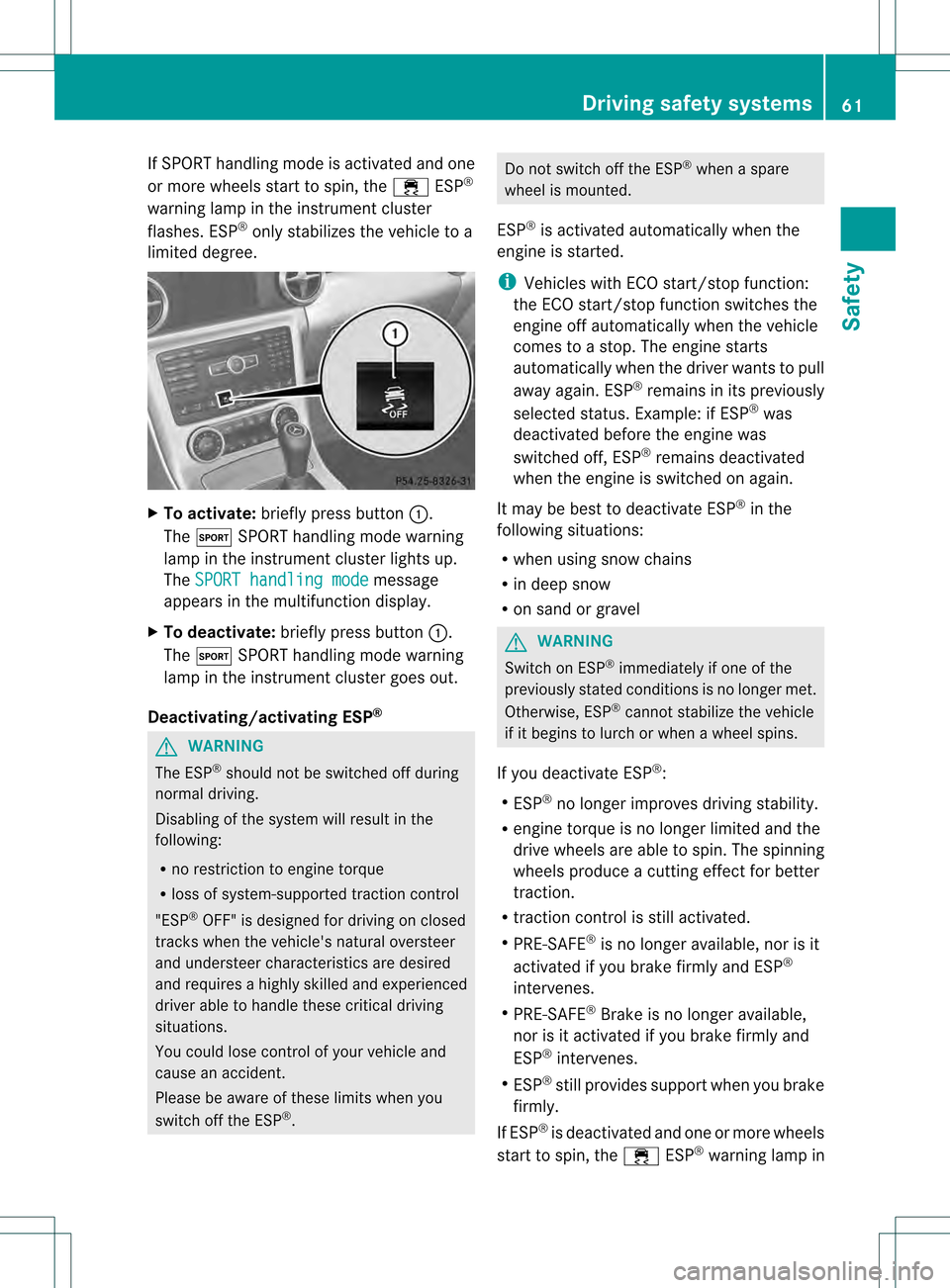
limited degree. X
To activate: briefly press button 0002.
The 0002 SPORT handling mode warning
lamp in the instrument cluster lights up.
The SPORT handling mode message
appears in the multifunction display.
X To deactivate: briefly press button 0002.
The 0002 SPORT handling mode warning
lamp in the instrument cluster goes out.
Deactivating/activating ESP ®G
WARNING
The ESP ®
should not be switched off during
normal driving.
Disabling of the system willr esult in the
following:
R no restriction to engine torque
R loss of system-supported traction control
"ESP ®
OFF" is designed for driving on closed
tracks when the vehicle's natural oversteer
and understeer characteristics are desired
and requires a highly skilled and experienced
driver able to handle these critical driving
situations.
You could lose control of your vehicle and
cause an accident.
Please be aware of these limits when you
switch off the ESP ®
. Do not switch off the ESP
®
when a spare
wheel is mounted.
ESP ®
is activated automatically when the
engine is started.
i Vehicles with ECO start/stop function:
the ECO start/stop function switches the
engine off automatically when the vehicle
comes to a stop. The engine starts
automatically when the driver wants to pull
away again. ESP ®
remains in its previously
selected status. Example: if ESP ®
was
deactivated before the engine was
switched off, ESP ®
remains deactivated
when the engine is switched on again.
It may be best to deactivate ESP ®
in the
following situations:
R when using snow chains
R in deep snow
R on sand or gravel G
WARNING
Switch on ESP ®
immediately if one of the
previously stated conditions is no longer met.
Otherwise, ESP ®
cannot stabilize the vehicle
if it begins to lurch or when a wheel spins.
If you deactivate ESP ®
:
R ESP ®
no longer improves driving stability.
R engine torque is no longer limited and the
drive wheels are able to spin. The spinning
wheels produce a cutting effec tfor better
traction.
R traction control is still activated.
R PRE-SAFE ®
is no longer available, nor is it
activated if you brake firmly and ESP ®
intervenes.
R PRE-SAFE ®
Brake is no longer available,
nor is it activated if you brake firmly and
ESP ®
intervenes.
R ESP ®
still provides support when you brake
firmly.
If ESP ®
is deactivated and one or more wheels
start to spin, the 000BESP®
warning lamp in Driving safety systems
61Safety Z
Page 100 of 334

G
WARNING
Let the system complete the adjustment
procedure before setting the vehicle in
motion. All steering wheel adjustment must
be completed before setting the vehicle in
motion. Driving off with the steering wheel
still adjusting could cause the drive rto lose
control of the vehicle.
Position of the steering wheel when the
EASY-ENTRY/EXIT featur eis active The steering wheel swings upwards when
you:
R
remove the SmartKey from the ignition lock
R open the driver's door and KEYLESS-GO is
in position 1
R open the driver's door and the SmartKey is
in position 0or 1in the ignition lock
i The steering wheel only moves upwards if
it has not already reached the upper end
stop.
Position of the steering wheel for
driving The steering wheel is moved to the last
selected position when:
R
the driver's door is closed.
R you insert the SmartKey into the ignition
lock.
or
R you press the Start/Stop button once on
vehicles with KEYLESS-GO.
When you close the driver's door with the
ignition switched on, the steering wheel is
also automatically moved to the previously
set position.
The last position of the steering wheel is
stored after each manual setting or when you
store the setting with the memory function
(Y page 100). Crash-responsive EASY-EXIT feature If the crash-responsive EASY-EXIT feature is
triggered in an accident, the steering column
will move upwards when the driver's door is
opened. This occurs irrespective of the
position of the SmartKey in the ignition lock.
This makes it easier to exit the vehicle and
rescue the occupants.
The crash-responsive EASY-EXIT feature is
only operational after an accident if the EASY-
EXIT/ENTRY feature is activated in the on-
board computer. Mirrors
Rear-view mirror
Rear-view mirror (manual anti-glare) X
Anti-glare mode: flick anti-glare lever 0002
forwards or back. Exterior mirrors
Adjusting the exterior mirrors G
WARNING
Exercise care when using the passenger-side
exterior rear view mirror. The mirror surface
is convex (outwardly curved surface for a
wider field of view). Objects in mirror are
closer than they appear. Check your interior
rear view mirror and glance over your
shoulder before changing lanes. 98
MirrorsSeats, steering wheel and mirrors