2012 MERCEDES-BENZ S-CLASS SEDAN radiator
[x] Cancel search: radiatorPage 15 of 536
Opening/closing the garage door ..455
Programming (button in the rear-
view mirror) ................................... 453
Gear indicator (on-board
computer) .......................................... 381
Gear or selector lever (cleaning
guidelines) ......................................... 472
Genuine Mercedes-Benz parts ......... 522
Glove box ........................................... 434
GPS reception .................................... 155
Gracenote Media Database .............. 231
H
Handbrake see Parking brake
Harman/kardon ®
Logic 7 ®
surround sound system see Surround sound (harman/
kardon ®
surround sound system)
Hazard warning lamps ...................... 283
HD Radio™ ......................................... 219
Heading up (navigation) ................... 188
Headlamp cleaning system Notes ............................................. 531
Headlamps
Adding fluid to cleaning system .....464
Cleaning system (function) ............282
Fogging up ..................................... 285
see Automatic headlamp mode
Headphones
Changing batteries ........................251
Function overview ..........................146
Indicator lamp ................................ 147
Selecting a screen .........................146
Switching on/off ........................... 146
Head restraints
Adjusting ....................................... 110
Adjusting (electrically) ...................110
Adjusting (rear) .............................. 111
NECK-PRO ..................................... 110
NECK-PRO luxury ........................... 110
see NECK-PRO head restraints/
NECK-PRO luxury head restraints
Heating
see Climate control
High-beam headlamps
Changing bulbs (vehicles with
halogen daytime running lamps) ....288
Changing bulbs (vehicles with LED
daylight lamps) .............................. 288
Display message ............................ 404
Switching Adaptive Highbeam
Assist on/off ................................. 284
Switching on/off ........................... 283
Hill start assist .................................. 310
HOLD function Display message ............................ 412
Function/notes ............................. 346
Home
see Home address
Home address
Entering and saving .......................160
Selecting from the destination
memory ......................................... 163
Hood
Closing ........................................... 459
Display message ............................ 420
Opening ......................................... 458
Hydroplaning ..................................... 333
I
Ignition lock see Key positions
Immobilizer .......................................... 79
In-car hotspot see Separate operating instructions
Incident (traffic report) ..................... 178
Indicator lamps see Warning and indicator lamps
Indicators
see Turn signals
Insect protection on the radiator .... 459
Instrument cluster Overview .......................................... 37
Warning and indicator lamps ...........38
Instrument lighting
see Instrument cluster lighting
Interface (USB, iPod ®
)
see Media Interface
Interior lighting ......................... 267, 285
Ambient light (COMAND) ...............268
Automatic control ..........................286
Index13
Page 21 of 536

R
RACETIMER (on-board computer) .... 382
Radar sensor system Activating/deactivating .................389
Display message ............................ 413
Radiator cover ................................... 459
Radio HD Radio™ .................................... 219
Selecting a station .........................380
Setting a station ............................ 216
Sound settings (balance, bass,
fader, treble) .................................. 139
Storing stations ............................. 217
Switching on .................................. 215
Switching wavebands ....................216
Radio-controlled devices
(installing) .......................................... 456
Read-aloud function .......................... 178
Reading lamp ..................................... 285
Real-time traffic reports ................... 178
Rear compartment Activating/deactivating climate
control ........................................... 296
Setting the air distribution .............299
Setting the airflow .........................299
Setting the air vents ......................303
Setting the temperature ................298
Rear fog lamp
Display message ............................ 404
Switching on/off ........................... 282
Rear seat
Adjusting ....................................... 108
Rear Seat Entertainment System
Adjusting the sound settings .........253
Audio mode (CD, DVD, MP3) .........255
AUX mode ...................................... 263
Changing batteries (remote
control, headphones) .....................251
Changing the picture format ..........254
Components/overview ..................143
Headphones (cordless) ..................146
Multiple users ................................ 253
Overview of picture settings ..........253
Remote control .............................. 144
Screen ........................................... 144
Setting the audio format ................262
System settings ............................. 254Using headphones .........................252
Using the main loudspeaker ..........252
Video DVD mode ........................... 258
Rear seats
Overview .......................................... 45
Rear view camera
Cleaning instructions .....................470
Function/notes ............................. 357
Rear-view mirror ............................... 117
Rear window blind ............................ 441
see Rear window roller sunblind
see Roller sunblind
Rear window defroster
Problem (malfunction) ...................301
Switching on/off ........................... 301
Redialing (telephone) ........................ 204
Refueling Fuel gauge ....................................... 37
Important safety notes ..................321
Refueling process ..........................322
see Fuel
Remote control
Garage door opener .......................452
Programming (garage door
opener) .......................................... 453
Remote operation
Selecting a screen (Rear Seat
Entertainment System) ..................144
Switching a screen on/off (Rear
Seat Entertainment System) ..........145
Reporting safety defects .................... 32
Reserve (fuel tank) see Fuel
Reserve fuel
Display message ............................ 409
Warning lamp ................................. 430
see Fuel
Reset function ................................... 154
Resetting (factory settings) ............. 154
Residual heat (climate control) ........ 302
Restraint system see SRS (Supplemental Restraint
System)
Reversing lamps (display
message) ............................................ 405
Road map see Map Index19
Page 29 of 536

Window curtain air bagDisplay message ............................ 400
Operation ......................................... 53
Windows
Cleaning ......................................... 469
see Side windows
Windshield
Defrosting ...................................... 300
Infrared reflective .......................... 456
Windshield washer fluid
see Windshield washer system
Windshield washer system .............. 464
Notes ............................................. 531
Windshield wipers
Problem (malfunction) ...................290
Replacing the wiper blades ............289
Switching on/off ........................... 289
Winter driving
Important safety notes ..................494
Slippery road surfaces ...................334
Snow chains .................................. 495
Winter operation
Radiator cover ............................... 459
Winter tires
M+S tires ....................................... 494
Wiper blades
Cleaning ......................................... 469
Important safety notes ..................289
Wooden trim (cleaning
instructions) ...................................... 472
Workshop see Qualified specialist workshop Index27
Page 122 of 536
Useful information
i This Operator's Manual describes all
models and all standard and optional
equipment of your vehicle available at the
time of publication of the Operator's
Manual. Country-specific differences are
possible. Please note that your vehicle may
not be equipped with all features
described. This also applies to safety-
related systems and functions.
i Please read the information on qualified
specialist workshops ( Y page 31).
Introduction
Operating safety
Important safety notes
GWARNING
Vehicles with HYBRID: ensure that you read
the "HYBRID" supplement. You may otherwise
fail to recognize dangers.
GWARNING
Making alterations to electronic components
can cause malfunctions.
Radio, satellite radio, amplifier, DVD changer,
navigation module, phone and voice control
are networked. If one component is not
functional or if it has been incorrectly
removed/replaced, this could impair the
operation of other components.
This could seriously jeopardize the
operational safety of your vehicle.
We recommend that you always have
maintenance work on electronic components
carried out at an authorized Mercedes-Benz
Center.
GWARNING
In order to avoid distraction which could lead
to an accident, the driver should enter system
settings while the vehicle is at a standstill, and
operate the system only when permitted by
road, weather and traffic conditions.
Bear in mind that at a speed of just 30 mph
(approximately 50 km/h), your car covers a
distance of 44 feet (approximately 14 m) every
second.
COMAND supplies you with information to
help you select your route more easily and
guide you conveniently and safely to your
destination. For safety reasons, we
encourage the driver to stop the vehicle in a
safe place before answering or placing a call,
or consulting the COMAND screen to read
navigational maps, instructions, or
downloaded information.GWARNING
While the navigation system provides
directional assistance, the driver must remain
focused on safe driving behavior, especially
attention to traffic and street signs, and
should utilize the system's audio cues while
driving.
The navigation system does not supply any
information on stop signs, yield signs, traffic
regulations or traffic safety rules. Their
observance always remains in the driver's
personal responsibility. DVD maps do not
cover all areas nor all routes within an area.
GWARNING
This equipment complies with FCC radiation
exposure limits set forth for uncontrolled
equipment and meets the FCC radio
frequency (RF) Exposure Guidelines in
Supplement C to OET65.
This equipment has very low levels of RF
energy that is deemed to comply without
maximum permissive exposure evaluation
(MPE). But it is desirable that it should be
installed and operated with at least 8 inches
(20 cm) and more between the radiator and a
person's body (excluding extremities: hands,
wrists, feet and legs.)
120IntroductionCOMAND
Page 370 of 536
audible warnings are emitted and the system
does not brake the vehicle to correct your
course.
If the lanes are very wide, it may not be
possible to monitor the complete width of the
neighboring lane. For this reason, vehicles in
the next lane may not be detected, especially
if they are driving in a staggered formation.
This may be the case if vehicles are driving at
that edge of their lane which is furthest away
from your vehicle.
Always pay attention to traffic conditions and
your surroundings. Otherwise, you may fail to
recognize dangers in time, cause an accident
and injure yourself and others.
If the lanes are narrow, vehicles driving in the
lane beyond the lane next to your vehicle may
be indicated, especially if the vehicles are not
driving in the middle of their lane. This may
be the case if there are vehicles driving at the
inner edge of their lanes.
Due to the nature of the system:
R warnings may be issued in error when
driving close to crash barriers or similar
solid lane borders.
R warnings may be interrupted when driving
alongside long vehicles, for example
trucks, for a prolonged time.
Two Active Blind Spot Assist radar sensors
are integrated into the front and rear bumpers
respectively. An additional radar sensor is
located behind the cover in the radiator grill.
Make sure that the sensors and areas around
them are free of dirt, ice or slush. The rear
sensors must not be covered, for example by
cycle racks or overhanging cargo. Following
a severe impact or in the event of damage to
the bumpers, have the function of the sensors
checked at a qualified specialist workshop.
Blind Spot Assist may otherwise not work
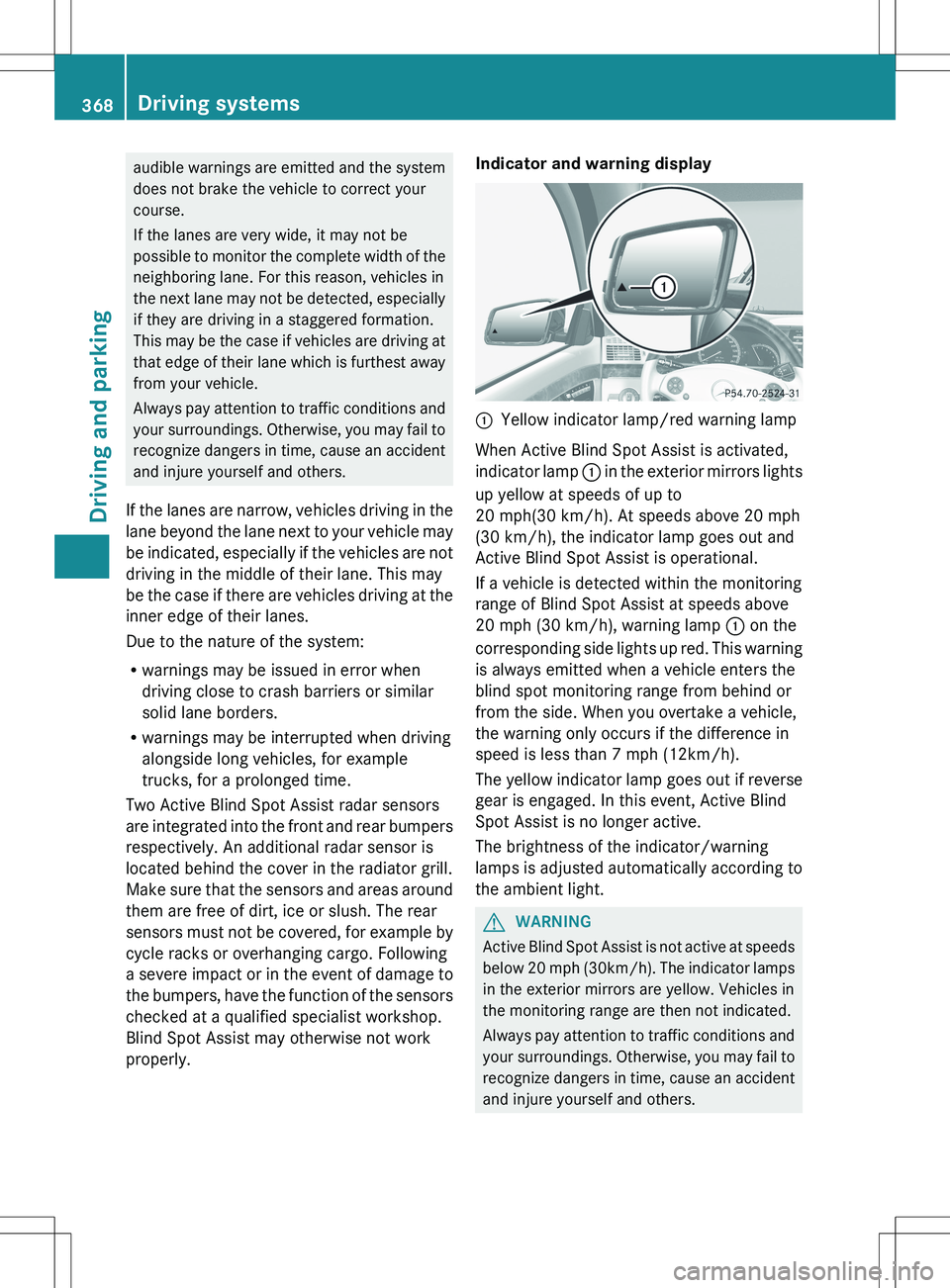
properly.Indicator and warning display:Yellow indicator lamp/red warning lamp
When Active Blind Spot Assist is activated,
indicator lamp : in the exterior mirrors lights
up yellow at speeds of up to
20 mph(30 km/h). At speeds above 20 mph
(30 km/h), the indicator lamp goes out and
Active Blind Spot Assist is operational.
If a vehicle is detected within the monitoring
range of Blind Spot Assist at speeds above
20 mph (30 km/h), warning lamp : on the
corresponding side lights up red. This warning
is always emitted when a vehicle enters the
blind spot monitoring range from behind or
from the side. When you overtake a vehicle,
the warning only occurs if the difference in
speed is less than 7 mph (12km/h).
The yellow indicator lamp goes out if reverse
gear is engaged. In this event, Active Blind
Spot Assist is no longer active.
The brightness of the indicator/warning
lamps is adjusted automatically according to
the ambient light.
GWARNING
Active Blind Spot Assist is not active at speeds
below 20 mph ( 30km/h). The indicator lamps
in the exterior mirrors are yellow. Vehicles in
the monitoring range are then not indicated.
Always pay attention to traffic conditions and
your surroundings. Otherwise, you may fail to
recognize dangers in time, cause an accident
and injure yourself and others.
368Driving systemsDriving and parking
Page 401 of 536

Display messagesPossible causes/consequences and M SolutionsPRE-SAFE
Functions
Currently Limited
See Operator's
ManualGRisk of accident
PRE-SAFE ®
Brake is temporarily inoperative. Possible causes are:
R the DISTRONIC PLUS cover in the radiator grill is dirty.
R function is impaired due to heavy rain or snow.
R the sensors in the bumpers are dirty.
R the radar sensor system is temporarily inoperative, e.g. due to
electromagnetic radiation emitted by nearby TV or radio
stations or other sources of electromagnetic radiation.
R the system is outside the operating temperature range.
R the on-board voltage is too low.
If the display message does not disappear:
XPull over and stop the vehicle safely as soon as possible, paying
attention to road and traffic conditions.XApply the electric parking brake.XClean the DISTRONIC PLUS cover in the radiator grill
( Y page 470).XClean the bumpers ( Y page 470).XRestart the engine.
If the system detects that the sensors are fully operational, the
display message disappears.
PRE-SAFE ®
Brake is operational again.
PRE-SAFE
Function Limited
See Oper. ManualGRisk of accident
PRE-SAFE ®
Brake is defective. BAS PLUS or the distance warning
signal may also have failed.
XVisit a qualified specialist workshop.6
SRS Malfunction
Service RequiredGRisk of injury
There is a malfunction in the SRS (Supplemental Restraint
System). The 6 warning lamp also lights up in the instrument
cluster.
XVisit a qualified specialist workshop.6
Front Left SRS
Malfunction
Service Required
or Front Right SRS
Malfunction
Service RequiredGRisk of injury
SRS has malfunctioned at the front on the left or right. The 6
warning lamp also lights up in the instrument cluster.
XVisit a qualified specialist workshop.Display messages399On-board computer and displaysZ
Page 408 of 536

Display messagesPossible causes/consequences and M Solutionsb
Please Switch Off
LightsThe lights are still switched on when you leave the vehicle. A
warning tone also sounds.XTurn the light switch to $ or c .
or
XIf the rear fog lamp is switched on: press the light switch in to
the stop.Adaptive High-beam
Assist InoperativeAdaptive Highbeam Assist is faulty.XVisit a qualified specialist workshop.
Engine
Display messagesPossible causes/consequences and M Solutions+
Check Coolant
Level See Oper.
ManualThe coolant level is too low.XAdd coolant, observing the warning notes when doing so
( Y page 463).XIf coolant needs to be added more often than usual, have the
engine coolant system checked at a qualified specialist
workshop.GWARNING
Do not spill antifreeze on hot engine parts. Antifreeze contains ethylene glycol which may burn
if it comes into contact with hot engine parts. You could be seriously burned.
! The coolant level is too low. Avoid making long journeys with too little coolant in the cooling
system. The engine will otherwise be damaged.
The display messages and the corresponding symbol that indicate that the coolant level is
too low must not be ignored.
Display messagesPossible causes/consequences and M Solutions?
Coolant Low Stop
Vehicle Turn
Engine OffThe coolant is too hot.XPull over and stop the vehicle safely and switch off the engine,
paying attention to road and traffic conditions.XMake sure that the air supply to the engine radiator is not
blocked, e.g. by snow, slush or ice.XWait until the display message disappears before restarting the
engine. Otherwise, the engine could be damaged.XPay attention to the coolant temperature display.XIf the temperature increases again, visit a qualified specialist
workshop immediately.406Display messagesOn-board computer and displays
Page 418 of 536
Display messagesPossible causes/consequences and M SolutionsDISTRONIC PLUS
Currently
Unavailable See
Oper. ManualDISTRONIC is deactivated and temporarily inoperative. Possible
causes are:
R the DISTRONIC PLUS cover in the radiator grill is dirty.
R function is impaired due to heavy rain or snow.
R the sensors in the bumpers are dirty.
R the radar sensor system is temporarily inoperative, e.g. due to
electromagnetic radiation emitted by nearby TV or radio
stations or other sources of electromagnetic radiation.
R the system is outside the operating temperature range.
R the on-board voltage is too low.
A warning tone also sounds.
If the display message does not disappear:XPull over and stop the vehicle safely as soon as possible, paying
attention to road and traffic conditions.XApply the electric parking brake.XClean the DISTRONIC PLUS cover in the radiator grill
( Y page 470).XClean the bumpers ( Y page 470).XRestart the engine.
If the system detects that the sensors are fully operational, the
display message disappears.
DISTRONIC is operational again.
DISTRONIC PLUS
InoperativeDISTRONIC PLUS is defective. BAS PLUS (Brake Assist PLUS) and
PRE-SAFE ®
Brake may be inoperative as well.
A warning tone also sounds.XVisit a qualified specialist workshop.DISTRONIC PLUS
OverrideYou have depressed the accelerator pedal. DISTRONIC PLUS is no
longer controlling the speed of the vehicle.XTake your foot off the accelerator pedal.DISTRONIC PLUS
--- mphAn activation condition for DISTRONIC PLUS is not fulfilled.XCheck the activation conditions for DISTRONIC PLUS
( Y page 336).416Display messagesOn-board computer and displays