2012 MERCEDES-BENZ E-CLASS ESTATE engine coolant
[x] Cancel search: engine coolantPage 15 of 457
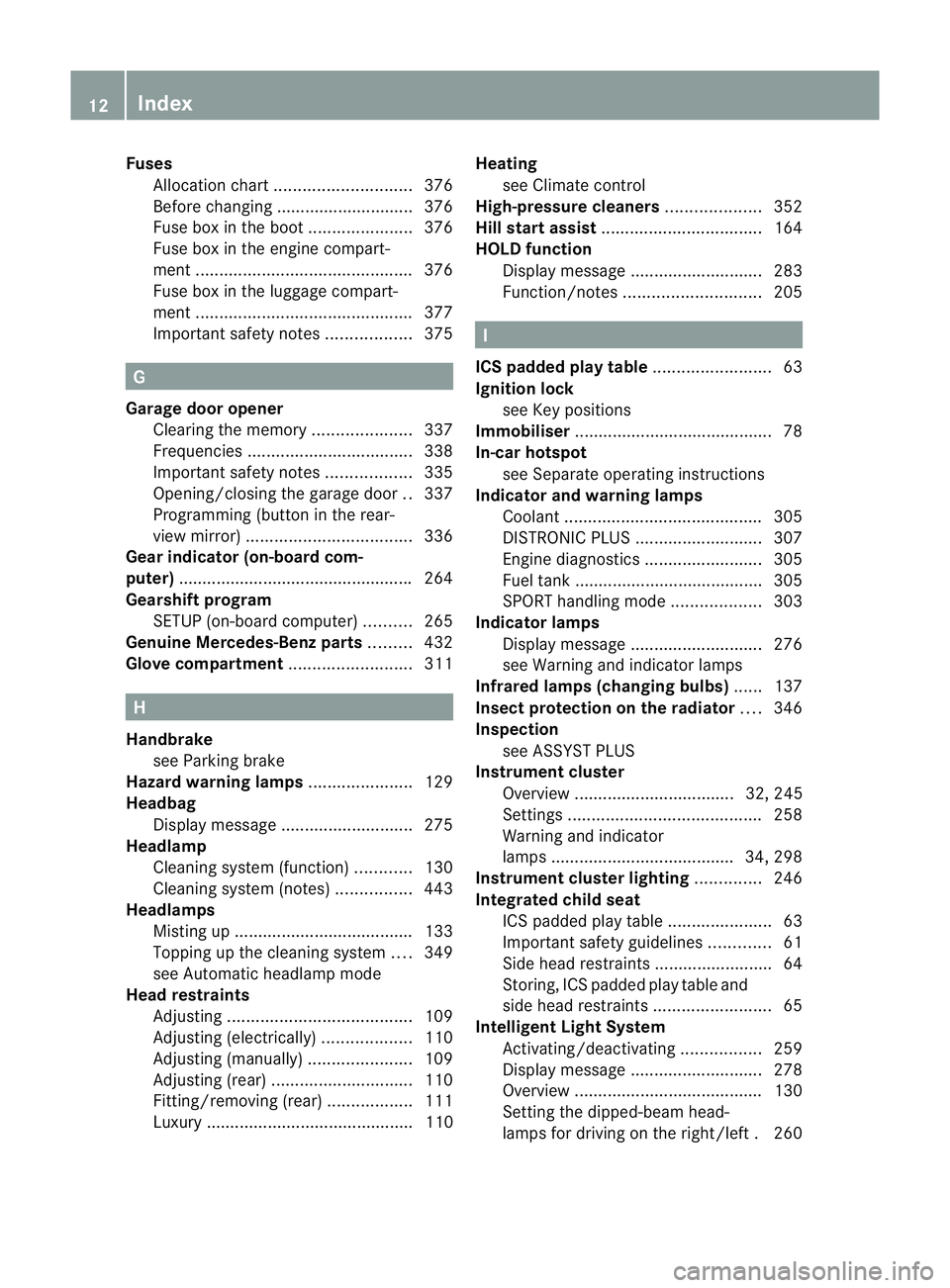
Fuses
Allocatio nchart ............................. 376
Before changing ............................. 376
Fuse box in the boot ......................376
Fuse box in the engine compart-
ment .............................................. 376
Fuse box in the luggage compart-
ment .............................................. 377
Important safety notes ..................375 G
Garage door opener Clearing the memory .....................337
Frequencies ................................... 338
Important safety notes ..................335
Opening/closing the garage door ..337
Programming (button in the rear-
view mirror) ................................... 336
Gear indicator (on-board com-
puter) ................................................. .264
Gearshift program SETUP (on-board computer) ..........265
Genuine Mercedes-Benz parts .........432
Glove compartment ..........................311H
Handbrake see Parking brake
Hazard warning lamps ......................129
Headbag Display message ............................ 275
Headlamp
Cleaning system (function) ............130
Cleaning system (notes) ................443
Headlamps
Misting up ...................................... 133
Topping up the cleaning system ....349
see Automatic headlamp mode
Head restraints
Adjusting ....................................... 109
Adjusting (electrically). ..................110
Adjusting (manually). .....................109
Adjusting (rear) .............................. 110
Fitting/removing (rear) ..................111
Luxury ............................................ 110 Heating
see Climate control
High-pressure cleaners ....................352
Hill start assist .................................. 164
HOLD function Display message ............................ 283
Function/notes ............................. 205 I
ICS padded play table .........................63
Ignition lock see Key positions
Immobiliser .......................................... 78
In-car hotspot see Separate operating instructions
Indicator and warning lamps
Coolant .......................................... 305
DISTRONI CPLUS ........................... 307
Engine diagnostics .........................305
Fuel tank ........................................ 305
SPORT handling mode ...................303
Indicator lamps
Display message ............................ 276
see Warning and indicator lamps
Infrared lamps (changing bulbs) ......137
Insectp rotection on the radiator ....346
Inspection see ASSYST PLUS
Instrument cluster
Overview .................................. 32, 245
Settings ......................................... 258
Warning and indicator
lamps ...................................... .34, 298
Instrument cluster lighting ..............246
Integrated child seat ICS padded pla ytable ...................... 63
Important safety guidelines .............61
Side hea drestraints ...................... ...64
Storing, ICS padded play table and
sid eh ead restraint s......................... 65
Intelligen tLight System
Activating/deactivatin g................. 259
Display message ............................ 278
Overview ........................................ 130
Setting the dipped-bea mhead-
lamps for driving on the right/left .260 12
Index
Page 21 of 457
Switching sea
theating on/off .......115
Switching the sea tventilation on/
off .................................................. 116
Selector lever
Cleaning ......................................... 356
Sensors (cleaning instructions) .......354
Service see ASSYST PLUS
Service Centre
see Qualified specialist workshop
Service menu (on-board computer) .257
Service products
AdBlue ®
special additive s.............. 440
Brake fluid ..................................... 442
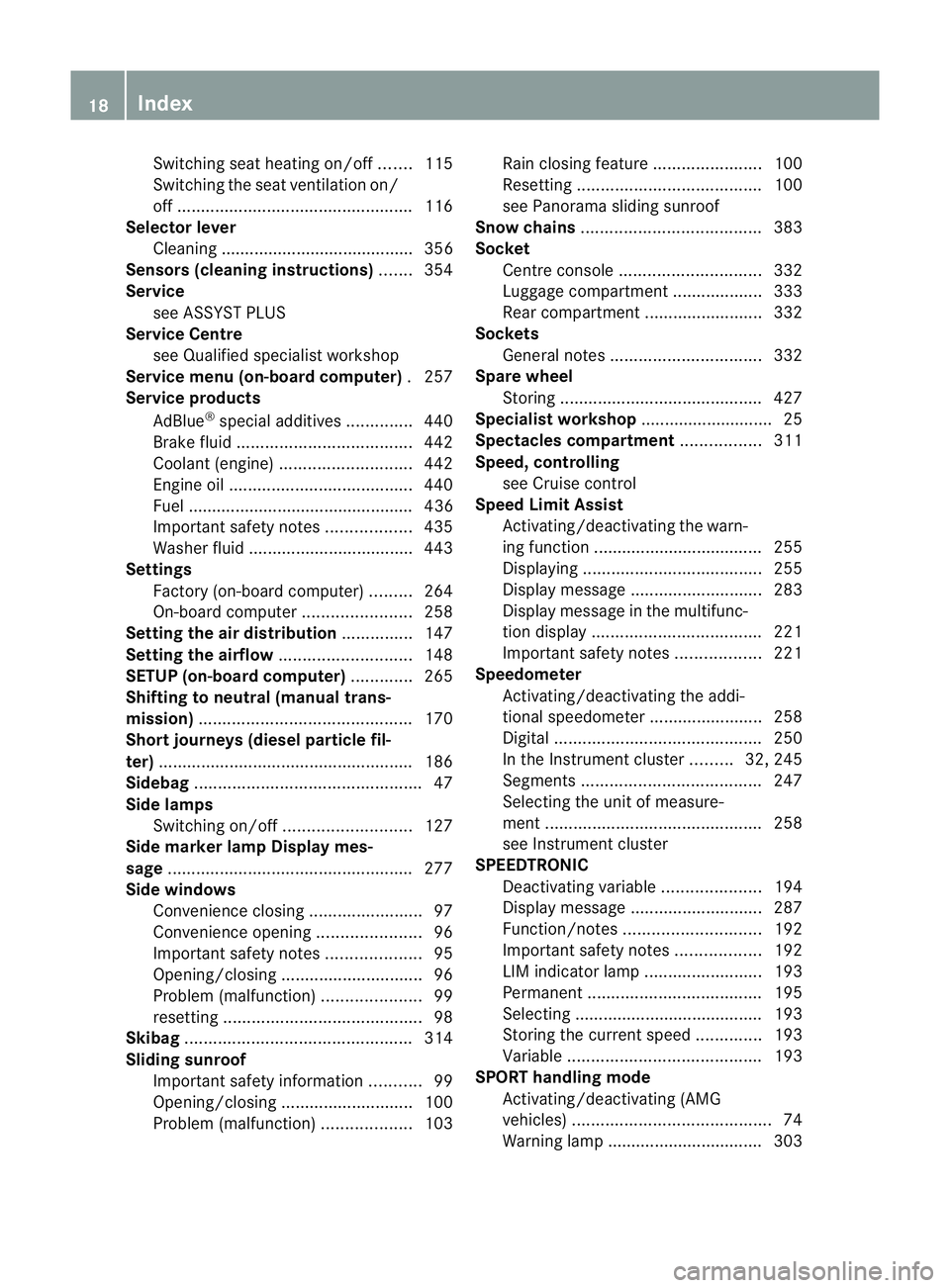
Coolant (engine) ............................ 442
Engine oil ....................................... 440
Fuel ................................................ 436
Important safety notes ..................435
Washer fluid .................................. .443
Settings
Factory (on-board computer) .........264
On-board computer .......................258
Setting the air distribution ...............147
Setting the airflow ............................148
SETUP (on-board computer) .............265
Shifting to neutral (manual trans-
mission) ............................................. 170
Short journeys (diesel particle fil-
ter) ...................................................... 186
Sidebag ................................................ 47
Side lamps Switching on/off ........................... 127
Side marker lamp Display mes-
sage .................................................... 277
Side windows Convenience closing ........................97
Convenience opening ......................96
Important safety notes ....................95
Opening/closing .............................. 96
Problem (malfunction) .....................99
resetting .......................................... 98
Skibag ................................................ 314
Sliding sunroof Important safety information ...........99
Opening/closing ............................ 100
Problem (malfunction) ...................103Rain closing feature
.......................100
Resetting ....................................... 100
see Panorama sliding sunroof
Snow chains ...................................... 383
Socket Centre console .............................. 332
Luggage compartment ...................333
Rea rcompartmen t......................... 332
Sockets
General notes ................................ 332
Spare wheel
Storing ........................................... 427
Specialist workshop ............................ 25
Spectacles compartment .................311
Speed, controlling see Cruise control
Spee dLimit Assist
Activating/deactivating the warn-
ing function .................................... 255
Displayin g...................................... 255
Display message ............................ 283
Display message in the multifunc-
tion displa y.................................... 221
Important safety notes ..................221
Speedometer
Activating/deactivating the addi-
tional speedometer ........................258
Digita l............................................ 250
In the Instrument cluster .........32, 245
Segments ...................................... 247
Selecting the unit of measure-
ment .............................................. 258
see Instrument cluster
SPEEDTRONIC
Deactivating variabl e..................... 194
Display message ............................ 287
Function/notes ............................. 192
Important safety notes ..................192
LIM indicator lamp .........................193
Permanent ..................................... 195
Selecting ........................................ 193
Storing the current spee d.............. 193
Variabl e......................................... 193
SPORT handling mode
Activating/deactivating (AMG
vehicles) .......................................... 74
Warning lamp ................................. 303 18
Index
Page 22 of 457
SRS (Supplemental Restraint Sys-
tem)
Display message ............................ 274
Introduction ..................................... 43
Warning lamp ................................. 304
Warning lamp (function) ................... 43
Starting (engine) ................................ 162
Steering (display message) ..............296
Steering wheel Adjusting (electrically). ..................117
Adjusting (manually). .....................117
Button overview ............................... 35
Buttons (on-board computer) ......... 247
Cleaning ......................................... 356
Gearshift paddles ........................... 175
Important safety notes ..................117
Steering wheel heating ..................117
Storing settings (memory func-
tion) ............................................... 121
Steering wheel gearshift paddles ....175
Steering wheel heating Problem (malfunction) ...................118
Switching on/off ........................... 117
Stopwatch (RACETIMER) ................... 265
Stowage areas ................................... 310
Stowage compartment Spectacles compartment ...............311
Stowage compartments
Armrest (front) ............................... 312
Armrest (under) ............................. 312
Centre console .............................. 311
Cuph older..................................... 328
Glove compartment .......................311
Important safety information .........310
Rea r............................................... 313
Under driver's seat/front-
passenger sea t.............................. 312
Stowage net ....................................... 313
Stowage space Stowage net ................................... 313
Stowage well beneath the boot
floor .................................................... 325
Summer tyres .................................... 382
Sun blind Rea rside windows ......................... 330
Sun visor ............................................ 329Supplement Restraint System
see SRS (Supplemental Restraint
System)
Surround lighting (on-board com-
puter) ................................................. .260
Suspension tuning AIRMATIC ...................................... 209
AMG RIDE CONTROL sports sus-
pension .......................................... 210
SETUP (on-board computer) ..........265
Switching off the alarm (ATA) ............78 T
Tailgate Display message ............................ 294
Emergency unlocking .......................95
Important safety notes ....................91
Limiting the opening angle ...............94
Opening/closing (automatically
from inside) ...................................... 93
Opening/closing (automatically
from outside) ................................... 92
Opening/closing (from outside) .......91
Opening dimensions ......................444
Tail lamps
Display message ............................ 276
Tank
see Fuel tank
Technical data
Emergency spare wheel .................429
Information .................................... 432
Trailer loads ................................... 448
Tyres/wheels ................................. 393
Vehicle data ................................... 444
Telephone
Accepting acall............................. 254
Display message ............................ 296
Menu (on-board computer) ............254
Number from the phone book ....... .254
Redialling ....................................... 255
Rejecting/ending acall................. 254
Telephone compartment ................312
Telescopic rod (Easy-Pac kfix kit) ....324
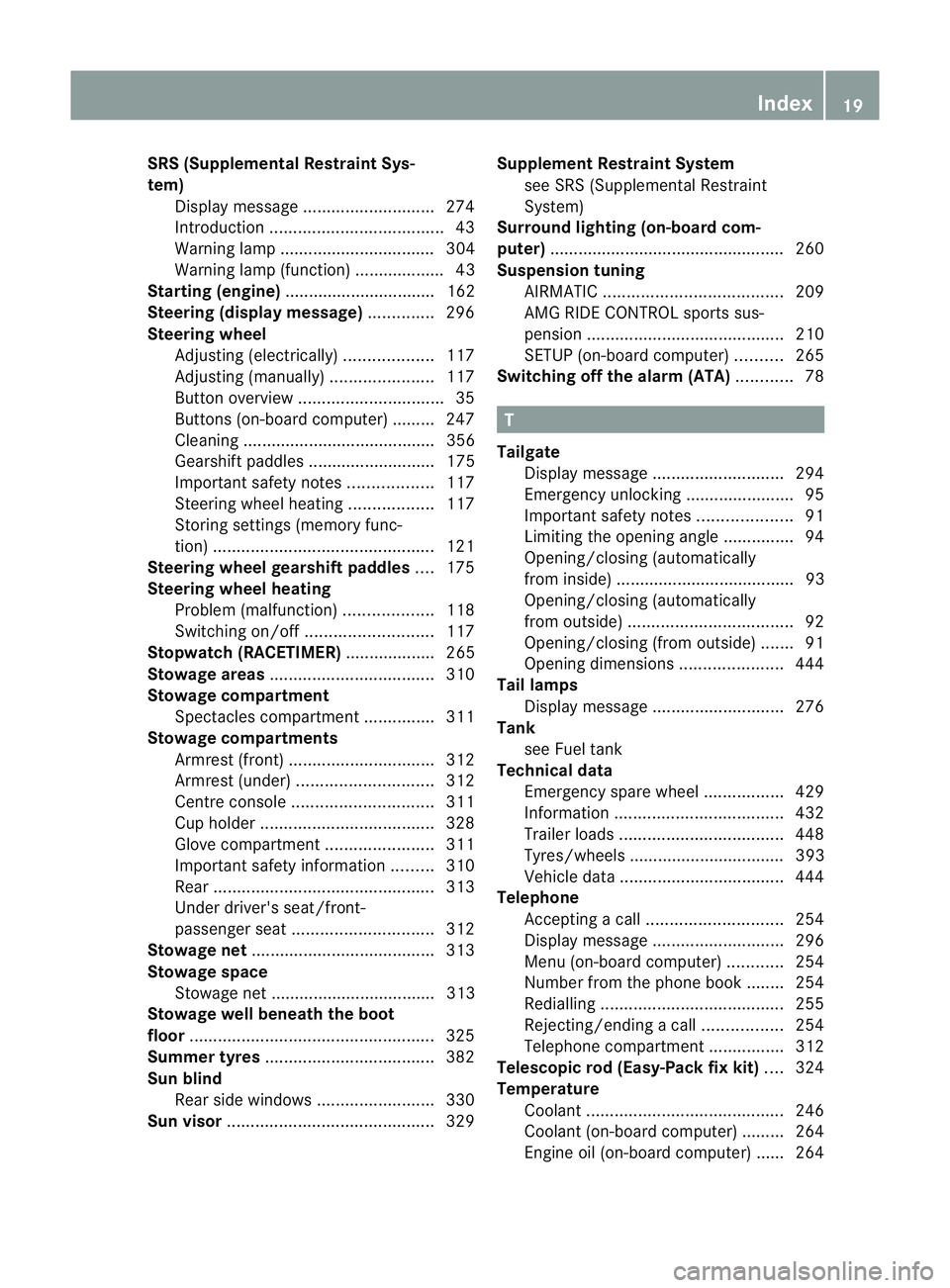
Temperature Coolant .......................................... 246
Coolant (on-board computer) ......... 264
Engine oil (on-board computer) ...... 264 Index
19
Page 37 of 457
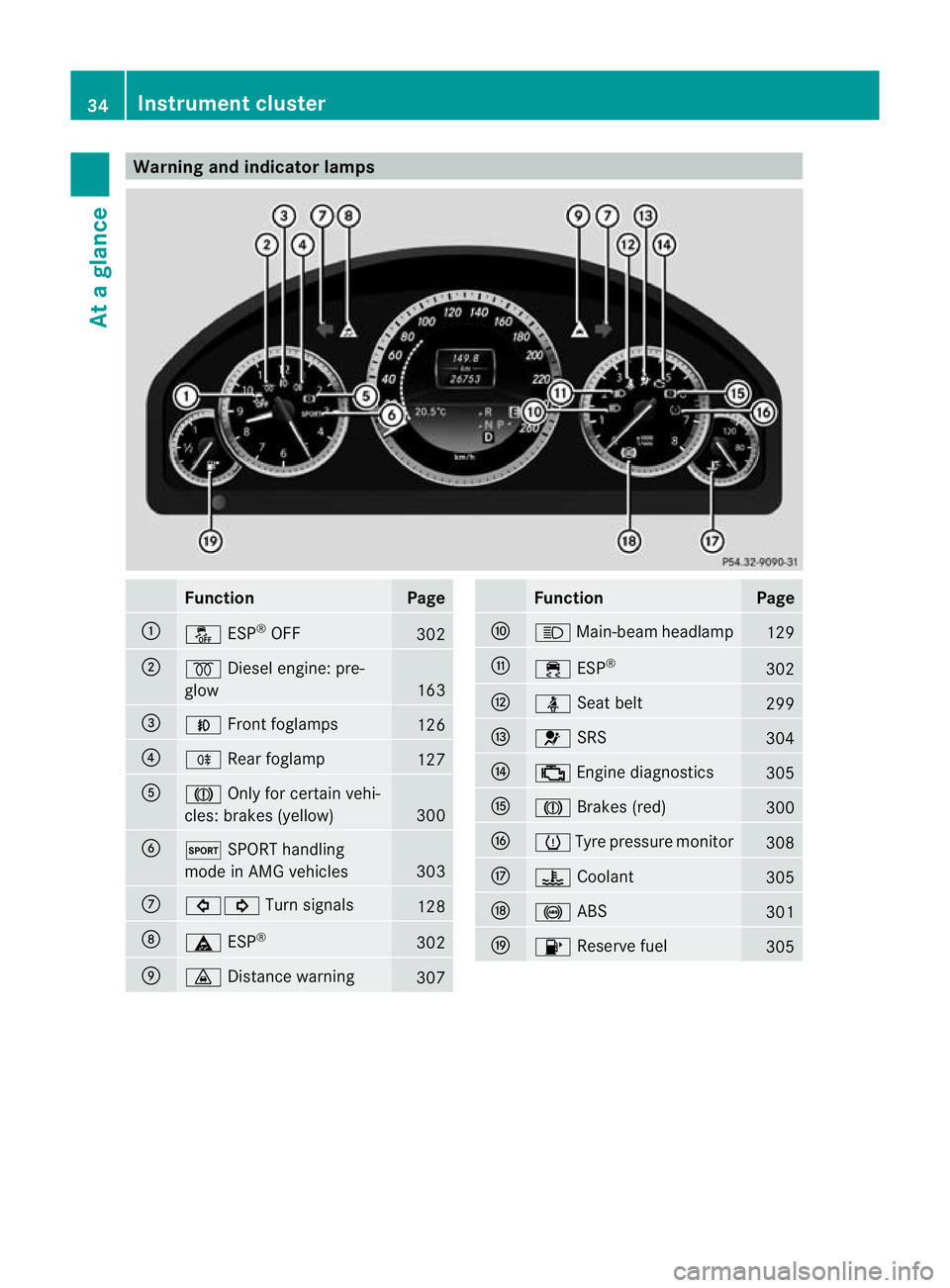
Warning and indicator lamps
Function Page
:
å
ESP®
OFF 302
;
%
Diesel engine: pre-
glow 163
=
N
Front foglamps 126
?
R
Rearfoglamp 127
A
J
Only for certain vehi-
cles: brakes (yellow) 300
B
M
SPORT handling
mode in AMG vehicles 303
C
#!
Turn signals 128
D
ä
ESP® 302
E
·
Distance warning 307 Function Page
F
K
Main-beam headlamp 129
G
÷
ESP® 302
H
ü
Seat belt 299
I
6
SRS 304
J
;
Engine diagnostics 305
K
J
Brakes (red) 300
L
h
Tyre pressure monitor 308
M
?
Coolant 305
N
!
ABS 301
O
8
Reserve fuel 30534
Instrument clusterAt a glance
Page 172 of 457
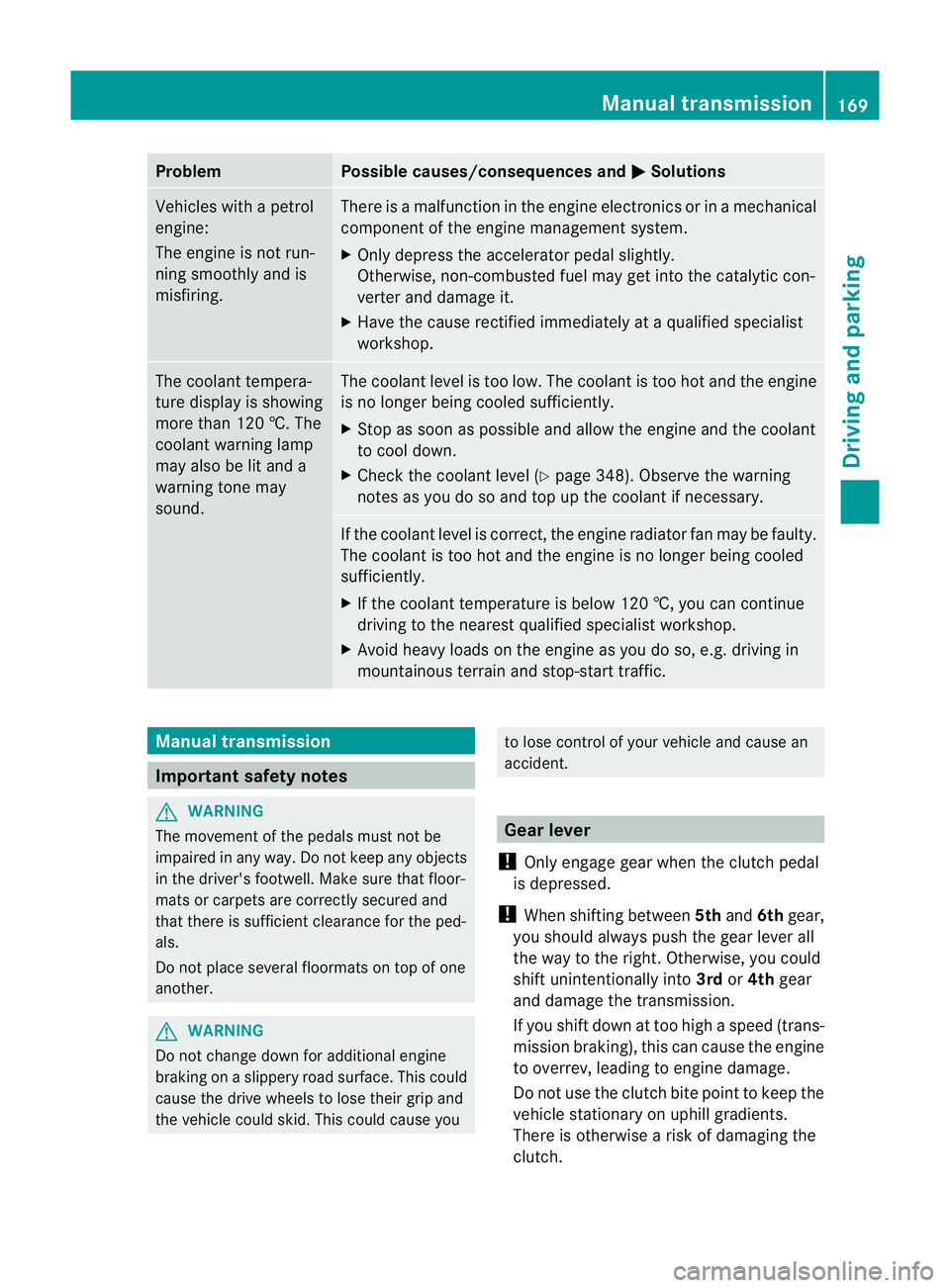
Problem Possible causes/consequences and
M Solutions
Vehicles with a petrol
engine:
The engine is not run-
ning smoothly and is
misfiring. There is a malfunction in the engine electronics or in a mechanical
component of the engine management system.
X
Only depress the accelerator pedal slightly.
Otherwise, non-combusted fuel may get into the catalytic con-
verter and damage it.
X Have the cause rectified immediately at a qualified specialist
workshop. The coolant tempera-
ture display is showing
more than 120 †. The
coolant warning lamp
may also be lit and a
warning tone may
sound. The coolant level is too low. The coolant is too hot and the engine
is no longer being cooled sufficiently.
X Stop as soon as possible and allow the engine and the coolant
to cool down.
X Check the coolant level (Y page 348). Observe the warning
notes as you do so and top up the coolant if necessary. If the coolant level is correct, the engine radiator fan may be faulty.
The coolant is too hot and the engine is no longer being cooled
sufficiently.
X If the coolant temperature is below 120 †, you can continue
driving to the nearest qualified specialist workshop.
X Avoid heavy loads on the engine as you do so, e.g. driving in
mountainous terrain and stop-start traffic. Manual transmission
Important safety notes
G
WARNING
The movement of the pedals must not be
impaired in any way. Do not keep any objects
in the driver's footwell. Make sure that floor-
mats or carpets are correctly secured and
that there is sufficient clearance for the ped-
als.
Do not place several floormats on top of one
another. G
WARNING
Do not change down for additional engine
braking on a slippery road surface. This could
cause the drive wheels to lose their grip and
the vehicle could skid. This could cause you to lose control of your vehicle and cause an
accident.
Gear lever
! Only engage gear when the clutch pedal
is depressed.
! When shifting between 5thand 6thgear,
you should always push the gear lever all
the way to the right. Otherwise, you could
shift unintentionally into 3rdor4th gear
and damage the transmission.
If you shift down at too high a speed (trans-
mission braking), this can cause the engine
to overrev, leading to engine damage.
Do not use the clutch bite point to keep the
vehicle stationary on uphill gradients.
There is otherwise a risk of damaging the
clutch. Manual transmission
169Driving and parking Z
Page 250 of 457
At high outside temperatures and when driv-
ing uphill, the coolant temperature may rise
to the end of the scale. Rev counter
! Do not drive in the overrevving range.
Doing so will damage the engine.
The red band in the rev counter indicates the
engine's overrevving range.
The fuel supply is interrupte dto protec tthe
engine when the red band is reached. Outside temperature display
G
WARNING
At temperatures just above freezing point, the
street may be icy, especially in wooded areas
or on bridges. If you do not adapt your driving
style to the conditions, the vehicle could skid.
For this reason, adapt your driving style and
speed to the weather conditions.
The outside temperature displayi s in the mul-
tifunction display (Y page 248).
Changes in the outside temperature are dis-
played after a short delay. Speedometer with segments
The segments in the speedometer indicate
which speed range is available.
R Cruise control activated (Y page 189):
The segments light up from the stored
speed to the maximum speed.
R Variable SPEEDTRONIC activated
(Y page 192):
The segments light up from the start of the
scale to the selected limit speed.
R DISTRONIC PLUS activated (Y page 195):
One or two segments in the set speed
range light up.
R DISTRONIC PLUS detects avehicle in front: The segments between the speed of the
vehicle in fron tand the stored speed light
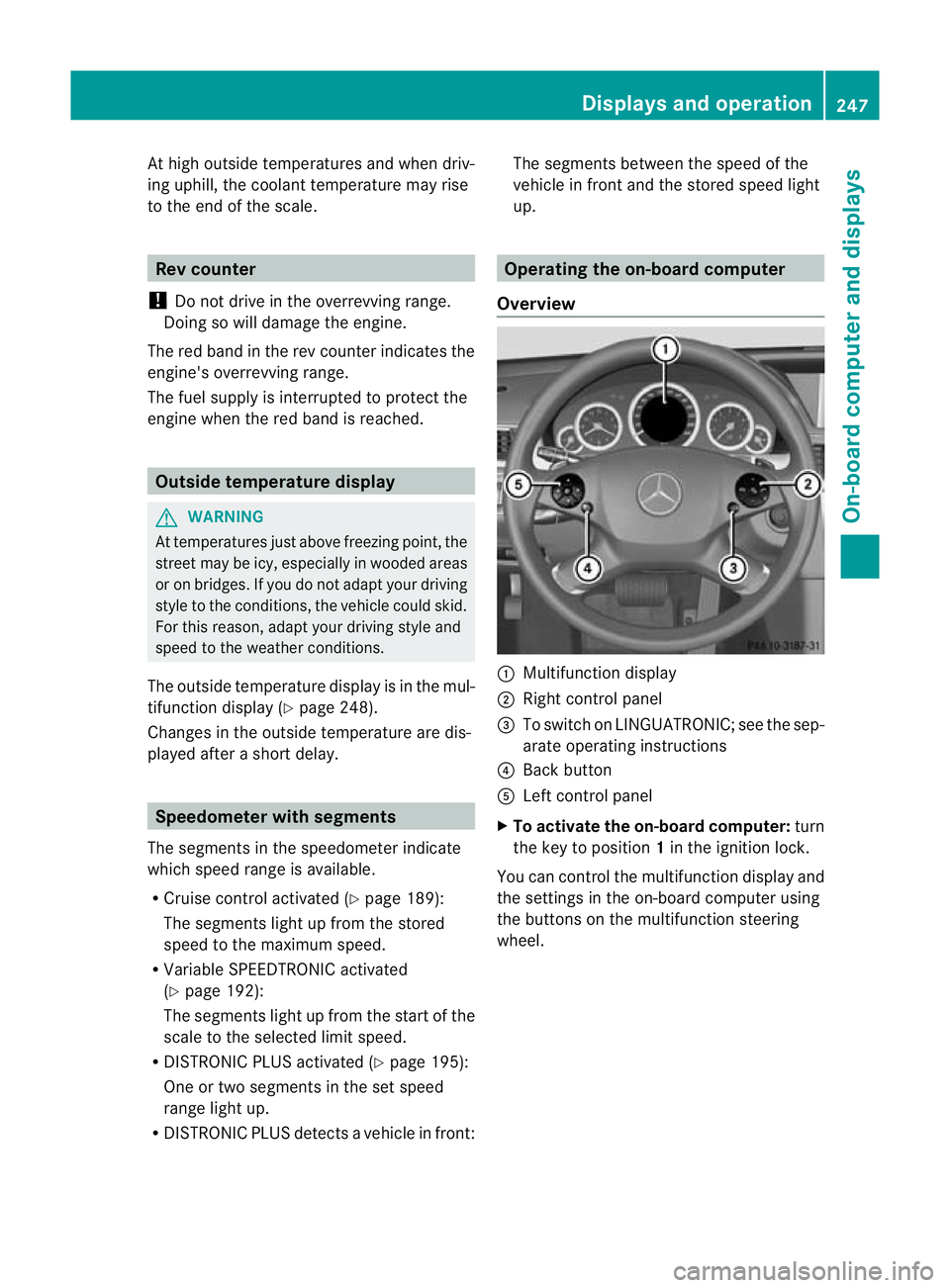
up. Operating the on-board computer
Overview :
Multifunctio ndisplay
; Right control panel
= To switch on LINGUATRONIC; see the sep-
arate operating instructions
? Back button
A Left control panel
X To activat ethe on-board computer: turn
the key to position 1in the ignition lock.
You can control the multifunction display and
the settings in the on-board computer using
the buttons on the multifunction steering
wheel. Displays and operation
247On-board computer and displays Z
Page 267 of 457
X
Press the :or9 button to select the
Belt adjustment function.
When the Belt adjustment function is
activated, the vehicle seat belt is displayed
in red in the multifunction display.
X Press the abutton to save the setting.
For further information on belt adjustment,
see (Y page 52).
Switching the fold-in mirrors when lock-
ing function on/off
This function is only available on vehicles with
Memory Function (Y page 121).
When you activate the Auto. fold in func-
tion, the exterior mirrors are folded in when
the vehicle is locked. When you unlock the
vehicle and then open a door, the exterior
mirrors fold out again.
X Press the =or; button on the steer-
ing wheel to select the Settings menu.
X Press the :or9 button to select the
Convenience submenu.
X Press ato confirm.
X Press the :or9 button to select the
Auto. fold in function.
If the Auto. fold in function is activated,
the vehicle's exterior mirror is displayed in
red in the multifunction display.
X Press the abutton to save the setting. :
To fold the exterior mirrors in or out
If you have switched the Auto. fold infunction on and you fold the exterior mirrors
in using button
:, they will not fold out auto-
matically (Y page 119). You can then only fold out the exterior mirrors
using button
:.
Resetting to factor ysettings X
Press the =or; button on the steer-
ing wheel to selec tthe Settings menu.
X Press the :or9 button to select the
Factory setting submenu.
X Press ato confirm.
The Reset all settings? message
appears.
X Press the :or9 button to select
No or
Yes .
X Press the abutton to confirm the selec-
tion.
If you have selected Yes , the multifunction
display shows a confirmation message.
For safety reasons, not all functions are reset:
the Limit speed (winter tyres) function
in permanent SPEEDTRONIC can only be set
in the Vehicle submenu. If you want to reset
the Daytime driving lights in the
Light submenu, you must turn the key to position
1
in the ignition lock. AMG menu in AMG vehicles
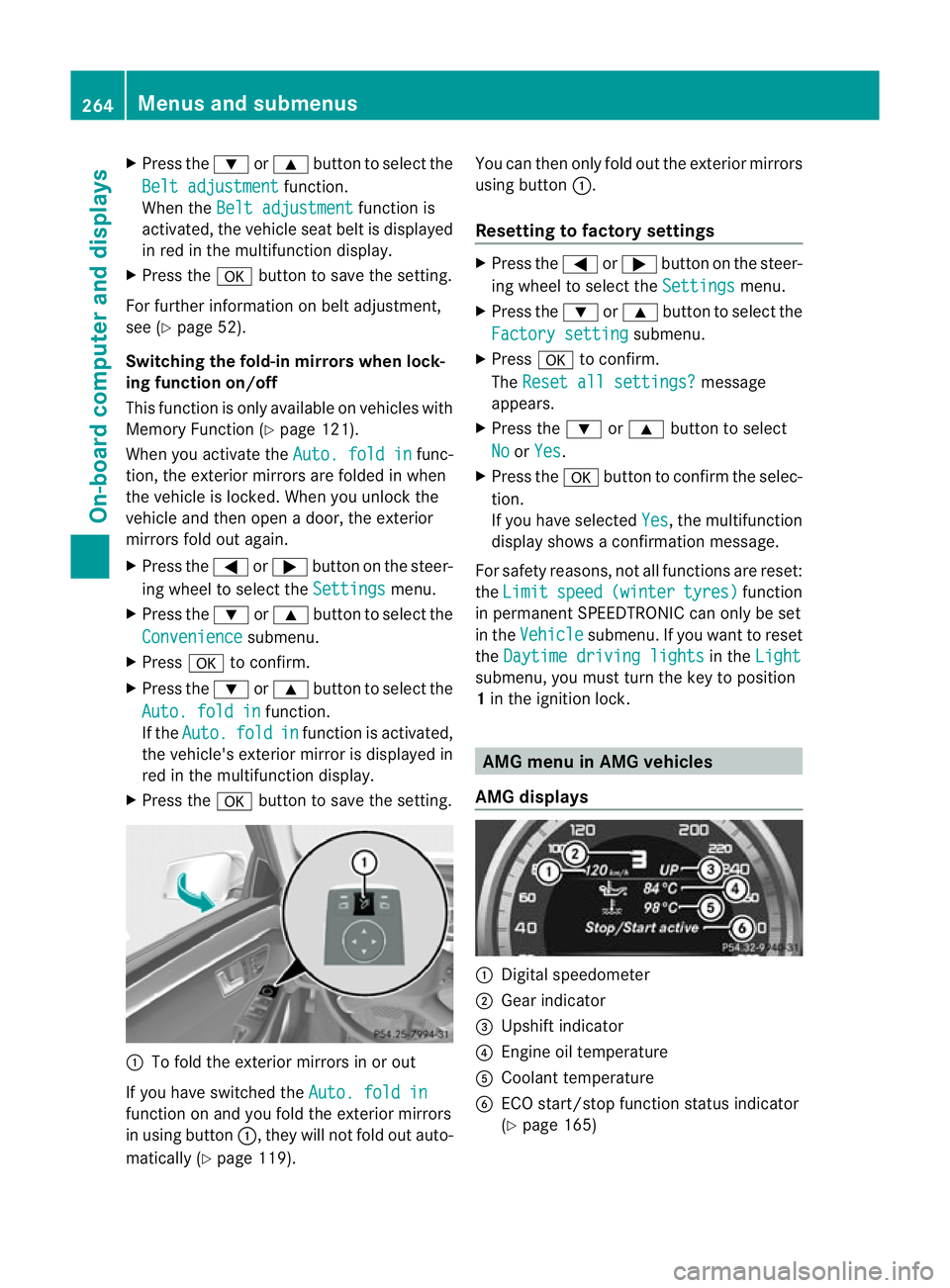
AMG displays :
Digital speedometer
; Gear indicator
= Upshift indicator
? Engine oil temperature
A Coolant temperature
B ECO start/stop function status indicator
(Ypage 165) 264
Menus and submenusOn-board computer and displays
Page 282 of 457
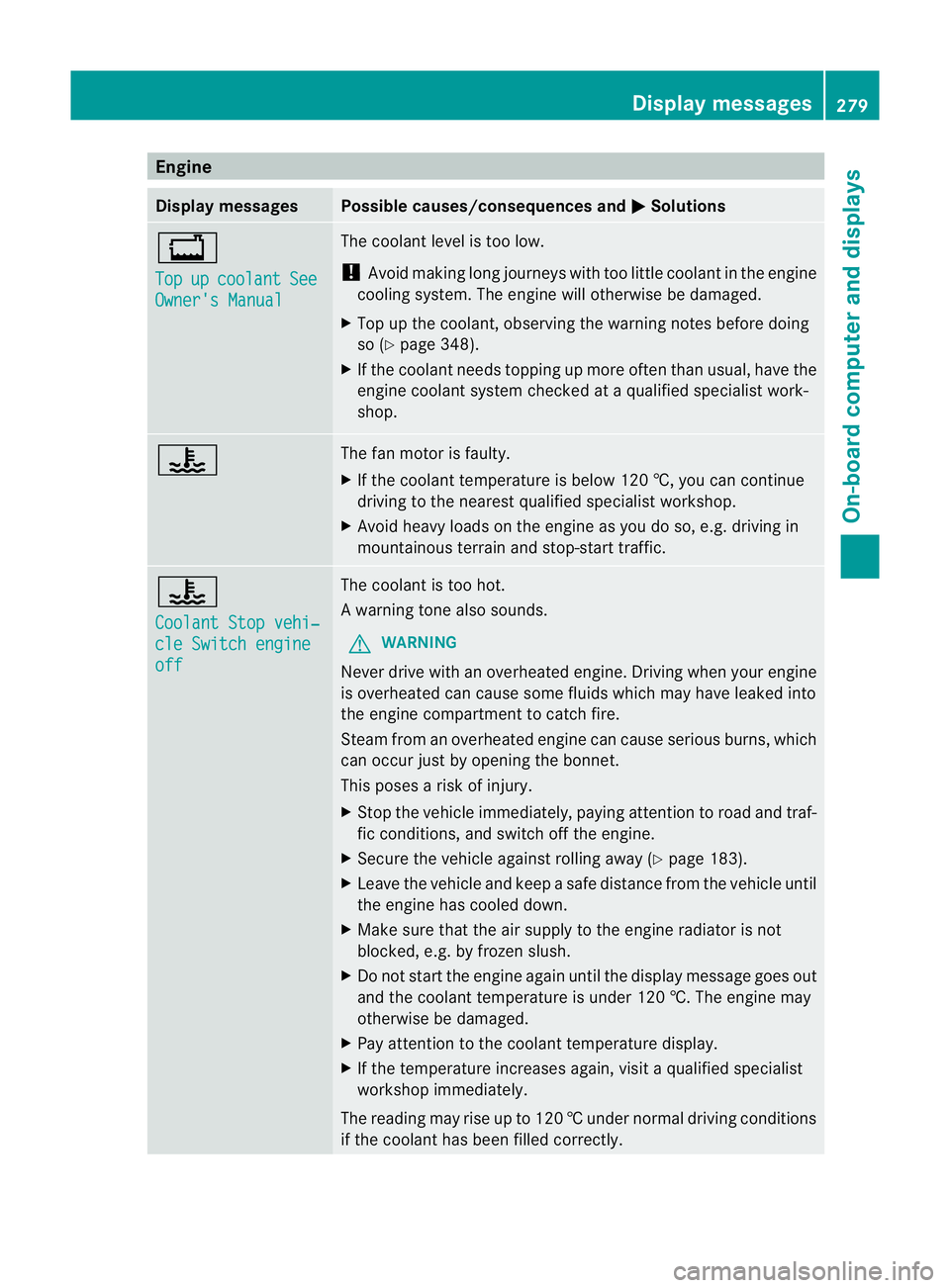
Engine
Display messages Possible causes/consequences and
M Solutions
+
Top
up coolant See
Owner's Manual The coolant level is too low.
!
Avoid making long journeys with too little coolant in the engine
cooling system. The engine will otherwise be damaged.
X Top up the coolant, observing the warning notes before doing
so (Y page 348).
X If the coolant needs topping up more often than usual, have the
engine coolant system checked at a qualified specialist work-
shop. ? The fan motor is faulty.
X
If the coolant temperature is below 120 †, you can continue
driving to the neares tqualified specialist workshop.
X Avoid heavy loads on the engine as you do so, e.g. driving in
mountainous terrain and stop-start traffic. ?
Coolant Stop vehi‐
cle Switch engine
off The coolan
tis too hot.
Aw arning tone also sounds.
G WARNING
Never drive with an overheated engine. Driving when your engine
is overheated can cause som efluids which may have leaked into
the engine compartment to catch fire.
Steam fro manoverheated engine can cause serious burns, which
can occur just by opening the bonnet.
This poses a risk of injury.
X Stop the vehicle immediately, paying attention to road and traf-
fic conditions, and switch off the engine.
X Secure the vehicle against rolling away (Y page 183).
X Leave the vehicle and keep a safe distance from the vehicle until
the engine has cooled down.
X Make sure that the air supply to the engine radiator is not
blocked, e.g. by frozen slush.
X Do not start the engine again until the display message goes out
and the coolant temperature is under 120 †. The engine may
otherwise be damaged.
X Pay attention to the coolant temperature display.
X If the temperature increases again, visi taqualified specialist
workshop immediately.
The reading may rise up to 120 †undernormal driving conditions
if the coolant has been filled correctly. Display messages
279On-board computer and displays Z