2012 MERCEDES-BENZ E-Class Rear view Camera
[x] Cancel search: Rear view CameraPage 24 of 234
Settings Time Consumption Display
off Rear
viewcamera Act
ivating/deact ivating
Bluetooth ® Resetting
COMAND
i Delete yourpersonal data
using thisfunct ion,for
example beforesellingyour
vehicle. If
equipped withtherear view camera: ifthe funct ionisactivated andCOMAND is
switched on,the image fromtherear view camera isautomatically showninthe COMAND
display whenreverse gearisengaged. Cleaning
instructions
! Donot touch theCOMAND display.The
displa yhas avery sensitive high-gloss
surface; thereisarisk ofscratc hing.Ifyou
have toclean thescreen, however, usea
mild cleaning agentandasoft, lint-free
cloth.
The displa ymust beswitched offand cooled
down before youstart cleaning. Cleanthe
displa yscreen, whennecessary, witha
commerc iallyavaila blemicrofiber clothand
cleaning agentforTFT/LCD displays.Donot
apply pressure tothe displa ysurface when
cleaning it,as this could cause irreversible
damage. Then,drythe surface withadry
microfiber cloth.
Avoid usingalcoholic thinners,gasoline or
abrasive cleaningagents.Thesecould
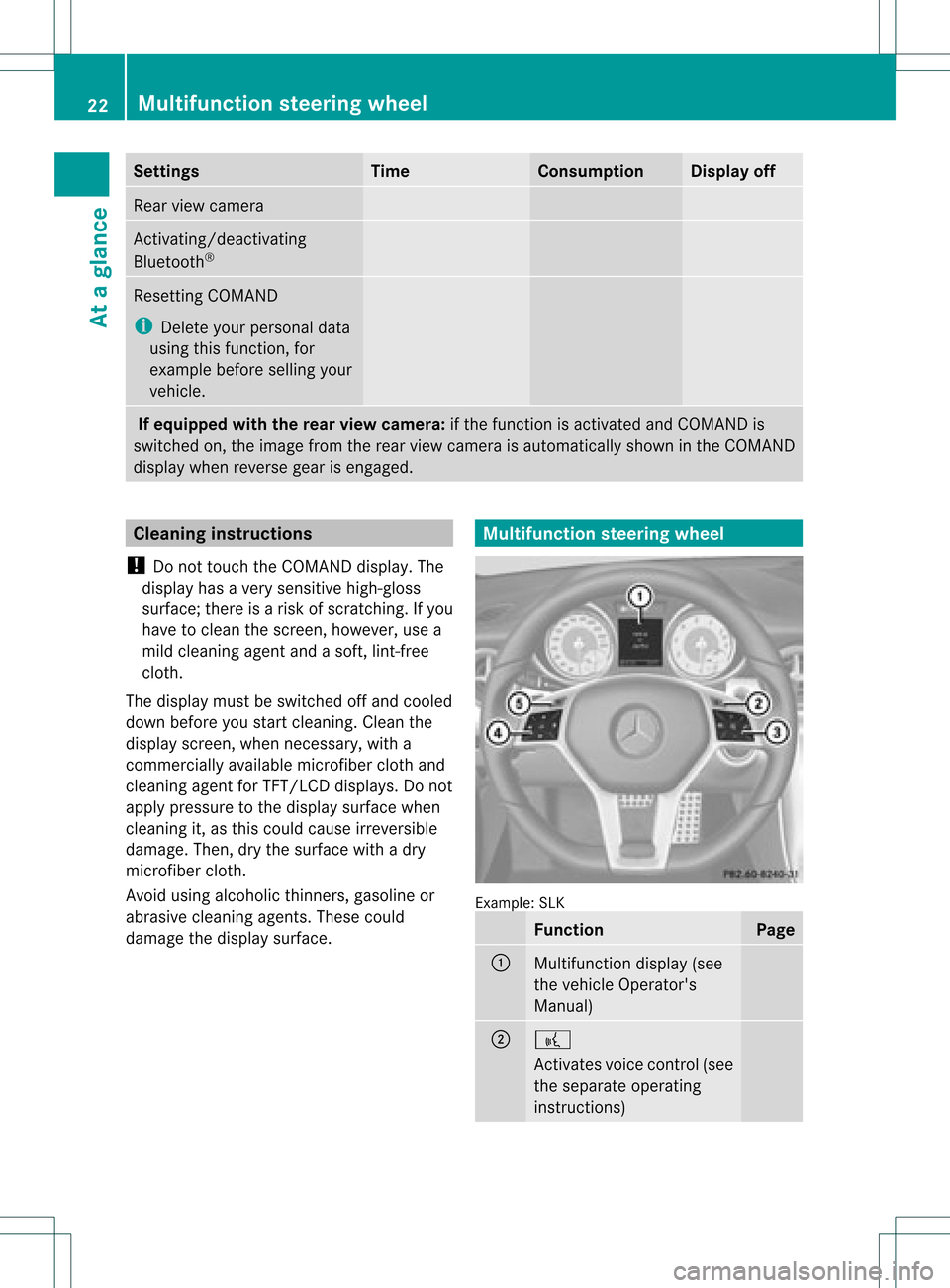
damage thedispla ysurface. Multifunction
steeringwheel Example:
SLK Function Page
:
Multifunction
display(see
the vehicle Operator's
Manual) ;
?
Act
ivates voicecontrol(see
the separate operating
instruct ions) 22
Multifunction
steeringwheelAtaglance
Page 39 of 234

Ã
Controls theclim atecontrol
auto matically1,
2
ñ Setstheclim atecontrol style to
auto maticmod e(FO CUS /MEDIUM /
DI FF US E)2
_ Setstheair dist ribut ion1,
2
M, PorO Setstheair
dist ribut ion3,
4
.
¬ Activat esthedef rostfun ction 1,
2,3, 4
Ù Switches on max imum coolin g
i The climatestatus displaydoes not
appear whentheimag efrom therear view
cam eraisdisp layed. The
climat est atus displayintheCOMA NDdisp lay
(ex ampl e) The
illust ration showsanexample ofthe
cur ren tset ting sfor :
R thedef rosterfun ction (top)
R clim atemod ein auto maticmod e(ce nter)
R max imum coolin g(bot tom) X
To hid eth edis pla y:tur nor pre ssthe
COMA NDcontrol ler.
or
X Pre ssoneof thebut tons on theCOMA ND
oper ating syst em.
i Adetailed descript ionofthe climate
con trol isavailable inthe vehicle
Operator 'sManual. Rear
view camer a G
WARN
ING
The rear view camera ismerely anaid.
Please observe thecorr espondin gnotes in
your vehicle's Operator's Manual.
The image fromtherear view camera is
shown inthe COMAND displaywhenreverse
gear isengaged, if:
R your vehicle isequipped witharear view
camera.
R COMAND isactivated.
R the Activation byRgear funct
ionis
activated.
If the funct ionisactivated, theCOMAND
display willautomatically switchbacktothe
previously selecteddisplayassoon asyou
shift outofreverse gear.
i Further informat iononthe rear view
camera drivingsystem canbefound inthe
vehicle Operator's Manual.
X Press theW functionbutton .
The system menuappears.
X Select Settings by
turnin gcVd the
COMAND controller andpress Wto
conf irm.
X Select Rear View Camera and
press Wto
conf irm.
1 Available for2-zone automatic climatecontrol.
2 Available for3-zone automatic climatecontrol.
3 Available forthe air-condit ioningsystem.
4 Available forHeatmatic . Rear
view camera
37Ataglance Z
Page 40 of 234

X
Sel ect Activationby Rgea r and
press
W toconfi rm.
The functi onissw itche don O oroff ª,
de pendi ng on the previous statu s.
i Ifasid evie wcame raisava ilab le,us ing
CO MAND youcan switch from therearview
came rapict ure tothe side view came ra
pict ure, seethe"Syst emsettings" sect ion. 38
Rea
rview cameraAtaglance
Page 194 of 234

Int
era ctive cont ent
DV Ds can contain interac tive conten t(e. g.a
vide ogame ).In avide ogame ,for example ,
you may beable toinfluen ceeve ntsby
sele cting and trigge ringact ions.The typeand
num berofact ionsdepe ndontheDV D.
X Se lec tana ction bysliding ZVÆ orXVY the
CO MAND controllera nd pre ssW to
exe cute it.
A menu appe arsand thefirst entry ,
Sel ect ,
is highl ighted .
X Pre ssW the COMAND controller. AU
Xvideo mode Co
nnectin gex tern alvideo source s
If yo ur veh icleis eq uipp ed with aMed ia
Inter face (Y pa ge 178) ,yo ucan conne ctan
exte rnalvid eo sou rce (AUXvideo).
The 1/8inch audio/vi deoj ack sare inthe
cen terc onsole stowage compartment.
i Invehicles witharear view camera, the
AUX video jackcann otbe used forexter nal
video sources. Switching
toAUX video mode
X Select Video in
the main functionbar by
sliding ZVandturnin gcVd theCOMAND
cont roller andpress Wtoconf irm.
If AUX video mode wasthelast mode
selected, itwill now beactive.
If another videosource isswitched on,you
can now switch toAUX video mode inthe
video menu.
X Select Video and
press Wtoconf irm.
X Select Aux and
press Wtoconf irm.
The AUX video menu appears. Youwillhear
and seethecont entofthe exter nalvideo
source ifit is conn ected andswitched to
playb ack. AUX
video mode
For details onhow tooperate theexter nal
video source, seetherespect ivedevice's
operating instructions. Showing/hiding
themenu
X To show: pressWthe COMAND
cont roller.
X To hide: slideZVtheCOMAND controller
and conf irmFull Screen by
pressing W. Volume
andsound settings
You willfind details onvolume (Ypage 33)
and sound (Ypage 34)settings inthe "Ata
glance" section. G
WARNIN
G
Ext ernal video sources mayhave different
volumes, whichcanmean thatsystem
messages suchastraffic announc ementsand
navigation systemannounc ementsare much
louder. Ifnecessary, pleasedeactivate the
system messages oradjust theirvolume
manually.
i Itmay bethe case thatadevice whichis
conn ected asan exter nalvideo source
seems quieter orlouder inthe vehicle, or
that theusual maximum volumecannotbe
reached. Onsome devices, itis possible to
adjust thevolume separately. Inthis case,
start atamedium volumeandincrease it
graduall y.This enables youtodetermin e 192
AUX
video modeVideo
Page 216 of 234

i
The headphones' volumesettingdoes not
affect themain loudspeakers. Adjust
ingthe sound settings
You canselect thesound settings inthe audio
CD/D VD/MP3, video DVDandAUX modes.
X Switc hon anoperating mode(e.g.audio
CD mode) (Ypage 217).
X Select Treble or
Bass using
the :=; buttonson the remote
cont roland press the9button toconf irm.
An adjustmen tscal eap pea rs.
X Sel ect asetti ngusing the 9:
bu ttons andpressthe 9button toconfi rm. Multi
pleusers
Simul taneoususeofthe rear-
co mpartment discdrive The
two rear-comp artmentscree nscan be
ope rate dalmost entirelyind epe ndentl yfrom
one another. However,there canbeaconfl ict
in some menusif the two scree nsare used
sim ultaneo usly.
If the rear-comp artmentdisc drive isbei ng
us ed for both scree nssim ultaneo usly,
sel ecting certainmenu sor setti ngsonone of
the scree nsalso affe ctsthe othe rscree n.
The followi ng functi onsaffectboth scree ns:
R cha nging play ba ck opti ons
R sel ecting atrack (fromatra cklist or folder)
R us ing the play ,pa useand stopfu nctio ns
R fast for wa rding/r ewind ing orscro lling
R cal ling up the DVD menu andnavigati ng
wi thi nit
R setting thelangua ge,subtitles andcamera
angle
R calling upinteract iveDVD content The
followi ngfunction saffect onlyone
screen:
R audi oand video function sas well aspicture
settings
R switching betweenfullscreen andthe
menu
Switching betweenoperating modes When
youexit anoperating mode(e.g.audio
CD mode), thecurrent settingissaved. Ifyou
call upthis operating modeagainlate r,th ere
are two poss ibilities:
R theoper atingmod ehas been chang edon
th eot her scree n.
R theoper atingmod ehas notb een changed.
In the first case, theoperatin gmode appears
as itis on the other screen .
In the secon dcase, thesett ingappears onthe
screen asitwas when youlast exitedthe
operatin gmode. Pictur
esettings
Overview You
canselect thesesettings invideo DVD
and AUX mode. Instruct ions forAUX mode
are detailed later(Y page 228).
Adju sting thebright ness,contra stand
color X
Switc hon video DVDmode (Ypage 221).
X To show themenu: pressthe9button
on the remot econ trol.
or
X Select (Ypage 188)Menu while
the
navigation menuisshown andpress the
9 button tocon firm.
X Select DVD-Vid eo using
the :=; buttonsand press the
9 button tocon firm. 214
Ba
sic functionsRear SeatEntert ainment System