X
Sel ect SIRIUS Service and
pressW to
confi rm.
The window onthe right halfof the displ ay
sho wsthe telephone numb erofthe
pro vider(SIR IUSXM) andtheserialnumb er
of your ser vice module for rece iving traf fic
mes sages .
Reg isteri ngfor the SIRIU SXM traffic
repo rtse rvic e X
Ca llthe trafficrep ort provider'spho ne
numb ersho wnonthe scre en.
i Youcan also have the satel lite ser vice
acti vate donl ine.Todo so, visit theSIRIUS
XM Radio website at
htt <0010002C00210021001700170017002000130009001200090015001300200003
000F000DH (USA)or
htt <0010002C00210021001700170017002000130009001200090015001300030001
000E000100040001H .com
(Canada) .
Once theconn ection hasbeen established:
X Follow theinstr uctions ofthe operator.
The activation processmaytake uptoten
minutes.
If registrat ionisnot included when
purchasing thesystem, yourcredit card
details willberequired toactivate your
account . Compass
function
In the compass view,youcan seethecurrent
direction oftravel, thecurrent heightabove
sea level andthecoordinat esofthe vehicle
position, forexample.
X To switch onnavigation mode:pressthe
Ø functionbutton .
X To show themenu: pressWthe COMAND
cont roller.
X Select Pos. in
the navigation systemmenu
bar bysliding VÆandturnin gcVd the
COMAND controller andpress Wto
conf irm.
X Select Compass and
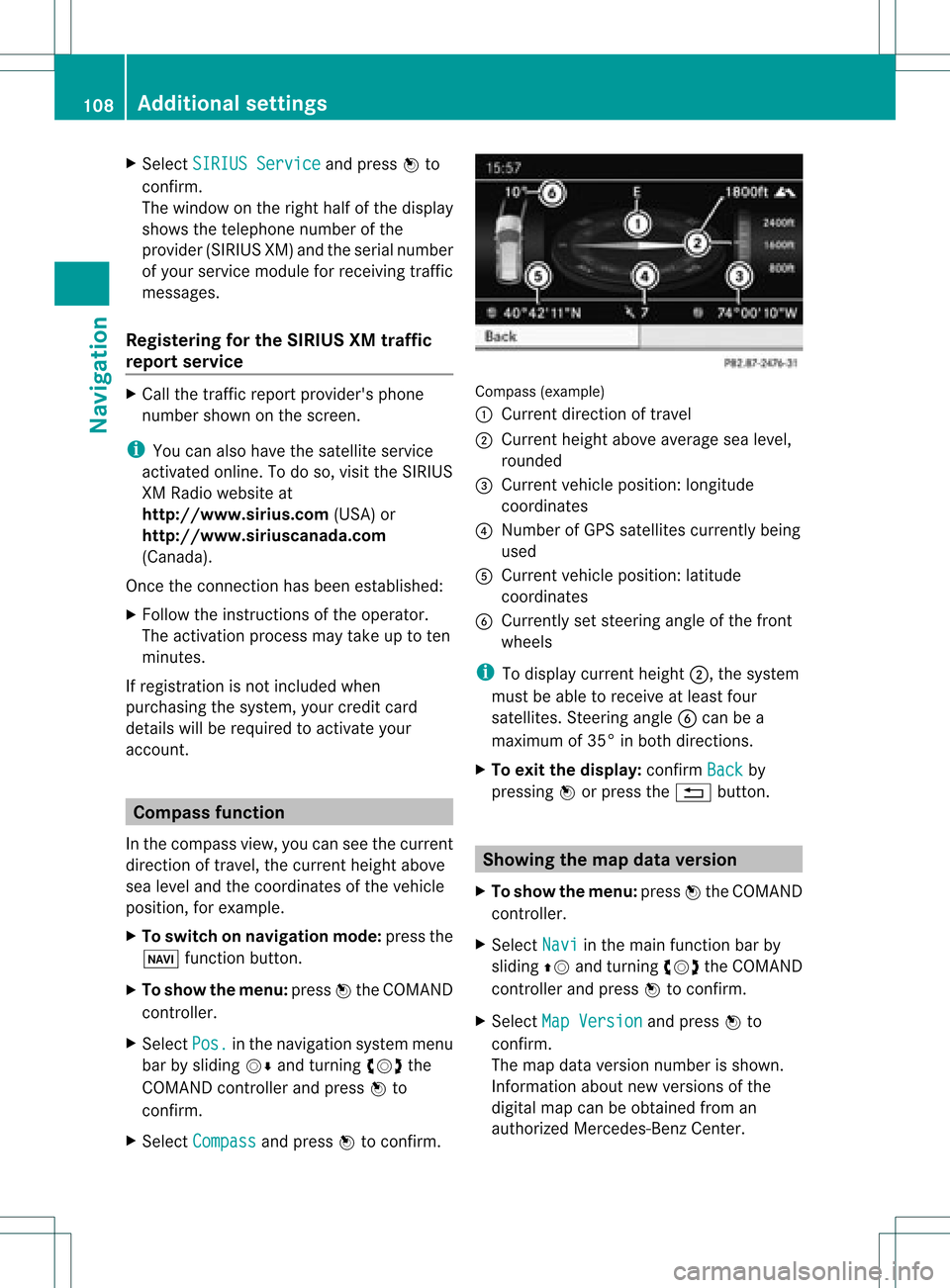
press Wtoconf irm. Compass
(example)
: Current direction oftravel
; Current heightaboveaverage sealevel,
rounded
= Current vehicleposition: longitude
coordinat es
? Number ofGPS satellites currentlybeing
used
A Current vehicleposition: latitude
coordinat es
B Currently setsteerin gangle ofthe front
wheels
i Todisplay current height;,thesystem
must beable toreceive atleast four
satellites. Steeringangle Bcan bea
maximum of35° inboth direction s.
X To exit thedisplay: confirmBack by
pressing Worpress the% button . Showing
themap dataversion
X To show themenu: pressWthe COMAND
cont roller.
X Select Navi in
the main functionbar by
sliding ZVandturnin gcVd theCOMAND
cont roller andpress Wtoconf irm.
X Select MapVersion and
press Wto
conf irm.
The map data version number isshown.
Infor mation aboutnewversions ofthe
digital mapcanbeobtained froman
authorized Mercedes-B enzCenter. 108
Additional
settingsNavigation
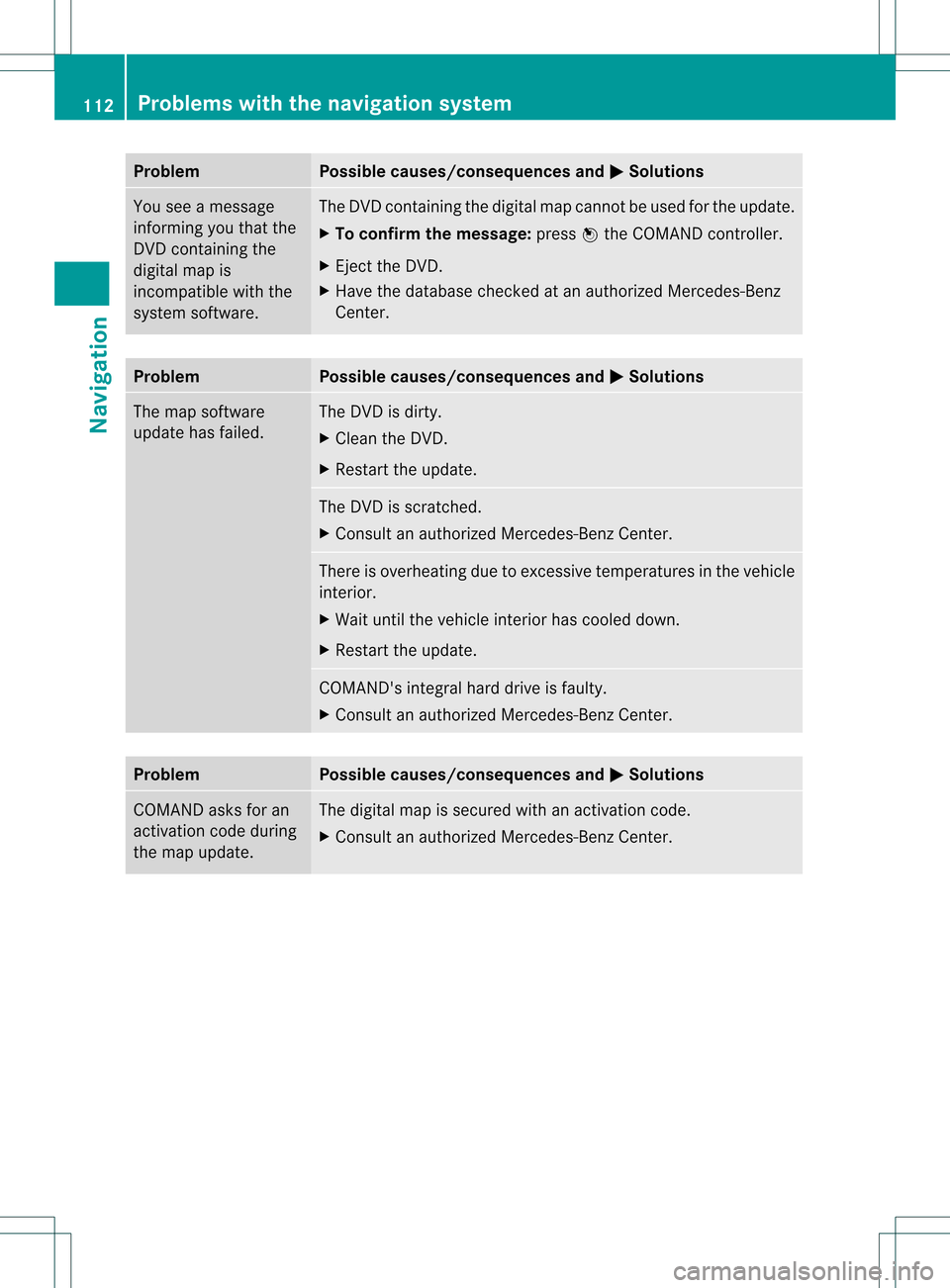
Problem Possible
causes/co nsequences andM Solutions
You
seeamessage
informin gyou that the
DVD containing the
digital mapis
incompatible withthe
system software. The
DVD containing thedigital mapcannot beused forthe update.
X To confirm themessage: pressWthe COMAND controller.
X Ejec tthe DVD .
X Have thedatabase checkedatan authorized Mercedes-B enz
Center. Problem Possible
causes/co nsequences andM Solutions
The
map software
update hasfailed. The
DVD isdirty.
X Clea nthe DVD .
X Restart theupdate. The
DVD isscratc hed.
X Consult anauthorized Mercedes-B enzCenter. There
isoverheating duetoexcessive temperatures inthe vehicle
interior.
X Wait untilthevehicle interior hascooled down.
X Restart theupdate. COMAND's
integralharddrive isfaulty.
X Consult anauthorized Mercedes-B enzCenter. Problem Possible
causes/co nsequences andM Solutions
COMAND
asksforan
activation codeduring
the map update. The
digital mapissecured withanactivation code.
X Consult anauthorized Mercedes-B enzCenter. 112
Problems
withthenavigation systemNavigation