Page 129 of 356

XTurn the SmartKey to position 2 in the
ignition lock.XTo activate: press the g button.
The indicator lamp in the g button lights
up.
i In the event of high pollution levels 13
or at
high outside temperatures, air-
recirculation mode is automatically
activated. When air-recirculation mode is
activated automatically, the indicator lamp
in the g button is not lit.
Outside air is added after about 30
minutes.
XTo switch off: press the g button.
The indicator lamp in the g button goes
out.
i Air-recirculation mode deactivates
automatically:
R after approximately five minutes if
outside temperatures are less than about
41 ‡ (5 †)
R after approximately five minutes if
cooling with air dehumidification is
deactivated
R after approximately 30 minutes if outside
temperatures are over about
41 ‡ (5 †)
Activating/deactivating the residual
heat function
The residual heat function is only available in
vehicles for Canada with automatic climate
control.
It is possible to make use of the residual heat
of the engine to continue heating the
stationary vehicle for up to 30 minutes after
the engine has been switched off. The heating
time depends on the temperature that has
been set.
i The blower will run at a low speed
regardless of the airflow setting.
i If you activate the residual heat function
at high temperatures, only the ventilation
will be activated. The blower runs at
medium speed.XTurn the SmartKey to position 0 in the
ignition lock or remove it.XTo activate: press the Ì button.
The indicator lamp in the Ì button lights
up.XTo switch off: press the Ì button.
The indicator lamp in the Ì button goes
out.
i Residual heat is deactivated
automatically:
R after about 30 minutes
R when the ignition is switched on
R if the battery voltage drops
R if the coolant temperature is too low
Setting the air vents
Important safety notes
GWARNING
When operating the climate control, the air
that enters the passenger compartment
through the air vents can be very hot or very
cold (depending on the set temperature). This
could cause burns or frostbite to unprotected
skin in the immediate area of the air vents.
Always keep sufficient distance between
unprotected parts of the body and the air
vents. If necessary, use the air distribution
adjustment to direct the air to air vents in the
vehicle interior that are not in the immediate
area of unprotected skin.
13 Automatic climate control only.Setting the air vents127Climate controlZ
Page 139 of 356
Rthe system detects moisture on the
windshield when the air-conditioning
system is switched on.
R the temperature in the vehicle interior
deviates from the set range.
R the charge level of the battery is too low.
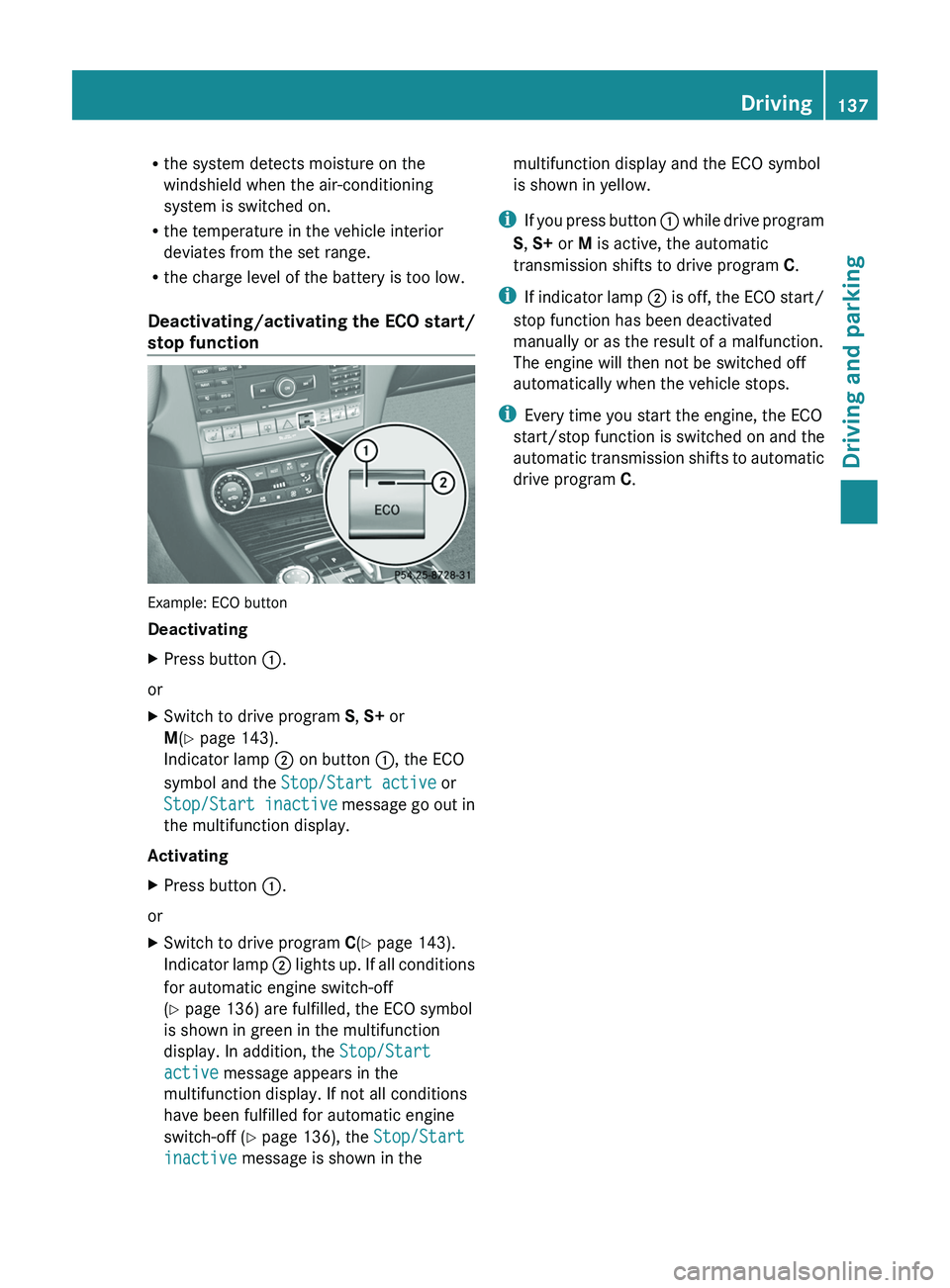
Deactivating/activating the ECO start/
stop function
Example: ECO button
Deactivating
XPress button :.
or
XSwitch to drive program S, S+ or
M (Y page 143).
Indicator lamp ; on button :, the ECO
symbol and the Stop/Start active or
Stop/Start inactive message go out in
the multifunction display.
Activating
XPress button :.
or
XSwitch to drive program C(Y page 143).
Indicator lamp ; lights up. If all conditions
for automatic engine switch-off
( Y page 136) are fulfilled, the ECO symbol
is shown in green in the multifunction
display. In addition, the Stop/Start
active message appears in the
multifunction display. If not all conditions
have been fulfilled for automatic engine
switch-off ( Y page 136), the Stop/Start
inactive message is shown in themultifunction display and the ECO symbol
is shown in yellow.
i If you press button : while drive program
S , S+ or M is active, the automatic
transmission shifts to drive program C.
i If indicator lamp ; is off, the ECO start/
stop function has been deactivated
manually or as the result of a malfunction.
The engine will then not be switched off
automatically when the vehicle stops.
i Every time you start the engine, the ECO
start/stop function is switched on and the
automatic transmission shifts to automatic
drive program C.
Driving137Driving and parkingZ
Page 212 of 356
Setting the ambient lighting colorXPress the = or ; button on the
steering wheel to select the Settings
menu.XPress the : or 9 button to select the
Light submenu.XPress the a button to confirm.XPress the : or 9 button to select the
Amb. color function.XPress the a button to confirm.XPress the : or 9 button to set the
color to SOLAR, NEUTRAL or POLAR .XPress the a or % button to save the
setting.
Activating/deactivating surround
lighting and exterior lighting delayed
switch-off
If you have activated the Surround
Lighting function and the light switch is in
the à position,
R if it is dark, the exterior lighting remains on
for another 40 seconds after you unlock the
vehicle using the SmartKey.
the exterior lighting switches off if you open
the driver’s door.
R if it is dark, the exterior lighting remains on
for another 15 seconds when the doors are
closed.
If the engine is switched off and then none
of the doors are opened, or if an open door
is not closed, the exterior lighting goes out
after 60 seconds.
If you activate the Surround Lighting
function, the following light up depending on
the vehicle's equipment:
R the parking lamps
R the low-beam headlamps
R the daytime running lamps
R the side marker lamps
R the surround lighting in the exterior mirrors
XPress the = or ; button on the
steering wheel to select the Settings
menu.XPress the : or 9 button to select the
Lights submenu.XPress the a button to confirm.XPress the : or 9 button to select the
Surround lighting function.
When the Surround Lighting function is
activated, the light cone and the area
around the vehicle are displayed in red in
the multifunction display.XPress the a button to save the setting.
Deactivating delayed switch-off of the
exterior lighting temporarily:
XBefore leaving the vehicle, turn the
SmartKey to position 0 in the ignition lock.XTurn the SmartKey to position 2 in the
ignition lock and back to position 0.
The exterior lighting delayed switch-off is
deactivated.
Delayed switch-off of the exterior lighting is
reactivated the next time you start the
engine.
Activating/deactivating the interior
lighting delayed switch-off
If you activate the Light. delay function,
the interior lighting remains on for 20
seconds after you remove the SmartKey from
the ignition lock.
XPress the = or ; button on the
steering wheel to select the Settings
menu.XPress the : or 9 button to select the
Lights submenu.XPress the a button to confirm.XPress the : or 9 button to select the
Light. Delay function.
When the Light. Delay function is
activated, the vehicle interior is displayed
in red in the multifunction display.XPress the a button to save the setting.210Menus and submenusOn-board computer and displays