2012 MERCEDES-BENZ B-CLASS maintenance
[x] Cancel search: maintenancePage 26 of 340

including interference that may cause
undesired operation of the device."
Diagnostics connection
The diagnostics connection is only intended
for the connection
of diagnostic equipment at
a qualified specialist workshop. G
WARNING
If you connect equipment to the diagnostics
connection in the vehicle, it may affect the
operation of the
vehicle systems. As a result,
the operating safety of the vehicle could be
affected. There is a risk of an accident.
Do not connect any equipment to a
diagnostics connection in the vehicle. G
WARNING
Objects in the driver's footwell can restrict the
pedal travel or obstruct a depressed pedal.
The operating and road safety of the vehicle
is jeopardized. There is a risk of an accident.
Make sure that all objects in the vehicle are
stowed correctly, and that they cannot enter
the driver's footwell. Install the floormats
securely and as specified in order to ensure
sufficient clearance for
the pedals. Do not use
loose floormats.
! If the engine is switched off and
equipment on the diagnostics connection
is used, the starter battery may discharge.
Connecting equipment to the diagnostics
connection can lead to emissions monitoring
information being reset, for example. This
may lead to the vehicle failing to meet the
requirements of the next emissions test
during the main inspection. Qualified specialist workshop
An authorized Mercedes-Benz Center is a
qualified specialist workshop. It has the
necessary specialist knowledge, tools and
qualifications to correctly carry out the work required on your vehicle. This is especially the
case for work relevant to safety.
Observe the notes in the Maintenance
Booklet.
Always have
the
following work carried out at
an authorized Mercedes-Benz Center:
R work relevant to safety
R service and maintenance work
R repair work
R alterations, installation work and
modifications
R work on electronic components Correct use
If you remove any warning stickers, you or
others could fail
to recognize certain dangers.
Leave warning stickers in position.
Observe the following information when
driving your vehicle:
R the safety notes in this manual
R the Technical Data section in this manual
R traffic rules and regulations
R laws and safety standards pertaining to
motor vehicles Problems with your vehicle
If you should
experience a problem with your
vehicle, particularly one that you believe may
affect its safe operation, we urge you to
contact an authorized Mercedes-Benz Center
immediately to have the problem diagnosed
and rectified. If the problem is not resolved to
your satisfaction, please discuss the problem
again with a Mercedes-Benz Center or
contact us at one of the following addresses.
In the USA
Customer Assistance Center
Mercedes-Benz USA, LLC
One Mercedes Drive
Montvale, NJ 07645-0350
In Canada 24
Introduction
ProCarManuals.com
Page 120 of 340

Useful information
i This Operator's Manual describes all
models and all standard and optional
equipment of your vehicle available at the
time of publication of the Operator's
Manual. Country-specific differences are
possible. Please note
that your vehicle may
not be equipped with all features
described. This also applies to safety-
related systems and functions.
i Read the information on qualified
specialist workshops: ( Y page 24).Overview of climate control systems
Important safety notes
Observe the settings recommended on the
following pages. The windows could
otherwise fog up.
To prevent the windows from fogging up:
R switch off climate control only briefly
R switch on air-recirculation mode only
briefly
R switch on the cooling with air
dehumidification function
R switch on the defrost windshield function
briefly, if required
The automatic climate control regulates the
temperature and the humidity of the vehicle
interior and filters out undesirable
substances from the air.
Automatic climate control/dual-zone
automatic climate control is only operational
when the engine is running. Optimum
operation is only achieved with the side
windows and panorama
roof with power tilt/
sliding panel closed.
The residual heat function can only be
activated or deactivated with the ignition
switched off (Y page 129).
i Ventilate the vehicle for a brief period
during warm weather, e.g. using the
convenience opening feature ( Y page 78).This will speed up the cooling process and
the desired vehicle interior temperature
will be reached more quickly.
i The integrated filter can filter out most
particles of dust,
and completely filters out
pollen. A clogged filter reduces the amount
of air supplied to the vehicle interior. For
this reason, you should always observe the
interval for replacing the filter, which is
specified in the Maintenance Booklet. As it
depends on environmental conditions, e.g.
heavy air pollution, the interval may be
shorter than stated in the Maintenance
Booklet.
i It is possible that the dehumidification
function of the climate control system may
be activated automatically an hour after the
SmartKey has been removed. The vehicle
is then ventilated for 30 minutes. 118
Overview of climate control systems
Climate control
ProCarManuals.com
Page 154 of 340

Parking the vehicle for a long period
If you leave
the vehicle parked for longer than
four weeks, the battery may be damaged by
exhaustive discharging.
If you leave the vehicle parked for longer than
six weeks, the vehicle may suffer damage as
a result of lack of use.
X Visit a qualified specialist workshop and
seek advice.
i You can obtain information about trickle
chargers from a qualified specialist
workshop. Driving tips
General notes
Important safety notes G
WARNING
If you switch off the ignition while driving,
safety-relevant functions are only available
with limitations, or
not at all. This could affect,
for example, the power steering and the brake
boosting effect. You will require considerably
more effort to steer and brake. There is a risk
of an accident.
Do not switch off the ignition while driving. G
WARNING
If you operate mobile communication
equipment while driving, you will be
distracted from traffic conditions. You could
also lose control
of the vehicle. There is a risk
of an accident.
Only operate this equipment when the vehicle
is stationary.
Observe the legal requirements for the
country in which you are driving. Some
jurisdictions prohibit the driver from using a
mobile phone while driving a vehicle.
If you make a call while driving, always use
hands-free mode. Only operate the telephone
when the traffic situation permits. If you are unsure, pull over to a safe location and stop
before operating the telephone.
Bear in mind that at a speed of only 30 mph
(approximately
50 km/h), the vehicle covers
a distance of 44 feet (approximately
14 m)
per second.
Drive sensibly – save fuel Observe the following tips to save fuel:
R
The tires should always be inflated to the
recommended tire pressure.
R Remove unnecessary loads.
R Remove roof racks when they are not
needed.
R Warm up the
engine at low engine speeds.
R Avoid frequent acceleration or braking.
R Have all maintenance work carried out as
indicated by the service intervals in the
Maintenance Booklet or by the service
interval display.
Fuel consumption also increases when
driving in cold weather, in stop-start traffic
and in hilly terrain.
Drinking and driving G
WARNING
Drinking and driving and/or taking drugs and
driving are very dangerous combinations.
Even a small amount of alcohol or drugs can
affect your reflexes, perceptions and
judgment.
The possibility of a serious or even fatal
accident are greatly
increased when you drink
or take drugs and drive.
Do not drink or take drugs and drive or allow
anyone to drive who has been drinking or
taking drugs.
Emission control G
WARNING
Combustion engines emit poisonous exhaust
gases such as carbon monoxide. Inhaling
these exhaust gases
leads to poisoning. There152
Driving tips
Driving and parking
ProCarManuals.com
Page 155 of 340
is a risk of fatal injury. Therefore never leave
the engine running in enclosed spaces
without sufficient ventilation.
Certain engine systems
are designed to keep
the level of poisonous components in exhaust
fumes within legal limits.
These systems only work at peak efficiency if
they are serviced exactly in accordance with
the manufacturer's specifications. For this
reason, only have work on the engine carried
out by qualified and authorized Mercedes-
Benz technicians.
The engine settings must not be changed
under any circumstances. Furthermore, all
specific service work must be carried out at
regular intervals and in accordance with the
Mercedes-Benz service requirements. Details
can be found in the Maintenance Booklet. ECO display
The ECO display
gives you information on how
economical your driving style is. The ECO
display assists you in achieving the optimum
driving style in terms of consumption, taking
the actual and selected conditions into
consideration. Your driving style can
significantly influence the vehicle's
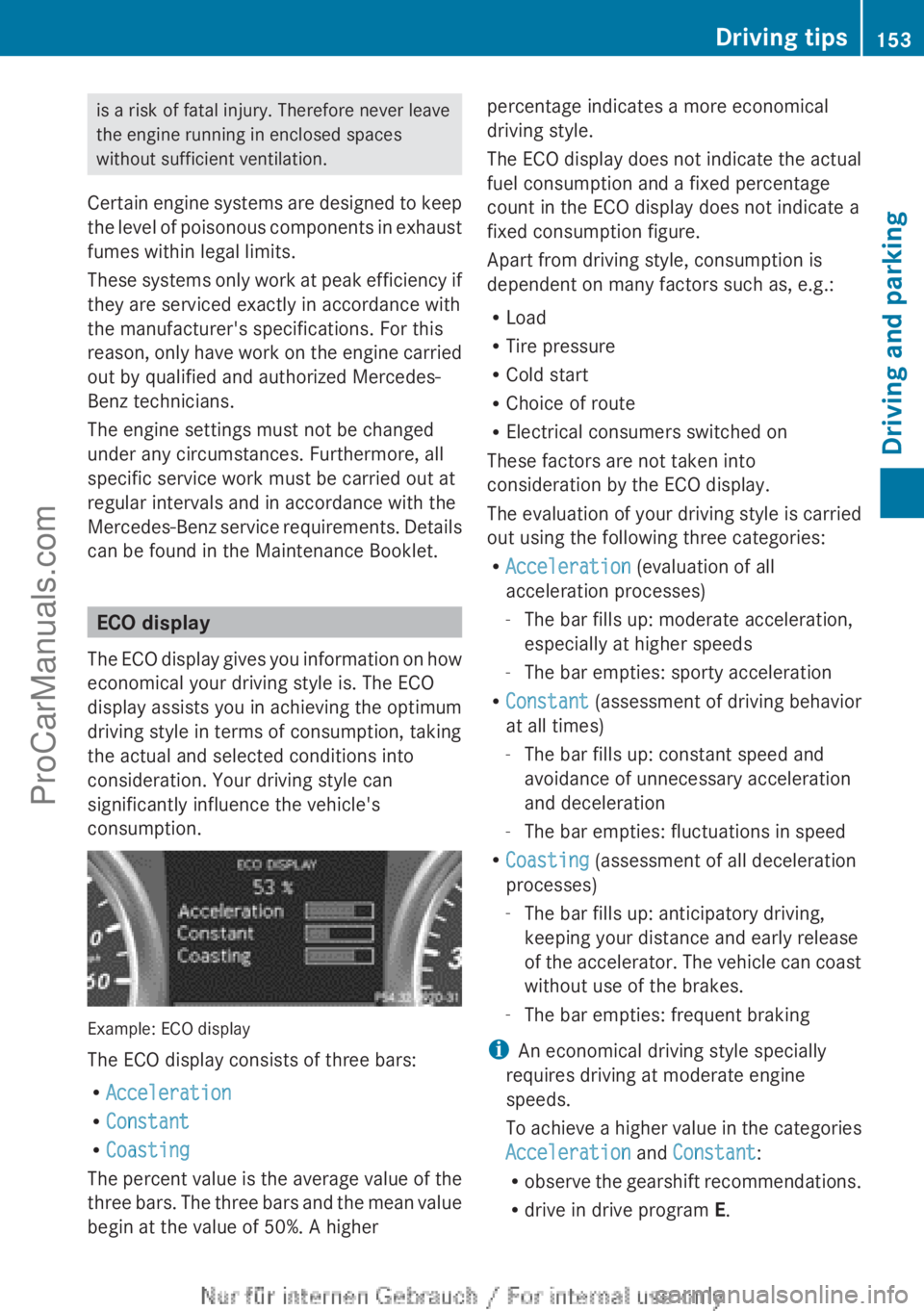
consumption. Example: ECO display
The ECO display consists of three bars:
R
Acceleration
R Constant
R Coasting
The percent value
is the average value of the
three bars. The three bars and the mean value
begin at the value of 50%. A higher percentage indicates a more economical
driving style.
The ECO display
does not indicate the actual
fuel consumption and a fixed percentage
count in the ECO display does not indicate a
fixed consumption figure.
Apart from driving style, consumption is
dependent on many factors such as, e.g.:
R Load
R Tire pressure
R Cold start
R Choice of route
R Electrical consumers switched on
These factors are not taken into
consideration by the ECO display.
The evaluation of your driving style is carried
out using the following three categories:
R Acceleration (evaluation of all
acceleration processes)
-The bar fills up: moderate acceleration,
especially at higher speeds
- The bar empties: sporty acceleration
R Constant (assessment of driving behavior
at all times)
-The bar fills up: constant speed and
avoidance of unnecessary acceleration
and deceleration
- The bar empties: fluctuations in speed
R Coasting (assessment of all deceleration
processes)
-The bar fills up: anticipatory driving,
keeping your distance and early release
of the accelerator. The vehicle can coast
without use of the brakes.
- The bar empties: frequent braking
i An economical driving style specially
requires driving at moderate engine
speeds.
To achieve a higher value in the categories
Acceleration and Constant:
R observe the gearshift recommendations.
R drive in drive program E. Driving tips
153
Driving and parking Z
ProCarManuals.com
Page 157 of 340
brake pads. This can result in a significantly
longer braking distance.
R
Brake occasionally to
remove any possible
salt residue. Make sure that you do not
endanger other road users when doing so.
R Carefully depress the brake pedal and the
beginning and end of a journey.
R Maintain a greater distance to the vehicle
ahead.
Servicing the brakes !
If the red
brake warning lamp lights up in
the instrument cluster and you hear a
warning tone while the engine is running,
the brake fluid level may be too low.
Observe additional warning messages in
the multifunction display.
The brake fluid level may be too low due to
brake pad wear or leaking brake lines.
Have the brake system checked
immediately. This work should be carried
out at a qualified specialist workshop.
! A function or performance test should
only be carried out on a 2-axle
dynamometer. If you are planning to have
the vehicle tested on such a dynamometer,
contact an authorized Mercedes-Benz
Center to obtain further information first.
Otherwise, you could damage the drive
train or the brake system.
! As the ESP ®
system operates
automatically, the engine and the ignition
must be switched off (the SmartKey must
be in position 0 or 1 in the ignition lock) if:
R the electric parking brake is tested on a
brake dynamometer (for a maximum of
ten seconds)
R the vehicle is towed with the front axle
raised.
Braking triggered automatically by ESP ®
may seriously damage the brake system.
All checks and maintenance work on the
brake system must be carried out at a qualified specialist workshop. Consult a
qualified
specialist workshop
to arrange this.
Have brake pads installed and brake fluid
replaced at a qualified specialist workshop.
If the brake system has only been subject to
moderate loads, you should test the
functionality of your brakes at regular
intervals.
You can find a description of Brake Assist
(BAS) on ( Y page 59).
Mercedes-Benz recommends that you only
have brake pads/linings installed on your
vehicle which have been approved for
Mercedes-Benz vehicles or which correspond
to an equivalent quality standard. Brake
pads/linings which have not been approved
for Mercedes-Benz vehicles or which are not
of an equivalent quality could affect your
vehicle's operating safety.
Mercedes-Benz recommends that you only
use brake fluid that has been specially
approved for your vehicle by Mercedes-Benz,
or which corresponds to an equivalent quality
standard. Brake fluid which has not been
approved for Mercedes-Benz vehicles or
which is not of an equivalent quality could
affect your vehicle's operating safety.
Checking brake lining thickness You can measure the break pad/lining
thickness using a test gauge. Color-coding
(green or
red)
on the test gauge allows you to
determine whether the brake pad/lining
thickness is still sufficient. The test gauge is
in the vehicle document wallet in the glove
box. Driving tips
155
Driving and parking Z
ProCarManuals.com
Page 198 of 340

X
Press the a button.
The current selection is displayed.
X Press a to confirm.
X Press the : or 9 button to set Off,
Standard or Adaptive.
X Press the a button to save the setting.
If Lane Keeping Assist is activated
(Y page 183) and
the ignition is switched on,
the à symbol appears in the multifunction
display. Maintenance menu
In the
Serv menu, you have the following
options:
R Calling up display messages in message
memory ( Y page 200)
R Restarting the tire pressure loss warning
system (Y page 305)
R Calling up the service due date
(Y page 270) Settings menu
Introduction In the
Sett menu, you have the following
options:
R changing the instrument cluster settings
R changing the light settings
R changing the vehicle settings R
changing the convenience settings
R restoring the factory settings
Instrument cluster Selecting the unit of measurement for
distance
You can
determine
whether the multifunction
display shows some messages in miles or
kilometers.
X Press the = or ; button on the
steering wheel to select the Sett menu.
X Press the : or 9
button to select the
Inst. Cluster submenu.
X Press a to confirm.
X Press the :
or 9
button to select the
Display Unit Speed-/Odometer:
function.
You will see the selected setting km or
miles.
X Press the a button to save the setting.
The selected unit of measurement for
distance applies to:
R the digital speedometer in the Trip menu
R the odometer and the trip odometer
R the trip computer
R the current consumption and the range
R the navigation instructions in the Navi
menu
R cruise control
R DISTRONIC PLUS
R ASSYST PLUS service interval display
Switching the additional speedometer
on/off
Only vehicles
with
manual transmission have
this function.
X Press the = or ; button on the
steering wheel to select the Sett menu.
X Press the : or 9
button to select the
Inst. Cluster submenu.
X Press a to confirm.196
Menus and submenus
On-board computer and displays
ProCarManuals.com
Page 261 of 340

The vehicle data is sent to the Customer
Assistance center.
Depending on what the customer service
representative agreed with you, the voice
connection is re-established
after the transfer
is complete. If necessary, you will be
contacted at a later time by another means,
e.g. by E-Mail or telephone.
Further functions of the vehicle remote
malfunction diagnosis include, for example:
R transfer of service data to the Customer
Assistance center. If a service is overdue,
the COMAND display shows a message
about various special offers at your
workshop.
R monthly status information E-Mail on oil
level, air pressure, maintenance, brakes,
etc. If applicable, you will receive
information on special offers in the E-Mail.
USA only: this information can also be
called up under "Owners Online" at http://
www.mbusa.com.
Information on the data stored in the vehicle
(Y page 25).
Information on roadside assistance
(Y page 22).
Downloading routes Downloading routes allows you to transfer
and save predefined routes in the navigation
system. To
do
this, an SD memory card must
be inserted into the COMAND system. If no
SD memory card is inserted, you must insert
the card into the card slot on the COMAND
system before saving.
A route can be prepared and sent either by a
customer service representative or via the
mbrace portal on the Internet. Each route can
include up to 20 way points. When a route has
been received by the navigation system, the
'Route name' has been saved to
memory card. Do you want to start
route guidance? message appears on the
COMAND display. The route is saved to the
SD memory card. X
To start route guidance: select Yes.
An overview of the route is shown in the
display.
i If you select No, the saved route can be
called up later in the navigation menu.
X Select Start.
Route guidance is started.
i Downloaded and
saved
data can be called
up again in COMAND.
You can find further information in the
separate COMAND operating instructions.
Speed alert You can define the upper speed limit, which
must not be exceeded by the vehicle. If this
selected speed is exceeded by the vehicle, a
message will be sent to the Customer
Assistance center. The Customer Assistance
center then
forwards
this information to you.
You can select the way in which you receive
this information beforehand. Possible options
include SMS, E-Mail or an automated call.
The data which is sent to the Customer
Assistance center contains the following
information:
R the location where the speed limit was
exceeded
R the time at which the speed limit was
exceeded
R the selected speed limit which was
exceeded
Geo fencing Geo fencing allows you to select areas which
the vehicle should
not enter or leave. You will
be informed if the vehicle crosses the
boundaries of the selected areas. You can
select the way in which you receive this
information beforehand. Possible options
include SMS, E-Mail or an automated call.
The area can be determined as either a circle
or a polygon with a maximum of ten corners.
You can specify up to ten areas Features
259
Stowage and features Z
ProCarManuals.com
Page 267 of 340
Useful information ............................
266
Engine compartment ........................ 266
Maintenance ...................................... 270
Care .................................................... 271 265Maintenance and care
ProCarManuals.com