2012 MERCEDES-BENZ B-CLASS lock
[x] Cancel search: lockPage 201 of 340
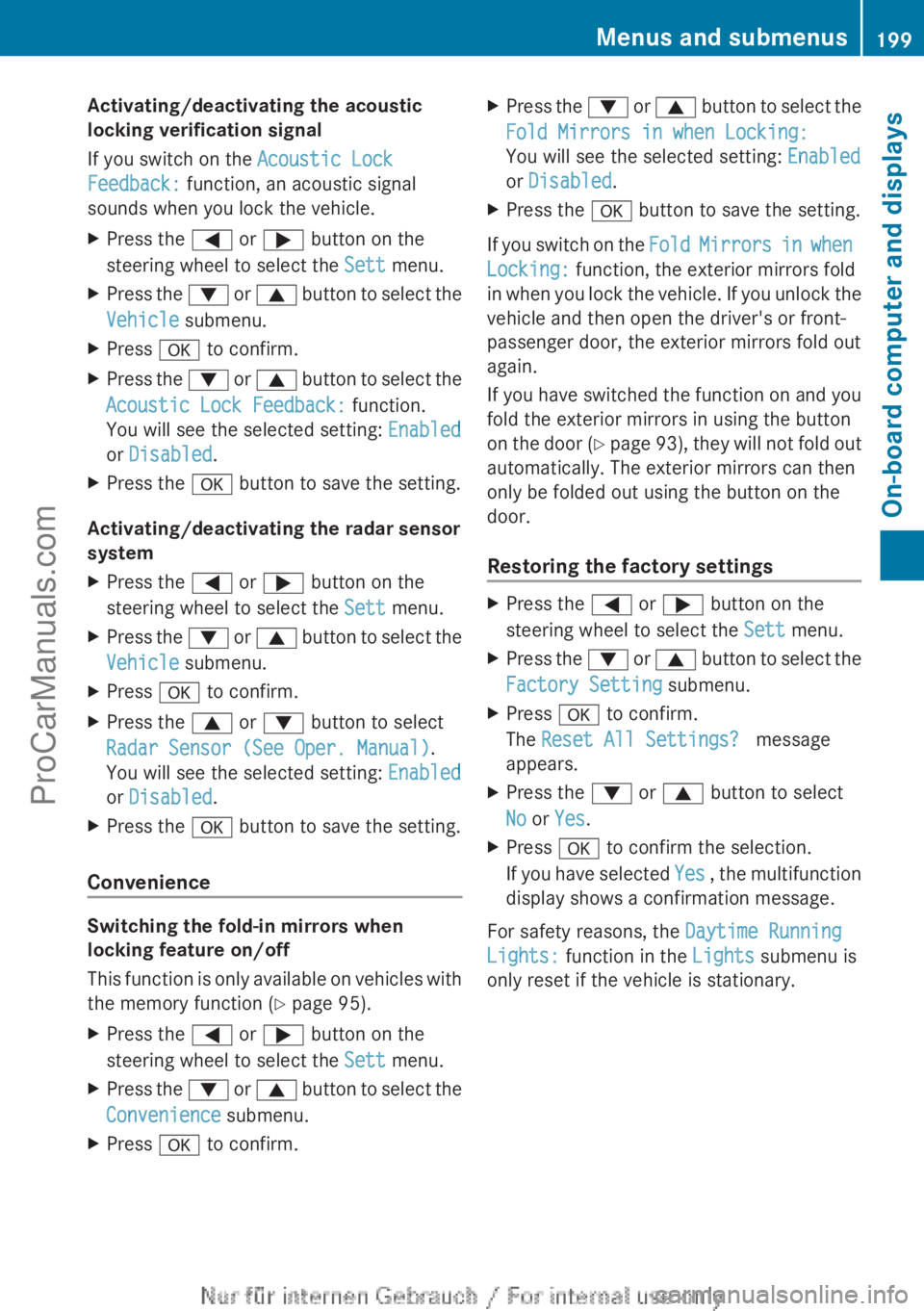
Activating/deactivating the acoustic
locking verification signal
If you switch on the Acoustic Lock
Feedback: function, an acoustic signal
sounds when you lock the vehicle.
X
Press the = or ; button on the
steering wheel to select the Sett menu.
X Press the : or 9 button to select the
Vehicle submenu.
X Press a to confirm.
X Press the :
or 9
button to select the
Acoustic Lock Feedback: function.
You will see the selected setting: Enabled
or Disabled.
X Press the a button to save the setting.
Activating/deactivating the radar sensor
system
X Press the = or ; button on the
steering wheel to select the Sett menu.
X Press the : or 9
button to select the
Vehicle submenu.
X Press a to confirm.
X Press the 9 or : button to select
Radar Sensor (See Oper. Manual).
You will see the selected setting: Enabled
or Disabled.
X Press the a button to save the setting.
Convenience Switching the fold-in mirrors when
locking feature on/off
This function
is
only available on vehicles with
the memory function ( Y page 95).
X Press the = or ; button on the
steering wheel to select the Sett menu.
X Press the : or 9
button to select the
Convenience submenu.
X Press a to confirm. X
Press the : or 9
button to select the
Fold Mirrors in when Locking:
You will see the selected setting: Enabled
or Disabled.
X Press the a button to save the setting.
If you switch on the Fold Mirrors in
when
Locking: function, the exterior mirrors fold
in when you lock the vehicle. If you unlock the
vehicle and then open the driver's or front-
passenger door, the exterior mirrors fold out
again.
If you have switched the function on and you
fold the exterior mirrors in using the button
on the door (Y page 93), they will not fold out
automatically. The exterior mirrors can then
only be folded out using the button on the
door.
Restoring the factory settings X
Press the = or ; button on the
steering wheel to select the Sett menu.
X Press the : or 9
button to select the
Factory Setting submenu.
X Press a to confirm.
The Reset All Settings? message
appears.
X Press the : or 9 button to select
No or Yes.
X Press a to confirm the selection.
If you have
selected Yes , the multifunction
display shows a confirmation message.
For safety reasons, the Daytime Running
Lights: function in the Lights submenu is
only reset if the vehicle is stationary. Menus and submenus
199
On-board computer and displays Z
ProCarManuals.com
Page 203 of 340

Safety systems
Display messages Possible causes/consequences and
M Solutions!÷
Currently
Unavailable See
Operator's Manual ABS (Anti-lock Braking System), ESP
®
(Electronic Stability
Program), BAS (Brake Assist), the HOLD function and hill start
assist are temporarily unavailable.
COLLISION PREVENTION ASSIST may also have failed.
In addition, the ÷, å and ! warning lamps light up in
the instrument cluster.
ATTENTION ASSIST is deactivated.
Possible causes are:
R Self-diagnosis is not yet complete.
R The on-board voltage may be insufficient.
G WARNING
The brake system continues to function normally, but without the
functions listed above. The wheels could therefore lock if you
brake hard, for example.
The steerability and braking characteristics may be severely
affected. The braking distance in an emergency braking situation
can increase.
If ESP ®
is not
operational, ESP ®
is unable to stabilize the vehicle.
There is an increased risk of skidding and an accident.
X Carefully drive a short distance on a suitable stretch of road,
making slight steering movements at a speed above 12 mph
(20 km/h).
If the display message disappears, the functions mentioned
above are available again.
If the display message continues to be displayed:
X Drive on carefully.
X Visit a qualified specialist workshop. !÷
Inoperative See
Operator's Manual ABS, ESP
®
, BAS, the HOLD function and hill start assist are
unavailable due to a malfunction.
COLLISION PREVENTION ASSIST may also have failed.
In addition, the J, ÷, å and ! warning lamps light
up in the instrument cluster.
ATTENTION ASSIST is deactivated.
G WARNING
The brake system continues to function normally, but without the
functions listed above. The wheels could therefore lock if you
brake hard, for example. Display messages
201On-board computer and displays Z
ProCarManuals.com
Page 205 of 340

Display messages Possible causes/consequences and
M Solutions÷
Inoperative See
Operator's Manual ESP
®
, BAS, the HOLD function and hill start assist are unavailable
due to a malfunction.
COLLISION PREVENTION ASSIST may also have failed.
In addition, the ÷
and å warning lamps light up in the
instrument cluster.
ATTENTION ASSIST is deactivated.
G WARNING
The brake system continues to function normally, but without the
functions listed above.
The braking distance in an emergency braking situation can thus
increase.
If ESP ®
is not
operational, ESP ®
is unable to stabilize the vehicle.
There is an increased risk of skidding and an accident.
X Drive on carefully.
X Visit a qualified specialist workshop. T!
÷
Inoperative See
Operator's Manual EBD (electronic brake force distribution), ABS, ESP
®
, BAS, the
HOLD function and hill start assist are not available due to a
malfunction.
COLLISION PREVENTION ASSIST may also have failed.
In addition, the ÷, å and ! warning lamps light up in
the instrument cluster and a warning tone sounds.
ATTENTION ASSIST is deactivated.
G WARNING
The brake system continues to function normally, but without the
functions listed above. The front and rear wheels could therefore
lock if you brake hard, for example.
The steerability and braking characteristics may be severely
affected. The braking distance in an emergency braking situation
can increase.
If ESP ®
is not
operational, ESP ®
is unable to stabilize the vehicle.
There is an increased risk of skidding and an accident.
X Drive on carefully.
X Visit a qualified specialist workshop immediately. F(USA
only)!(Canada
only) The red
F (USA only)/! (Canada only) indicator lamp
flashes and a warning tone sounds. A condition for automatic
release of the electric parking brake is not fulfilled ( Y page 150).
You are driving with the electric parking brake applied.
X Release the electric parking brake manually. Display messages
203
On-board computer and displays Z
ProCarManuals.com
Page 208 of 340
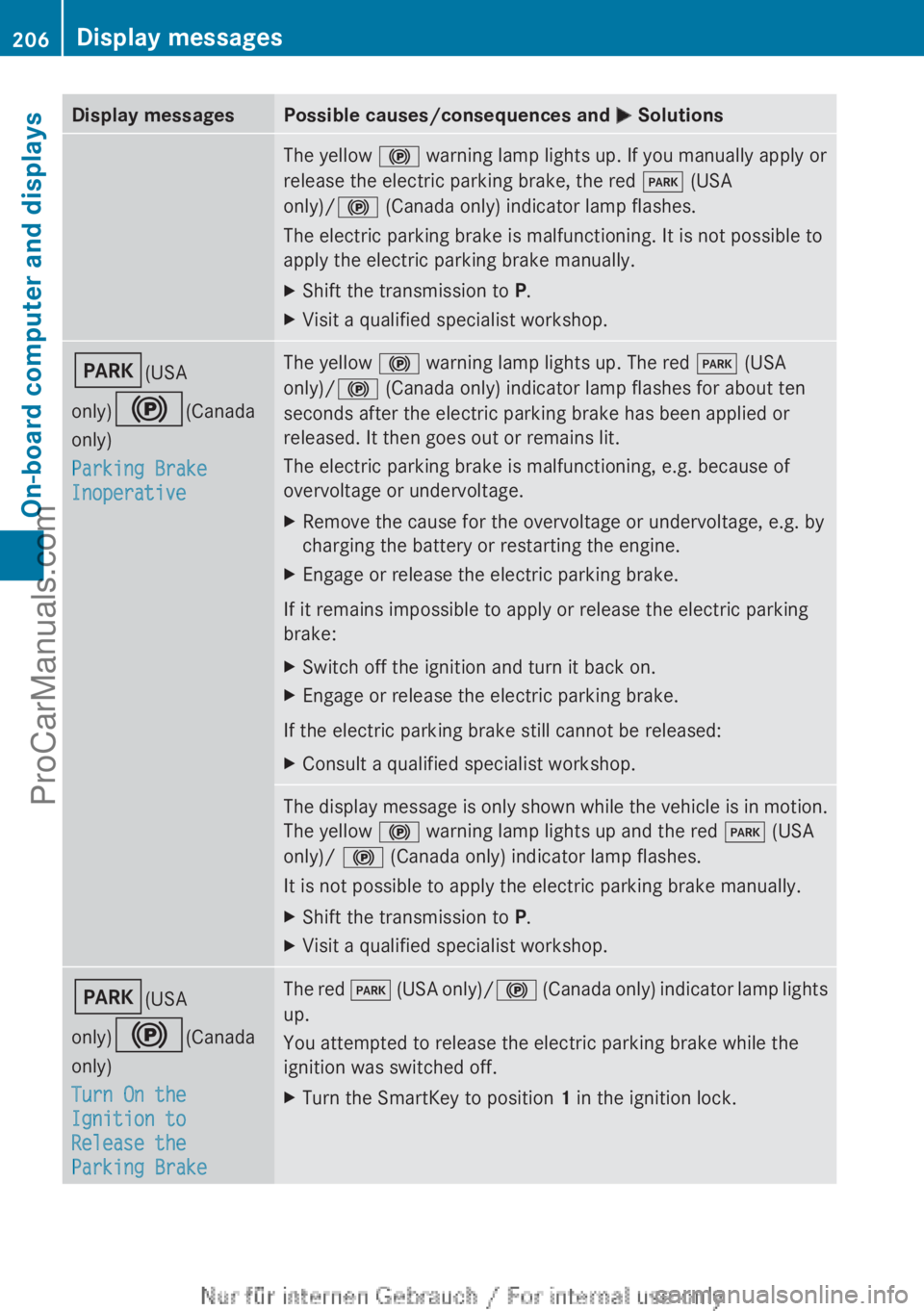
Display messages Possible causes/consequences and
M SolutionsThe yellow
! warning lamp lights up. If you manually apply or
release the electric parking brake, the red F (USA
only)/! (Canada only) indicator lamp flashes.
The electric parking brake is malfunctioning. It is not possible to
apply the electric parking brake manually.
X Shift the transmission to P.
X Visit a qualified specialist workshop. F(USA
only)!(Canada
only)
Parking Brake
Inoperative The yellow
! warning lamp lights up. The red F (USA
only)/! (Canada only) indicator lamp flashes for about ten
seconds after the electric parking brake has been applied or
released. It then goes out or remains lit.
The electric parking brake is malfunctioning, e.g. because of
overvoltage or undervoltage.
X Remove the cause for the overvoltage or undervoltage, e.g. by
charging the battery or restarting the engine.
X Engage or release the electric parking brake.
If it remains impossible to apply or release the electric parking
brake:
X Switch off the ignition and turn it back on.
X Engage or release the electric parking brake.
If the electric parking brake still cannot be released:
X Consult a qualified specialist workshop. The display message is only shown while the vehicle is in motion.
The yellow
! warning lamp lights up and the red F (USA
only)/ ! (Canada only) indicator lamp flashes.
It is not possible to apply the electric parking brake manually.
X Shift the transmission to P.
X Visit a qualified specialist workshop. F(USA
only)!(Canada
only)
Turn On the
Ignition to
Release the
Parking Brake The red
F (USA
only)/ ! (Canada only) indicator lamp lights
up.
You attempted to release the electric parking brake while the
ignition was switched off.
X Turn the SmartKey to position 1 in the ignition lock.206
Display messages
On-board computer and displays
ProCarManuals.com
Page 215 of 340

Display messages Possible causes/consequences and
M Solutions?
Coolant Too Hot
Stop Vehicle Turn
Engine Off The coolant is too hot.
A warning tone also sounds.
G WARNING
Do not drive when your engine is overheated. This can cause some
fluids which may have leaked into the engine compartment to
catch fire.
Steam from the overheated engine can also cause serious burns
which can occur just by opening the hood.
There is a risk of injury.
X Pull over and stop the vehicle safely and switch off the engine,
paying attention to road and traffic conditions.
X Secure the vehicle against rolling away ( Y page 149).
X Wait until the engine has cooled down.
X Make sure that the air supply to the engine radiator is not
blocked, e.g. by snow, slush or ice.
X Do not start the engine again until the display message goes out
and the coolant temperature is below 248 ‡ (120 †).
Otherwise, the engine could be damaged.
X Pay attention to the coolant temperature display.
X If the temperature increases again, visit a qualified specialist
workshop immediately.
Under
normal operating conditions and with the specified coolant
level, the coolant temperature may rise to 248 ‡ (120 †). # The battery is not being charged.
A warning tone also sounds.
Possible causes are:
R
a defective alternator
R a torn poly-V-belt
R a malfunction in the electronics
X Pull over and stop the vehicle safely and switch off the engine,
paying attention to road and traffic conditions.
X Open the hood.
X Check whether the poly-V-belt is torn.
If the poly-V-belt is torn:
! Do not continue
driving. The engine could otherwise overheat.
X Consult a qualified specialist workshop.
If the poly-V-belt is not damaged:
X Visit a qualified specialist workshop immediately. Display messages
213
On-board computer and displays Z
ProCarManuals.com
Page 222 of 340

Vehicle
Display messages Possible causes/consequences and
M SolutionsShift to 'P' or 'N'
to Start Engine You have attempted to start the engine with the transmission in
position R or D.
X
Shift the transmission to position P or N.Auxiliary Battery
Malfunction The auxiliary battery for the automatic transmission is no longer
being charged.
X
Visit a qualified specialist workshop at the next opportunity.
X Until then, set the automatic transmission to position P before
you switch off the engine.
X Before leaving the vehicle, apply the electric parking brake. Depress Brake to
Start Engine You have attempted to start the engine with the transmission in
position N without depressing the brake pedal.
X
Depress the brake pedal. To Deselect P or N,
Depress Brake and
Start Engine You have attempted to shift the transmission to position
R or D
without starting the engine.
X Start the engine.
X Depress the brake pedal.
i It is only possible to shift the transmission from position P to
the desired position if you depress the brake pedal. Only then
can the parking lock be deactivated. If you do not depress the
brake pedal, you can move the DIRECT SELECT lever but the
parking lock remains engaged.
i At transmission fluid temperatures below Ò4 ‡ (Ò20 †) you
can only shift out of position P into another transmission
position when the engine is running. Apply Brake to
Shift from 'P' You have attempted to move the transmission selector lever to
position R, N or D without depressing the brake pedal.
X
Depress the brake pedal. Transmission Not
in P
Risk of Vehicle
Rolling Away The driver's door is open and the transmission is in position
R, N
or D.
A warning tone also sounds.
X Shift the transmission to position P.
X Secure the vehicle against rolling away ( Y page 149).220
Display messagesOn-board computer and displays
ProCarManuals.com
Page 224 of 340
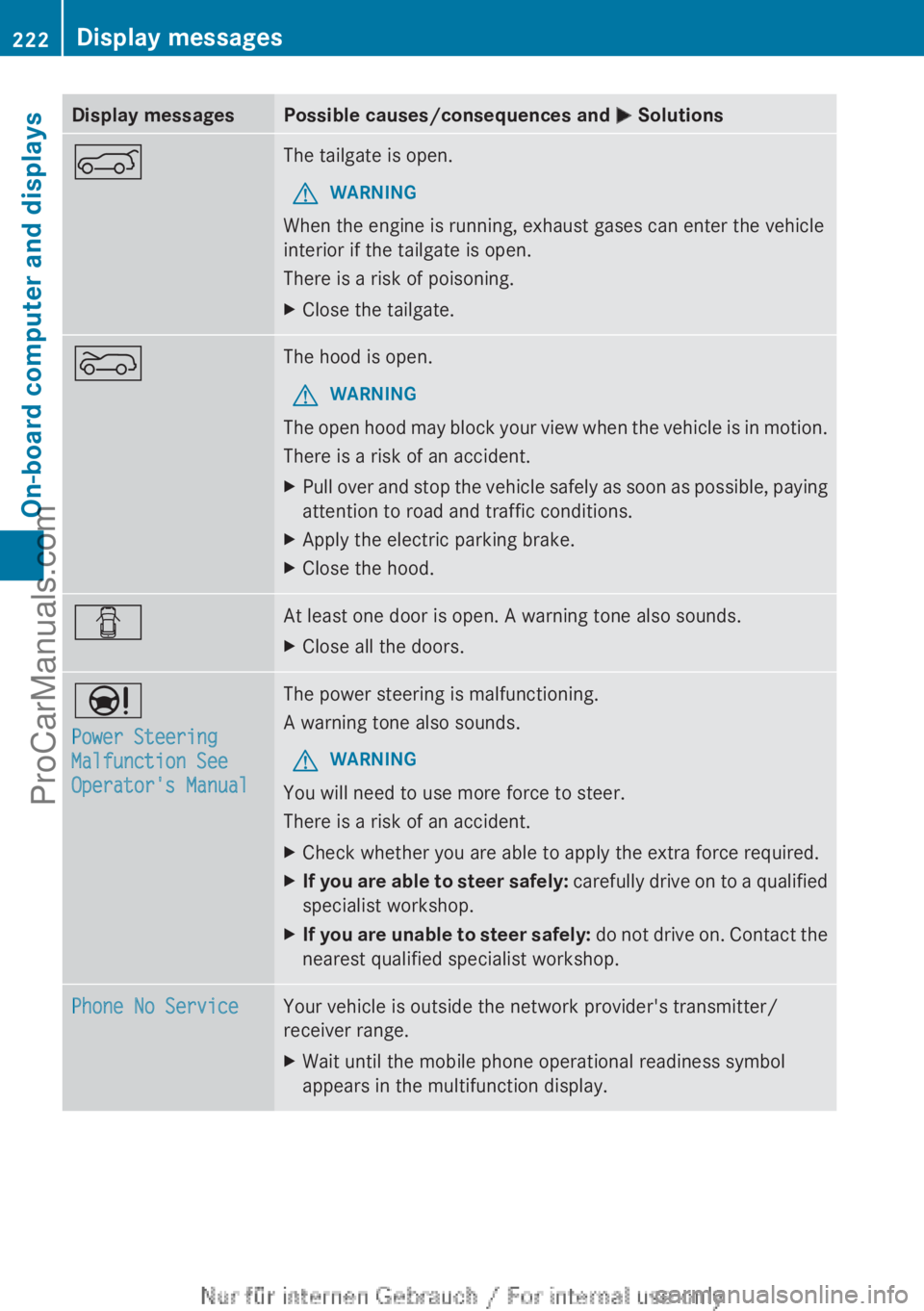
Display messages Possible causes/consequences and
M SolutionsA The tailgate is open.
G WARNING
When the engine is running, exhaust gases can enter the vehicle
interior if the tailgate is open.
There is a risk of poisoning.
X Close the tailgate. ? The hood is open.
G WARNING
The open hood may block your view when the vehicle is in motion.
There is a risk of an accident.
X Pull over and stop the vehicle safely as soon as possible, paying
attention to road and traffic conditions.
X Apply the electric parking brake.
X Close the hood. C At least one door is open. A warning tone also sounds.
X
Close all the doors. Ð
Power Steering
Malfunction See
Operator's Manual The power steering is malfunctioning.
A warning tone also sounds.
G WARNING
You will need to use more force to steer.
There is a risk of an accident.
X Check whether you are able to apply the extra force required.
X If you are able to steer safely:
carefully drive
on to a qualified
specialist workshop.
X If you are unable to steer safely: do not
drive on. Contact the
nearest qualified specialist workshop. Phone No Service Your vehicle is outside the network provider's transmitter/
receiver range.
X
Wait until the mobile phone operational readiness symbol
appears in the multifunction display.222
Display messages
On-board computer and displays
ProCarManuals.com
Page 225 of 340
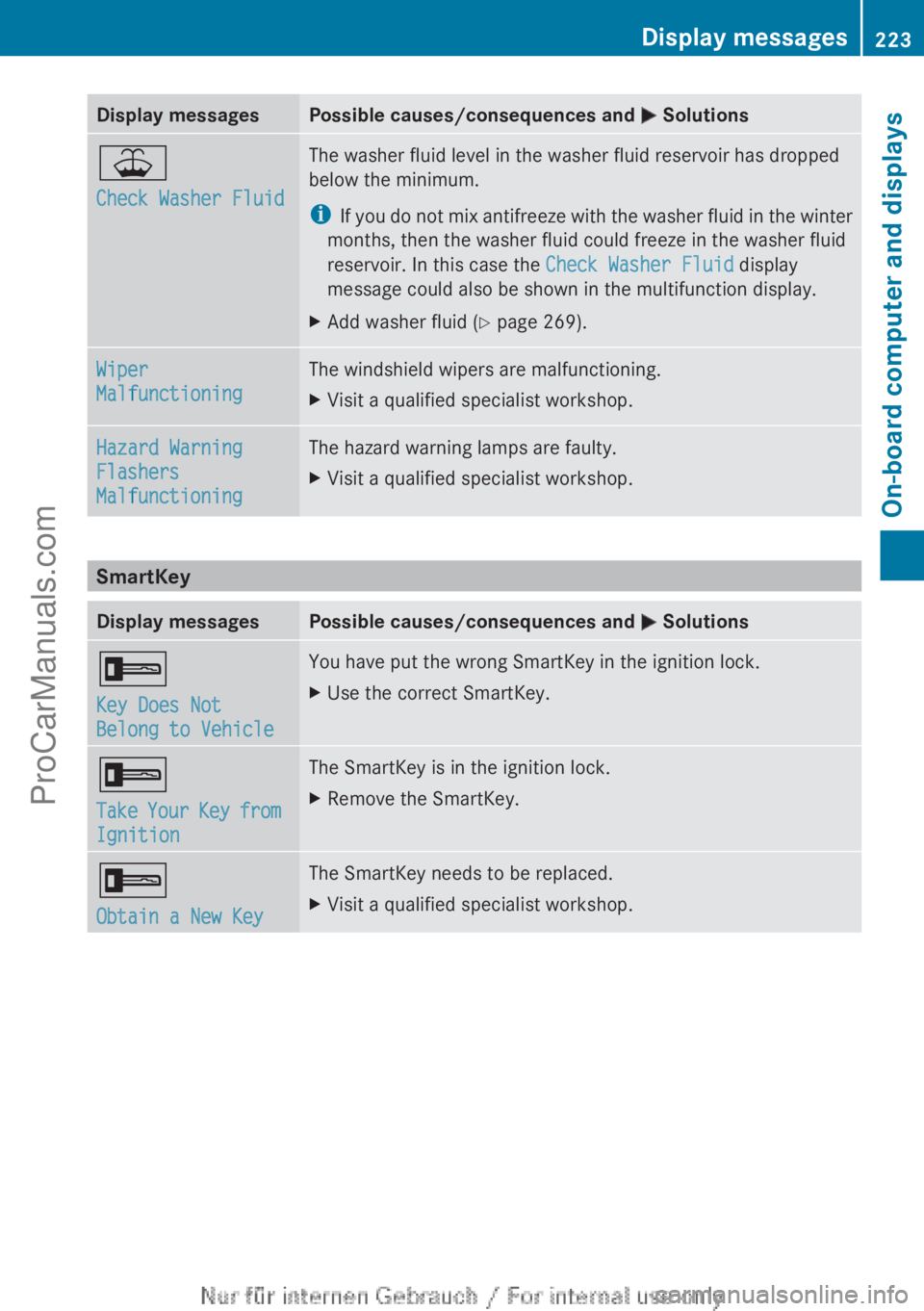
Display messages Possible causes/consequences and
M Solutions¥
Check Washer Fluid The washer fluid level in the washer fluid reservoir has dropped
below the minimum.
i
If you do
not mix antifreeze with the washer fluid in the winter
months, then the washer fluid could freeze in the washer fluid
reservoir. In this case the Check Washer Fluid display
message could also be shown in the multifunction display.
X Add washer fluid ( Y page 269).Wiper
Malfunctioning The windshield wipers are malfunctioning.
X
Visit a qualified specialist workshop. Hazard Warning
Flashers
Malfunctioning The hazard warning lamps are faulty.
X
Visit a qualified specialist workshop. SmartKey
Display messages Possible causes/consequences and
M Solutions+
Key Does Not
Belong to Vehicle You have put the wrong SmartKey in the ignition lock.
X
Use the correct SmartKey. +
Take Your
Key
from
Ignition The SmartKey is in the ignition lock.
X
Remove the SmartKey. +
Obtain a New Key The SmartKey needs to be replaced.
X
Visit a qualified specialist workshop. Display messages
223
On-board computer and displays Z
ProCarManuals.com