2012 LINCOLN MKT Rear screen
[x] Cancel search: Rear screenPage 85 of 437

Safety information
WARNING:Driving while distracted can result in loss of vehicle
control, accident and injury. Ford strongly recommends that
drivers use extreme caution when using any device or feature that may
take their focus off the road. Your primary responsibility is the safe
operation of the vehicle. We recommend against the use of any handheld
device while driving, encourage the use of voice-operated systems when
possible and that you become aware of applicable state and local laws
that may affect the use of electronic devices while driving.
Read all of the safety and operating instructions before operating the
system and retain for future reference.
Do not attempt to service, repair or modify the Family Entertainment
System (FES). See your dealer.
Do not insert foreign objects into the DVD compartment.
WARNING:Do not leave children unattended in the vehicle and
do not let children operate the system while unsupervised. If
wired headphones or auxiliary systems are used, children may become
entangled in the cords and seriously injure themselves.
WARNING:The front glass on the liquid crystal display (LCD)
flip-down screen may break when hit with a hard surface. If the
glass breaks, do not touch the liquid crystalline material. In case of
contact with skin, wash immediately with soap and water.
WARNING:The driver should not attempt to operate any
function of the DVD system while the vehicle is in motion. Give
full attention to driving and to the road. Pull off the road in a safe
place before inserting or extracting DVDs from the system. A remote
control is included in the system to allow the rear seat occupants to
operate the FES functions without distracting the driver.
Do not expose the liquid crystal display (LCD) flip-down screen
to direct sunlight or intensive ultraviolet rays for extensive
periods of time. Ultraviolet rays deteriorate the liquid crystal.
Be sure to review User Manuals for video games and video game
equipment when used as auxiliary inputs for your Family Entertainment
System (FES).
Entertainment Systems
85
2012 MKT(mkt)
Owners Guide, 1st Printing
USA(fus)
Page 88 of 437

DUAL ZONE AUTOMATIC TEMPERATURE CONTROL
Climate system without navigation system shown; with navigation similar.
Temperature conversion:To switch between Fahrenheit and Celsius,
refer toMessage centerin theInstrument Clusterchapter.
1.Climate:Press to control the climate control system through the
touch display screen. SeeTouchscreen functionslater in this section.
2.Passenger temperature:Press to activate separate passenger
temperature control and turn the knob to increase/decrease the air
temperature on the passenger side of the vehicle.
3.
Passenger heated seat:Press to activate. Refer toFront seating
in theSeating and Safety Restraintschapter for more information.
4.A/C:Press to activate/deactivate air conditioning. Use with
recirculated air to improve cooling performance and efficiency. A/C
engages automatically in MAX A/C,
(defrost) and
(floor/defrost).
5.
RRear defroster:Press to activate/deactivate the rear window
defroster. Refer toRear window defrosterlater in this chapter for more
information. This button will also activate the heated mirrors.
Climate Controls
88
2012 MKT(mkt)
Owners Guide, 1st Printing
USA(fus)
Page 90 of 437
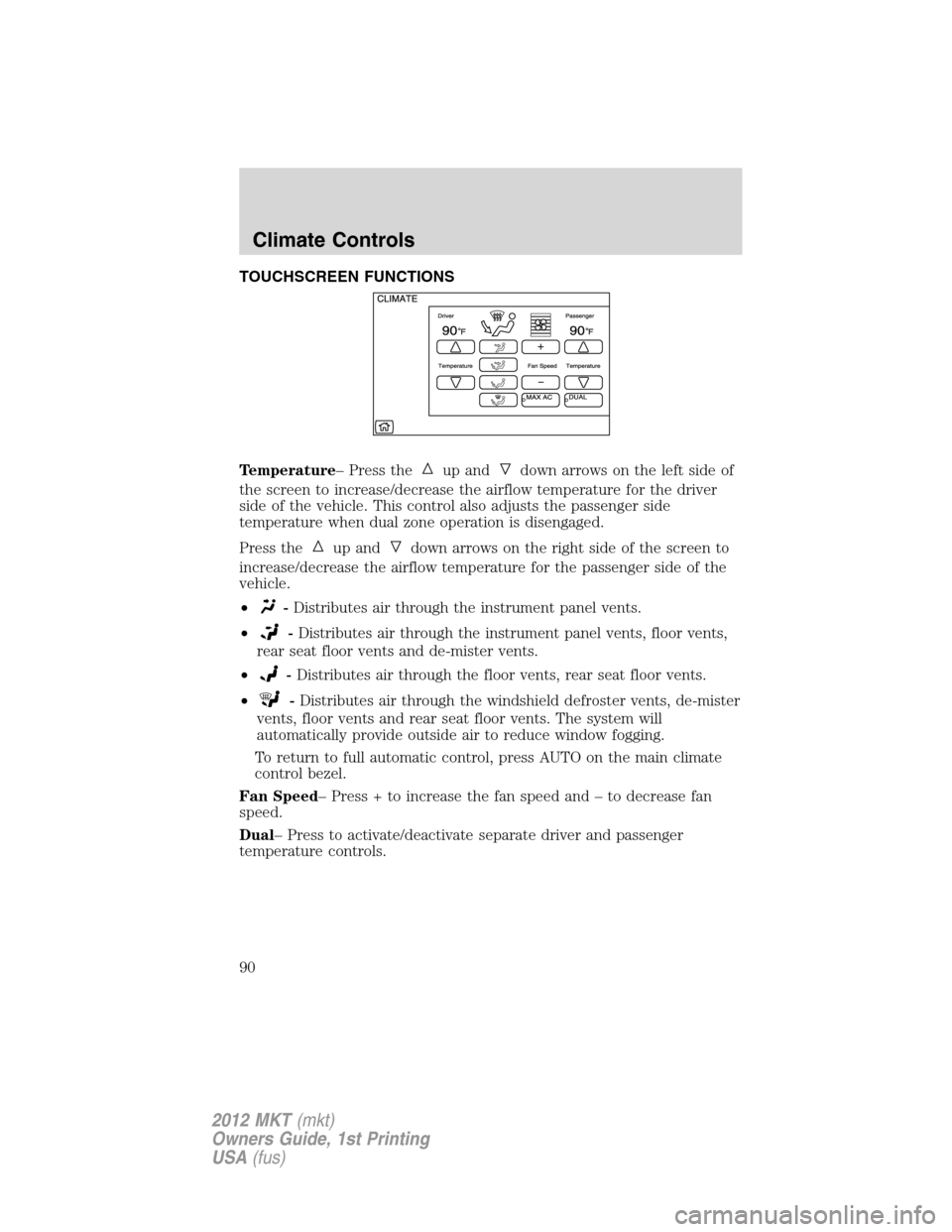
TOUCHSCREEN FUNCTIONS
Temperature– Press the
up anddown arrows on the left side of
the screen to increase/decrease the airflow temperature for the driver
side of the vehicle. This control also adjusts the passenger side
temperature when dual zone operation is disengaged.
Press the
up anddown arrows on the right side of the screen to
increase/decrease the airflow temperature for the passenger side of the
vehicle.
•
-Distributes air through the instrument panel vents.
•
-Distributes air through the instrument panel vents, floor vents,
rear seat floor vents and de-mister vents.
•
-Distributes air through the floor vents, rear seat floor vents.
•
-Distributes air through the windshield defroster vents, de-mister
vents, floor vents and rear seat floor vents. The system will
automatically provide outside air to reduce window fogging.
To return to full automatic control, press AUTO on the main climate
control bezel.
Fan Speed– Press + to increase the fan speed and – to decrease fan
speed.
Dual– Press to activate/deactivate separate driver and passenger
temperature controls.
Climate Controls
90
2012 MKT(mkt)
Owners Guide, 1st Printing
USA(fus)
Page 91 of 437
Max A/C– Distributes recirculated air through the instrument panel
vents to cool the vehicle. This re-cooling of the interior air is more
economical and efficient. Recirculated air may also help reduce
undesirable odors from entering the vehicle. Press MAX A/C again for
normal operation.
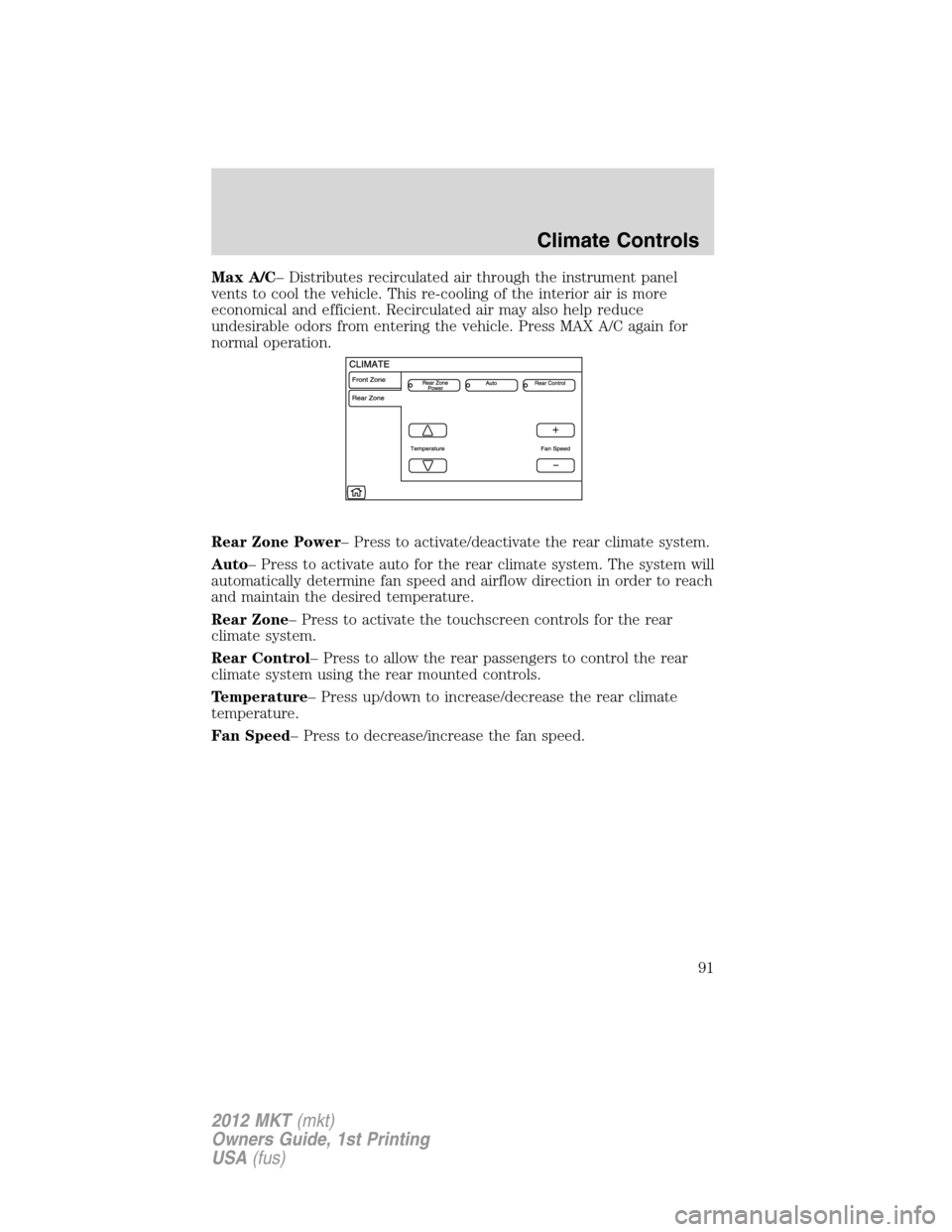
Rear Zone Power– Press to activate/deactivate the rear climate system.
Auto– Press to activate auto for the rear climate system. The system will
automatically determine fan speed and airflow direction in order to reach
and maintain the desired temperature.
Rear Zone– Press to activate the touchscreen controls for the rear
climate system.
Rear Control– Press to allow the rear passengers to control the rear
climate system using the rear mounted controls.
Temperature– Press up/down to increase/decrease the rear climate
temperature.
Fan Speed– Press to decrease/increase the fan speed.
Climate Controls
91
2012 MKT(mkt)
Owners Guide, 1st Printing
USA(fus)
Page 111 of 437

OVERHEAD CONSOLE
The appearance of your vehicle’s overhead console will vary according to
your option package.
Storage compartment
The storage compartment may be
used to store a pair of sunglasses.
Press the release area on the rear
edge of the bin door to open the
storage compartment. The door will
open to the full open position.
ELECTRONIC COMPASS
The compass heading is displayed in the touchscreen.
CENTER CONSOLE
Your vehicle may be equipped with a variety of console features. These
include:
1. Cupholders
2. Utility compartment with coin
holder, audio input jack, USB port
and power point
3. Rear climate controls, rear power
point outlet and 110 Volt power
point outlet (if equipped).
WARNING:Use only soft cups in the cupholder. Hard objects
can injure you in a collision.
Driver Controls
111
2012 MKT(mkt)
Owners Guide, 1st Printing
USA(fus)
Page 291 of 437

REARVIEW CAMERA SYSTEM
The rearview camera system,
located on the liftgate, provides a
video image, which appears on the
navigation system screen, of the
area behind the vehicle. It adds
assistance to the driver while
reversing or reverse parking the
vehicle.
To use the camera system, place the transmission in R (Reverse); an
image will display on the navigation screen. The area displayed on the
screen may vary according to the vehicle orientation and/or road
condition.
•(1) Rear bumper
•(2) Red zone
•(3) Yellow zone
•(4) Green zone
•(5) Center line of vehicle
Always use caution while backing.
Objects in the red zone are closest
to your vehicle and objects in the
green zone are further away. Objects
are getting closer to your vehicle as they move from the green zone to
the yellow or red zones.
Use the side mirrors and rearview mirror to get better coverage on both
sides and rear of the vehicle. When shifting out of reverse and into any
other gear, the image will remain on for a few seconds before it shuts off
to assist in parking or trailer hookup.
After shifting out of R (Reverse) and into any gear other than P (Park),
the image will remain until the vehicle speed reaches 5 mph (8 km/h),
only if the rear camera delay feature is on, or until any navigation radio
button is pressed.
Note:The default setting for the rear camera delay is off. Press the
“Settings” button found on the navigation screen to set the rear camera
delay feature to on or off.
Driving
291
2012 MKT(mkt)
Owners Guide, 1st Printing
USA(fus)
Page 292 of 437
When towing, the camera system will only see what is being towed behind
the vehicle; this might not provide adequate coverage as it usually provides
in normal operation and some objects might not be seen.
The camera lens for the camera is located on the liftgate. Keep the lens
clean so the video image remains clear and undistorted. Clean the lens
with a soft, lint-free cloth and non-abrasive cleaner.
Note:If the camera system image is not clear or seems distorted, it may
be covered with water droplets, snow, mud or any other substance. If
this occurs, clean the camera lens before using the camera system.
WARNING:The camera system is a reverse aid supplement
device that still requires the driver to use it in conjunction with
the rearview mirror and the side mirrors for maximum coverage.
WARNING:Objects that are close to either corner of the
bumper or under the bumper, might not be seen on the screen
due to the limited coverage of the camera system.
WARNING:Backup as slow as possible since higher speeds
might limit your reaction time to stop the vehicle.
WARNING:Do not use the camera system with the liftgate open.
If the back end of the vehicle is hit or damaged, then check with your
authorized dealer to have your rear video system checked for proper
coverage and operation.
Night time and dark area use
At night time or in dark areas, the camera system relies on the reverse
lamp lighting to produce an image. Therefore it is necessary that both
reverse lamps are operating in order to get a clear image in the dark. If
either of the lamps are not operating, stop using the camera system, at
least in the dark, until the lamp(s) are replaced and functioning.
Servicing
•If the image comes on while the vehicle is not in R (Reverse), have
the system inspected by your authorized dealer.
•If the image is not clear, then check if there is anything covering the
lens such as dirt, mud, ice, snow, etc. If the image is still not clear
after cleaning, have your system inspected by your authorized dealer.
Driving
292
2012 MKT(mkt)
Owners Guide, 1st Printing
USA(fus)