Page 209 of 437
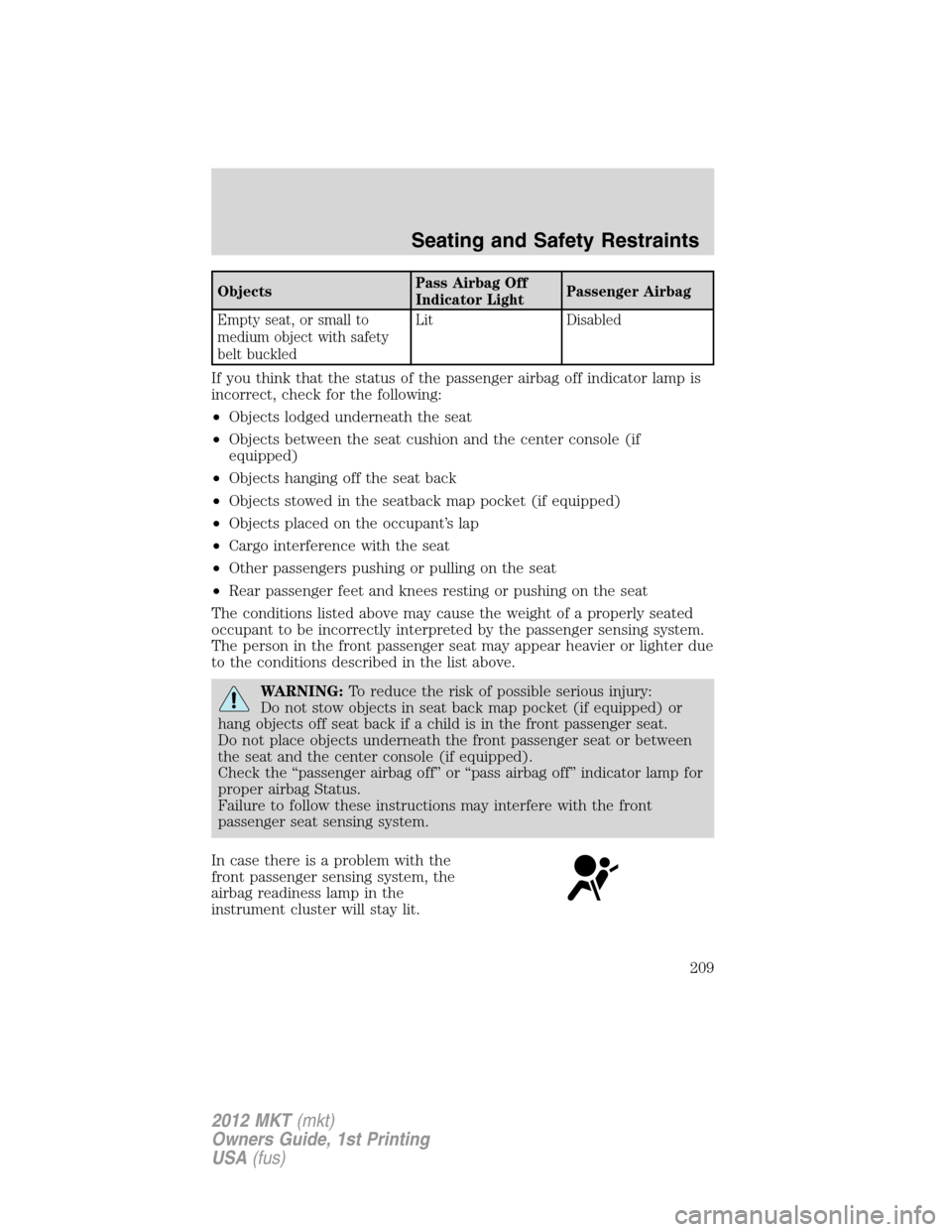
ObjectsPass Airbag Off
Indicator LightPassenger Airbag
Empty seat, or small to
medium object with safety
belt buckledLit Disabled
If you think that the status of the passenger airbag off indicator lamp is
incorrect, check for the following:
•Objects lodged underneath the seat
•Objects between the seat cushion and the center console (if
equipped)
•Objects hanging off the seat back
•Objects stowed in the seatback map pocket (if equipped)
•Objects placed on the occupant’s lap
•Cargo interference with the seat
•Other passengers pushing or pulling on the seat
•Rear passenger feet and knees resting or pushing on the seat
The conditions listed above may cause the weight of a properly seated
occupant to be incorrectly interpreted by the passenger sensing system.
The person in the front passenger seat may appear heavier or lighter due
to the conditions described in the list above.
WARNING:To reduce the risk of possible serious injury:
Do not stow objects in seat back map pocket (if equipped) or
hang objects off seat back if a child is in the front passenger seat.
Do not place objects underneath the front passenger seat or between
the seat and the center console (if equipped).
Check the “passenger airbag off” or “pass airbag off” indicator lamp for
proper airbag Status.
Failure to follow these instructions may interfere with the front
passenger seat sensing system.
In case there is a problem with the
front passenger sensing system, the
airbag readiness lamp in the
instrument cluster will stay lit.
Seating and Safety Restraints
209
2012 MKT(mkt)
Owners Guide, 1st Printing
USA(fus)
Page 272 of 437

There may be areas inside your vehicle where the IA key is not detected.
If the message NO KEY DETECTED appears on your message center
when you press the START/STOP button, it may be necessary to move
your IA key to another area within the vehicle. The IA key may not be
detected near the roof (between the driver or passenger sun visor and
the roof, or in the overhead console area), or in the third row seat cup
holder and armrest area, or in the extreme corners of the rear package
tray, near your audio speakers. It is not recommended that you stow the
IA key in these locations. If you move the IA key to a location where it
has been detected before and you still see the NO KEY DETECTED
message, your IA key’s battery may be low or you may be in an area with
excessive radio frequency interference. If this occurs, you can use the
back-up method to start your vehicle (see below).
Back-up method of starting:Your
IA key uses a radio frequency signal
to communicate with your vehicle
and authorize your vehicle to start
when you press the START/STOP
button and apply the brake pedal. If
excessive radio frequency
interference is present in the area,
or if the battery in your IA key is
low, it may be necessary to start
your car by inserting the IA key in
the back-up slot, located in the rear of the center console utility
compartment. Insert the IA key into the slot with buttons facing out and
with key ring up. After inserting the IA key into the back-up slot, use the
START/STOP button and brake pedal to start your vehicle as usual. The
vehicle should respond normally as long as the IA key is in the back-up
slot in the center console utility compartment. Once the vehicle is
started, the IA key can be removed from the back-up slot, if desired.
Fast restart feature:The Fast Restart feature allows you to re-start
your vehicle within 20 seconds of switching the vehicle off, if a valid IA
key is not present when the vehicle is switched off. When you switch
your vehicle off without an IA key in the passenger compartment, the
message RESTART NOW OR KEY IS NEEDED will be displayed in the
message center. You can re-start the vehicle (by applying the brake pedal
and pressing the START/STOP button) for up to 20 seconds, even
though the IA key is not present. After 20 seconds have expired, you can
no longer start your vehicle without the IA key present inside the
vehicle.
Driving
272
2012 MKT(mkt)
Owners Guide, 1st Printing
USA(fus)
Page 278 of 437

ADVANCETRAC�WITH ROLL STABILITY CONTROL™ (RSC�)
STABILITY ENHANCEMENT SYSTEM
Your vehicle is equipped with the AdvanceTrac�with RSC�system. The
AdvanceTrac�with RSC�system provides the following stability
enhancement features for certain driving situations:
•Traction control system (TCS), which functions to help avoid
drive-wheel spin and loss of traction.
•Electronic stability control (ESC), which functions to help avoid skids
or lateral slides
•Roll Stability Control™ (RSC�), which functions to help avoid a
vehicle roll-over.
WARNING:Vehicle modifications involving braking system,
aftermarket roof racks, suspension, steering system, tire
construction and/or wheel/tire size may change the handling
characteristics of the vehicle and may adversely affect the performance
of the AdvanceTrac�with RSC�system. In addition, installing any
stereo loudspeakers may interfere with and adversely affect the
AdvanceTrac�with RSC�system. Install any aftermarket stereo
loudspeaker as far as possible from the front center console, the
tunnel, and the front seats in order to minimize the risk of interfering
with the AdvanceTrac�with RSC�sensors. Reducing the effectiveness
of the AdvanceTrac�with RSC�system could lead to an increased risk
of loss of vehicle control, vehicle rollover, personal injury and death.
WARNING:Remember that even advanced technology cannot
defy the laws of physics. It’s always possible to lose control of a
vehicle due to inappropriate driver input for the conditions. Aggressive
driving on any road condition can cause you to lose control of your
vehicle increasing the risk of personal injury or property damage.
Activation of the AdvanceTrac�with RSC�system is an indication that at
least some of the tires have exceeded their ability to grip the road; this
could reduce the operator’s ability to control the vehicle, potentially
resulting in a loss of vehicle control, vehicle rollover, personal injury and
death. If your AdvanceTrac�with RSC�system activates, SLOW DOWN.
WARNING:If a failure has been detected within the
AdvanceTrac�with RSC�system, the stability control light will
illuminate steadily and you may hear a chime. If equipped with a
message center, the vehicle will also indicate a failure with the brake
system. Have the system serviced by an authorized dealer immediately.
Driving
278
2012 MKT(mkt)
Owners Guide, 1st Printing
USA(fus)
Page 296 of 437
ACTIVE PARK ASSIST (APA) (IF EQUIPPED)
Active park assist (APA) will detect an available parallel parking space
and automatically steer the vehicle into the space (hands-free) while you
control the accelerator, gearshift and brakes. The system will visually
and/or audibly instruct the driver to park the vehicle.
WARNING:This system is designed to be a supplementary park
aid. It may not work in all conditions and is not intended to
replace the driver’s attention and judgment. The driver is responsible
for avoiding hazards and maintaining a safe distance and speed, even
when the APA is in use.
Conditions in which the system may not work:
•Something passes between the front bumper and the space such as a
pedestrian or cyclist
•The edge of the vehicle is high from the ground such as a bus, tow
truck, or flatbed truck
Automatic search for parking space
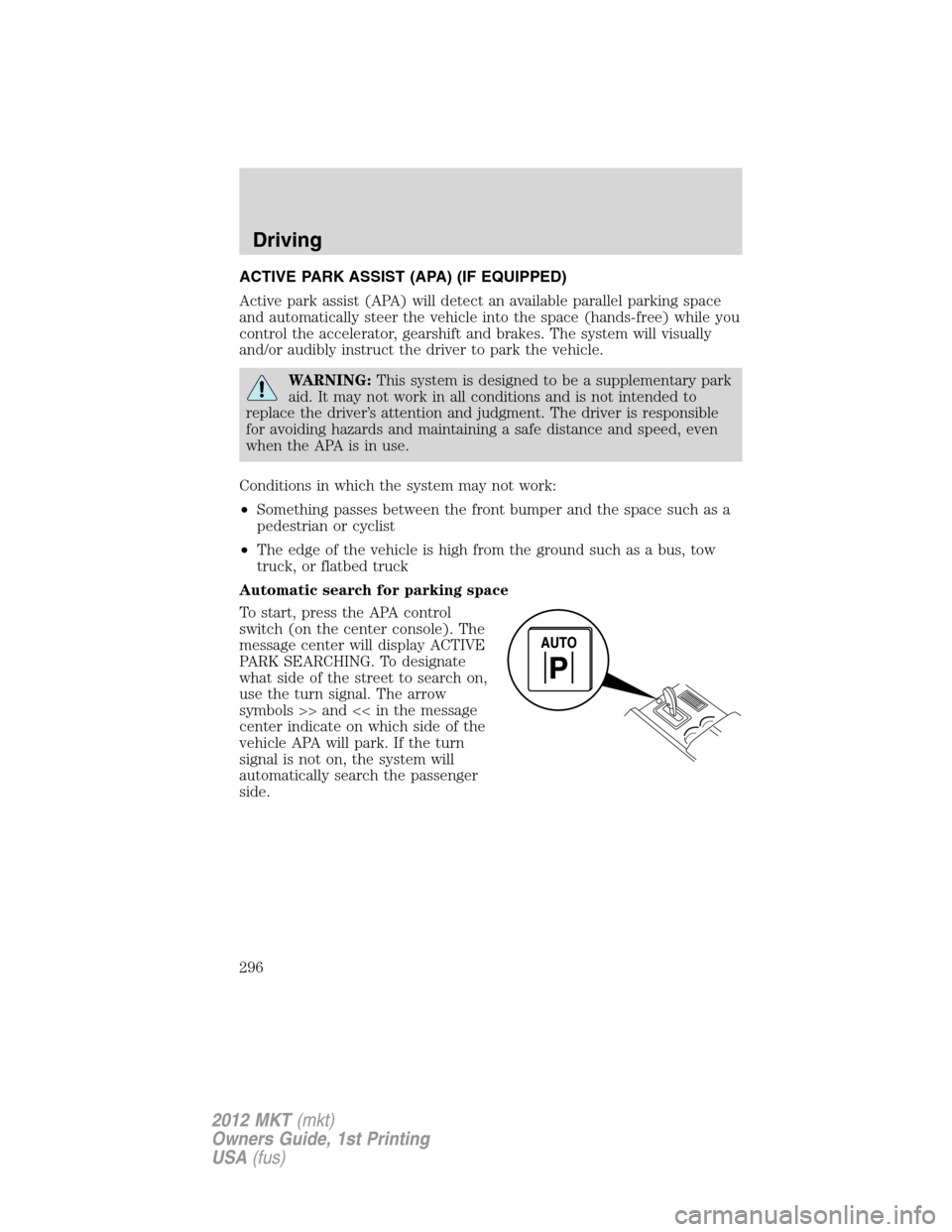
To start, press the APA control
switch (on the center console). The
message center will display ACTIVE
PARK SEARCHING. To designate
what side of the street to search on,
use the turn signal. The arrow
symbols >> and << in the message
center indicate on which side of the
vehicle APA will park. If the turn
signal is not on, the system will
automatically search the passenger
side.
Driving
296
2012 MKT(mkt)
Owners Guide, 1st Printing
USA(fus)