Page 4 of 592

TABLE OF CONTENTSIndex
4
3-1. Using the air conditioning system and defogger
Automatic air conditioning system ............................................. 216
Rear window and outside rear view
mirror defoggers ....................... 224
Windshield wiper de-icer ......... 225
3-2. Using the audio system Audio system type ....................... 226
Using the radio .............................. 229
Using the CD player ................... 237
Playing back MP3 and WMA discs .................................. 244
Operating an iPod ....................... 252
Operating a USB memory...... 260
Optimal use of the audio system ............................................ 269
Using the AUX port..................... 271
Using the steering wheel audio switches ............................ 273 3-3. Using the Bluetooth
® audio
system
Bluetooth
® audio system ......... 276
Using the Bluetooth
®
audio system................................ 279
Operating a Bluetooth
®
enabled portable player ......... 284
Setting up a Bluetooth
®
enabled portable player ......... 287
Bluetooth
® audio system
setup ............................................... 293
3-4. Using the hands-free phone system (for mobile phones)
Hands-free system for mobile phones ........................................... 294
Using the hands-free system (for mobile phones) ................. 298
Making a phone call................... 306
Setting a mobile phone ............... 310
Security and system setup ......... 315
Using the phone book................. 319
3-5. Using the interior lights Interior lights list............................ 325
• Interior lights ............................... 327
• Personal lights ............................ 327
3Interior features
Page 214 of 592

214
3-1. Using the air conditioningsystem and defogger
Automatic air conditioning system ...................................... 216
Rear window and outside rear view
mirror defoggers ................. 224
Windshield wiper de-icer .... 225
3-2. Using the audio system Audio system type.................. 226
Using the radio........................ 229
Using the CD player ............. 237
Playing back MP3 and WMA discs............................ 244
Operating an iPod ................. 252
Operating a USB memory .................................. 260
Optimal use of the audio system ..................................... 269
Using the AUX port ............... 271
Using the steering wheel audio switches ...................... 273 3-3. Using the Bluetooth®
audi
o system
Bluetooth
® audio system ..... 276
Using the Bluetooth®
audio system .......................... 279
Operating a Bluetooth
®
enabled portable
player ...................................... 284
Setting up a Bluetooth
®
enabled portable player ... 287
Bluetooth
® audio system
setup ....................................... 293
3-4. Using the hands-free phone system
(for mobile phones)
Hands-free system for mobile phones...................... 294
Using the hands-free system (for mobile
phones) .................................. 298
Making a phone call.............. 306
Setting a mobile phone ......... 310
Security and system setup ........................................ 315
Using the phone book ........... 319
Interior features3
Page 227 of 592
227
3-2. Using the audio system
3
Interior features
Ti t l ePa g e
Using the radioP. 2 2 9
Using the CD playerP. 2 3 7
Playing back MP3 and WMA discsP. 2 4 4
Operating an iPodP. 2 5 2
Operating a USB memoryP. 2 6 0
Optimal use of the audio systemP. 2 6 9
Using the AUX portP. 2 7 1
Using the steering wheel audio switchesP. 2 7 3
Page 244 of 592
244
3-2. Using the audio system
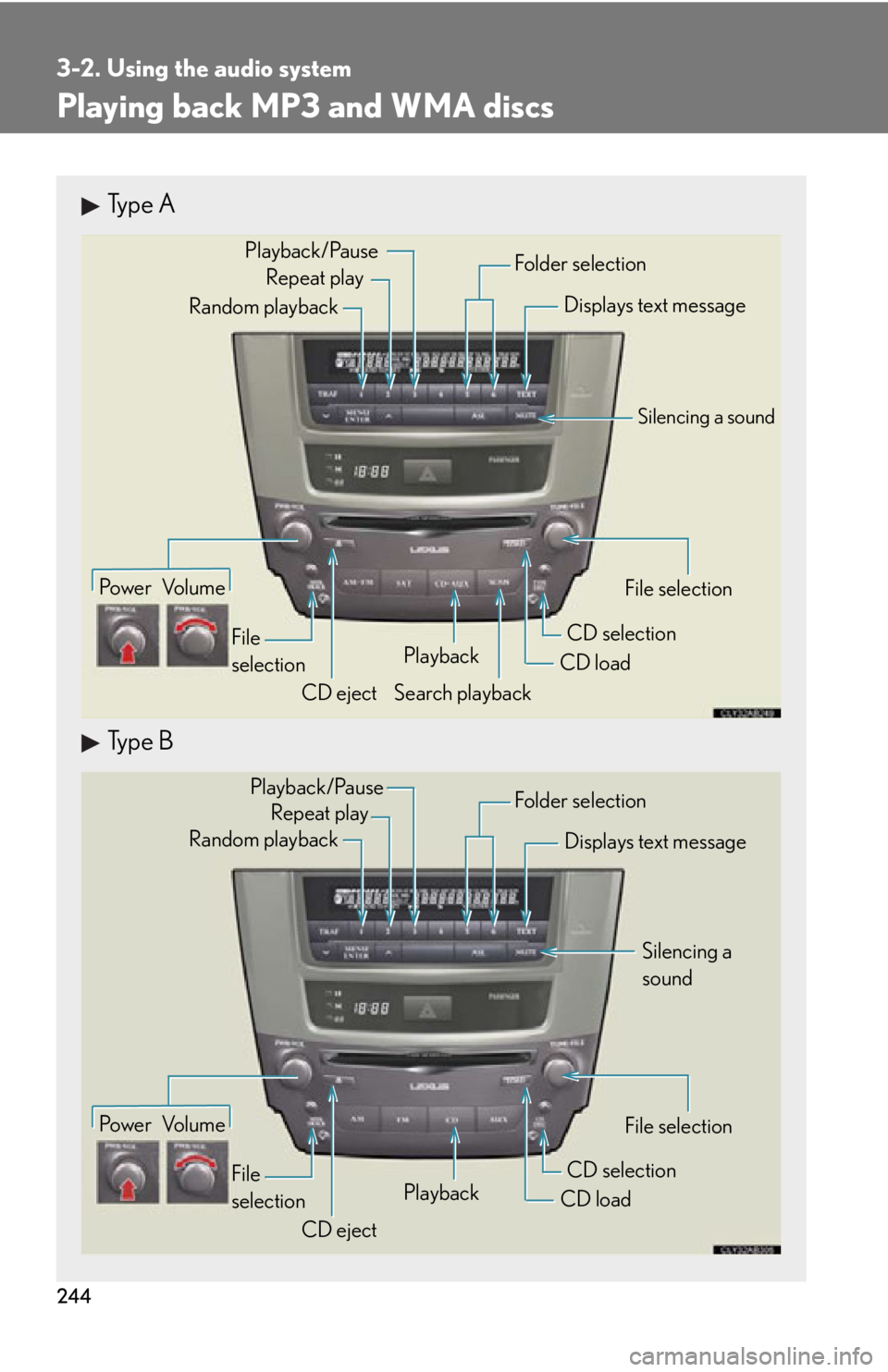
Playing back MP3 and WMA discs
Type A
Type B
Po w e r Vo l u m eCD ejectPlayback
Search playback CD load
CD selection File selection
Random playback
Repeat play
Displays text message
Folder selection
File
selection
Playback/Pause
Silencing a sound
Po w e r Vo l u m e CD ejectPlayback
CD loadCD selection File selection
Random playback
Repeat play
Displays text message
Folder selection
File
selection
Silencing a
sound
Playback/Pause
Page 245 of 592
245
3-2. Using the audio system
3
Interior features
Loading and ejecting MP3 and WMA discs P. 238, 239
Selecting MP3 and WMA discs
P. 2 4 0
Selecting a folder
■ Selecting folders one at a time
Press ( ) or ( ) to select the desired folder.
■ Selecting the desired folder by cueing the first file of each folder
(type A only)
Press and hold until you hear a beep. When the desired folder is
reached, press once again.
■ Returning to the first folder
Press and hold ( ) until you hear a beep.
Fast-forwarding and reversing files
To fast-forward or reve rse, press and hold “” or “ ” on until you
hear a beep.
Page 247 of 592

247
3-2. Using the audio system
3
Interior features
Switching the displayPress .
Each time is pressed, the display changes in the order of Folder no./
File no./Elapsed time Folder name File name Album title (MP3
only) Track title Artist name.
■Display
Up to 12 characters can be displayed at a time.
If there are 13 characters or more, pressing and holding until you hear a
beep will display the remaining characters.
A maximum of 24 characters can be displayed.
If is pressed until you hear a beep again or has not been pressed for 6 sec-
onds or more, the display will return to the first 12 characters.
Depending on the contents recorded, the characters may not be displayed prop-
erly or may not be displayed at all.
■Canceling random, repeat and scan playback
Press (RAND), (RPT), again.
■When “LOAD”, “ERROR”, “WAIT” or “NO MUSIC” is shown on the display
“LOAD”: This indicates that the CD pl ayer has completed loading the CD.
“ERROR”: This indicates a trouble either in the CD or inside the player. The CD may be dirty, damaged, or inserted up-side down.
“WAIT”: Operation is stopped due to a hi gh temperature inside the player. Wait
for a while and then press or . Contact your Lexus dealer if
the CD still cannot be played back.
“NO MUSIC”: This indicates that the MP3/WMA file is not included in the CD.
Page 248 of 592

248
3-2. Using the audio system
■Discs that can be used
Discs with the marks shown below can be used.
Playback may not be possible depending on recording format or disc features, or
due to scratches, dirt or deterioration.
■CD player protection feature
To protect the internal components, play back is automatically stopped when a
problem is detected while the CD player is being used.
■If CDs are left inside the CD player or in the ejected position for extended peri-
ods
CDs may be damaged and may not play properly.
■Lens cleaners
Do not use lens cleaners. Doing so may damage the CD player.
■MP3 and WMA files
MP3 (MPEG Audio LAYER 3) is a standard audio compression format.
Files can be compressed to approximately 1 /10 of their original size by using MP3
compression.
WMA (Windows Media Audio) is a Microsoft audio compression format.
This format compresses audio data to a size smaller than that of the MP3 format.
There is a limit to the MP3 and WMA file standards and to the media/formats
recorded by them that can be used.
●MP3 file compatibility
• Compatible standards
MP3 (MPEG1 LAYER3, MPEG2 LSF LAYER3)
• Compatible sampling frequencies MPEG1 LAYER3: 32, 44.1, 48 (kHz)
MPEG2 LSF LAYER3: 16, 22.05, 24 (kHz)
• Compatible bit rates (compatible with VBR) MPEG1 LAYER3: 64, 80, 96, 112, 128, 160, 192, 224, 256, 320 (kbps)
MPEG2 LSF LAYER3: 64, 80, 96, 112, 128, 144, 160 (kbps)
• Compatible channel modes: stereo, joint stereo, dual channel and monaural
Page 249 of 592

249
3-2. Using the audio system
3
Interior features
●WMA file compatibility
• Compatible standardsWMA Ver. 7, 8, 9
• Compatible sampling frequencies
32, 44.1, 48 (kHz)
• Compatible bit rates (only compat ible with 2-channel playback)
Ver. 7, 8: CBR 48, 64, 80, 96, 128, 160, 192 (kbps)
Ver. 9: CBR 48, 64, 80, 96, 128, 160, 192, 256, 320 (kbps)
●Compatible media
Media that can be used for MP3 and WMA playback are CD-Rs and CD-RWs.
Playback in some instances may not be po ssible, depending on the status of the
CD-R or CD-RW. Playback may not be po ssible or the audio may jump if the disc
is scratched or marked with fingerprints.
●Compatible disc formats
The following disc formats can be used.
• Disc formats: CD-ROM Mode 1 and Mode 2
CD-ROM XA Mode 2, Form 1 and Form 2
• File formats: ISO9660 Level 1, Level 2, (Romeo, Joliet) MP3 and WMA files written in any format other than those listed above may
not play correctly, and their file names and folder names may not be dis-
played correctly.
Items related to standards and limitations are as follows.
• Maximum directory hierarchy: 8 levels
• Maximum length of folder names/file names: 32 characters
• Maximum number of folders: 192 (including the root)
• Maximum number of files per disc: 255
●File names
The only files that can be recognized as MP3/WMA and played are those with
the extension .mp3 or .wma.
●Multi-sessions
As the audio system is compatible with multi-sessions, it is possible to play discs
that contain MP3 and WMA files. However, only the first session can be played.