Page 16 of 839
14
GX460_U.S.A. (OM60J00U)
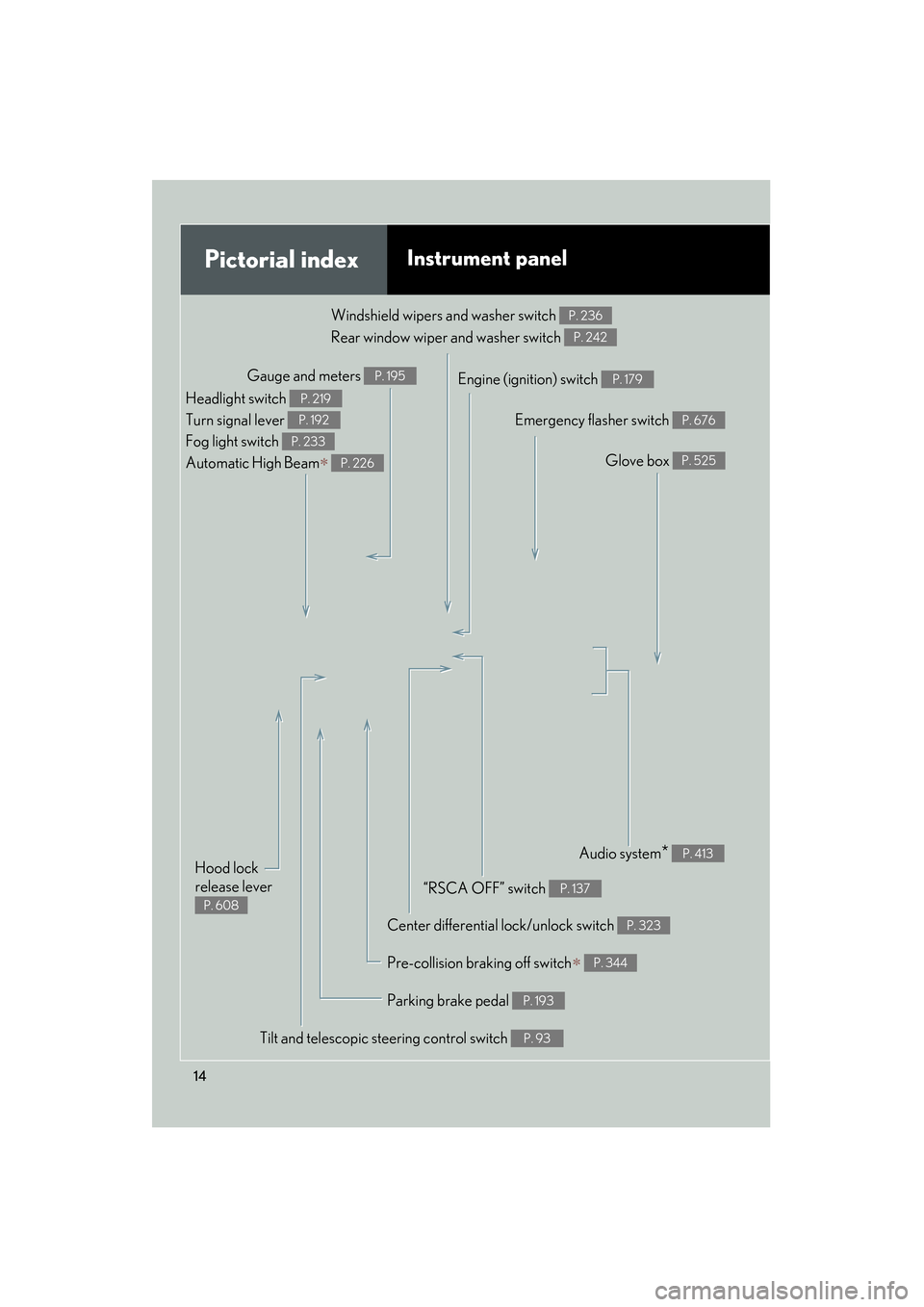
Pictorial indexInstrument panel
Gauge and meters P. 195Engine (ignition) switch P. 179
Windshield wipers and washer switch
Rear window wiper and washer switch P. 236
P. 242
Headlight switch
Turn signal lever
Fog light switch
Automatic High Beam
∗
P. 219
P. 192
P. 233
P. 226
Center differential lock/unlock switch P. 323
Audio system* P. 413
Glove box P. 525
“RSCA OFF” switch P. 137
Emergency flasher switch P. 676
Parking brake pedal P. 193
Hood lock
release lever
P. 608
Tilt and telescopic steering control switch P. 93
Pre-collision braking off switch∗ P. 344
Page 71 of 839
69
1-3. Adjustable components (seats, mirrors, steering wheel, etc.)
1
Before driving
GX460_U.S.A. (OM60J00U)
Folding down the second seatbacks (without third seats)■ Before folding down the second seatbacks
Stow the center seat belt buckle
with the hook-and-loop fastener
and lower the head restraints to
the lowest position.
■ Folding down second seatbacks
Pull the lever and fold down the
outer seat head restraint.
Swing the bottom cushion up by
pulling the lock release strap.
STEP1
STEP2
Page 73 of 839
71
1-3. Adjustable components (seats, mirrors, steering wheel, etc.)
1
Before driving
GX460_U.S.A. (OM60J00U)
■Folding down second center seatback only
■If you cannot raise the second seatbackPull the center seatback lock release lever
behind the seatback and fold it down.
To return the center seatback to its original
position, lift it up until it locks.
Release the seat belt lock by:
Pushing on the lower front edge of the
seatback to slacken the seat belt.
Let the seat belt retract a little.
Page 85 of 839
83
1-3. Adjustable components (seats, mirrors, steering wheel, etc.)
1
Before driving
GX460_U.S.A. (OM60J00U)
■Adjusting the height of the head restraints
■Using the second center seat head restraint
■Using the third seats
Always lift the head restraints up until they lock when using.
■Removing the head restraints (front and second seats)Make sure that the head restraints are
adjusted so that the center of the head
restraint is closest to the top of your ears.
Always raise the head restraint one level from
the stowed position when using.
Pull the head restraint up while pressing the
lock release button.
Page 122 of 839
120
GX460_U.S.A. (OM60J00U)
1-7. Safety information
Correct driving posture
Drive with a good posture as follows:
Sit upright and well back in
the seat. (→P. 6 3 )
Adjust the position of the seat
forward or backward to
ensure the pedals can be
reached and easily
depressed to the extent
required. ( →P. 6 3 )
Adjust the seatback so that
the controls are easily opera-
ble.
Adjust the tilt and telescopic
positions of the steering
wheel downward so the air-
bag is facing your chest.
(→ P. 9 3 )
Lock the head restraint in
place with the center of the
head restraint closest to the
top of your ears. ( →P. 8 2 )
Wear the seat belt correctly.
(→ P. 8 5 )
Page 153 of 839
151
1
1-7. Safety information
Before driving
GX460_U.S.A. (OM60J00U)
Installing child restraints
Follow the child restraint system manufacturer’s instructions. Firmly
secure child restraints to the seats using the LATCH anchors or a seat belt.
Attach the top tether strap when installing a child restraint.
The lap/shoulder belt can be used if your child restraint system is not com-
patible with the LATCH (Lower Anchors and Tethers for Children) system.
Child restraint LATCH anchors
LATCH anchors are provided
for the right side second seat
and between the center and left
side second seats. (Buttons dis-
playing the location of the
anchors are attached to the
seats.)
Seat belts equipped with a child
restraint locking mechanism
(ALR/ELR belts except driver’s
seat belt) (→P. 8 7 )
Page 165 of 839

163
1-7. Safety information
1
Before driving
GX460_U.S.A. (OM60J00U)
CAUTION
■When installing a child restraint system
●When installing a child restraint system in the second center seat, adjust both
seatbacks at the same angle.
●When using the LATCH anchors for a child restraint system, move the seat as far
back as possible, with the seatback close to the child restraint system.
●When a booster seat is installed, always ensure that the shoulder belt is posi-
tioned across the center of the child’s shoulder. The belt should be kept away from
the child’s neck, but not so that it could fall off the child’s shoulder. Failing to do so
may result in death or serious injury in the event of an accident or sudden braking.
●Ensure that the belt and plate are securely locked and the seat belt is not twisted.
●Push and pull the child restraint system from side to side and forward to be sure it
is secure.
●After securing a child restraint system, never adjust the seat.
●Follow all installation instructions provided by the child restraint system manufac-
turer.
■Do not use a seat belt extender
If a seat belt extender is used when installing a child restraint system, the seat belt
will not securely hold the child restraint system, which could cause death or serious
injury to the child or other passengers in the event of an accident.
Page 203 of 839

201
2-2. Instrument cluster
2
When driving
GX460_U.S.A. (OM60J00U)
*1: These lights turn on when the “ENGINE START STOP” switch is turnedto IGNITION ON mode to indicate that a system check is being per-
formed. They will turn off after the engine is on, or after a few seconds.
There may be a malfunction in a system if the lights do not come on, or
turn off. Have the vehicle inspected by your Lexus dealer.
*2: The light flashes to indicate that the system is operating.
*3: The light comes on when pre-collision braking is disabled. The lightflashes faster than usual to indica te that the system is operating.
(if equipped)
Crawl Control indicator
(→ P. 3 2 8 )AIR BAG ON/OFF
indicator ( →P. 1 3 9 )
(if equipped)
Downhill assist control
system indicator
(→ P. 3 3 2 )
(if equipped)
Intuitive parking assist
indicator ( →P. 266)
“2nd STRT” indicator
(→ P. 1 8 8 )
(if equipped)
“AFS OFF” indicator
(→ P. 223)
Low speed four-wheel
drive indicator light
(→ P. 322)“RSCA OFF” indicator
(→ P. 1 3 7 )
Center differential lock
indicator ( →P. 3 2 3 )
(if equipped)
“PCS” warning
(→ P. 3 4 3 )
*1
*1
*1
*1
*1, 3