Page 316 of 839

314
2-4. Using other driving systems
GX460_U.S.A. (OM60J00U)
CAUTION
■Conditions which may affect the Multi-terrain Monitor system
●If the front or the rear of the vehicle or the outside rear view mirror has been hit,
the camera’s position and mounting angle may have changed. Have the vehicle
inspected by your Lexus dealer.
●As the camera has a water proof construction, do not detach, disassemble or
modify it. This may cause incorrect operation.
●Rapid temperature changes, such as when hot water is poured on the vehicle in
cold weather, may cause the system to function abnormally.
●If the camera lens is dirty, it cannot transmit a clear image. Rinse with water and
wipe with a soft cloth. If the camera lens is extremely dirty, wash with a mild
cleanser and rinse.
●Do not strongly rub the camera lens. If the camera lens is scratched, it cannot
transmit a clear image.
●Do not allow organic solvent, car wax, window cleaner or glass coat to adhere to
the camera. If this happens, wipe it off as soon as possible.
●The displayed image may be darker and moving images may be slightly distorted
when the system is cold.
●Situations unsuitable for Multi-terrain Monitor
• On icy or slick road surfaces, or in snow
•When using tire chains
●When washing the vehicle, do not apply intensive bursts of water to the camera
or camera area. Doing so may result in the camera malfunctioning.
Page 413 of 839
411
3-1. Using the air conditioning system and defogger
3
Interior features
GX460_U.S.A. (OM60J00U)
Rear window defogger switch
■The defoggers can be operated when
The “ENGINE START STOP” switch is in IGNITION ON mode.
■The outside rear view mirror defoggers
Turning the rear window defogger on will turn the outside rear view mirror defog-
gers on.
CAUTION
■When the outside rear view mirror defoggers are on
Do not touch the outside surface of the rear view mirrors, as they can become very
hot and burn you.
Defoggers are used to defog the rear window, and to remove raindrops,
dew and frost from the outside rear view mirrors.
Vehicles with a navigation system
Refer to the “Navigation System Owner’s Manual”.
Vehicles without a navigation system Turns the rear window and out-
side rear view mirror defoggers
on/off.
The defoggers will automatically
turn off after their operation
time. The operation time varies
depending on the ambient tem-
perature and vehicle speed.
Page 536 of 839

534
3-6. Using the storage features
GX460_U.S.A. (OM60J00U)
■Auxiliary box light (type B)
●The auxiliary box light turns on when the tail lights are on.
●The brightness of the auxiliary box light changes in conjunction with the instru-
ment cluster light. (→P. 1 9 6 )
■Closing the auxiliary box lid
CAUTION
■Caution while driving
●Keep the auxiliary boxes closed. In the event of sudden braking or sudden swerv-
ing, an accident may occur due to an occupant being struck by an open auxiliary
box or the items stored inside.
●Do not place cups, aluminum cans or bottles in the box. They may be thrown out
of the box in the event of sudden braking, sudden swerving or an accident, result-
ing in injury. (type B and C)
■Items unsuitable for storing (type A)
●Do not store items heavier than 0.4 lb. (0.2 kg).
Doing so may cause the auxiliary box to open and the items inside may fall out,
resulting in an accident.
●Do not put large items in the overhead console.
The overhead console may not be able to be shut from the conversation mirror
state.
Slide the auxiliary box lid forward.
Auxiliary boxes
Page 577 of 839
575
3-7. Other interior features
3
Interior features
GX460_U.S.A. (OM60J00U)
Compass∗
∗: If equipped
The compass on the inside rear view mirror indicates the direction in which
the vehicle is heading.
■ Operation
To turn the compass on or off,
push the switch.
■ Displays and directions
DisplayDirection
“N”North
“NE”Northeast
“E”East
“SE”Southeast
“S”South
“SW”Southwest
“W”We s t
“NW”Northwest
Page 580 of 839

578
3-7. Other interior features
GX460_U.S.A. (OM60J00U)
■Conditions unfavorable to correct operation
The compass may not show the correct direction in the following conditions:
●The vehicle is stopped immediately after turning.
●The vehicle is on an inclined surface.
●The vehicle is in a place where the earth’s magnetic field is subject to interfer-
ence by artificial magnetic fields (underground car park/parking lot, under a
steel tower, between buildings, roof car park/parking lot, near an intersection,
near a large vehicle, etc.).
●The vehicle has become magnetized.
(There is a magnet or metal object near the inside rear view mirror.)
●The battery has been disconnected.
●A door is open.
CAUTION
■While driving the vehicle
Do not adjust the display. Adjust the display only when the vehicle is stopped.
■When doing the circling calibration
Secure a wide space, and watch out for people and vehicles in the vicinity. Do not
violate any local traffic rules while performing circling calibration.
Page 581 of 839
579
3-7. Other interior features
3
Interior features
GX460_U.S.A. (OM60J00U)
NOTICE
■To avoid the compass malfunctions
Do not place magnets or any metal objects near the inside rear view mirror.
Doing this may cause the compass sensor to malfunction.
■To ensure normal operation of the compass
●Do not perform a circling calibration of the compass in a place where the earth’s
magnetic field is subject to interference by artificial magnetic fields.
●During calibration, do not operate electric systems (moon roof, power windows,
etc.) as they may interfere with the calibration.
Page 591 of 839

589
4-1. Maintenance and care
4
Maintenance and care
GX460_U.S.A. (OM60J00U)
■Automatic car washes
●Fold the mirrors back before washing the vehicle. Start washing from the front
of the vehicle. Make sure to extend the mirrors before driving.
●Brushes used in automatic car washes may scratch the vehicle surface and
harm your vehicle’s paint.
■High pressure car washes
●Do not allow the nozzles of the car wash to come within close proximity of the
windows and the air suspension unit.
●Before using the car wash, check that the fuel filler door on your vehicle is
closed properly.
■Touch-up paint (if equipped)
Touch-up paint may be used to cover small chips or scratches.
Apply the paint soon after the damage occurs or corrosion may set in. To apply the
touch-up paint so it is hardly noticeable, the trick is to apply it only to the bare spots.
Apply only the smallest amount possible and do not paint the surface around the
scratch or chip.
■Aluminum wheels
●Remove any dirt immediately by using a neutral detergent. Do not use hard
brushes or abrasive cleaners. Do not use strong or harsh chemical cleaners.
Use the same mild detergent and wax as used on the paint.
●Do not use detergent on the wheels when they are hot, for example after driving
for long distance in the hot weather.
●Wash detergent from the wheels immediately after use.
■Bumpers and side moldings
Do not scrub with abrasive cleaners.
Page 657 of 839
655
4-3. Do-it-yourself maintenance
4
Maintenance and care
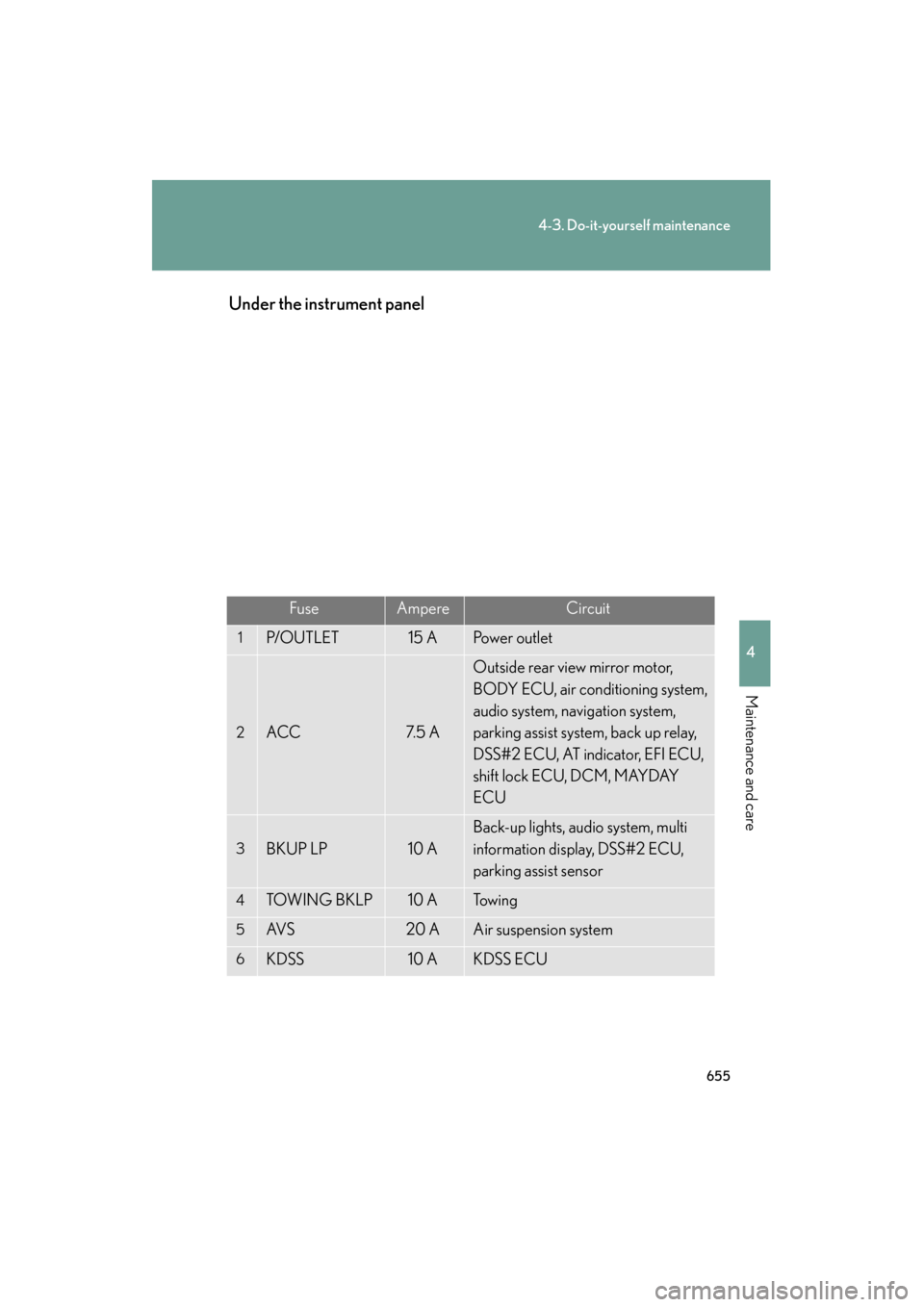
GX460_U.S.A. (OM60J00U)Under the instrument panel
FuseAmpereCircuit
1P/O U T L E T15 APo w e r o u t l e t
2ACC7. 5 A
Outside rear view mirror motor,
BODY ECU, air conditioning system,
audio system, navigation system,
parking assist system, back up relay,
DSS#2 ECU, AT indicator, EFI ECU,
shift lock ECU, DCM, MAYDAY
ECU
3BKUP LP10 A
Back-up lights, audio system, multi
information display, DSS#2 ECU,
parking assist sensor
4TOW I N G B K L P10 ATo w i n g
5AV S20 AAir suspension system
6KDSS10 AKDSS ECU