Page 206 of 554

Interior features3
205
ES350_U
3-3. Using the Bluetooth®
audio system
Bluetooth
® audio system .... 260
Using the Bluetooth
®
audio system ......................... 263
Operating a Bluetooth
®
enabled portable player .... 268
Setting up a Bluetooth
®
enabled portable player ..... 271
Bluetooth
® audio system
setup ........................................ 278
3-4. Using the hands-free system (for mobile phone)
Hands-free system for mobile phones ...................... 279
Using the hands-free system
(for mobile phone).............. 283
Making a phone call ............... 291
Setting a mobile phone......... 296
Security and system setup ......................................... 301
Using the phone book.......... 305
3-5. Using the interior lights Interior lights list ...................... 312
• Interior lights ......................... 314
• Personal lights ....................... 314 3-6. Using the storage features
List of storage features.......... 315
• Glove box ............................... 316
• Console box .......................... 317
• Overhead console............... 318
• Cup holders ........................... 319
• Auxiliary box ......................... 321
3-7. Other interior features Sun visors ................................. 322
Vanity mirror ........................... 323
Clock ......................................... 324
Ashtray ..................................... 325
Cigarette lighter .................... 326
Power outlet ............................ 327
Seat heaters ............................ 328
Seat heaters and ventilators ............................. 330
Armrest .................................... 332
Rear sunshade ........................ 333
Extended trunk....................... 335
Coat hooks .............................. 336
Floor mat .................................. 337
Trunk features ......................... 338
Garage door opener ............ 340
Compass................................... 346
Safety Connect ...................... 350
Page 211 of 554
210
3-1. Using the air conditioning system and defogger
ES350_U
Adjusting the position of and opening and closing the air outlets
Center outlets Direct air flow to the left or right,
up or down
Front outlets (right and left side) Direct air flow to the left or right,
up or down
Turn the knob right to open the
vent and left to close the vent
Rear outlets Direct air flow to the left or right,
up or down
Turn the knob up to open the
vent and down to close the vent
Page 212 of 554

211
3-1. Using the air conditioning system and defogger
3
Interior features
ES350_U
■Using the automatic mode
Fan speed is adjusted automatically in accordance with the temperature setting and
ambient conditions. As a result, the following may occur.
●Immediately after the switch is pressed, the fan may stop for a while until warm
or cool air is ready to flow.
●Cool air may flow to the area around the upper body when the heater is on.
■Using the system in recirculated air mode
The windows will fog up more easily if the recirculated air mode is used for an
extended period.
■Switching between outside air and recirculated air modes
Recirculated air mode or outside air mode may be automatically switched to in
accordance with the temperature setting and the inside temperature.
■Window defogger feature
Recirculated air mode may automatically switch to
(outside air) mode in sit-
uations where the windows need to be defogged.
■When outside air temperature approaches 32 °F (0 °C)
The air conditioning system may not operate even when
is pressed.
■When the indicator light on flashes
Press
and turn off the air conditioning system before turning it on once
more. There may be a problem in the air conditioning system if the indicator light
continues to flash. Turn the air conditioning system off and have it inspected by your
Lexus dealer.
■Automatic mode for air intake control
In automatic mode, the system detects exhaust gas and other pollutants and auto-
matically switches between outside air and recirculated air modes.
Page 220 of 554
219
3-2. Using the audio system
3
Interior features
ES350_U■
Displaying radio text messages
Press twice.
A text message is displayed when “MSG” is shown on the screen.
If the text continues past the end of the display, “ ” is displayed. Press and
hold until you hear a beep.
XM® Satellite Radio (If equipped)
■ Receiving XM
® Satellite Radio
Press .
The display changes as follows each time the button is pressed:
“SAT1” → “SAT2” → “SAT3”
Turn to select the desired channel in the all categories or
press “ ∧” or “ ∨” on to select the desired channel in
the current category.
■ Setting XM
® Satellite Radio channel presets
Select the desired channel. Press and hold the button (from
to
) the channel is to be set to until you hear a beep.
■ Changing the channel category
Press “ ∧” or “ ∨” on .
■ Scanning XM
® Satellite Radio channels
● Scanning the channels in the current category
Press .
When the desired channel is reached, press the button
again.
STEP1
STEP2
STEP1
STEP2
Page 222 of 554

221
3-2. Using the audio system
3
Interior features
ES350_U
■When the battery is disconnected
All preset stations are erased.
■Reception sensitivity
●It is difficult to maintain perfect radio reception at all times due to the continually
changing position of the antenna, differences in signal strength and surrounding
objects, such as trains and transmitters.
●The radio antenna is mounted inside the rear window. To maintain clear radio
reception, do not attach metallic window tinting or other metallic objects to the
antenna wire mounted inside the rear window.
■Receiving XM® Satellite Radio
An XM
® Satellite Radio is a tuner designed exclusively to receive broadcasts pro-
vided under a separate subscription. Availability is limited to the 48 contiguous
states and 10 Canadian provinces.
●XM® subscriptions
For detailed information about XM® Satellite Radio or to subscribe:
U.S.A.
Visit on the web at www.xmradio.com
or call 1-877-515-3987.
Canada
Visit on the web at www.xmradio.ca
or call 1-877-515-3987.
●Radio ID
You will need the radio ID when activating XM
® service or reporting a prob-
lem. Select “CH000” using , and the receiver's 8-character ID number
will appear.
●Satellite tuner
The tuner supports only Audio Services (Music and Talk) and the accompany-
ing Text Information of XM
® Satellite Radio.
Page 223 of 554

222
3-2. Using the audio system
ES350_U
■If the satellite radio does not operate normally
If a problem occurs with the XM
® tuner, a message will appear on the display. Refer
to the table below to identify the problem, and take the suggested corrective action.
“A N T E N N A”
The XM® antenna is not connected. Check whether
the XM® antenna cable is attached securely.
There is a short-circuit in the antenna or the surround-
ing antenna cable. See a Lexus certified dealer.
“UNAUTH”
You have not subscribed to the XM® Satellite Radio.
The radio is being updated with the latest encryption
code. Contact the XM
® Satellite Radio for subscrip-
tion information. When a contract is canceled, you can
choose the “CH000” and all free-to-air channels.
The premium channel you selected is not authorized.
Wait for about 2 seconds until the radio returns to the
previous channel or “CH001”. If it does not change
automatically, select another channel. If you want to lis-
ten to the premium channel, contact the XM
® Satellite
Radio.
“NO SIGNAL”
The XM® signal is too weak at the current location.
Wait until your vehicle reaches a location with a stron-
ger signal.
“LOADING”The unit is acquiring audio or program information.
Wait until the unit has received the information.
“OFF AIR”The channel you selected is not broadcasting any pro-
gramming. Select another channel.
“-----”
There is no song/program title or artist name/feature
associated with the channel at that time. No action
needed.
Page 224 of 554

223
3-2. Using the audio system
3
Interior features
ES350_U
Contact the XM® Listener Care Center at 1-877-515-3987.
■Certifications for the radio tuner
This equipment has been tested and found to comply with the limits for a class B
digital device, pursuant to Part 15 of the FCC Rules. These limits are designed to
provide reasonable protection against harmful interference in a residential installa-
tion. This equipment generates, uses and can radiate radio frequency energy and, if
not installed and used in accordance with the instructions, may cause harmful inter-
ference to radio communications. However, there is no guarantee that interference
will not occur in a particular installation.
If this equipment does cause harmful interference to radio or television reception,
which can be determined by turning the equipment off and on, the user is encour-
aged to try to correct the interference by trying one or more of the following:
●Reorienting or relocate the receiving antenna.
●Increasing the separation between the equipment and receiver.
●Connecting the equipment into an outlet on a circuit different from that to which
the receiver is connected.
●Consulting the dealer or an experienced radio/TV technician for help.
“CH UNAVL”
The channel you selected is no longer available. Wait
for about 2 seconds until the radio returns to the previ-
ous channel or “CH001”. If it does not change auto-
matically, select another channel.
Page 225 of 554
224
3-2. Using the audio system
ES350_U
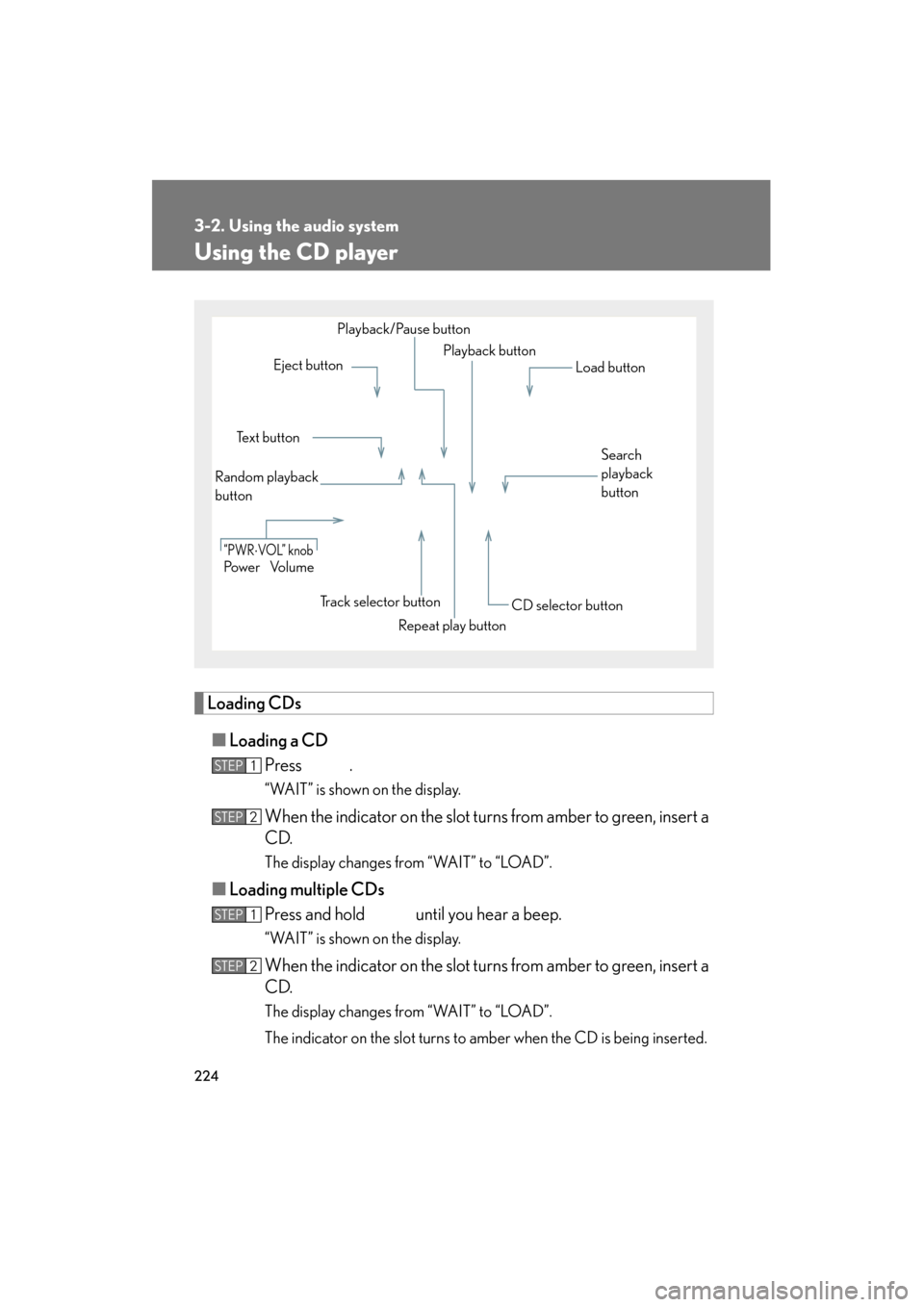
Using the CD player
Loading CDs■ Loading a CD
Press .
“WAIT” is shown on the display.
When the indicator on the slot turns from amber to green, insert a
CD.
The display changes from “WAIT” to “LOAD”.
■Loading multiple CDs
Press and hold until you hear a beep.
“WAIT” is shown on the display.
When the indicator on the slot turns from amber to green, insert a
CD.
The display changes from “WAIT” to “LOAD”.
The indicator on the slot turns to amber when the CD is being inserted.
Po w e r Vo l u m e
Repeat play button
“PWR⋅VOL” knob
Eject buttonPlayback button
Random playback
button Te x t b u t t o n Playback/Pause button
Load button
Search
playback
button
Track selector button CD selector button
STEP1
STEP2
STEP1
STEP2