Page 369 of 710
368
3-2. Using the audio system
CT200h_OM_OM76067E_(EE)
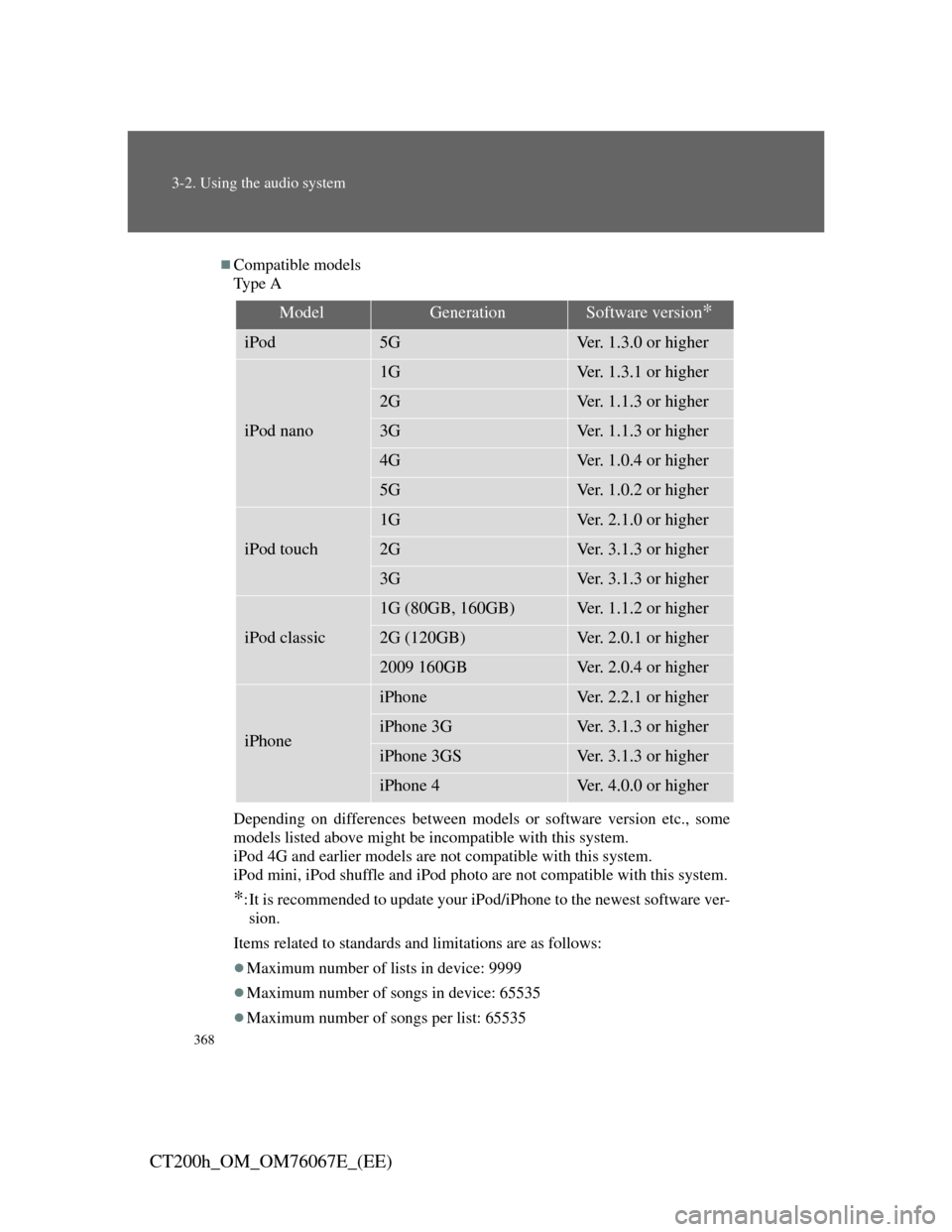
Compatible models
Ty p e A
Depending on differences between models or software version etc., some
models listed above might be incompatible with this system.
iPod 4G and earlier models are not compatible with this system.
iPod mini, iPod shuffle and iPod photo are not compatible with this system.
*:It is recommended to update your iPod/iPhone to the newest software ver-
sion.
Items related to standards and limitations are as follows:
Maximum number of lists in device: 9999
Maximum number of songs in device: 65535
Maximum number of songs per list: 65535
ModelGenerationSoftware version*
iPod5GVer. 1.3.0 or higher
iPod nano
1GVer. 1.3.1 or higher
2GVer. 1.1.3 or higher
3GVer. 1.1.3 or higher
4GVer. 1.0.4 or higher
5GVer. 1.0.2 or higher
iPod touch
1GVer. 2.1.0 or higher
2GVer. 3.1.3 or higher
3GVer. 3.1.3 or higher
iPod classic
1G (80GB, 160GB)Ver. 1.1.2 or higher
2G (120GB)Ver. 2.0.1 or higher
2009 160GBVer. 2.0.4 or higher
iPhone
iPhoneVer. 2.2.1 or higher
iPhone 3GVer. 3.1.3 or higher
iPhone 3GSVer. 3.1.3 or higher
iPhone 4Ver. 4.0.0 or higher
Page 370 of 710

369
3-2. Using the audio system
3
Interior features
CT200h_OM_OM76067E_(EE)
Ty p e B
Depending on differences between models or software version etc., some
models listed above might be incompatible with this system.
iPod 4G and earlier models are not compatible with this system.
iPod mini, iPod shuffle and iPod photo are not compatible with this system.
*:It is recommended to update your iPod/iPhone to the newest software ver-
sion.
Items related to standards and limitations are as follows:
Maximum number of lists in device: 9999
Maximum number of songs in device: 65535
Maximum number of songs per list: 65535
ModelGenerationSoftware version*
iPod5GVer. 1.2.0 or higher
iPod nano
1GVer. 1.0.0 or higher
2GVer. 1.1.3 or higher
3GVer. 1.0.0 or higher
4GVer. 1.0.2 or higher
5GVer. 1.0.1 or higher
iPod touch
1GVer. 1.1.0 or higher
2GVer. 2.1.1 or higher
3GVer. 3.1.3 or higher
iPod classic
1G (80GB, 160GB)Ver. 1.0.0 or higher
2G (120GB)Ver. 2.0.0 or higher
2009 160GBVer. 2.0.3 or higher
iPhone
iPhoneVer. 2.1.0 or higher
iPhone 3GVer. 2.1.0 or higher
iPhone 3GSVer. 3.0.0 or higher
iPhone 4Ver. 4.0.0 or higher
Page 397 of 710
395
3-3. Using the Bluetooth® audio system
3
Interior features
CT200h_OM_OM76067E_(EE)
Steering wheel switch
Ta l k s w i t c h
Turns the voice command
system on (press)/turns the
voice command system off
(press and hold)
Microphone
Page 399 of 710
397
3-3. Using the Bluetooth® audio system
3
Interior features
CT200h_OM_OM76067E_(EE)Select “Confirm” using a voice command or .
A passkey is displayed and heard, and a voice guidance instruction
for inputting the passkey into the portable player is heard.
Input the passkey into the portable player.
Refer to the manual that comes with the portable player for the
operation of the portable player.
Guidance for registration completion is heard.
If the portable player has a Bluetooth
® phone, the phone can be
registered at the same time. A voice guidance instruction to regis-
ter a Bluetooth
® phone is heard.
Select “Yes” or “No” using a voice command or .
(Bluetooth
® phone P. 413)
STEP5
STEP6
STEP7
Page 409 of 710
407
3-3. Using the Bluetooth® audio system
3
Interior features
CT200h_OM_OM76067E_(EE)
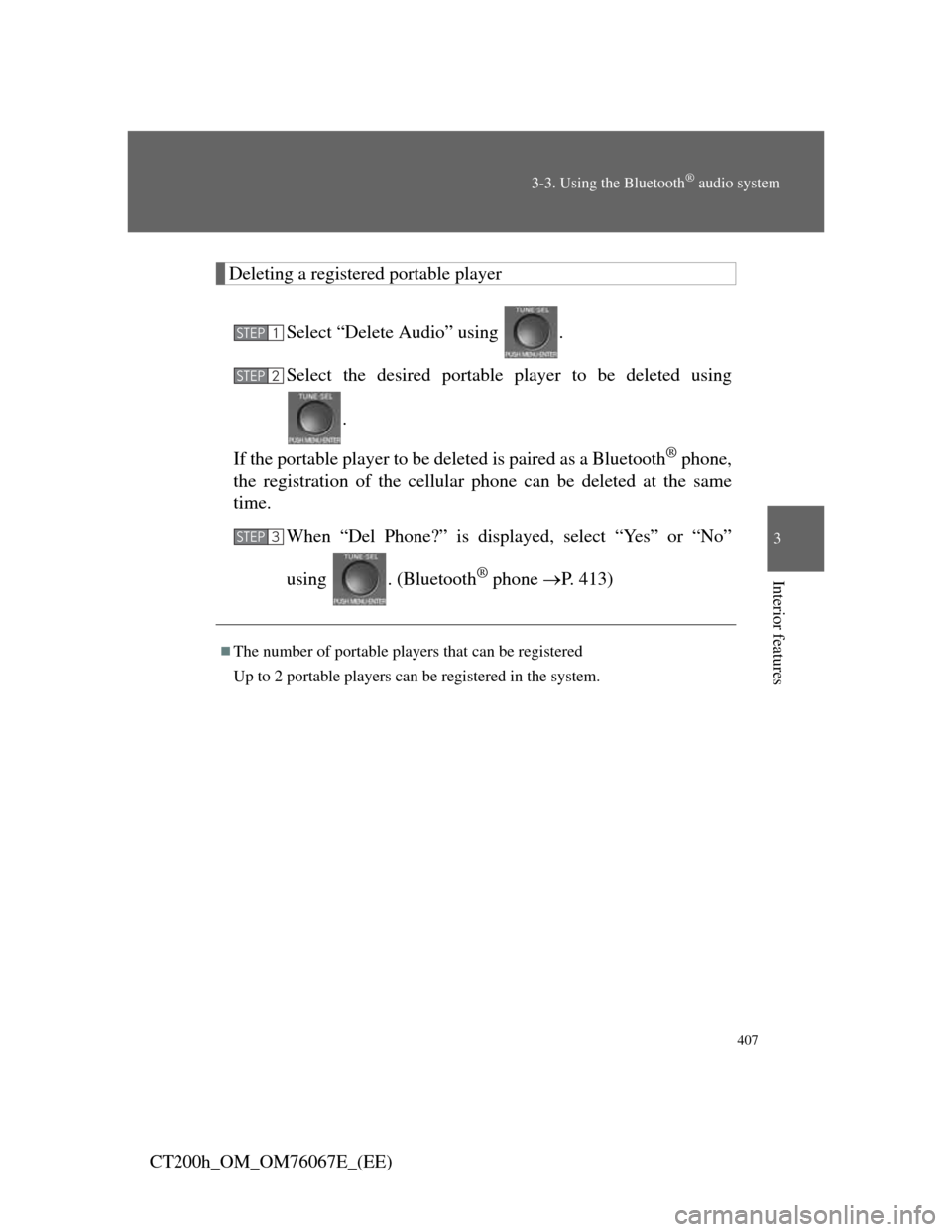
Deleting a registered portable player
Select “Delete Audio” using .
Select the desired portable player to be deleted using
.
If the portable player to be deleted is paired as a Bluetooth
® phone,
the registration of the cellular phone can be deleted at the same
time.
When “Del Phone?” is displayed, select “Yes” or “No”
using . (Bluetooth
® phone P. 413)
The number of portable players that can be registered
Up to 2 portable players can be registered in the system.
STEP1
STEP2
STEP3
Page 411 of 710
409
3
Interior features
CT200h_OM_OM76067E_(EE)
3-4. Using the hands-free phone system (for cellular phones)
Hands-free system for cellular phone
The hands-free system is a function that allows you to use your cellu-
lar phone without touching it.
This system supports Bluetooth
® cellular phones. Bluetooth® is a
wireless data system that allows the cellular phone to wirelessly con-
nect to the hands-free system and make/receive calls.
Vehicles with a navigation system
Refer to the “Navigation System Owner’s Manual”.
Vehicles without a navigation system
Hands-free system quick guide
Setting a cellular phone. (P. 420)
Adding an entry to the phonebook. (Up to 20 names can
be stored.) (P. 438)
Dialing by inputting a name. (P. 425)
Hands-free function list
TitlePage
Using the hands-free system
Using the hands-free phone system for
the first time
P. 4 2 0
STEP1
STEP2
STEP3
Page 412 of 710
410
3-4. Using the hands-free phone system (for cellular phones)
CT200h_OM_OM76067E_(EE)
TitlePage
Making a phone call
Making a phone call
• Dialing by inputting a name
• Speed dialing
•Redial
• Call back
Receiving a phone call
• Answering the phone
• Refusing the call
Transferring a call
Using a call history memory
• Dialing
• Storing data in the phone book
• Deleting
P. 4 2 4
Setting a cellular phone
Functions and operation proceduresP. 4 2 9
Security and system setup
Security setting items and operation
procedure
System setup items and operation
procedure
P. 4 3 3
Page 413 of 710
411
3-4. Using the hands-free phone system (for cellular phones)
3
Interior features
CT200h_OM_OM76067E_(EE)
TitlePage
Using the phone book
Adding a new phone number
Changing the registered name in the
phone book
Listing the registered data
Setting speed dials
Deleting the registered data
Deleting speed dials
P. 4 3 8