2012 KIA Sportage ignition
[x] Cancel search: ignitionPage 148 of 387
Features of your vehicle
58
4
Immobilizer indicator
(if equipped)
With smart key system
If any of the following occurs in a vehicle
equipped with the smart key, the immobi-
lizer indicator illuminates, blinks or goes
off.
When the smart key is in the vehicle, if the ENGINE START/STOP button is in
the ACC or ON position, the indicator
will illuminate for approximately 30
seconds to indicate that you are able to
start the engine. However, when the
smart key is not in the vehicle, if the
ENGINE START/STOP button is
pressed, the indicator will blink for a
few seconds to indicate that you are
not be able to start the engine.
If the indicator illuminates only for 2 seconds and goes out when the
ENGINE START/STOP button is
turned to ON position with the smart
key in the vehicle, have the system
checked by an authorized Kia dealer.
When the battery is weak, if the ENGINE START/STOP button is
pressed, the indicator will blink and you
are not able to start the engine.
However, you are able to start the
engine by inserting the smart key in
the smart key holder. Also, if the smart
key system related parts have a prob-
lem, the indicator will blink.
D150320AHM-EU-U1
Malfunction Indicator Light
(MIL) (check engine light)
This indicator light is part of the Engine
Control System which monitors various
emission control system components. If
this light illuminates while driving, it indi-
cates that a potential malfunction has
been detected somewhere in the emis-
sion control system.
This light will also illuminate when the
ignition switch is turned to the ON posi-
tion, and will go out in a few seconds
after the engine is started. If it illuminates
while driving, or does not illuminate when
the ignition switch is turned to the ON
position, take your vehicle to the nearest
authorized Kia dealer and have the sys-
tem checked.
Generally, your vehicle will continue to be
drivable, but have the system checked by
an authorized Kia dealer promptly.
CAUTION
If the Emission Control SystemMalfunction Indicator Light illumi-nates, potential catalytic converterdamage is possible. This could result in loss of engine power. Havethe Engine Control System inspect- ed as soon as possible by anauthorized Kia dealer.
CAUTION
Prolonged driving with the Emission Control System MalfunctionIndicator Light illuminated may cause damage to the emission con-trol systems which could effect dri-vability and/or fuel economy.
Page 149 of 387
459
Features of your vehicle
D150323AAM-EU
ESC (Electronic StabilityControl) indicator
The ESC indicator will illuminate when
the ignition switch is turned ON, but
should go off after approximately 3 sec-
onds. When the ESC is on, it monitors
the driving conditions and under normal
driving conditions, the ESC indicator will
remain off. When a slippery or low trac-
tion condition is encountered, the ESC
will operate, and the ESC indicator will
blink to indicate the ESC is operating.
If this indicator illuminates and stays on,
the ESC may have malfunctioned. Take
your vehicle to an authorized Kia dealer
and have the system checked.
D150324AAM-EU
ESC OFF indicator
The ESC OFF indicator will illuminate
when the ignition switch is turned ON,
but should go off after approximately 3
seconds. To switch to ESC OFF mode,
press the ESC OFF button. The ESC
OFF indicator will illuminate indicating
the ESC is deactivated.
✽ ✽ NOTICE
No system, no matter how advanced, can
compensate for all driver error and/or
driving conditions. Always drive respon-
sibly.
DBC (Downhill brake con-
trol) indicator (if equipped)
The DBC indicator will illuminate when
the DBC button is pressed and the sys-
tem is on.
When driving down a steep hill at a
speed under 35 km/h (22 mph), the DBC
will operate and the DBC indicator will
blink to indicate the DBC is operating.
If the red indicator illuminates, the DBC
system may have malfunctioned. Take
your vehicle to an authorized Kia dealer
and have the system checked.
Page 150 of 387
Features of your vehicle
60
4
D150325AAM
Cruise indicators (if equipped)
CRUISE indicator
The indicator illuminates when the cruise
control system is enabled.
The cruise indicator in the instrument
cluster is illuminated when the cruise
control ON-OFF switch on the steering
wheel is pushed.
The indicator goes off when the cruise
control ON-OFF switch is pushed again.
For more information about the use of
cruise control, refer to “Cruise control
system” in section 5.
Cruise SET indicator
The indicator illuminates when the cruise
function switch (SET - or RES +) is ON.
The cruise SET indicator in the instru-
ment cluster is illuminated when the
cruise control switch (SET - or RES +) is
pushed.
The cruise SET indicator does not illumi-
nate when the cruise control switch
(CANCEL) is pushed or the system is
disengaged.
D150327AUN
Key reminder warning chime
(if equipped)
If the driver’s door is opened while the
ignition key is left in the ignition switch
(ACC or LOCK position), the key
reminder warning chime will sound. This
is to prevent you from locking your keys
in the vehicle. The chime sounds until the
key is removed from the ignition switch or
the driver’s door is closed.
KEY OUT indicator (if equipped)
When the ENGINE START/STOP button
is in the ACC or ON position, if any door
is open, the system checks for the smart
key. If the smart key is not in the vehicle,
the indicator will blink, and if all doors are
closed, the chime will also sound for
about 5 seconds. The indicator will go off
while the vehicle is moving. Keep the
smart key in the vehicle or insert it in the
smart key holder.
4WD system warning light(if equipped)
When the ignition switch is turned to the
ON position, the 4WD indicator will illu-
minate and then go off in a few seconds.
If the 4WD system warning light
illuminates, this indicates that there is a
malfunction in the 4WD system. If this
occurs, have your vehicle checked by an
authorized Kia dealer as soon as possi-
ble.
SET
CRUISE
KEY
OUT
Page 153 of 387
463
Features of your vehicle
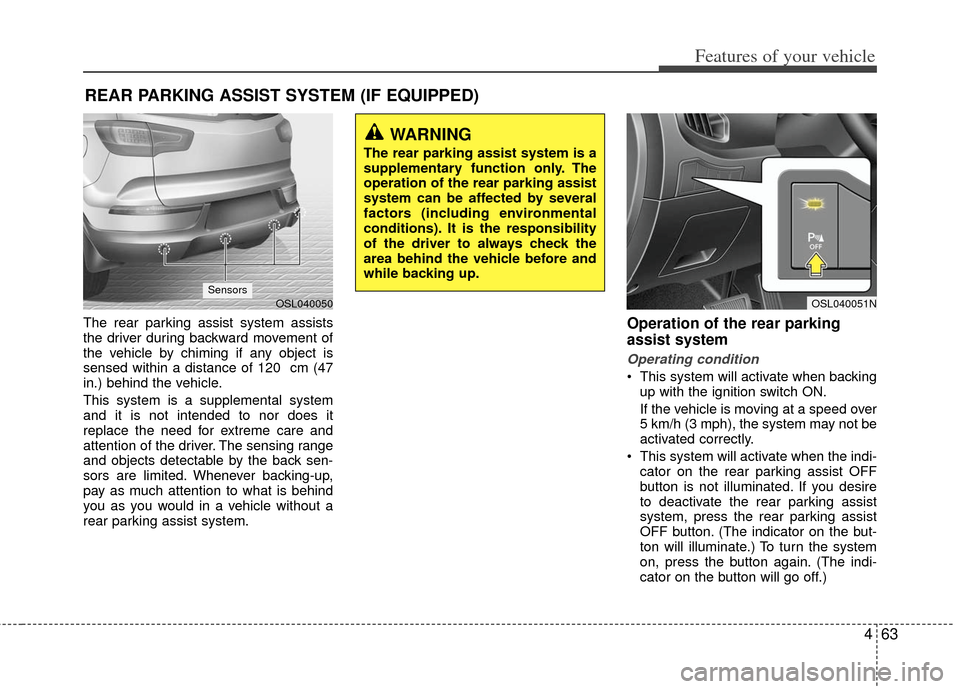
The rear parking assist system assists
the driver during backward movement of
the vehicle by chiming if any object is
sensed within a distance of 120 cm (47
in.) behind the vehicle.
This system is a supplemental system
and it is not intended to nor does it
replace the need for extreme care and
attention of the driver. The sensing range
and objects detectable by the back sen-
sors are limited. Whenever backing-up,
pay as much attention to what is behind
you as you would in a vehicle without a
rear parking assist system.Operation of the rear parking
assist system
Operating condition
This system will activate when backingup with the ignition switch ON.
If the vehicle is moving at a speed over
5 km/h (3 mph), the system may not be
activated correctly.
This system will activate when the indi- cator on the rear parking assist OFF
button is not illuminated. If you desire
to deactivate the rear parking assist
system, press the rear parking assist
OFF button. (The indicator on the but-
ton will illuminate.) To turn the system
on, press the button again. (The indi-
cator on the button will go off.)
REAR PARKING ASSIST SYSTEM (IF EQUIPPED)
WARNING
The rear parking assist system is a
supplementary function only. The
operation of the rear parking assist
system can be affected by several
factors (including environmental
conditions). It is the responsibility
of the driver to always check the
area behind the vehicle before and
while backing up.
OSL040051NOSL040050Sensors
Page 156 of 387
Features of your vehicle
66
4
D330000AHM-EE
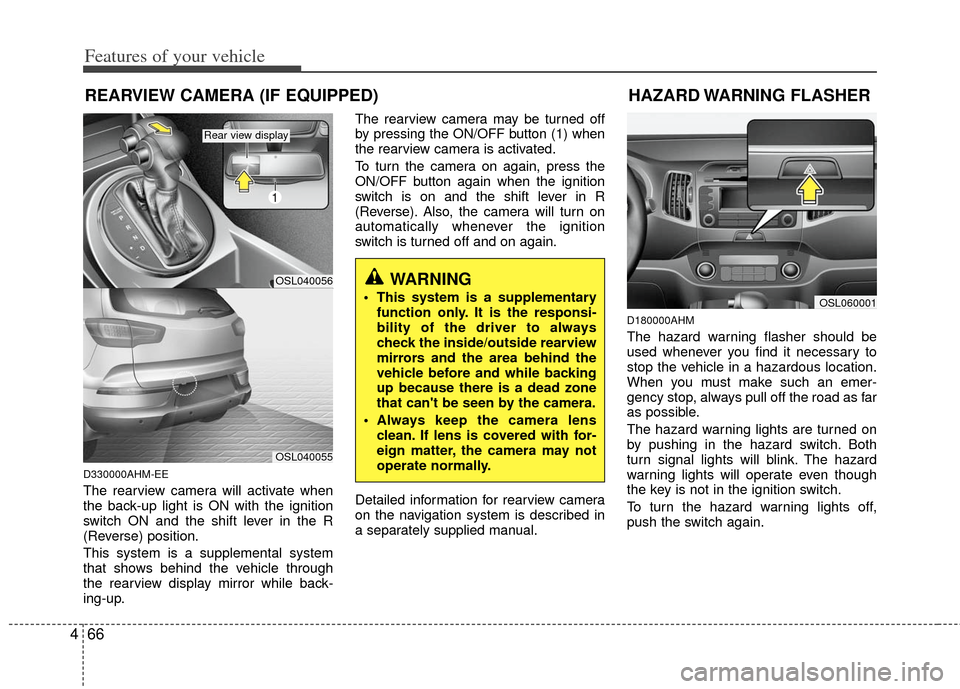
The rearview camera will activate when
the back-up light is ON with the ignition
switch ON and the shift lever in the R
(Reverse) position.
This system is a supplemental system
that shows behind the vehicle through
the rearview display mirror while back-
ing-up. The rearview camera may be turned off
by pressing the ON/OFF button (1) when
the rearview camera is activated.
To turn the camera on again, press the
ON/OFF button again when the ignition
switch is on and the shift lever in R
(Reverse). Also, the camera will turn on
automatically whenever the ignition
switch is turned off and on again.
Detailed information for rearview camera
on the navigation system is described in
a separately supplied manual.
D180000AHM
The hazard warning flasher should be
used whenever you find it necessary to
stop the vehicle in a hazardous location.
When you must make such an emer-
gency stop, always pull off the road as far
as possible.
The hazard warning lights are turned on
by pushing in the hazard switch. Both
turn signal lights will blink. The hazard
warning lights will operate even though
the key is not in the ignition switch.
To turn the hazard warning lights off,
push the switch again.
WARNING
This system is a supplementary
function only. It is the responsi-
bility of the driver to always
check the inside/outside rearview
mirrors and the area behind the
vehicle before and while backing
up because there is a dead zone
that can't be seen by the camera.
Always keep the camera lens clean. If lens is covered with for-
eign matter, the camera may not
operate normally.
REARVIEW CAMERA (IF EQUIPPED)
OSL060001
HAZARD WARNING FLASHER
OSL040056
1
OSL040055
Rear view display
Page 157 of 387
467
Features of your vehicle
D190100APB
Battery saver function
The purpose of this feature is to pre-vent the battery from being discharged
if the lights are left in the ON position.
The system automatically shuts off the
parking lights 30 seconds after the
ignition key is removed and the driver’s
door is opened and closed.
With this feature, the parking lights will turn off automatically if the driver parks
on the side of the road at night and
opens the driver’s side door.
If necessary, to keep the parking lights
on when the ignition key is removed,
perform the following:
1) Open the driver-side door.
2) Turn the parking lights OFF and ON again using the light switch on the
steering column.
Headlight escort function
(if equipped)
The headlights (and/or taillights) remain
on for approximately 20 minutes after the
ignition key is removed or turned to the
ACC or LOCK position. However, if the
driver’s door (and tailgate) is opened and
closed, the headlights are turned off after
30 seconds.
The headlights can be turned off by
pressing the lock button on the transmit-
ter (or smart key) twice or turning off the
light switch from the headlight or Auto
light position.
Headlight welcome function
(if equipped)
When the headlight switch is in the ON or
AUTO position and all doors (and tail-
gate) are closed and locked, if you press
the door unlock button on the transmitter
(or smart key), the headlights will come
on for about 15 seconds.
If the headlight switch is in the AUTO
position, the function can only operate at
night.
At this time, if you press the door lock
button or unlock button (once or twice) on
the transmitter (or smart key), the head-
lights will turn off immediately.
LIGHTING
CAUTION
If the driver gets out of the vehiclethrough other doors (except dri-ver's door), the battery saver func-tion does not operate and the head- light escort function does not turnoff automatically. Therefore, It caus-es the battery to be discharged. Inthis case, make sure to turn off thelamp before getting out of the vehi-cle.
Page 158 of 387
Features of your vehicle
68
4
❈ The actual feature may differ from the illus-
tration.
D190400AUN-C1
Lighting control
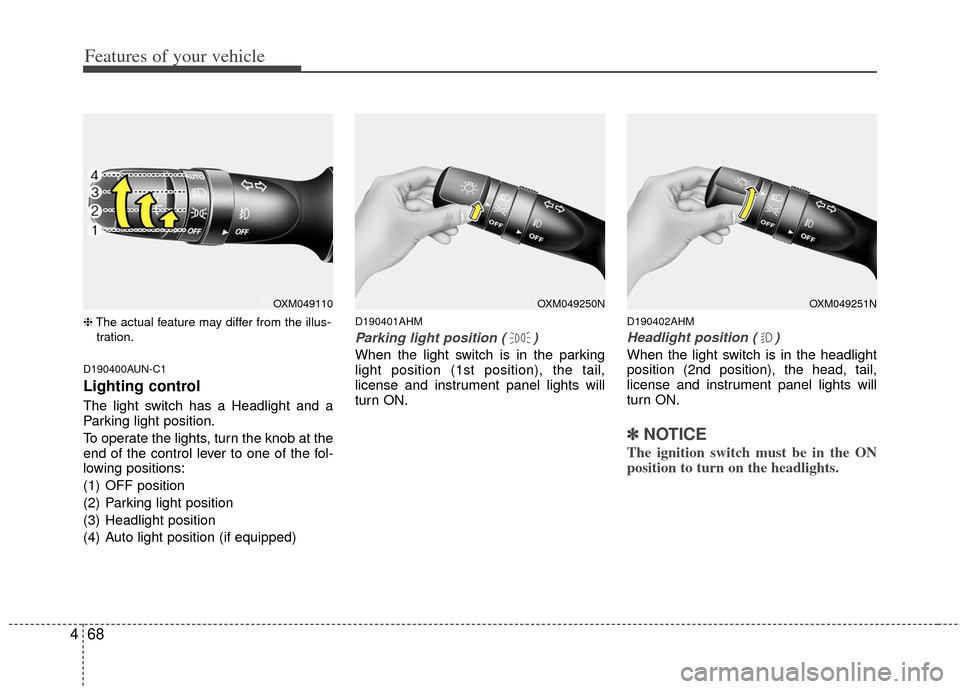
The light switch has a Headlight and a
Parking light position.
To operate the lights, turn the knob at the
end of the control lever to one of the fol-
lowing positions:
(1) OFF position
(2) Parking light position
(3) Headlight position
(4) Auto light position (if equipped)
D190401AHM
Parking light position ( )
When the light switch is in the parking
light position (1st position), the tail,
license and instrument panel lights will
turn ON.
D190402AHM
Headlight position ( )
When the light switch is in the headlight
position (2nd position), the head, tail,
license and instrument panel lights will
turn ON.
✽ ✽ NOTICE
The ignition switch must be in the ON
position to turn on the headlights.
OXM049251NOXM049250NOXM049110
Page 160 of 387
Features of your vehicle
70
4
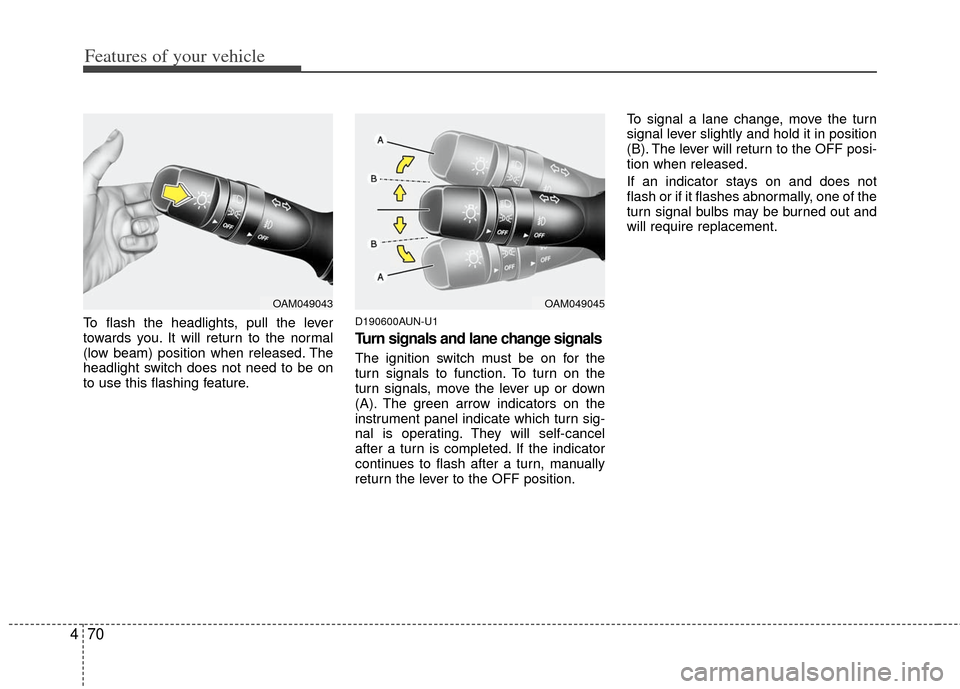
To flash the headlights, pull the lever
towards you. It will return to the normal
(low beam) position when released. The
headlight switch does not need to be on
to use this flashing feature.D190600AUN-U1
Turn signals and lane change signals
The ignition switch must be on for the
turn signals to function. To turn on the
turn signals, move the lever up or down
(A). The green arrow indicators on the
instrument panel indicate which turn sig-
nal is operating. They will self-cancel
after a turn is completed. If the indicator
continues to flash after a turn, manually
return the lever to the OFF position. To signal a lane change, move the turn
signal lever slightly and hold it in position
(B). The lever will return to the OFF posi-
tion when released.
If an indicator stays on and does not
flash or if it flashes abnormally, one of the
turn signal bulbs may be burned out and
will require replacement.
OAM049045OAM049043