2012 KIA Rio Blink
[x] Cancel search: BlinkPage 35 of 385

313
Safety features of your vehicle
Seat belt warning (for driver’s seat)
The driver's seat belt warning light and
chime will activate to the following table
when the ignition switch is in "ON" posi-
tion.*
1Warning pattern repeats 11 times with
an interval of 24 seconds. If the driver's
seat belt is buckled, the light will stop
within 6 seconds and chime will stop
immediately.
*
2The light will stop within 6 seconds and
chime will stop immediately.
Seat belt warning (for front passen- ger’s seat)
The front passenger's seat belt warning
light will activate to the following table
when the ignition switch is in "ON" posi-
tion.
1GQA2083
ConditionsWarning Pattern
Seat BeltVehicle
SpeedLight-BlinkChime-Sound
Unbuckled6 seconds
Buckled6 secondsNone
Buckled →
Unbuckled
Below 5 km/h (3 mph)6 secondsNone
5 km/h~10 km/h6 seconds
Above 10 km/h(6 mph)6 sec. on / 24 sec. off (11 times)
Unbuckled
Above 10 km/h(6 mph)
↓
Below 5 km/h
(3 mph)6 seconds *1
↓
Stop *2
OUB031014N
Page 36 of 385
Safety features of your vehicle
14
3
*1The seat belt warning light will go off if
the vehicle speed decreases below 5
km/h (3 mph). If the vehicle speed
increases above 5 km/h (3 mph), the
warning light will blink again.
You can find the front passenger's seat belt warning light on the center fascia
panel.
Although the front passenger seat is not occupied, the seat belt warning
light will blink for 6 seconds.
The seat belt warning light can blink when a briefcase or purse is placed on
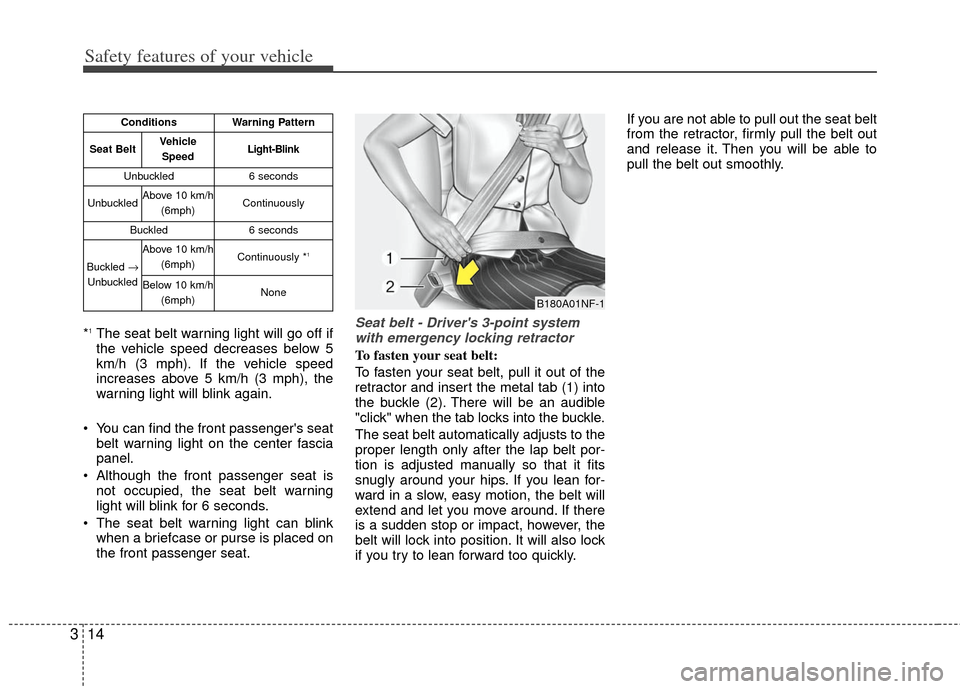
the front passenger seat.Seat belt - Driver's 3-point systemwith emergency locking retractor
To fasten your seat belt:
To fasten your seat belt, pull it out of the
retractor and insert the metal tab (1) into
the buckle (2). There will be an audible
"click" when the tab locks into the buckle.
The seat belt automatically adjusts to the
proper length only after the lap belt por-
tion is adjusted manually so that it fits
snugly around your hips. If you lean for-
ward in a slow, easy motion, the belt will
extend and let you move around. If there
is a sudden stop or impact, however, the
belt will lock into position. It will also lock
if you try to lean forward too quickly. If you are not able to pull out the seat belt
from the retractor, firmly pull the belt out
and release it. Then you will be able to
pull the belt out smoothly.
ConditionsWarning Pattern
Seat BeltVehicle
SpeedLight-Blink
Unbuckled6 seconds
UnbuckledAbove 10 km/h (6mph)Continuously
Buckled6 seconds
Buckled →
Unbuckled
Above 10 km/h (6mph)Continuously *1
Below 10 km/h(6mph)NoneB180A01NF-1
Page 79 of 385

Features of your vehicle
44
With a smart key, you can lock or unlock
a door and even start the engine without
inserting the key.
The functions of the buttons on a smart
key are similar to the remote keyless
entry. (Refer to the “Remote keyless
entry” in this section.)
Smart key functions
Carrying the smart key, you may lock and
unlock the vehicle doors. Also, you may
start the engine. Refer to the following,
for more details.
Locking
Pressing the button of the front outside
door handles with all doors closed and
any door unlocked, locks all the doors.
The hazard warning lights will blink and
the chime will sound once to indicate that
all doors are locked. The button will only
operate when the smart key is within
0.7~1 m (28~40 in.) from the outside
door handle. If you want to make sure
that a door has locked or not, you should
check the door lock button inside the
vehicle or pull the outside door handle.
SMART KEY (IF EQUIPPED)
OXM049001L
■ Type B
■Type AOUB041002N
OUB041004
Page 80 of 385

45
Features of your vehicle
Even though you press the button, the
doors will not lock and the chime will
sound for 3 seconds if any of the follow-
ing occurs:
The smart key is in the vehicle.
The ignition switch is in the ACC or ONposition.
Any door except the trunk (or tailgate) is opened.Unlocking
Pressing the button of the driver's out-
side door handle with all doors closed
and locked, unlocks the driver's door. The
hazard warning lights will blink and the
chime will sound twice to indicate that the
driver's door is unlocked. All doors are
unlocked if the button is pressed once
more within 4 seconds. The hazard warn-
ing lights will blink and the chime will
sound twice to indicate that all the doors
are unlocked.
Pressing the button in the front passen-
ger's outside door handle with all doors
closed and locked, unlocks all the doors.
The hazard warning lights will blink and
the chime will sound twice to indicate that
all doors are unlocked. The button will
only operate when the smart key is with-
in 0.7~1 m (28~40 in.) from the outside
door handle.
Tailgate unlocking (if equipped)
If you are within 0.7 m (28 in.) from the
outside tailgate handle, with your smart
key in possession, the tailgate will unlock
and open when you press the tailgate
handle switch.
The hazard warning lights will blink twice
to indicate that the tailgate is unlocked.
Also, once the tailgate is opened and
then closed, the tailgate will lock auto-
matically.
Start-up
You can start the engine without inserting
the key. For detailed information refer to
“Starting the engine with a smart key” in
section 5.
Page 82 of 385

47
Features of your vehicle
Remote keyless entry system
operations
Lock (1)
All doors are locked if the lock button is
pressed. If all doors (and trunk or tail-
gate) are closed, the hazard warning
lights will blink once to indicate that all
doors (and trunk or tailgate) are locked.
Also, if the lock button is pressed once
more within 4 seconds, the hazard warn-
ing lights will blink and the chime will
sound once to confirm that the door is
locked.
However, if any door remains open, the
hazard warning lights (and/or the chime)
will not operate. But if all doors are
closed after the lock button is pressed,
the hazard warning lights will blink once.
Unlock (2)
The driver's door is unlocked if the unlock
button is pressed once. The hazard
warning lights will blink (for smart key, the
chime also sounds) twice to indicate that
the driver's door is unlocked.
All doors are unlocked if the unlock but-
ton is pressed once more within 4 sec-
onds. The hazard warning lights will blink
(for smart key, the chime also sounds)
twice again to indicate that all doors are
unlocked. After pressing this button, the
doors will lock automatically unless you
open any door within 30 seconds.
✽ ✽NOTICE
If the keyless entry system is inoperative
due to exposure to water or liquids, it
will not be covered by your manufactur-
er's vehicle warranty.
REMOTE KEYLESS ENTRY (IF EQUIPPED)
OAM041096L
OUB041003N
■Type A
■ Type B
OXM049001L
■ Type C
Page 83 of 385

Features of your vehicle
84
Tailgate open (3) (if equipped)
The tailgate is opened if the button is
pressed for more than 1 second.
Once the tailgate is opened and then
closed, the tailgate will lock automatical-
ly.
Alarm (4)
The horn sounds and the hazard warning
lights blink for about 30 seconds if this
button is pressed for more than 0.5 sec-
onds. To stop the horn and lights, press
any button on the transmitter.
Transmitter precautions
The transmitter (or smart key) will not
work if any of following occurs:
The ignition key is in the ignitionswitch.
You exceed the operating distance limit (about 30 m [90 feet]).
The battery in the transmitter (or smart key) is weak.
Other vehicles or objects may be blocking the signal.
The weather is extremely cold.
The transmitter (or smart key) is close to a radio transmitter such as a radio
station or an airport which can interfere
with normal operation of the transmit-
ter.
When the transmitter (or smart key) does
not work properly, open and close the
door with the ignition key. If you have a
problem with the transmitter (or smart
key), contact an authorized Kia dealer. This device complies with Industry
Canada Standard RSS-210.
Operation is subject to the following two
conditions:
1. This device may not cause harmful
interference, and
2. This device must accept any interfer- ence received, including interference
that may cause undesired operation.
✽ ✽NOTICE
Changes or modifications not expressly
approved by the party responsible for
compliance could void the user’s
authority to operate the equipment. If
the keyless entry system is inoperative
due to changes or modifications not
expressly approved by the party respon-
sible for compliance, it will not be cov-
ered by your manufacturer’s vehicle
warranty.
Page 86 of 385

411
Features of your vehicle
This device complies with Industry
Canada Standard RSS-210.
Operation is subject to the following two
conditions:
1. This device may not cause harmfulinterference, and
2. This device must accept any interfer- ence received, including interference
that may cause undesired operation.Limp home (override) procedure
When you turn the ignition switch to the
ON position, if the immobilizer indicator
( ) goes off after blinking 5 times,
your transponder equipped in the ignition
key is out of order. You cannot start the
engine without the limp home procedure.
To start the engine, you have to input
your password by using the ignition
switch. Your password is only available
from an authorized Kia dealership.
Contact an authorized dealer for more
information.
The following procedure is how to input
your password of “2345” as an example.
1. Turn the ignition s witch to the ON posi-
tion. The immobilizer indicator ( )
will blink 5 times and go off indicating
the beginning of the limp home proce-
dure.
2. Turn the ignition switch to the ACC position.
3. To enter the first digit (in this example “2”), turn the ignition switch to the ON
and ACC position twice. Perform the
same procedure for the next digits
between 3 seconds and 10 seconds
(for example, for “3”, turn the ignition
ON and ACC 3 times). 4. If all of the digits have been input suc-
cessfully, you have to start the engine
within 30 seconds. If you attempt to
start the engine after 30 seconds, the
engine will not start and you will have
to input your password again.
After performing the limp home proce-
dure, you have to see an authorized Kia
dealer immediately to inspect and repair
your ignition key or immobilizer system.
WARNING
Changes or modifications not
expressly approved by the party
responsible for compliance could
void the user's authority to operate
the equipment.
Page 87 of 385

Features of your vehicle
12
4
This system is designed to provide pro-
tection from unauthorized entry into the
vehicle. This system is operated in three
stages: the first is the "Armed" stage, the
second is the "Theft-alarm" stage, and
the third is the "Disarmed" stage. If trig-
gered, the system provides an audible
alarm with blinking of the hazard warning
lights.
Armed stage
Park the vehicle and stop the engine.
Arm the system as described below.
1. Remove the ignition key from the igni-
tion switch and exit the vehicle.
2. Make sure that all doors (and tailgate) and engine hood are closed and
latched.
3. door lock button on the transmitter
(or smart key).
After completion of the steps above,
the hazard warning lights will blink
once to indicate that the system is
armed.
If any door, tailgate or engine hood
remains open, the hazard warning
lights won’t operate and theft-alarm
will not arm. After this, if all doors, tail-
gate and engine hood are closed, the
hazard warning lights blink once.
of the front outside door handles with
the smart key in your possession.
After completion of the steps above,
the hazard warning lights will blink
once to indicate that the system is
armed.
If any door remains open, the hazard
warning lights won’t operate and
theft-alarm will not arm. Close the
door and try again to lock the doors.
If tailgate or engine hood remains
open, the hazard warning lights won’t
operate and theft-alarm will not arm.
Close the tailgate or engine hood.
The hazard warning lights blink once
and theft-alarm arms.
THEFT-ALARM SYSTEM (IF EQUIPPED)
Armed stage
Theft-alarm stageDisarmedstage