2012 KIA RIO HATCHBACK maintain
[x] Cancel search: maintainPage 186 of 385
![KIA RIO HATCHBACK 2012 Owners Manual 4111
Features of your vehicle
DISPLAY SETTINGS
Press the key Select [Display]
through TUNE knob or key
Select menu through TUNE knob
Mode Pop up
[Mode Pop up] Changes /
selection mode
orkey to d](/manual-img/2/57982/w960_57982-185.png "KIA RIO HATCHBACK 2012 Owners Manual 4111
Features of your vehicle
DISPLAY SETTINGS
Press the key Select [Display]
through TUNE knob or key
Select menu through TUNE knob
Mode Pop up
[Mode Pop up] Changes /
selection mode
orkey to d")
4111
Features of your vehicle
DISPLAY SETTINGS
Press the key Select [Display]
through TUNE knob or key
Select menu through TUNE knob
Mode Pop up
[Mode Pop up] Changes /
selection mode
orkey to display the mode
change pop up screen.
Text Scroll
[Text Scroll] Set /
Maintains scroll
: Scrolls only one (1) time.
Media Display
When playing an MP3 file, select the
desired display info from ‘Folder/File’ or
‘Album/Artist/Song’.
Off
On
OffOn
MEDIARADIO
OffOn
1
SETUP
Page 216 of 385

4141
Features of your vehicle
VOICE COMMAND
Starting Voice Command
the key on the steering wheel
remote controller.
then the system will say “Please say a
command. Beep”
❈ If voice command is in [Expert Mode],
then the system will only say a “Beep-”
❈ Setting Voice command [Normal
Mode]/[Expert Mode]:
Press the key Select [System]
through the TUNE knob or
key Select [Prompt Feedback] through
the TUNE knob Set [Normal
Mode]/[Expert Mode]
5
SETUP
CAUTION
For proper voice recognition, say the voice command after the guid- ance message and the “Beep”sound.
(Continued)
After downloading Bluetooth®
wireless technology contacts, thesystem requires some times toconvert the contacts into voiceinformation. During this time,voice recognition may not oper- ate properly.
Upon inputting your contacts, special symbols and numberscannot be recognized by voice.For example, “# John Doe%&” will be recognized as “John Doe”.
CAUTION IN USING
VOICE COMMAND
The voice recognition feature of this product supports recognitionof the commands listed withinthis user’s manual.
While using voice recognition, operating the steering remotecontrol or the device will termi- nate voice recognition and allowyou to manually operate desiredfunctions.
Position of the microphone is above the head of the driver’sseat. For superior performance,maintain good posture when say-ing voice commands.
Voice recognition may not func- tion properly due to outsidenoise. The following conditionscan affect the performance ofVoice Recognition:
- When the windows and sunroof are open
- When the heating/cooling sys- tem is on
- When passing a tunnel - When driving on rugged and uneven roads
(Continued)
Page 219 of 385
Features of your vehicle
144
4
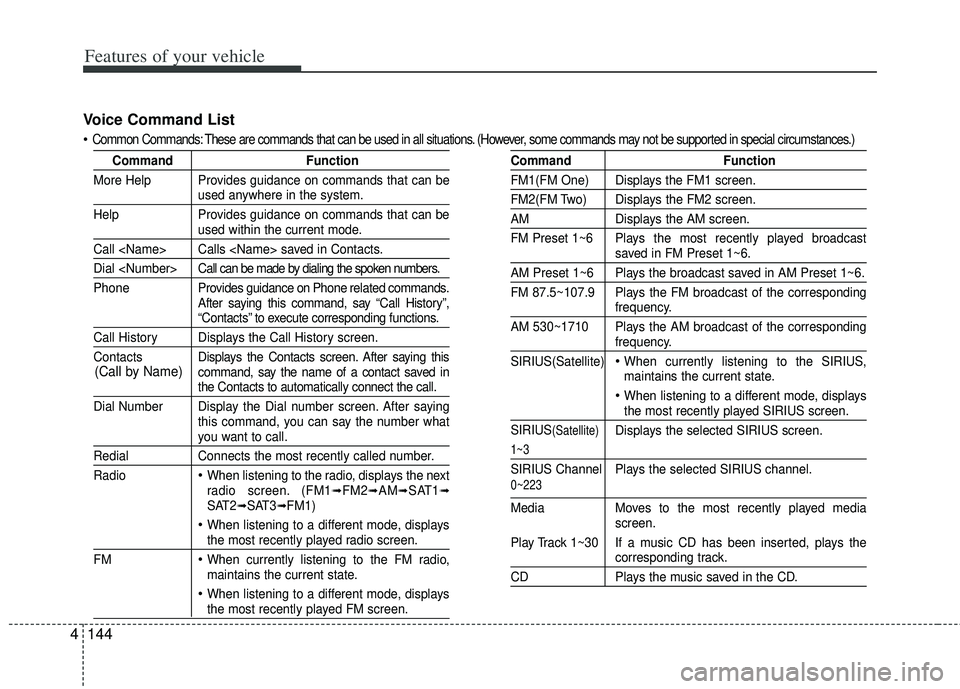
Voice Command List
Common Commands: These are commands that can be used in all situations. (However, some commands may not be supported in special c ircumstances.)
CommandFunction
More Help Provides guidance on commands that can be
used anywhere in the system.
Help Provides guidance on commands that can be
used within the current mode.
Call
Dial
Phone Pro vides guidance on Phone related commands.
After saying this command, say “Call History”,
“Contacts” to execute corresponding functions.
Call History Displays the Call History screen.
Contacts Displays the Contacts screen. After saying this
command, say the name of a contact saved in
the Contacts to automatically connect the call.
Dial Number Display the Dial number screen. After saying this command, you can say the number what
you want to call.
RedialConnects the most recently called number.
Radio
When listening to the radio, displays the next
radio screen. (FM1➟FM2➟AM➟SAT1➟SAT2➟SAT3➟FM1)
When listening to a different mode, displaysthe most recently played radio screen.
FM
When currently listening to the FM radio,
maintains the current state.
When listening to a different mode, displaysthe most recently played FM screen.
Command Function
FM1(FM One) Displays the FM1 screen.
FM2(FM Two) Displays the FM2 screen.
AMDisplays the AM screen.
FM Preset 1~6 Plays the most recently played broadcast
saved in FM Preset 1~6.
AM Preset 1~6 Plays the broadcast saved in AM Preset 1~6.
FM 87.5~107.9 Plays the FM broadcast of the corresponding
frequency.
AM 530~1710 Plays the AM broadcast of the corresponding
frequency.
SIRIUS(Satellite)
When currently listening to the SIRIUS,
maintains the current state.
When listening to a different mode, displaysthe most recently played SIRIUS screen.
SIRIUS
(Satellite)Displays the selected SIRIUS screen.
1~3
SIRIUS Channel Plays the selected SIRIUS channel.
Media Moves to the most recently played media
screen.
Play Track 1~30 If a music CD has been inserted, plays the
corresponding track.
CD Plays the music saved in the CD.
(Call by Name)
0~223
Page 236 of 385

513
Driving your vehicle
During cold weather, shifting may bedifficult until the transaxle lubricant is
warmed up. This is normal and not
harmful to the transaxle.
If you've come to a complete stop and it's hard to shift into 1st or R (Reverse),
leave the shift lever at neutral position
and release the clutch. Depress the
clutch pedal back down, and then shift
into 1st or R (Reverse) gear position.Using the clutch
The clutch should be depressed all the
way to the floor before shifting, then
released slowly. The clutch pedal should
always be fully released while driving. Do
not rest your foot on the clutch pedal
while driving. This can cause unneces-
sary wear. Do not partially engage the
clutch to hold the vehicle on an incline.
This causes unnecessary wear. Use the
foot brake or parking brake to hold the
vehicle on an incline. Do not operate the
clutch pedal rapidly and repeatedly.
Downshifting
When you must slow down in heavy traf-
fic or while driving up steep hills, down-
shift before the engine starts to labor.
Downshifting reduces the chance of
stalling and gives better acceleration
when you need to increase your speed
again. When the vehicle is traveling down
steep hills, downshifting helps maintain
safe speed and prolongs brake life.
CAUTION - Premature wear
• Do not drive with your foot rest- ing on the clutch pedal or use theclutch pedal to hold the vehiclestopped on an uphill or at a trafficlight. This will result in prematureclutch wear.
Do not use the shift lever as a handrest during driving, as thiscan result in premature wear ofthe transaxle shift forks.
WARNING - Incline parking
Before leaving the driver’s seat,
always set the parking brake fully
and shut the engine off. Then make
sure the transaxle is shifted into 1st
gear when the vehicle is parked on
a level or uphill grade, and shifted
into R (Reverse) on a downhill
grade. Unexpected and sudden
vehicle movement can occur if
these precautions are not followed
in the order identified.
Page 241 of 385

Driving your vehicle
18
5
Up (+) : Push the lever forward once to
shift up one gear.
Down (-) : Pull the lever backwards once to shift down one gear.
In sports mode, the driver must exe- cute upshifts in accordance with road
conditions, taking care to keep the
engine speed below the red zone.
In sports mode, only the 6 forward gears can be selected. To reverse or
park the vehicle, move the shift lever to
the R (Reverse) or P (Park) position as
required.
In sports mode, downshifts are made automatically when the vehicle slows
down. When the vehicle stops, 1st gear
is automatically selected.
In sports mode, when the engine rpm approaches the red zone shift points
are varied to upshift automatically.
To maintain the required levels of vehi- cle performance and safety, the system
may not execute certain gearshifts
when the shift lever is operated. When driving on a slippery road, push
the shift lever forward into the +(up)
position. This causes the transaxle to
shift into the 2nd gear which is better
for smooth driving on a slippery road.
Push the shift lever to the -(down) side
to shift back to the 1st gear.Shift lock system (if equipped)
For your safety, the automatic transaxle
has a shift lock system which prevents
shifting the transaxle out of P (Park)
unless the brake pedal is depressed.
To shift the transaxle from P (Park) into R
(Reverse):
1. Depress and hold the brake pedal.
2. Start the engine or turn the ignition switch to the ON position.
3. Move the shift lever.
If the brake pedal is repeatedly
depressed and released with the shift
lever in the P (Park) position, a chattering
noise near the shift lever may be heard.
This is a normal condition.
WARNING - Shifting from park
Always fully depress the brake
pedal before and while shifting out
of the P (Park) position into anoth-
er position to avoid inadvertent
motion of the vehicle.
Page 244 of 385

521
Driving your vehicle
Power brakes
Your vehicle has power-assisted brakes
that adjust automatically through normal
usage.
In the event that the power-assisted
brakes lose power because of a stalled
engine or some other reason, you can
still stop your vehicle by applying greater
force to the brake pedal than you nor-
mally would. The stopping distance, how-
ever, will be longer.
When the engine is not running, the
reserve brake power is partially depleted
each time the brake pedal is applied. Do
not pump the brake pedal when the
power assist has been interrupted.
Pump the brake pedal only when neces-
sary to maintain steering control on slip-
pery surfaces.Wet brakes may impair the vehicle’s abil-
ity to safely slow down; the vehicle may
also pull to one side when the brakes are
applied. Applying the brakes lightly will
indicate whether they have been affected
in this way. To dry the brakes, apply them
lightly while maintaining a safe forward
speed until brake performance returns to
normal.
In the event of brake failure
If service brakes fail to operate while the
vehicle is in motion, you can make an
emergency stop with the parking brake.
The stopping distance, however, will be
much greater than normal.
BRAKE SYSTEM
WARNING- Parking brake
Avoid applying the parking brake to
stop the vehicle while it is moving
except in an emergency situation.
Applying the parking brake while
the vehicle is moving at normal
speeds can cause a sudden loss of
control of the vehicle. If you must
use the parking brake to stop the
vehicle, use great caution in apply-
ing the brake.
WARNING- Steep hillbraking
Avoid continuous application of the
brakes when descending a long or
steep hill by shifting to a lower
gear. Continuous brake application
will cause the brakes to overheat
and could result in a temporary
loss of braking performance.
CAUTION - Brake pedal
Do not drive with your foot resting
on the brake pedal. This will createabnormally high brake tempera-tures which can cause excessivebrake lining and pad wear.
Page 247 of 385

Driving your vehicle
24
5
Anti-lock brake system (ABS)
(if equipped)
ABS (or ESC) will not prevent accidents
due to improper or dangerous driving
maneuvers. Even though vehicle control
is improved during emergency braking,
always maintain a safe distance between
you and objects ahead. Vehicle speeds
should always be reduced during
extreme road conditions.
The vehicle should be driven at reduced
speeds in the following circumstances:
When driving on rough, gravel or
snow-covered roads
When driving on roads where the road surface is pitted or has different sur-
face heights.
Driving in these conditions increases the
stopping distance for your vehicle. The ABS continuously senses the speed
of the wheels. If the wheels are going to
lock, the ABS system repeatedly modu-
lates the hydraulic brake pressure to the
wheels.
When you apply your brakes under con-
ditions which may lock the wheels, you
may hear a “tik-tik’’ sound from the
brakes, or feel a corresponding sensation
in the brake pedal. This is normal and it
means your ABS is active.
In order to obtain the maximum benefit
from your ABS in an emergency situa-
tion, do not attempt to modulate your
brake pressure and do not try to pump
your brakes. Press your brake pedal as
hard as possible or as hard as the situa-
tion allows the ABS to control the force
being delivered to the brakes.
✽ ✽
NOTICE
A click sound may be heard in the
engine compartment when the vehicle
begins to move after the engine is start-
ed. These conditions are normal and
indicate that the anti-lock brake system
is functioning properly.
Even with the anti-lock brake system,
your vehicle still requires sufficient
stopping distance. Always maintain a
safe distance from the vehicle in front
of you.
Always slow down when cornering. The anti-lock brake system cannot pre-
vent accidents resulting from exces-
sive speeds.
On loose or uneven road surfaces, operation of the anti-lock brake system
may result in a longer stopping dis-
tance than for vehicles equipped with a
conventional brake system.
Page 249 of 385

Driving your vehicle
26
5
Electronic stability control (ESC) will not
prevent accidents. Excessive speed in
turns, abrupt maneuvers and hydroplan-
ing on wet surfaces can still result in seri-
ous accidents. Only a safe and attentive
driver can prevent accidents by avoiding
maneuvers that cause the vehicle to lose
traction. Even with ESC installed, always
follow all the normal precautions for driv-
ing - including driving at safe speeds for
the conditions.
The Electronic Stability Control (ESC)
system is an electronic system designed
to help the driver maintain vehicle control
under adverse conditions. It is not a
substitute for safe driving practices.
Factors including speed, road conditions
and driver steering input can all affect
whether ESC will be effective in
preventing a loss of control. It is still your
responsibility to drive and corner at
reasonable speeds and to leave a
sufficient margin of safety.
When you apply your brakes under con-
ditions which may lock the wheels, you
may hear a “tik-tik’’ sound from the
brakes, or feel a corresponding sensation
in the brake pedal. This is normal and it
means your ESC is active.ESC operation
ESC ON condition
ON, ESC and ESC OFF indi-
cator lights illuminate for
approximately 3 seconds,
then ESC is turned on.
for at least half a second after
turning the ignition ON to turn
ESC off. (ESC OFF indicator
will illuminate). To turn the
ESC on, press the ESC OFF
button (ESC OFF indicator
light will go off).
you may hear a slight ticking
sound. This is the ESC per-
forming an automatic system
self-check and does not indi-
cate a problem. When operating
When the ESC is in operation,
ESC indicator light blinks.
Control is operating properly,
you can feel a slight pulsation
in the vehicle. This is only the
effect of brake control and
indicates nothing unusual.
or slippery road, pressing the
accelerator pedal may not
cause the engine rpm (revo-
lutions per minute) to
increase.
-