2012 KIA PICANTO voice
[x] Cancel search: voicePage 241 of 840

Features of your vehicle
168
4
✽✽
NOTICE
- The system can recognize single digits from zero to nine. Numbers that are
ten or greater cannot be recognized.
- You can enter each digit individually or group digits together in preferred
string lengths.
- To speed up input, it is a good idea to
group all digits into a continuous
string.
- Recommend to enter the numbers con- stituted an grouping within all digit
numbers to dial 995 / 734 / 0000
- The display corresponding to each
operation appears on the screen as fol-
lows:
Input operation example: 1. Say: “Nine, nine, five”
➟ Display: “995”
2. And say: “Seven, three, four”
➟ Display: “995734”
1. Press button.
2. Say “Phonebook”.
3. Say “Add Entry” after prompt.
4. Say “By Phone” to proceed.
5. Say “Yes” to confirm.
6. Your phone will start to transfer phone/contact list to the audio system.
This process may take over 10 minutes depending on the phone model and
number of entries
7. Wait till the audio displays “Transfer Complete” message.
Changing Name
The registered names can be modified.
1. Press button.
2. Say “Phonebook”.
3. Say “Change Name” after prompt.
4. Say the name of the entry (voice tag).
5. Say “Yes” to confirm.
6. Say new desired name.
Deleting Name
The registered names can be deleted.
1. Press button.
2. Say “Phonebook”.
3. Say “Delete Name” after prompt.
4. Say the name of the entry (voice tag).
5. Say “Yes” to confirm.
■ Making a Phone Call
A phone call can be made by speaking names registered in the audio system.
1. Press button.
2. Say “Call”.
3. Say “Name” when prompted.
4. Say desired name (voice tag).
5. Say desired location (phone number type). Only stored locations can be selected.
6. Say “Yes” to confirm and make a call.
✽✽ Tip
A shortcut to each of the following func-
tions is available:
1. Say “Call Name”
2. Say “Call
3. Say “Call
Page 242 of 840

4169
Features of your vehicle
A phone call can be made by dialing the
spoken numbers. The system can recog-
nize single digits from zero to nine.
1. Press button.
2. Say “Call”.
3. Say “Number” when prompted.
4. Say desired phone numbers.
5. Say “Dial” to complete the number andmake a call.
✽✽Tip
A shortcut to each of the following func-
tions is available:
1. Say “Dial Number”
2. Say “Dial
■ Receiving a Phone Call
When receiving a phone call, a ringtone
is audible from speakers and the audio
system changes into telephone mode.
When receiving a phone call, “Incoming
call” message and incoming phone num-
ber (if available) are displayed on the
audio.
- Press button on the steering wheel.
- Press button on the steering wheel.
- Use VOLUME buttons on the steering wheel.
Call):
- Press button on the steering wheel until the audio system transfers a
call to the phone. ■
Talking on the Phone
When talking on the phone, “Active Call”
message and the other party’s phone
number (if available) are displayed on the
audio.
- Press button on the steering wheel.
✽✽ NOTICE
In the following situations, you or the
other party may have difficulty hearing
each other:
1. Speaking at the same time, your voice may not reach each other parties. (This
is not a malfunction.) Speak alternate-
ly with the other party on the phone.
2. Keep the Bluetooth ®
volume to a low
level. High-level volume may result in
distortion and echo.
3. When driving on a rough road.
4. When driving at high speeds.
5. When the window is open.
6. When the air conditioning vents are
facing the microphone.
7. When the sound of the air condition-
ing fan is loud.
Page 636 of 840

4137
Features of your vehicle
CAUTION IN USING
BLUETOOTH®
MOBILE
PHONE
Do not use a mobile phone or per- form Bluetooth®settings (e.g.
pairing a phone) whilst driving.
Some Bluetooth
®-enabled phones
may not be recognized by the system or fully compatible withthe system.
Before using Bluetooth
®related
features of the audio system, refer your phone’s User’s Manual for phone-side Bluetooth
®opera-
tions.
The phone must be paired to the audio system to use Bluetooth®
related features.
You will not be able to use the
hands-free feature when yourphone (in the car) is outside of
the mobile service area (e.g. in atunnel, in a underground, in amountainous area, etc.).
If the mobile phone signal is poor or the vehicles interior noise is
too loud, it may be difficult to hearthe other person’s voice during a call.
(Continued)
(continued) Do not place the phone near or inside metallic objects, otherwise
communications with Bluetooth
®
system or mobile service stationscan be disturbed.
While a phone is connected through Bluetooth
®your phone
may discharge quicker than usual for additional Bluetooth
®-related
operations.
Some mobile phones or other devices may cause interferencenoise or malfunction to audio
system. In this case, store thedevice in a different location mayresolve the situation.
Please save your phone name in English, or your phone name may
not be displayed correctly.
Page 639 of 840

Features of your vehicle
140
4
2. Select “PHONE”, then “PRIORITY” in
PHONE menu.
3. Select desired phone name from the list shown.
®
Volume
Bluetooth ®
system volume can be adjust-
ed separately from main volume of the audio system.
1.Press button to enter SETUP
mode.
2. Select “PHONE”, then “BT VOL” in PHONE menu.
3. Adjust volume to desired level by turn-
ing the TUNE knob, then press the
knob to confirm.
Bluetooth ®
ON/OFF
Bluetooth ®
system can be enabled (ON)
or disabled (OFF) by this menu.
- If Bluetooth ®
is disabled, all the com-
mands related to Bluetooth ®
system
prompts whether you wish to turn Bluetooth ®
ON or not.
1. Press button to enter SETUP mode.
2. Select “PHONE”, then “BT OFF” in PHONE menu. ■
Receiving a Phone Call
When receiving a phone call, a ringtone
is audible from speakers and the audio
system changes into telephone mode.
When receiving a phone call, “Incoming”
message and incoming phone number
(if available) are displayed on the audio.
- Press bu t t o n on the steering wheel.
- Press button on the steering wheel.
- Use VOLUME buttons on the steering wheel.
Call):
- Press and hold button on the steering wheel until the audio system
transfers a call to the phone.
■ Talking on the Phone
When talking on the phone, “Active Calls”
message and the other party’s phone
number (if available) are displayed on the
audio.
(if equipped)
- Press button on the audio.
- Press button on the steering wheel.
■ Making a Phone Call
A Call Back can be made by pressing button on the steering wheel.
- This is the same function as using the button solely on the mobile phone.
NOTE: Some phone models require pressing button twice to make a call.
✽✽NOTICE
In the following situations, you or the
other party may have difficulty hearing
each other:
1. Speaking at the same time, your voice may not reach each other parties. (This
is not a malfunction.) Speak alternate-
ly with the other party on the phone.
2. Keep the Bluetooth
®volume to a low
level. High-level volume may result in
distortion and echo.
3. When driving on a rough road.
4. When driving at high speeds.
5. When the window is open.
6. When the air conditioning vents are facing the microphone.
7. When the sound of the air condition- ing fan is loud.
MUTE
SETUP
SETUP
Page 657 of 840

Features of your vehicle
158
4
CAUTION IN USING
BLUETOOTH ®
MOBILE
PHONE
Do not use a mobile phone or per- form Bluetooth®settings (e.g.
pairing a phone) whilst driving.
Some Bluetooth
®-enabled phones
may not be recognized by the system or fully compatible withthe system.
Before using Bluetooth
®related
features of the audio system, refer your phone’s User’s Manual for phone-side Bluetooth
®opera-
tions.
The phone must be paired to the audio system to use Bluetooth®
related features.
You will not be able to use the
hands-free feature when yourphone (in the car) is outside of
the mobile service area (e.g. in atunnel, in a underground, in a mountainous area, etc.).
If the mobile phone signal is poor or the vehicles interior noise is
too loud, it may be difficult to hearthe other person’s voice during a call.
(Continued)
(continued) Do not place the phone near or inside metallic objects, otherwise
communications with Bluetooth
®
system or mobile service stationscan be disturbed.
While a phone is connected through Bluetooth
®your phone
may discharge quicker than usual for additional Bluetooth
®-related
operations.
Some mobile phones or other devices may cause interferencenoise or malfunction to audio
system. In this case, store thedevice in a different location mayresolve the situation.
Please save your phone name in English, or your phone name may
not be displayed correctly.
Page 658 of 840

4159
Features of your vehicle
BLUETOOTH®
PHONE OPERATION
(if equipped)
1. button : Places and transfers calls.
2. button : Ends calls or cancels func- tions.
3. button : Activates voice recognition.
4. button : Raises or lowers speak- er volume.
■ What is Bluetooth ®
?
Bluetooth ®
is a wireless technology that
allows multiple devices to be connected
in a short range, low-powered devices
like hands-free, stereo headset, steering
remote control, etc. For more informa-tion, visit
the Bluetooth®website atwww.Bluetooth.com
■ General Features
®
hands-free and stereo-headset features. - HANDS-FREE feature: Making or receiving calls wirelessly through
voice recognition.
- STEREO-HEADSET feature: Playing music from mobile phones (that sup-
ports A2DP feature) wirelessly.
Bluetooth ®
system supports 10 types of
languages:
FRENCH GERMANUK ENGLISH
SPANISHDUTCH
ITALIAN
DANISH
RUSSIANPOLISHSWEDISH✽✽ NOTICE
The phone must be paired to the sys- tem before using Bluetooth
®features.
Only one selected (linked) mobile phone can be used with the system at a time.
Some phones are not fully compatible with this system.
The Bluetooth ®
word mark and logos
are registered trademarks owned by
Bluetooth ®
SIG, Inc. and any use of
such marks by Kia is under license.
A Bluetooth enabled cell phone is
required to use Bluetooth ®
wireless
technology.
VOLUME
Page 659 of 840
Features of your vehicle
160
4
■
Bluetooth ®
Language Setting
The system language can be changed by
the following steps:
1. Power on the audio system with the volume set to an audible level.
2. Press and hold button on the steering wheel until the audio displays
“Please Wait”.
- The Bluetooth ®
system will reply in
currently selected language that it is
changing to the next language.
- System language cycles between
FRENCH/GERMAN/UK ENGLISH
SPANISH /DUTCH/ITALIAN/DANISH/
RUSSIAN/POLISH/SWEDISH.
3. When completed, the audio display returns to normal.
4. Repeat steps 2 and 3 for the next lan- guage selection.
NOTE:
The phone needs to be paired again
after changing system language.
- Avoid resting your thumb or finger on the button as the language
could unintentionally change. ■
Voice Recognition Activation
in the Bluetooth ®
System can be acti-
vated in the following conditions:
- Button Activation
The voice recognition system will be
active when the button is pressed
and after the sound of a Beep.
- Active Listening The voice recognition system will be
active for a period of time when the
Voice Recognition system has asked
for a customer response.
from zero to nine whilst number greater
than ten will not be recognized.
system will announce "Pardon" or No
input voice signal from microphone. (Noresponse)
tion mode in following cases : When
pressing the button and saying
cancel following the beep. When notmaking a call and pressing the
button. When voice recognition has
failed 3 consecutive times.
will announce what commands are
available.
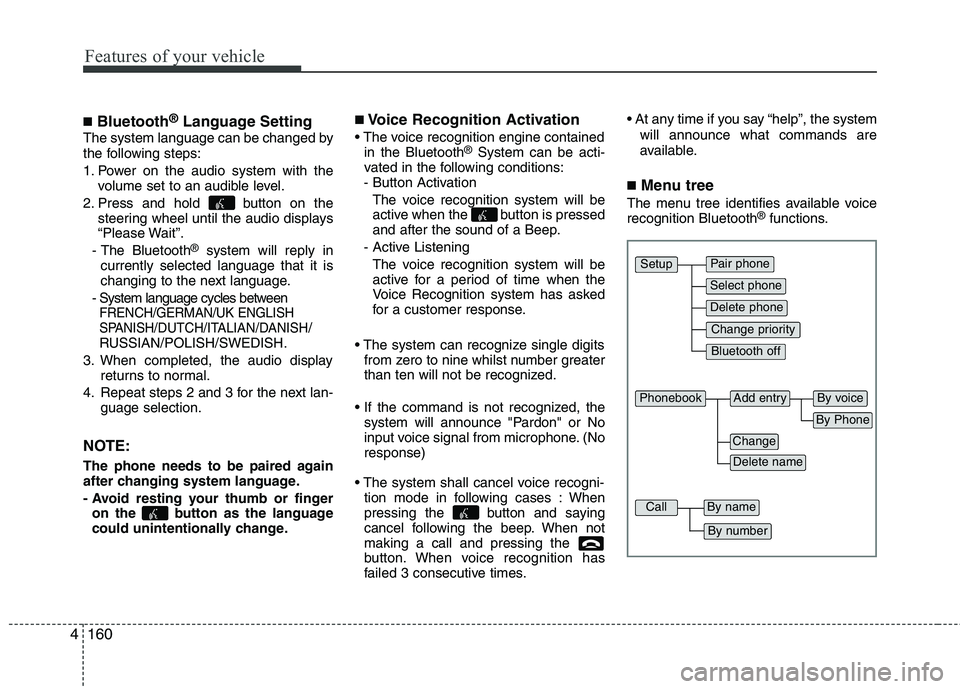
■ Menu tree
The menu tree identifies available voice recognition Bluetooth ®
functions.
Pair phone
Select phone
Change priority
Delete phone
Bluetooth off
Setup
Add entryPhonebook
Change
Delete name
By Phone
By voice
CallBy name
By number
Page 660 of 840

4161
Features of your vehicle
■Voice Operation Tip
To get the best performance out of the
Voice Recognition System, observe the
followings:
- Keep the interior of the vehicle as quiet as possible. Close the window to elim-
inate surrounding noise (traffic noise,
vibration sounds, etc), which may dis-
turb recognizing the voice command
correctly.
- Speak a command after a beep sound within 5 seconds. Otherwise the com-
mand will not be received properly.
- Speak in a natural voice without paus- ing between words.
■ Information Display
®
icon appears on the
upper side of audio display when a phone is connected. ■ Phone Setup
All Bluetooth ®
-related operations can be
performed by voice command or by man-
ual operation.
- By Voice Command:
Press button on the steering wheel
to activate voice recognition.
- By Manual Operation:
1) Push the “SETUP” button to enter SETUP mode 2) Select “PHONE” item by rotating the
TUNE knob, then push the knob.
3) Select desired item by rotating the TUNE knob, then push the knob.
Before using Bluetooth ®
features, the
phone must be paired (registered) to the
audio system. Up to 5 phones can bepaired with the system.
NOTE:
The pairing procedure of the phone
varies according to each phone
model. Before attempting to pair
phone, please see your phone’s
User’s Guide for instructions.