2012 KIA Cerato port
[x] Cancel search: portPage 2 of 353

i
Thank you for choosing a KIA vehicle.
When you require service, remember that your KIA Dealer
knows your vehicle best. Your dealer has factory-trained tech-
nicians, recommended special tools, genuine KIA replacement
parts and is dedicated to your complete satisfaction.
Because subsequent owners require this important information
as well, this publication should remain with the vehicle if it is
sold.
This manual will familiarize you with operational, mainte-
nance and safety information about your new vehicle. It is sup-
plemented by a Warranty and Consumer Information manual
that provides important information on all warranties regarding
your vehicle.
We urge you to read these publications carefully and follow the
recommendations to help assure enjoyable and safe operation
of your new vehicle.
KIA offers a great variety of options, components and features
for its various models. Therefore, some of the equipment
described in this manual, along with the various illustrations,
may not be applicable to your particular vehicle.
The information and specifications provided in this manual
were accurate at the time of printing. KIA reserves the right to
discontinue or change specifications or design at any time
without notice and without incurring any obligation. If you
have questions, always check with your KIA dealer.
We assure you of our continuing interest in your motoring
pleasure and satisfaction in your KIA vehicle.
© 2011 Kia Canada Inc.
All rights reserved. Reproduction by any means, electronic or
mechanical, including photocopying, recording, or by any
information storage and retrieval system or translation in
whole or part is not permitted without written authorization
from Kia Canada Inc..
Printed in Korea
Foreword
Page 9 of 353

Introduction
21
A010000AAM
We want to help you get the greatest
possible driving pleasure from your vehi-
cle. Your Owner’s Manual can assist you
in many ways. We strongly recommend
that you read the entire manual. In order
to minimize the chance of death or injury,
you must read the WARNING and CAU-
TION sections in the manual.
Illustrations complement the words in this
manual to best explain how to enjoy your
vehicle. By reading your manual, you will
learn about features, important safety
information, and driving tips under vari-
ous road conditions.The general layout of the manual is pro-
vided in the Table of Contents. Use the
index when looking for a specific area or
subject; it has an alphabetical listing of all
information in your manual.
Sections: This manual has eight sections
plus an index. Each section begins with a
brief list of contents so you can tell at a
glance if that section has the information
you want.
You will find various WARNINGs,
CAUTIONs, and NOTICEs in this manu-
al. These WARNINGs were prepared to
enhance your personal safety. You should
carefully read and follow ALL procedures
and recommendations provided in these
WARNINGS, CAUTIONS and NOTICES.
✽ ✽
NOTICE
A NOTICE indicates interesting or help-
ful information is being provided.
HOW TO USE THIS MANUAL
WARNING
A WARNING indicates a situation in
which harm, serious bodily injury or
death could result if the warning is
ignored.
CAUTION
A CAUTION indicates a situation in
which damage to your vehicle couldresult if the caution is ignored.
Page 15 of 353

23
Your vehicle at a glance
INSTRUMENT PANEL OVERVIEW
B020000ATD
OTDC019002N
1. Instrument cluster .............................4-39
2. Light control / Turn signals ................4-59
3. Wiper/Washer ...................................4-63
4. Horn ..................................................4-34
5. Steering wheel audio control* ...........4-95
6. Auto cruise control*...........................5-33
7. Driver’s air bag ..................................3-47
8. Advanced lighting speaker switch* ...4-96
9. Steering wheel ..................................4-32
10. Ignition switch* or ENGINE START/STOP button*...5-4/5-6
11. Digital clock .....................................4-92
12. Hazard ......................................4-58/6-2
13. Audio* .............................................4-94
14. Climate control system ...................4-69
15. Shift lever ................................5-12/5-15
16. Aux, USB and iPod port* ................4-97
17. Power outlet* ...................................4-91
18. Seat warmer* ....................................3-7
19. Passenger’s air bag ........................3-47
20. Glove box ........................................4-88
* : if equipped
Page 19 of 353

33
Safety features of your vehicle
WARNING- Driver’s seat Never attempt to adjust the seatwhile the vehicle is moving. This
could result in loss of control, and
an accident causing death, seri-
ous injury, or property damage.
Do not allow anything to interfere with the normal position of the
seatback. Storing items against a
seatback or in any other way
interfering with proper locking of
a seatback could result in serious
or fatal injury in a sudden stop or
collision.
seatback upright and the lap por-
tion of the seat belt snug and low
across the hips. This is the best
position to protect you in case of
an accident.
In order to avoid unnecessary and perhaps severe air bag
injuries, always sit as far back as
possible from the steering wheel
while maintaining comfortable
control of the vehicle. It is recom-
mended that your chest is at least
250 mm (10 inches) away from
the steering wheel.
WARNING - Uprighting
seat
When you return the seatback to its
upright position, hold the seatback
and return it slowly and be sure
there are no other occupants
around the seat. If the seatback is
returned without being held and
controlled, the back of the seat
could spring forward resulting in
accidental injury to a person struck
by the seatback.
WARNING- Loose objects
Loose objects in the driver’s foot
area could interfere with the opera-
tion of the foot pedals, possibly
causing an accident. Do not place
anything under the front seats.
WARNING- Driver respon-
sibility for front seat pas-
senger
Riding in a vehicle with a front seat-
back reclined could lead to serious
or fatal injury in an accident. If a
front seat is reclined during an
accident, the occupant’s hips may
slide under the lap portion of the
seat belt applying great force to the
unprotected abdomen. The
Protection of your restraint system
(seat belt and air bags) is greatly
reduced by reclining your seat.
Serious or fatal internal injuries
could result. The driver must advise
the front passenger to keep the
seatback in an upright position
whenever the vehicle is in motion.
Page 22 of 353
Safety features of your vehicle
63
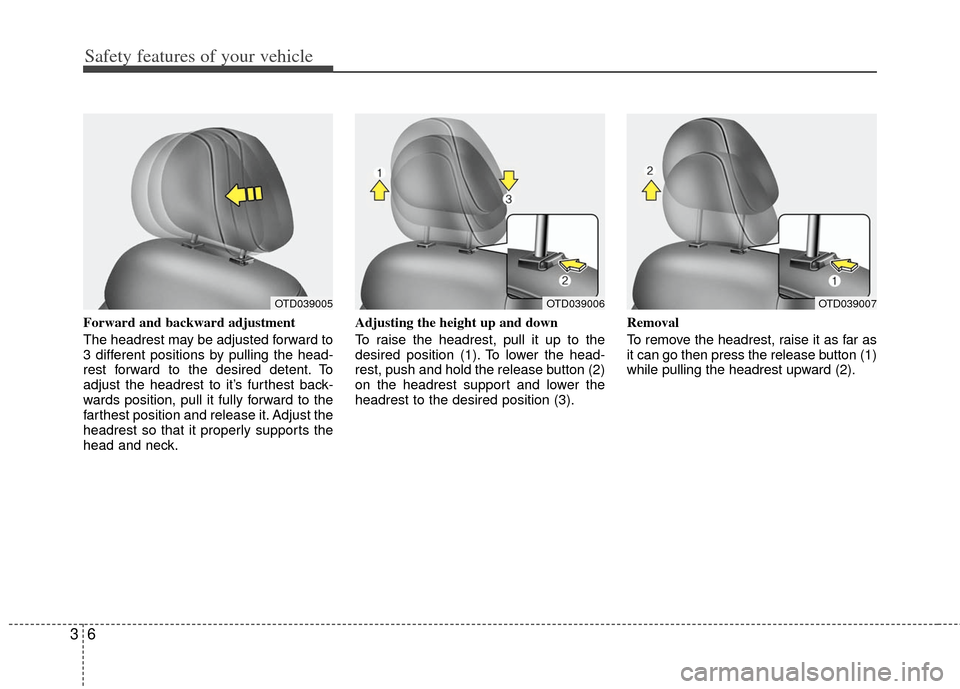
Forward and backward adjustment
The headrest may be adjusted forward to
3 different positions by pulling the head-
rest forward to the desired detent. To
adjust the headrest to it’s furthest back-
wards position, pull it fully forward to the
farthest position and release it. Adjust the
headrest so that it properly supports the
head and neck.Adjusting the height up and down
To raise the headrest, pull it up to the
desired position (1). To lower the head-
rest, push and hold the release button (2)
on the headrest support and lower the
headrest to the desired position (3).
Removal
To remove the headrest, raise it as far as
it can go then press the release button (1)
while pulling the headrest upward (2).
OTD039006OTD039005OTD039007
Page 27 of 353
311
Safety features of your vehicle
■
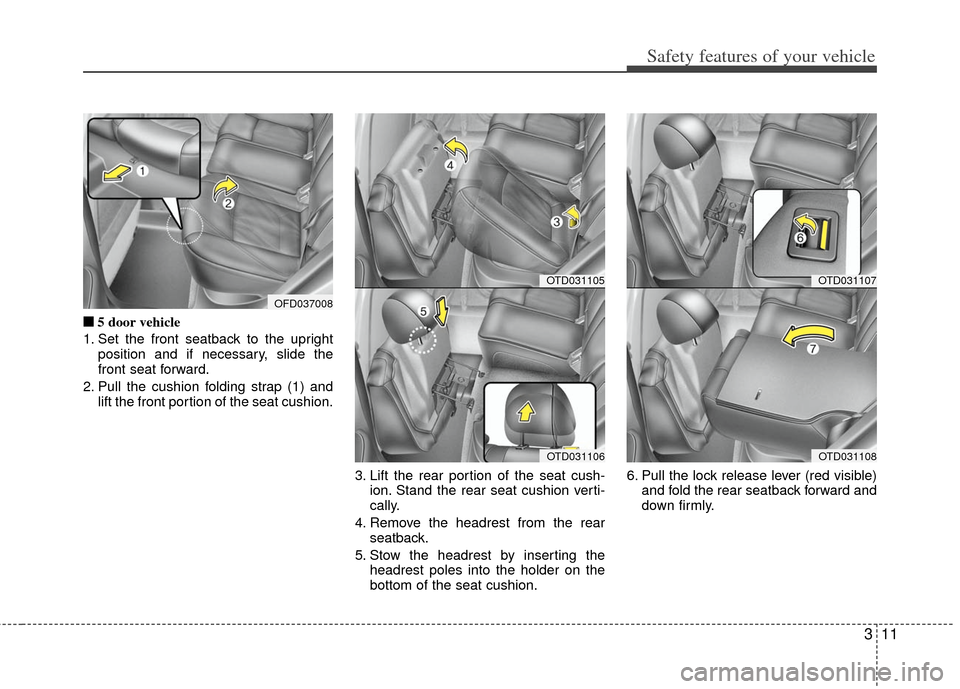
■5 door vehicle
1. Set the front seatback to the upright position and if necessary, slide the
front seat forward.
2. Pull the cushion folding strap (1) and lift the front portion of the seat cushion.
3. Lift the rear portion of the seat cush-ion. Stand the rear seat cushion verti-
cally.
4. Remove the headrest from the rear seatback.
5. Stow the headrest by inserting the headrest poles into the holder on the
bottom of the seat cushion. 6. Pull the lock release lever (red visible)
and fold the rear seatback forward and
down firmly.
OTD031105
OTD031106
OFD037008
OTD031107
OTD031108
Page 30 of 353

Safety features of your vehicle
14
3
Adjusting the height up and down
(if equipped)
To raise the headrest, pull it up to the
desired position (1). To lower the head-
rest, push and hold the release button (2)
on the headrest support and lower the
headrest to the desired position (3). Removal
To remove the headrest, raise it as far as
it can go then press the release button
(1) while pulling the headrest upward (2).
To reinstall the headrest, put the head-
rest poles (3) into the holes while press-
ing the release button (1). Then adjust it
to the appropriate height.C010304ATD
Armrest (if equipped)
To use the armrest, pull it forward from
the seatback.
OTD039010OMG039037
WARNING
Make sure the headrest locks in
position after adjusting it to proper-
ly protect the occupants.
OMG035036
Page 33 of 353

317
Safety features of your vehicle
C020102ATD-EU
Seat belt - Driver's 3-point systemwith emergency locking retractor
To fasten your seat belt:
To fasten your seat belt, pull it out of the
retractor and insert the metal tab (1) into
the buckle (2). There will be an audible
"click" when the tab locks into the buckle.
The seat belt automatically adjusts to the
proper length only after the lap belt por-
tion is adjusted manually so that it fits
snugly around your hips. If you lean for-
ward in a slow, easy motion, the belt will
extend and let you move around. If there
is a sudden stop or impact, however, the
belt will lock into position. It will also lock
if you try to lean forward too quickly.
✽ ✽ NOTICE
If you are not able to pull out the seat
belt from the retractor, firmly pull the
belt out and release it. Then you will be
able to pull the belt out smoothly.
Height adjustment (if equipped)
You can adjust the height of the shoulder
belt anchor to one of the 4 positions for
maximum comfort and safety.
The height of the adjusting seat belt
should not be too close to your neck. The
shoulder portion should be adjusted so
that it lies across your chest and midway
over your shoulder near the door and not
your neck.
To adjust the height of the seat belt
anchor, lower or raise the height adjuster
into an appropriate position.
B180A01NF
1
2
OMG035038