Page 131 of 613
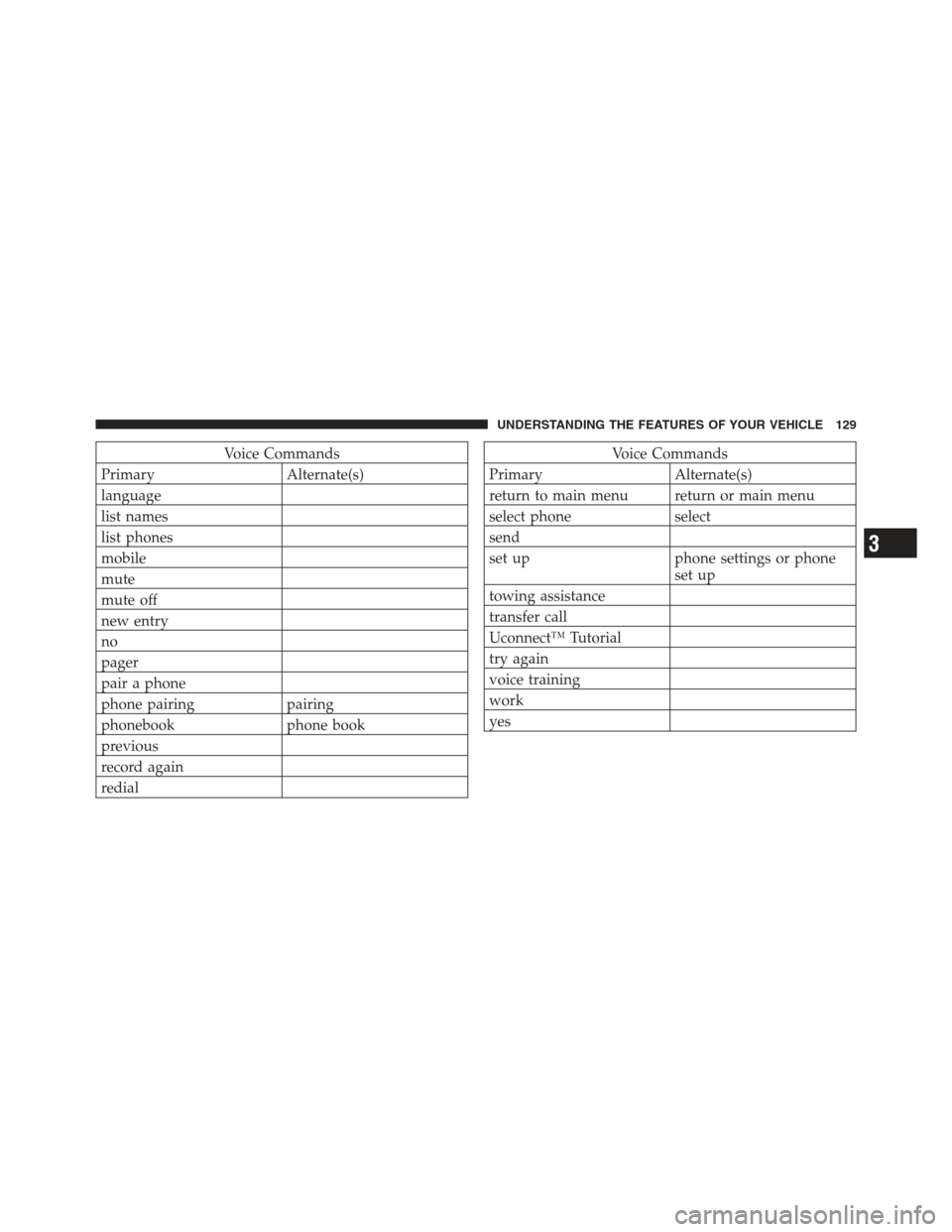
Voice Commands
Primary Alternate(s)
language
list names
list phones
mobile
mute
mute off
new entry
no
pager
pair a phone
phone pairing pairing
phonebook phone book
previous
record again
redialVoice Commands
Primary Alternate(s)
return to main menu return or main menu
select phone select
send
set up phone settings or phone set up
towing assistance
transfer call
Uconnect™ Tutorial
try again
voice training
work
yes
3
UNDERSTANDING THE FEATURES OF YOUR VEHICLE 129
Page 132 of 613

General Information
This device complies with Part 15 of the FCC rules and
RSS 210 of Industry Canada. Operation is subject to the
following conditions:
•Changes or modifications not expressly approved by
the party responsible for compliance could void the
user’s authority to operate the equipment.
•This device may not cause harmful interference.
•This device must accept any interference received,
including interference that may cause undesired
operation.
VOICE COMMAND — IF EQUIPPED
Voice Command System Operation
This Voice Command system allows you to
control your AM, FM radio, satellite radio, disc
player, and a memo recorder.NOTE:
Take care to speak into the Voice Interface
System as calmly and normally as possible. The ability of
the Voice Interface System to recognize user voice com-
mands may be negatively affected by rapid speaking or a
raised voice level.
WARNING!
Any voice commanded system should be used only
in safe driving conditions following local laws. All
attention should be kept on the roadway ahead.
Failure to do so may result in a collision causing
serious injury or death.
When you press the Voice Command
button, you
will hear a beep. The beep is your signal to give a
command.
NOTE:
If you do not say a command within a few
seconds, the system will present you with a list of options.
130 UNDERSTANDING THE FEATURES OF YOUR VEHICLE
Page 133 of 613

If you ever wish to interrupt the system while it lists
options, press the Voice Command
button, listen
for the beep, and say your command.
Pressing the Voice Command
button while the
system is speaking is known as “barging in.” The system
will be interrupted, and after the beep, you can add or
change commands. This will become helpful once you
start to learn the options.
NOTE: At any time, you can say the words “Cancel”,
“Help” or “Main Menu”.
These commands are universal and can be used from any
menu. All other commands can be used depending upon
the active application.
When using this system, you should speak clearly and at
a normal speaking volume. The system will best recognize your speech if the win-
dows are closed, and the heater/air conditioning fan is
set to low.
At any point, if the system does not recognize one of your
commands, you will be prompted to repeat it.
To hear the first available Menu, press the Voice Com-
mand
button and say “Help” or “Main Menu”.
Commands
The Voice Command system understands two types of
commands. Universal commands are available at all
times. Local commands are available if the supported
radio mode is active.
Changing the Volume
1. Start a dialogue by pressing the Voice Command
button.
2. Say a command (e.g., “Help”).
3
UNDERSTANDING THE FEATURES OF YOUR VEHICLE 131
Page 136 of 613
“Continue” (to continue recording)
“Delete” (to delete the recording)
•“Play Memos” (to play previously recorded memos)
— During the playback you may press the Voice
Command
button to stop playing memos. You
proceed by saying one of the following commands:
“Repeat” (to repeat a memo)
“Next” (to play the next memo)
“Previous” (to play the previous memo)
“Delete” (to delete a memo)
•“Delete All” (to delete all memos)
Setup
To switch to system setup, you may say on of the
following:
•“Change to setup”
•“Switch to system setup”
•“Change to setup”
•“Main menu setup” or
•“Switch to setup”
In this mode, you may say the following commands:
•“Language English”
•“Language French”
•“Language Spanish”
•“Tutorial”
•“Voice Training”
NOTE: Keep in mind that you have to press the Voice
Command
button first and wait for the beep before
speaking the “Barge In” commands.
134 UNDERSTANDING THE FEATURES OF YOUR VEHICLE
Page 137 of 613

Voice Training
For users experiencing difficulty with the system recog-
nizing their voice commands or numbers the Uconnect™
Voice “Voice Training” feature may be used.
1. Press the Voice Command
button, say “System
Setup” and once you are in that menu then say “Voice
Training.” This will train your own voice to the system
and will improve recognition.
2. Repeat the words and phrases when prompted by
Uconnect™ Voice. For best results, the “Voice Training”
session should be completed when the vehicle is parked,
engine running, all windows closed, and the blower fan
switched off. This procedure may be repeated with a new
user. The system will adapt to the last trained voice only.
SEATS
Seats are part of the Occupant Restraint System of the
vehicle.
WARNING!
•It is dangerous to ride in a cargo area, inside or
outside of a vehicle. In a collision, people riding in
these areas are more likely to be seriously injured
or killed.
•Do not allow people to ride in any area of your
vehicle that is not equipped with seats and seat
belts. In a collision, people riding in these areas
are more likely to be seriously injured or killed.
•Be sure everyone in your vehicle is in a seat and
using a seat belt properly.
Front Seat Adjustment
The seat can be adjusted forward or rearward by using a
bar located by the front of the seat cushion, near the floor.
While sitting in the seat, lift up on the bar located under
the seat cushion and move the seat forward or rearward.
Release the bar once you have reached the desired
3
UNDERSTANDING THE FEATURES OF YOUR VEHICLE 135
Page 141 of 613
NOTE:
•The front passenger seats have a track memory, which
returns the seat to just past the halfway point of the
track regardless of its original position.
•The recliner and easy entry levers should not be used
during the automatic returning of the seat to its sitting
position.
Tip n’ Slide Seats — Two-Door Models
This feature allows the front seats to be rotated toward
the instrument panel to allow easier entry into the rear
seats.
Driver’s Seat
Pull upward on the recline lever and bring the seatback
to its full forward position.
Recline Lever
3
UNDERSTANDING THE FEATURES OF YOUR VEHICLE 139
Page 142 of 613
Rotate the entire seat assembly toward the instrument
panel.
Passenger Seat
In addition to Easy Entry, the front passenger seat is also
equipped with Tip n’ Slide. This feature allows for easier
entry for rear passengers.Pull upward on the recline lever and slide the entire seat
forward (Easy Entry).
With the seat forward, pull the entire seat assembly
toward the instrument panel.
Tip n’ SlideEasy Entry Lever
140 UNDERSTANDING THE FEATURES OF YOUR VEHICLE
Page 143 of 613

Heated Seats — If Equipped
On some models, the front driver and passenger seats
may be equipped with heaters in both the seat cushions
and seatbacks.
There are two heated seat switches that allow the driver
and passenger to operate the seats independently. Thecontrols for each seat are located on a switch bank near
the bottom center of the instrument panel.
You can choose from HIGH, LOW or OFF heat settings.
Amber indicator lights in each switch indicate the level of
heat in use. Two indicator lights will illuminate for
HIGH, one for LOW and none for OFF.
Press the switch once to select HIGH-level
heating. Press the switch a second time to select
LOW-level heating. Press the switch a third
time to shut the heating elements OFF.
When the HIGH-level setting is selected, the heater will
provide a boosted heat level during the first four minutes
of operation. Then, the heat output will drop to the
normal HIGH-level. If the HIGH-level setting is selected,
the system will automatically switch to LOW-level after
approximately 30 minutes of continuous operation. At
that time, the number of illuminated LEDs changes from
Tip n’ Slide
3
UNDERSTANDING THE FEATURES OF YOUR VEHICLE 141