Page 195 of 505
UNDERSTANDING YOUR INSTRUMENT PANEL
CONTENTS
�Instrument Panel Features............... 196
�Instrument Cluster.................... 197
�Instrument Cluster Descriptions........... 198
�Mini-Trip Computer — If Equipped........ 211
▫Control Buttons..................... 212
�Electronic Vehicle Information Center (EVIC) —
If Equipped.......................... 213
▫Engine Oil Change Indicator System — If
Equipped.......................... 216▫EVIC Functions..................... 217
▫Compass/Temperature/Audio........... 217
▫Average Fuel Economy................ 217
▫Distance To Empty (DTE).............. 218
▫Tire Pressure Monitor (TPM)............ 218
▫Elapsed Time....................... 218
▫Personal Settings
(Customer-Programmable Features)....... 219
4
Page 213 of 505
•Each time the ignition is turned to ON/RUN, the ESC
system will be ON, even if it was turned off previously.
•The ESC system will make buzzing or clicking sounds
when it is active. This is normal; the sounds will stop
when ESC becomes inactive following the maneuver
that caused the ESC activation.
30. 4WD! Warning Light
This light monitors the 4-Wheel Drive (4WD)
system. The light will come on, for a bulb
check, when the ignition key is turned to the
ON/RUN position and may stay on for as long
as three seconds.
When lit solid:There is an 4WD system fault. 4WD
performance will be at a reduced level. Service the 4WD
system soon.
When blinking:The 4WD system is temporarily dis-
abled due to overload condition.31. Electronic Vehicle Information Center (EVIC)
Display — If Equipped
When the appropriate conditions exist, this display
shows the Electronic Vehicle Information Center (EVIC)
messages.
For further information, refer to “Electronic Vehicle In-
formation Center (EVIC)”.
MINI-TRIP COMPUTER — IF EQUIPPED
The Mini-Trip Computer is located in the instrument
cluster and features a driver-interactive trip information
and temperature display.
NOTE:The system will display the last known outside
temperature when starting the vehicle and may need to
be driven several minutes before the updated tempera-
ture is displayed. Engine temperature can also affect the
displayed temperature; therefore, temperature readings
are not updated when the vehicle is not moving.
4
UNDERSTANDING YOUR INSTRUMENT PANEL 211
Page 215 of 505
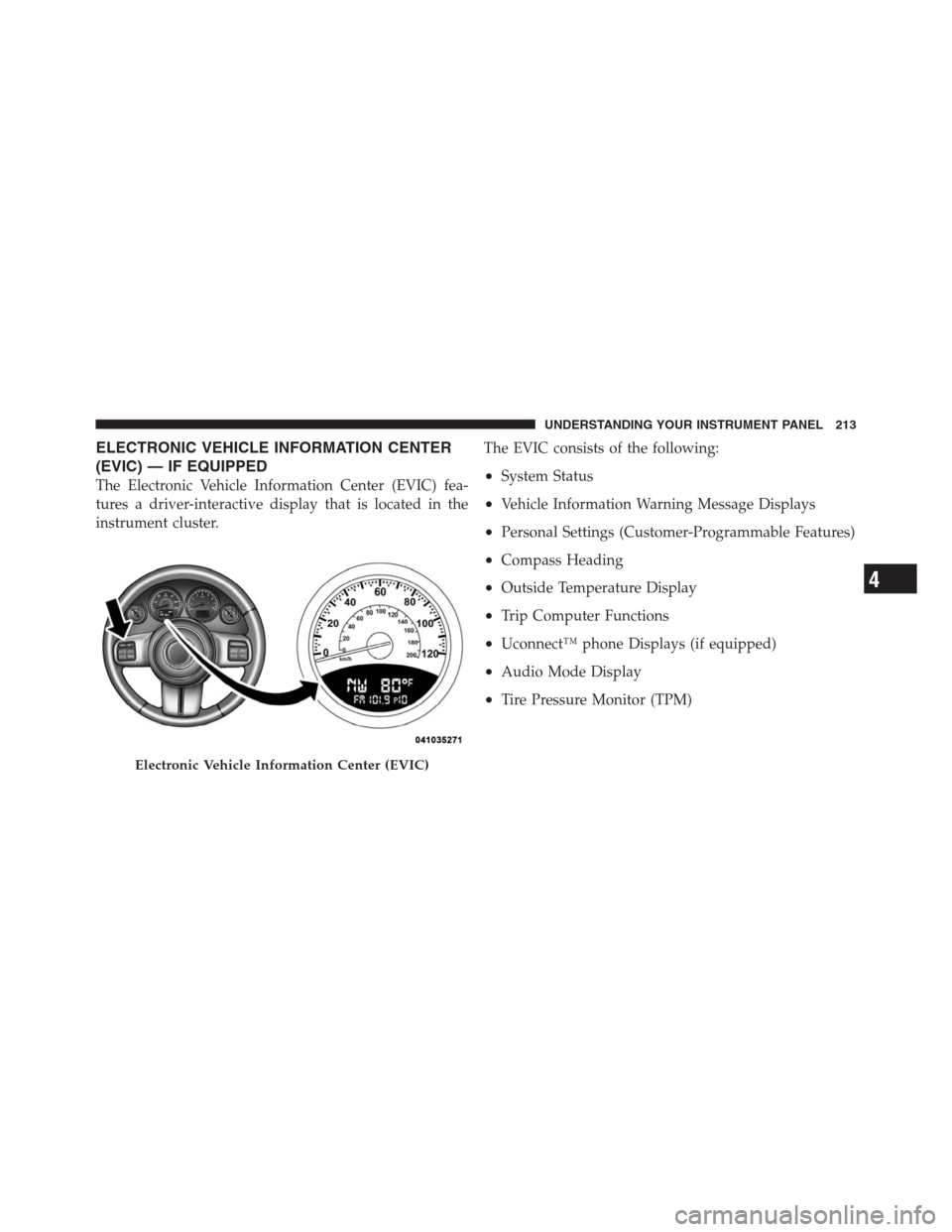
ELECTRONIC VEHICLE INFORMATION CENTER
(EVIC) — IF EQUIPPED
The Electronic Vehicle Information Center (EVIC) fea-
tures a driver-interactive display that is located in the
instrument cluster.The EVIC consists of the following:•System Status
•Vehicle Information Warning Message Displays
•Personal Settings (Customer-Programmable Features)
•Compass Heading
•Outside Temperature Display
•Trip Computer Functions
•Uconnect™ phone Displays (if equipped)
•Audio Mode Display
•Tire Pressure Monitor (TPM)
Electronic Vehicle Information Center (EVIC)
4
UNDERSTANDING YOUR INSTRUMENT PANEL 213
Page 375 of 505

Loose Fuel Filler Cap Message
If the vehicle diagnostic system determines that the fuel
filler cap is loose or improperly installed, a “gASCAP”
message will be displayed in the Odometer/Trip Odom-
eter in the instrument cluster. Refer to “Instrument
Cluster Description” in “Understanding Your Instrument
Panel” for further information. Tighten the fuel filler cap
properly and press the odometer/trip odometer RESET
button to turn the message off. If the problem continues,
the message will appear the next time the vehicle is
started. Refer to “Onboard Diagnostic System” in “Main-
taining Your Vehicle” for further information.
VEHICLE LOADING
As required by National Highway Traffic Safety Admin-
istration regulations, your vehicle has a certification label
affixed to the driver’s side door or B-Pillar.
Vehicle Certification Label
Your vehicle has a Vehicle Certification Label attached to
the driver’s door B-Pillar.
The label contains the following information:
•Name of manufacturer
•Month and year of manufacture
•Gross Vehicle Weight Rating (GVWR)
•Vehicle Identification Number (VIN)
•Type of Vehicle
•Month, Day and Hour of Manufacture (MDH)
The bar code allows a computer scanner to read the
Vehicle Identification Number (VIN).
5
STARTING AND OPERATING 373
Page 495 of 505

Voltage............................ 198
Warning (Instrument Cluster Description) . . . 198
Loading Vehicle......................373,375
Capacities.......................... 375
Tires .............................. 342
Locks
Automatic Door...................... 31
Child Protection...................... 33
Door.............................. 29
Power Door......................... 30
Lubrication, Body....................... 427
Luggage Rack (Roof Rack)................. 189
Lumbar Support........................ 139
Maintenance Free Battery.................. 423
Maintenance Procedures................... 418
Maintenance Schedule.................... 458
Maintenance, General..................... 418
Malfunction Indicator Light (Check Engine). . . 209,416Manual Transaxle.....................295,298
Downshifting....................... 300
Fluid Level Check.................... 441
Frequency of Fluid Change...........441,442
Lubricant Selection................... 441
Manual Transmission..................... 440
Fluid Level Check.................... 440
Frequency of Fluid Change............. 441
Lubricant Selection................... 440
Manual, Service......................... 479
Map/Reading Lights..................... 153
Master Cylinder (Brakes).................. 437
Methanol............................. 368
Mini-Trip Computer...................... 211
Mirrors................................ 94
Automatic Dimming................... 95
Electric Powered...................... 96
Exterior Folding...................... 98
Heated............................. 9810
INDEX 493
Page 502 of 505

Transmission
Automatic.......................300,439
Fluid............................. 439
Transmitter Battery Service
(Remote Keyless Entry).................... 25
Transmitter, Garage Door Opener (HomeLink®) . . 161
Transporting Pets........................ 84
Tread Wear Indicators.................... 352
Trip Computer.......................... 211
Trip Odometer.......................... 207
Trip Odometer Reset Button................ 205
Turn Signals......................151,199,453
UCI Connector......................... 267
Uconnect™ (Hands-Free Phone).............. 99Understanding Your Instrument Panel......... 196
Uniform Tire Quality Grades................ 481
Universal Consumer Interface (UCI) Connector . . . 267
Universal Transmitter..................... 161
Unleaded Gasoline....................... 367
Vanity Mirrors........................... 99
Variance, Compass....................... 222
Vehicle Certification Label................. 373
Vehicle Identification Number (VIN)............ 7
Vehicle Loading...................343,373,375
Vehicle Modifications/Alterations.............. 8
Vehicle Storage.......................287,452
Vehicle Theft Alarm (Security Alarm).......... 18
Voice Recognition System (VR).............. 129
500 INDEX