Page 15 of 558
NOTE:
•For vehicles not equipped with the Electronic Vehicle
Information Center (EVIC), features such as the power
window switches, radio, power sunroof or Sky Slider�
(if equipped), and power outlets will remain active for
45 seconds after the ignition switch is turned to the
LOCK position. Opening either front door will cancel
this feature.
•For vehicles equipped with the EVIC, features such as
the power window switches, radio, power sunroof or
Sky Slider� (if equipped), and power outlets will
remain active for up to 10 minutes after the ignition
switch is turned to the LOCK position. Opening either
front door will cancel this feature. The time for this
feature is programmable. Refer to “Electronic Vehicle
Information Center (EVIC)/Personal Settings
(Customer-Programmable Features)” in “Understand-
ing Your Instrument Panel” for further information.
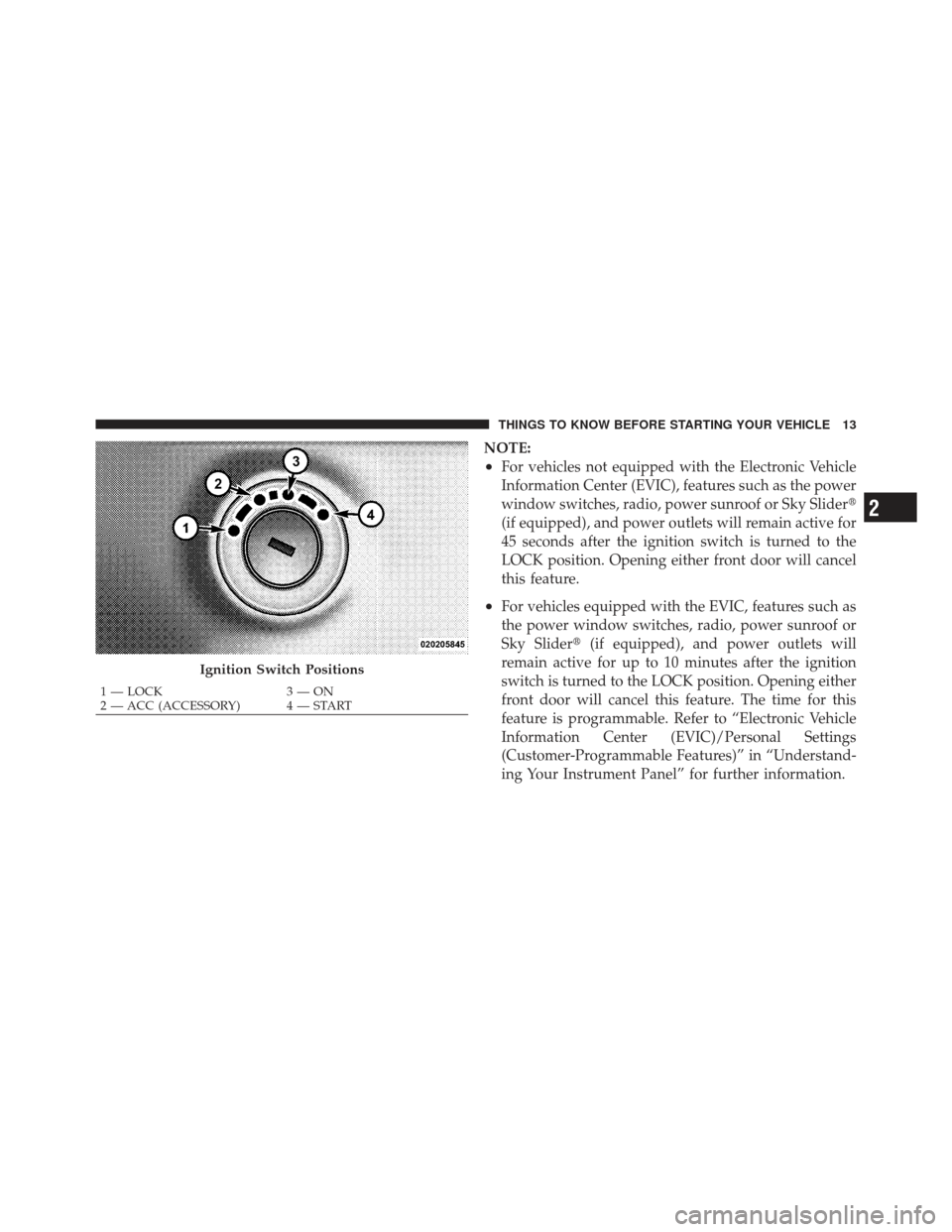
Ignition Switch Positions
1 — LOCK 3 — ON
2 — ACC (ACCESSORY) 4 — START
2
THINGS TO KNOW BEFORE STARTING YOUR VEHICLE 13
Page 31 of 558
To Enter Remote Start Mode
Press and release the REMOTE START button
on the RKE transmitter twice within five sec-
onds. The parking lights will flash and the horn
will chirp twice (if programmed). Then, the
engine will start and the vehicle will remain in the
Remote Start mode for a 15-minute cycle.
NOTE:
•If your power door locks were unlocked, Remote Start
will automatically lock the doors.
•If an engine fault is present or fuel level is low, the
vehicle will start and then shut down in 10 seconds.
•For security, power window operation and sunroof or
Sky Slider� operation (if equipped) is disabled when
the vehicle is in the Remote Start mode.
•The engine can be started two consecutive times (two
15-minute cycles) with the RKE transmitter. However,
the ignition switch must be cycled to the ON/RUN
position before you can repeat the start sequence for a
third cycle.
To Exit Remote Start Mode Without Driving The
Vehicle
Press and release the REMOTE START button one time or
allow the engine to run for the entire 15-minute cycle.
NOTE: To avoid unintentional shut downs, the system
will disable the one-time press of the REMOTE START
button for two seconds after receiving a valid Remote
Start request.
2
THINGS TO KNOW BEFORE STARTING YOUR VEHICLE 29
Page 41 of 558
Wind Buffeting
Wind buffeting can be described as the perception of
pressure on the ears or a helicopter-type sound in the
ears. Your vehicle may exhibit wind buffeting with the
windows down, or the sunroof or Sky Slider™ (if
equipped) in certain open or partially open positions.
This is a normal occurrence and can be minimized. If the
buffeting occurs with the rear windows open, then open
the front and rear windows together to minimize the
buffeting. If the buffeting occurs with the sunroof or Sky
Slider™ open, adjust the sunroof or Sky Slider™ opening
to minimize the buffeting or open any window.
Window Lockout Button
2
THINGS TO KNOW BEFORE STARTING YOUR VEHICLE 39
Page 65 of 558
WARNING! (Continued)
•Do not have any accessory items installed which
will alter the roof, including adding a sunroof to
your vehicle. Do not add roof racks that require
permanent attachments (bolts or screws) for instal-
lation on the vehicle roof. Do not drill into the roof
of the vehicle for any reason.
Supplemental Side Air Bag Inflatable Curtain
(SABIC)
SABIC air bags may offer side-impact and vehicle roll-
over protection to front and rear seat outboard occupants
in addition to that provided by the body structure. Each
air bag features inflated chambers placed adjacent to the
head of each outboard occupant that reduce the potential
for side-impact head injuries. The SABIC air bags deploy
downward, covering both windows on the impact side.NOTE:
•Should a vehicle rollover occur, the pretensioners
and/or SABIC air bags on both sides of the vehicle
may deploy.
•Air Bag covers may not be obvious in the interior trim,
but they will open during air bag deployment.
•Being too close to the side air bags during deployment
could cause you to be severely injured or killed.
The system includes side impact sensors that are cali-
brated to deploy the side air bags during impacts that
require side air bag occupant protection.
2
THINGS TO KNOW BEFORE STARTING YOUR VEHICLE 63
Page 66 of 558
WARNING!
•If your vehicle is equipped with left and right
Supplemental Side Air Bag Inflatable Curtain
(SABIC), do not stack luggage or other cargo up
high enough to block the location of the SABIC.
The area where the SABIC is located should re-
main free from any obstructions.
•Do not use accessory seat covers or place objects
between you and the side air bags; the perfor-
mance could be adversely affected and/or objects
could be pushed into you, causing serious injury.
WARNING! (Continued)
•If your vehicle is equipped with SABIC air bags,
do not have any accessory items installed which
will alter the roof, including adding a sunroof to
your vehicle. Do not add roof racks that require
permanent attachments (bolts or screws) for instal-
lation on the vehicle roof. Do not drill into the roof
of the vehicle for any reason.
Knee Impact Bolsters
The Knee Impact Bolsters help protect the knees of the
driver and the front passenger, and position front occu-
pants for the best interaction with the Advanced Front
Air Bag.
64 THINGS TO KNOW BEFORE STARTING YOUR VEHICLE
Page 98 of 558
▫To Deactivate ....................... 174
▫ To Resume Speed .................... 174
▫ To Vary The Speed Setting .............. 174
▫ To Accelerate For Passing .............. 175
� Parksense� Rear Park Assist — If Equipped . . . 176
▫ Parksense� Sensors................... 176
▫ Parksense� Warning Display ............ 176
▫ Parksense� Display................... 177
▫ Enabling And Disabling Parksense� ....... 180
▫ Service The Parksense� Rear Park Assist
System ............................ 181
▫ Cleaning The Parksense� System......... 181
▫ Parksense� System Usage Precautions ...... 182�
Garage Door Opener — If Equipped ........ 184
▫ Before You Begin Programming
HomeLink� ........................ 186
▫ Programming A Rolling Code ........... 186
▫ Programming A Non-Rolling Code ........ 188
▫ Canadian/Gate Operator Programming .... 189
▫ Using HomeLink� ................... 191
▫ Security ........................... 191
▫ Troubleshooting Tips .................. 192
▫ General Information .................. 193
� Power Sunroof — If Equipped ............ 193
▫ Opening Sunroof — Express ............ 194
▫ Opening Sunroof — Manual Mode ........ 194
96 UNDERSTANDING THE FEATURES OF YOUR VEHICLE
Page 99 of 558
▫Closing Sunroof — Express ............. 194
▫ Closing Sunroof — Manual Mode ........ 195
▫ Pinch Protect Feature ................. 195
▫ Pinch Protect Override ................ 195
▫ Venting Sunroof — Express ............. 195
▫ Sunshade Operation .................. 195
▫ Wind Buffeting ...................... 196
▫ Sunroof Maintenance ................. 196
▫ Ignition Off Operation ................. 196
� Sky Slider™ Full Length Open Roof — If
Equipped ............................ 196
▫ Sky Slider™ Usage Precautions .......... 197
▫ Sky Slider™ Control .................. 199 ▫
Opening The Sky Slider™ .............. 199
▫ Closing The Sky Slider™ ............... 200
▫ Anti-Pinch Protect Feature .............. 201
▫ Wind Buffeting ...................... 201
▫ Sky Slider™ Maintenance .............. 201
� Electrical Power Outlet ................. 202
� Cupholders .......................... 205
� Storage ............................. 206
▫ Glove Box Storage Compartment ......... 206
▫ Front Storage Compartment ............. 206
▫ Console Storage Compartment ........... 207
� Cargo Area Features ................... 208
▫ Cargo Load Floor .................... 208
3
UNDERSTANDING THE FEATURES OF YOUR VEHICLE 97
Page 100 of 558
�Rear Window Features .................. 214
▫ Rear Window Wiper/Washer ............ 214▫
Rear Window Defroster ................ 215
� Roof Luggage Rack — If Equipped ......... 216
98 UNDERSTANDING THE FEATURES OF YOUR VEHICLE