2012 INFINITI M belt
[x] Cancel search: beltPage 89 of 522

2-16Instruments and controls
Supplemental air bag warning
light
After pushing the ignition switch to the ON
position, the supplemental air bag warning
light will illuminate. The supplemental air
bag warning light will turn off after about 7
seconds if the supplemental front air bag
and supplemental side air bag, curtain
side-impact air bag systems and/or pre-
tensioner seat belt are operational.
If any of the following conditions occur, the
supplemental front air bag, supplemental
side air bag, supplemental curtain side-
impact air bag and pretensioner seat belt
needs servicing and your vehicle must be
taken to your nearest INFINITI retailer.
. The supplemental air bag warning light
remains on after approximately 7 sec-
onds.
. The supplemental air bag warning light
flashes intermittently.
. The supplemental air bag warning light
does not come on at all.
Unless checked and repaired, the Supple-
mental Restraint Systems and/or the pre-
tensioner seat belt may not function
properly.
For additional information, see “Supple- mental restraint system”
in the“1. Safety
— Seats, seat belts and supplemental
restraint system” section.
WARNING
If the supplemental air bag warning light is
on, it could mean that the supplemental
front air bag, supplemental side air bag,
curtain side-impact air bag systems and/or
pretensioner seat belt will not operate in an
accident. To help avoid injury to yourself or
others, have your vehicle checked by a
retailer as soon as possible.
Vehicle Dynamic Control (VDC)
warning light
The light will blink when the VDC system or
the traction control system is operating,
thus alerting the driver that the vehicle is
nearing its traction limits. The road surface
may be slippery.
When the vehicle dynamic control warning
light illuminates when the vehicle dynamic
control system is turned on, this light
alerts the driver to the fact that the vehicle
dynamic control system ’s fail-safe mode is
operating, for example the vehicle dynamic control, active trace control (if so
equipped), Rise-up & Build-up function,
Brake Force Distribution or hill start assist
system may not be functioning properly.
Have the system checked by an INFINITI
retailer. If a malfunction occurs in the
system, the vehicle dynamic control sys-
tem function will be canceled but the
vehicle is still driveable. For additional
information, see
“Variable voltage control
system” in the“5. Starting and driving ”
section of this manual.
INDICATOR LIGHTS
Adaptive Front lighting System
(AFS) off indicator light (if so
equipped)
When the ignition switch is pushed to the
ON position, the Adaptive Front lighting
System (AFS) off indicator light will illumi-
nate. The light will turn off in about 1
second if the AFS is operational.
This light also illuminates when the AFS is
turned off using the AFS switch.
If the AFS off indicator light blinks, it may
indicate the AFS is not functioning prop-
erly. Have the system checked by an
INFINITI retailer.
Page 90 of 522

See“Adaptive Front lighting System (AFS) ”
later in this section.
Automatic Transmission (AT)
position indicator light
When the ignition switch is pushed to the
ON position, the indicator shows the
automatic selector position.
In the manual shift mode, when the
transmission does not shift to the selected
gear due to a transmission protection
mode, the AT position indicator light will
blink and a chime will sound.
See “Automatic transmission ”in the “5.
Starting and driving ”section for further
details.
Blind Spot Intervention (BSI)
ON indicator light (green; if so
equipped)
The light comes on in green when the Blind
Spot Intervention (BSI) system is turned
on. The light turns off when the system is
turned off.
NOTE:
This light is common with the blind spot
warning light (orange). (See “Blind Spot
Warning (BSW)/Blind Spot Intervention (BSI) system warning light
”earlier in this
section).
For more details, see “Blind Spot Warning
(BSW) system/Blind Spot Intervention
TM
(BSI) system” in the“5. Starting and
driving ”section.
ECO drive indicator light
When the ignition switch is pushed to the
ON position, the light will come on in
orange, turn green, and then turn off.
When the drive mode select switch is
turned to the ECO mode, the ECO drive
indicator light will illuminate or change its
color depending on the accelerator pedal
operation to help assist the driver to drive
economically. For more details, see “Eco
mode ”in the “5. Starting and driving ”
section.
Front fog light indicator light
The front fog light indicator light illumi-
nates when the front fog lights are on. (See
“ Fog light switch ”later in this section.)
Front passenger air bag status
light
The front passenger air bag status light
(
) will be lit and the passenger front air bag will be OFF depending on how the front
passenger seat is being used.
For front passenger air bag status light
operation, see
“INFINITI Advanced Air Bag
System (front seats) ”in the “1. Safety —
Seats, seat belts and supplemental re-
straint system” section of this manual.
High beam indicator light
This light comes on when the headlight
high beam is on and goes out when the low
beam is selected.
Intelligent Brake Assist (IBA)
off indicator light (if so equipped)
The light illuminates when the Intelligent
Brake Assist (IBA) off switch is pushed to
OFF. This indicates that the Intelligent
Brake Assist (IBA) system is not operating.
When the IBA off indicator light illuminates
while the system is turned on (without the
warning chime sound), this light indicates
that the system control is temporarily
unavailable.
When the IBA off indicator light illuminates
with the warning chime sound while the
IBA system is turned on, this light indicates
that the system may not be functioning
properly. Park the vehicle in a safe place.
Instruments and controls2-17
Page 128 of 522

If the windows do not close auto-
matically
If the power window automatic function
(closing only) does not operate properly,
perform the following procedure to initi-
alize the power window system.
1. Push the ignition switch to the ONposition.
2. Close the door.
3. Open the window completely by oper- ating the power window switch.
4. Pull the power window switch and hold it to close the window, and then hold
the switch more than 3 seconds after
the window is closed completely.
5. Release the power window switch. Operate the window by the automatic
function to confirm the initialization is
complete.
6. Perform steps 2 through 5 above for other windows.
If the power window automatic function
does not operate properly after performing
the procedure above, have your vehicle
checked by an INFINITI retailer.
WARNING
. In an accident you could be thrown from
the vehicle through an open moonroof.
Always use seat belts and child re-
straints.
. Do not allow anyone to stand up or
extend any portion of their body out of
the moonroof opening while the vehicle
is in motion or while the moonroof is
closing.
CAUTION
.Remove water drops, snow, ice or sand
from the moonroof before opening.
. Do not place any heavy object on the
moonroof or surrounding area.
AUTOMATIC MOONROOF
The moonroof only operates when the
ignition switch is in the ON position.
The automatic moonroof is operational for
about 45 seconds, even if the ignition
switch is pushed to the OFF position. If the
driver ’s door or the passenger ’s door is
opened during this period of about 45
seconds, power to the moonroof is can-
celed.
Instruments and controls2-55
MOONROOF
Page 142 of 522

ceed 1408F (60 8C).
— Do not change or modify the
Intelligent Key.
— Do not use a magnet key holder.
— Do not place the Intelligent Key
near an electric appliance such
as a television set or personal
computer.
— Do not allow the Intelligent Key
to come into contact with water
or salt water, and do not wash it
in a washing machine. This
could affect the system function.
. If an Intelligent Key is lost or stolen,
INFINITI recommends erasing the ID code
of that Intelligent Key. This will prevent
the Intelligent Key from unauthorized
use to unlock the vehicle. For informa-
tion regarding the erasing procedure,
please contact an INFINITI retailer.
SPA2033
Mechanical key
To remove the mechanical key, release the
lock knob at the back of the Intelligent Key.
To install the mechanical key, firmly insert
it into the Intelligent Key until the lock
knob returns to the lock position.
Use the mechanical key to lock or unlock
the doors, glove box and trunk pass-
through lid, if they are equipped with a
key cylinder.
See “Doors ”later in this section and
“ Trunk lid” later in this section, “Storage ”
in the “2. Instruments and controls ”
section and “Seats ”in the “1. Safety —Seats, seat belts and supplemental re-
straint system”
section.
CAUTION
Always carry the mechanical key installed in
the key.
VALET HAND-OFF
When you have to leave a key with a valet,
give them the Intelligent Key itself and
keep the mechanical key with you to
protect your belongings.
To prevent the glove box and the trunk
from being opened during valet hand-off,
follow the procedures below.
1. Push the trunk release power cancel
switch to the CANCEL side.
2. Remove the mechanical key from the Intelligent Key.
3. Lock the glove box and the trunk pass- through with the mechanical key.
4. Hand the Intelligent Key to the valet, keeping the mechanical key in your
pocket or bag for insertion into the
Intelligent Key when you retrieve your
vehicle.
Pre-driving checks and adjustments3-3
Page 143 of 522

3-4Pre-driving checks and adjustments
See“Trunk lid ”later in this section,
“ Storage ”in the “2. Instruments and
controls ”section and “Seats ”in the “1.
Safety —Seats, seat belts and supple-
mental restraint system” section.
WARNING
.Always have the doors locked while
driving. Along with the use of seat belts,
this provides greater safety in the event
of an accident by helping to prevent
persons from being thrown from the
vehicle. This also helps keep children
and others from unintentionally opening
the doors, and will help keep out
intruders.
. Before opening any door, always look for
and avoid oncoming traffic.
. Do not leave children unattended inside
the vehicle. They could unknowingly
activate switches or controls. Unat-
tended children could become involved
in serious accidents.
SPA2527
LOCKING WITH MECHANICAL KEY
The power door lock system allows you to
lock or unlock all doors simultaneously
using the mechanical key.
.Turning the driver ’s door key cylinder to
the front of the vehicle
*1will lock all
doors.
. Turning the driver ’s door key cylinder
once to the rear of the vehicle
*2will
unlock the driver ’s door. After returning
the key to the neutral position
*3,
turning it to the rear again within 60
seconds will unlock all doors.
DOORS
Page 160 of 522

that people become locked inside the trunk
or in the event of the loss of electrical
power such as a discharged battery.
Releasing inside the trunk
To open the trunk lid from the inside, pull
the release handle
*1until the lock
releases and push up on the trunk lid.
The release lever is made of a material that
glows in the dark after a brief exposure to
ambient light.
The handle is located on the back of the
trunk lid as illustrated.
Releasing from the rear seat
You can access the release handle through
the trunk pass-through (rear seat armrest).
(See “Armrest ”in the “1. Safety —Seats,
seat belts and supplemental restraint
system” section.)
To open the trunk lid from the rear seat,
pull the release handle towards front of
vehicle until the lock releases.
SPA2735
OPENING THE FUEL-FILLER DOOR
To open the fuel-filler door, unlock the fuel-
filler door by using one of the following
operations, then push the upper left side
of the door.
. Push the door handle request switch
with the Intelligent Key carried with
you.
. Push the UNLOCK button on the Intelli-
gent Key.
. Insert the mechanical key into the door
lock cylinder and turn it to the rear of
the vehicle. .
Push the power door lock switch to the
UNLOCK position.
To lock, close the fuel-filler door securely
and lock all doors by operating the door
handle request switch, the LOCK button on
the Intelligent Key, the mechanical key or
the power door lock switch.
FUEL-FILLER CAP
WARNING
. Gasoline is extremely flammable and
highly explosive under certain condi-
tions. You could be burned or seriously
injured if it is misused or mishandled.
Always stop engine and do not smoke or
allow open flames or sparks near the
vehicle when refueling.
. Do not attempt to top off the fuel tank
after the fuel pump nozzle shuts off
automatically. Continued refueling may
cause fuel overflow, resulting in fuel
spray and possibly a fire.
. Use only an original equipment type
fuel-filler cap as a replacement. It has a
built-in safety valve needed for proper
operation of the fuel system and emis-
sion control system. An incorrect cap can
Pre-driving checks and adjustments3-21
FUEL-FILLER DOOR
Page 162 of 522

SPA2832
Loose fuel cap warning
The LOOSE FUEL CAP warning appears on
the dot matrix liquid crystal display when
the fuel-filler cap is not tightened correctly
after the vehicle has been refueled. It may
take a few driving trips for the warning to
be displayed.
To turn off the warning, perform the
following:
1. Remove and install the fuel-filler cap assoon as possible. (See “Fuel-filler cap ”
earlier in this section.)
2. Tighten the fuel-filler cap until it clicks. 3. Push the reset switch
*Aon the right
side of the combination meter panel for
longer than 1 second to turn off the
LOOSE FUEL CAP warning after tighten-
ing the fuel cap.
WARNING
. Do not adjust the steering wheel while
driving. You could lose control of your
vehicle and cause an accident.
. Do not adjust the steering wheel any
closer to you than is necessary for
proper steering operation and comfort.
The driver ’s air bag inflates with great
force. If you are unrestrained, leaning
forward, sitting sideways or out of
position in any way, you are at greater
risk of injury or death in a crash. You
may also receive serious or fatal injuries
from the air bag if you are up against it
when it inflates. Always sit back against
the seatback and as far away as practical
from the steering wheel. Always use the
seat belts.
Pre-driving checks and adjustments3-23
TILT/TELESCOPIC STEERING
Page 168 of 522
SPA2792
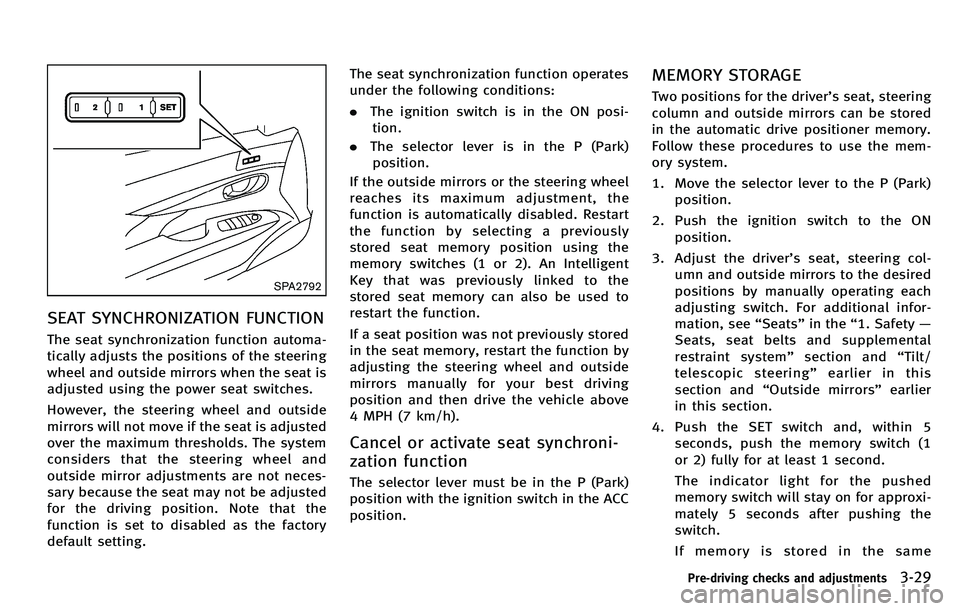
SEAT SYNCHRONIZATION FUNCTION
The seat synchronization function automa-
tically adjusts the positions of the steering
wheel and outside mirrors when the seat is
adjusted using the power seat switches.
However, the steering wheel and outside
mirrors will not move if the seat is adjusted
over the maximum thresholds. The system
considers that the steering wheel and
outside mirror adjustments are not neces-
sary because the seat may not be adjusted
for the driving position. Note that the
function is set to disabled as the factory
default setting.The seat synchronization function operates
under the following conditions:
.
The ignition switch is in the ON posi-
tion.
. The selector lever is in the P (Park)
position.
If the outside mirrors or the steering wheel
reaches its maximum adjustment, the
function is automatically disabled. Restart
the function by selecting a previously
stored seat memory position using the
memory switches (1 or 2). An Intelligent
Key that was previously linked to the
stored seat memory can also be used to
restart the function.
If a seat position was not previously stored
in the seat memory, restart the function by
adjusting the steering wheel and outside
mirrors manually for your best driving
position and then drive the vehicle above
4 MPH (7 km/h).
Cancel or activate seat synchroni-
zation function
The selector lever must be in the P (Park)
position with the ignition switch in the ACC
position.
MEMORY STORAGE
Two positions for the driver ’s seat, steering
column and outside mirrors can be stored
in the automatic drive positioner memory.
Follow these procedures to use the mem-
ory system.
1. Move the selector lever to the P (Park) position.
2. Push the ignition switch to the ON position.
3. Adjust the driver ’s seat, steering col-
umn and outside mirrors to the desired
positions by manually operating each
adjusting switch. For additional infor-
mation, see “Seats ”in the “1. Safety —
Seats, seat belts and supplemental
restraint system ”section and “Tilt/
telescopic steering ”earlier in this
section and “Outside mirrors” earlier
in this section.
4. Push the SET switch and, within 5 seconds, push the memory switch (1
or 2) fully for at least 1 second.
The indicator light for the pushed
memory switch will stay on for approxi-
mately 5 seconds after pushing the
switch.
If memory is stored in the same
Pre-driving checks and adjustments3-29