2012 INFINITI M change wheel
[x] Cancel search: change wheelPage 321 of 522

5-8Starting and driving
tions of the vehicle, road and traffic.
WARNING
The following actions can increase the
chance of losing control of the vehicle if
there is a sudden loss of tire air pressure.
Losing control of the vehicle may cause a
collision and result in personal injury.
.The vehicle generally moves or pulls in
the direction of the flat tire.
. Do not rapidly apply the brakes.
. Do not rapidly release the accelerator
pedal.
. Do not rapidly turn the steering wheel.
1. Remain calm and do not overreact.
2. Maintain a firm grip on the steering
wheel with both hands and try to hold a
straight course.
3. When appropriate, slowly release the accelerator pedal to gradually slow the
vehicle.
4. Gradually steer the vehicle to a safe location off the road and away from
traffic if possible. 5. Lightly apply the brake pedal to gradu-
ally stop the vehicle.
6. Turn on the hazard warning flashers and either contact a roadside emer-
gency service to change the tire or see
“Changing a flat tire ”in the “6. In case
of emergency” section of this Owner ’s
Manual.
DRINKING ALCOHOL/DRUGS AND
DRIVING
WARNING
Never drive under the influence of alcohol or
drugs. Alcohol in the bloodstream reduces
coordination, delays reaction time and im-
pairs judgement. Driving after drinking
alcohol increases the likelihood of being
involved in an accident injuring yourself and
others. Additionally, if you are injured in an
accident, alcohol can increase the severity
of the injury.
INFINITI is committed to safe driving.
However, you must choose not to drive
under the influence of alcohol. Every year
thousands of people are injured or killed in
alcohol-related accidents. Although the local laws vary on what is considered to
be legally intoxicated, the fact is that
alcohol affects all people differently and
most people underestimate the effects of
alcohol.
Remember, drinking and driving don
’t mix!
And that is true for drugs, too (over-the-
counter, prescription, and illegal drugs).
Don ’t drive if your ability to operate your
vehicle is impaired by alcohol, drugs, or
some other physical condition.
INTELLIGENT ALL-WHEEL DRIVE
(AWD) DRIVING SAFETY PRECAU-
TIONS
WARNING
. Do not drive beyond the performance
capability of the tires, even with Intelli-
gent AWD engaged. Accelerating quickly,
sharp steering ma neuvers or sudden
braking may cause loss of control.
. Always use tires of the same type, size,
brand, construction (bias, bias-belted or
radial), and tread pattern on all four
wheels. Install tire chains on the rear
wheels when driving on slippery roads
and drive carefully.
Page 324 of 522

If the battery of the vehicle is discharged,
the push-button ignition switch cannot be
turned from the LOCK position.
Some indicators and warnings for opera-
tion are displayed on the dot matrix liquid
crystal display between the speedometer
and tachometer. (See“Dot matrix liquid
crystal display ”in the “2. Instruments and
controls ”section.)
The ignition lock is designed so that the
ignition switch position cannot be switched
to LOCK until the selector lever is moved to
the P (Park) position.
When the ignition switch cannot be pushed
toward the LOCK position, proceed as
follows:
1. Move the selector lever into the P (Park) position.
2. Push the ignition switch to the OFF position. The ignition switch position
indicator will not illuminate.
3. Open the door. The ignition switch will change to the LOCK position.
The selector lever can be moved from the P
(Park) position if the ignition switch is in
the ON position and the brake pedal is
depressed.STEERING LOCK (if so equipped)
In order for the steering wheel to be
locked, it must be turned about 1/8 of a
right or left turn from the straight up
position.
To lock the steering wheel, push the
ignition switch to the OFF position. To
unlock the steering wheel, push the
ignition switch. If the steering lock release
malfunction indicator appears on the dot
matrix liquid crystal display, push the
push-button ignition switch again while
lightly turning the steering wheel right
and left. (See “Dot matrix liquid crystal
display ”in the “2. Instruments and con-
trols ”section.)
PUSH-BUTTON IGNITION SWITCH
POSITIONS
LOCK (Normal parking position)
The ignition switch can only be locked in
this position.
The ignition switch will be unlocked when
it is pushed to the ACC position while
carrying the Intelligent Key.
ACC (Accessories)
This position activates electrical acces-
sories such as the radio, when the engine
is not running.
ON (Normal operating position)
This position turns on the ignition system
and electrical accessories.
OFF
The engine can be turned off in this
position.
The ignition lock is designed so that the
ignition switch cannot be switched to the
LOCK position until the selector lever is
moved to the P (Park) position.
CAUTION
Do not leave the vehicle with the push-
button ignition switch in ACC or ON posi-
tions when the engine is not running for an
extended period. This can discharge the
battery.
Starting and driving5-11
Page 333 of 522
5-20Starting and driving
SNOW MODE
Used on snowy roads or slippery areas.
When the SNOW mode is activated, engine
output is controlled to avoid wheel spin.
Turn the SNOW mode off for normal
driving. Turn the drive mode select switch
to the SNOW position.“SNOW” appears in
the vehicle information display for 2
seconds.
ECO MODE
Adjusts engine and transmission points to
enhance fuel economy.
NOTE:
Selecting this drive mode will not neces-
sarily improve fuel economy as many
driving factors influence its effectiveness.
Operation
Turn the drive mode select switch to the
ECO position. “ECO ”appears in the vehicle
information display for 2 seconds and the
ECO drive indicator light illuminates on the
instrument panel.
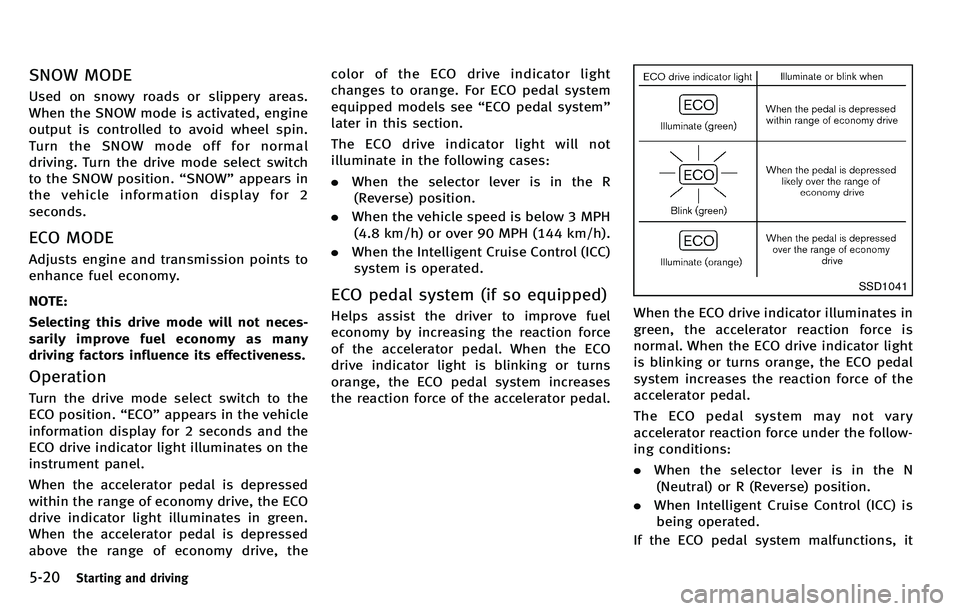
When the accelerator pedal is depressed
within the range of economy drive, the ECO
drive indicator light illuminates in green.
When the accelerator pedal is depressed
above the range of economy drive, the color of the ECO drive indicator light
changes to orange. For ECO pedal system
equipped models see
“ECO pedal system ”
later in this section.
The ECO drive indicator light will not
illuminate in the following cases:
. When the selector lever is in the R
(Reverse) position.
. When the vehicle speed is below 3 MPH
(4.8 km/h) or over 90 MPH (144 km/h).
. When the Intelligent Cruise Control (ICC)
system is operated.
ECO pedal system (if so equipped)
Helps assist the driver to improve fuel
economy by increasing the reaction force
of the accelerator pedal. When the ECO
drive indicator light is blinking or turns
orange, the ECO pedal system increases
the reaction force of the accelerator pedal.
SSD1041
When the ECO drive indicator illuminates in
green, the accelerator reaction force is
normal. When the ECO drive indicator light
is blinking or turns orange, the ECO pedal
system increases the reaction force of the
accelerator pedal.
The ECO pedal system may not vary
accelerator reaction force under the follow-
ing conditions:
. When the selector lever is in the N
(Neutral) or R (Reverse) position.
. When Intelligent Cruise Control (ICC) is
being operated.
If the ECO pedal system malfunctions, it
Page 336 of 522

The LDW and LDP systems monitor the lane
markers on the traveling lane using the
camera unit
*1located above the inside
mirror. When the camera unit detects that
the vehicle is traveling close to either the
left or the right of the traveling lane, the
lane departure warning light on the instru-
ment panel blinks in orange and a warning
chime sounds. When the LDP system is on,
it will automatically apply the brakes for a
short period of time, using the function of
the Vehicle Dynamic Control (VDC) system.
LANE DEPARTURE WARNING (LDW)
SYSTEM
Precautions on LDW system
WARNING
. This system is only a warning device to
inform the driver of a potential unin-
tended lane departure. It will not steer
the vehicle or prevent loss of control. It
is the driver ’s responsibility to stay
alert, drive safely, keep the vehicle in
the traveling lane, and be in control of
the vehicle at all times.
. The system will not operate at speeds below approximately 45 MPH or if it
cannot detect lane markers.
. If the LDW system malfunctions, it will
cancel automatically, and the lane de-
parture warning light (orange) will illu-
minate.
. If the lane departure warning light
(orange) illuminates, pull off the road
to a safe location and stop the vehicle.
Turn the engine off and restart the
engine. If the lane departure warning
light (orange) continues to illuminate,
have the system checked by an INFINITI
retailer.
. Excessive noise will interfere with the
warning chime sound, and the chime
may not be heard.The system may not function properly
under the following conditions:
.On roads where there are multiple
parallel lane markers; lane markers
that are faded or not painted clearly;
yellow painted lane markers; non-stan-
dard lane markers; or lane markers
covered with water, dirt, snow, etc.
. On roads where the discontinued lane
markers are still detectable. .
On roads where there are sharp curves.
. On roads where there are sharply
contrasting objects, such as shadows,
snow, water, wheel ruts, seams or lines
remaining after road repairs. (The LDW
system could detect these items as
lane markers.)
. On roads where the traveling lane
merges or separates.
. When the vehicle ’s traveling direction
does not align with the lane marker.
. When traveling close to the vehicle in
front of you, which obstructs the lane
camera unit detection range.
. When rain, snow or dirt adheres to the
windshield in front of the lane camera
unit.
. When the headlights are not bright due
to dirt on the lens or if the aiming is not
adjusted properly.
. When strong light enters the lane
camera unit. (For example, the light
directly shines on the front of the
vehicle at sunrise or sunset.)
. When a sudden change in brightness
occurs. (For example, when the vehicle
enters or exits a tunnel or under a
bridge.)
Starting and driving5-23
Page 340 of 522

chains, non-standard wheels).
—When the vehicle is equipped withnonoriginal brake parts or suspen-
sion parts.
. If the LDP system malfunctions, it will
cancel automatically. The lane departure
warning light (orange) on the instrument
panel will illuminate.
. If the lane departure warning light
(orange) illuminates, pull off the road
to a safe location and stop the vehicle.
Turn the engine off and restart the
engine. If the warning light (orange)
continues to illuminate, have the LDP
system checked by an INFINITI retailer.
. Excessive noise will interfere with the
warning chime sound, and the chime
may not be heard.
The functions of the LDP system (warning
and brake control assist) may or may not
operate properly under the following con-
ditions:
.On roads where there are multiple
parallel lane markers; lane markers
that are faded or not painted clearly;
yellow painted lane markers; non-stan-
dard lane markers; lane markers cov- ered with water, dirt, snow, etc.
. On roads where discontinued lane
markers are still detectable.
. On roads where there are sharp curves.
. On roads where there are sharply
contrasting objects, such as shadows,
snow, water, wheel ruts, seams or lines
remaining after road repairs. (The LDP
system could detect these items as
lane markers.)
. On roads where the traveling lane
merges or separates.
. When the vehicle ’s traveling direction
does not align with the lane marker.
. When traveling close to the vehicle in
front of you, which obstructs the lane
camera unit detection range.
. When rain, snow or dirt adheres to the
windshield in front of the lane camera
unit.
. When the headlights are not bright due
to dirt on the lens or if the aiming is not
adjusted properly.
. When strong light enters the lane
camera unit. (For example, the light
directly shines on the front of the
vehicle at sunrise or sunset.) .
When a sudden change in brightness
occurs. (For example, when the vehicle
enters or exits a tunnel or under a
bridge.)
While the LDP system is operating, you
may hear a sound of brake operation. This
is normal and indicates that the LDP
system is operating properly.
Starting and driving5-27
Page 343 of 522

5-30Starting and driving
.When you operate the lane change
signal and change the traveling lanes
in the direction of the signal. (The LDP
system will be deactivated for approxi-
mately 2 seconds after the lane change
signal is turned off.)
. When the vehicle speed lowers to less
than approximately 45 MPH (70 km/h).
. When the BSI system activates an
audible warning or brake control.
After the above conditions have finished
and the necessary operating conditions are
satisfied, the warning and assist functions
will resume.
Condition B:
The assist function of the LDP system is not
designed to work under the following
conditions (warning is still functional):
. When the brake pedal is depressed.
. When the steering wheel is turned as
far as necessary for the vehicle to
change lanes.
. When the accelerator pedal is de-
pressed while the brake control assist
is provided.
. When the Intelligent Cruise Control (ICC)
approach warning occurs. .
When the hazard warning flashers are
operated.
. When driving on a curve at high speed.
After the above conditions have finished
and the necessary operating conditions are
satisfied, the LDP brake control assist
function will resume.
Condition C:
Under the following conditions, a beep will
sound and the LDP system will be canceled
automatically. The LDP ON indicator light
will blink in green, and the LDP system
cannot be activated:
. When the VDC system (except TCS
function) or ABS operates.
. When the VDC system is turned off.
. When the drive mode select switch is
turned to the SNOW mode.
Action to take:
When the above conditions no longer exist,
turn off the LDP system. Push the dynamic
driver assistance switch again to turn the
LDP system back on.
Temporary disabled status at high tem-
perature:
If the vehicle is parked in direct sunlight
under high temperature conditions (over approximately 104
8F (408 C)) and then the
LDP system is turned on, the LDP system
may be deactivated automatically. The lane
departure warning light (orange) will blink.
Action to take:
When the above conditions no longer exist,
turn off the LDP system. Push the dynamic
driver assistance switch again to turn the
LDP system back on.
Page 351 of 522

5-38Starting and driving
certain objects are present such as:
—Pedestrians, bicycles, animals
— Several types of vehicles such as
motorcycles
— Oncoming vehicles
— Vehicles remaining in the detection
zone when you accelerate from a
stop
(See “BSW/BSI driving situations ”
later in this section)
— A vehicle merging into an adjacent
lane at a speed approximately the
same as your vehicle
(See “BSW/BSI driving situations ”
later in this section)
— A vehicle approaching rapidly from
behind.
(See “BSW/BSI driving situations ”
later in this section)
— A vehicle which your vehicle over-
takes rapidly.
(See “BSW/BSI driving situations ”
later in this section)
. Severe weather or road spray condi-
tions may reduce the ability of the
radar to detect other vehicles.
. The radar sensors detection zone is
designed based on a standard lane
width. When driving in a wider lane, the radar sensors may not detect vehicles
in an adjacent lane. When driving in a
narrow lane, the radar sensors may
detect vehicles driving two lanes away.
. The radar sensors are designed to
ignore most stationary objects, how-
ever objects such as guardrails, walls,
foliage and parked vehicles may occa-
sionally be detected. This is a normal
operating condition.
. The camera may not detect lane mar-
kers in the following situations and the
BSI system may not operate properly.
— On roads where there are multiple
parallel lane markers; lane markers
that are faded or not painted clearly;
yellow painted lane markers; non-
standard lane markers; lane mar-
kers covered with water, dirt, snow,
etc.
— On roads where discontinued lane
markers are still detectable.
— On roads where there are sharp
curves.
— On roads where there are sharply
contrasting objects, such as sha-
dows, snow, water, wheel ruts,
seams or lines remaining after road
repairs. —
On roads where the traveling lane
merges or separates.
— When the vehicle ’s traveling direc-
tion does not align with the lane
markers.
— When traveling close to the vehicle
in front of you, which obstructs the
lane camera unit detection range.
— When rain, snow or dirt adheres to
the windshield in front of a lane
camera unit.
— When the headlights are not bright
due to dirt on the lens or if aiming is
not adjusted properly.
— When strong light enters a lane
c a mera
unit. (e.g. light directly
shines on the front of the vehicle
at sunrise or sunset.)
— When a sudden change in bright-
ness occurs. (e.g. when the vehicle
enters or exits a tunnel or under a
bridge.)
Page 367 of 522

5-54Starting and driving
SSD0977
Intelligent cruise control switch
The system is operated by a MAIN switch
and four control switches, all mounted on
the steering wheel.
1. RESUME/ACCELERATE switch:Resumes set speed or increases speed
incrementally.
2. SET/COAST switch: Sets desired cruise speed, reduces
speed incrementally.
3. CANCEL switch:
Deactivates the system without erasing
the set speed. 4. DISTANCE switch:
Changes the vehicle ’s following dis-
tance:
.Long.Middle.Short
5. MAIN switch:
Master switch to activate the system
SSD0978
Intelligent cruise control system
display and indicators
The display is located between the speed-
ometer and tachometer.
1. MAIN switch indicator:Indicates that the MAIN switch is ON.
2. Vehicle ahead detection indicator: Indicates whether it detects a vehicle in
front of you.
3. Set distance indicator: Displays the selected distance between
vehicles set with the DISTANCE switch.