2012 INFINITI G-CONVERTIBLE lights
[x] Cancel search: lightsPage 87 of 474

2-16Instruments and controls
install the cap and continue to drive the
vehicle. Thelight should turn off
after a few driving trips. If thelight
does not turn off after a few driving
trips, have the vehicle inspected by an
INFINITI retailer. You do not need to
have your vehicle towed to the retailer.
. Malfunction indicator light blinking —
An engine misfire has been detected
which may damage the emission con-
trol system.
To reduce or avoid emission control
system damage:
a) Do not drive at speeds above 45 MPH (72 km/h).
b) Avoid hard acceleration or decelera- tion.
c) Avoid steep uphill grades.
d) If possible, reduce the amount of
cargo being hauled or towed.
The malfunction indicator light may
stop blinking and remain on.
Have the vehicle inspected by an
INFINITI retailer. You do not need to
have your vehicle towed to the retailer.CAUTION
Continued vehicle operation without having
the emission control system checked and
repaired as necessary could lead to poor
driveability, reduced fuel economy, and
possible damage to the emission control
system.
Security indicator lightGUID-5C1A30CC-C304-47F2-9017-21DB6C86EF88The light blinks when the ignition switch is
in the ACC, OFF or LOCK position. This
function indicates the security system
equipped on the vehicle is operational.
If the security system is malfunctioning,
this light will remain on while the ignition
switch is in the ON position. For additional
information, see “Security systems” (P.2-
27).
Low beam indicator lightGUID-74BD5266-0D40-44BC-B993-5808317E4C38The light comes on when the front park,
side marker, tail and license plate lights
are on.
Turn signal/hazard indicator
lights
GUID-00B1B086-3725-450B-94DE-085F076508AEThe light flashes when the turn signal
switch lever or hazard switch is turned on.
Vehicle Dynamic Control (VDC)
off indicator light
GUID-5CBCDD2A-ACCA-4B6D-8B1E-B27C7F5AB078The light comes on when the vehicle
dynamic control off switch is pushed to
OFF. This indicates that the vehicle dynamic
control system and traction control system
are not operating.
AUDIBLE REMINDERSGUID-E1144D4E-396B-40A8-884E-447992E83ED5
Key reminder chimeGUID-E43BBD4C-3A1F-483C-9D44-524733918052A chime will sound if the driver side door is
opened while the ignition switch is pushed
to the ACC position or pushed to the OFF or
LOCK position with the Intelligent Key left
in the Intelligent Key port. Make sure the
ignition switch is pushed to the OFF
position, and take the Intelligent Key with
you when leaving the vehicle.
Light reminder chimeGUID-8624C04E-DC02-4067-8A90-B91AF097C12CA chime will sound when the driver side
door is opened with the light switch in the
orposition and the ignition switch
in the ACC, OFF or LOCK position.
Page 88 of 474
Turn the light switch off when you leave the
vehicle.
Parking brake reminder chimeGUID-EDB23543-6254-4F4C-99B1-CA1825499CF1The parking brake reminder chime will
sound if the vehicle is driven at more than
4 MPH (7 km/h) with the parking brake
applied. Stop the vehicle and release the
parking brake.
Brake pad wear warningGUID-97586C77-B2B4-4D32-AA76-DF460CACF31EThe disc brake pads have audible wear
warnings. When a brake pad requires
replacement, it will make a high pitched
scraping sound when the vehicle is in
motion. This scraping sound will first occur
only when the brake pedal is depressed.
After the wear of the brake pad is
increased, the sound will be heard all the
time even if the brake pedal is not
depressed. Have the brakes checked as
soon as possible if the warning sound is
heard.
Seat belt warning chimeGUID-0160A1CA-0F2F-4D1A-B495-E7DCB264CBAFThe seat belt warning chime will sound for
about 6 seconds unless the driver’s seat
belt is securely fastened.
GUID-CF20BAB9-FD7E-48A6-8C2B-BF546667BDDB
SIC4293
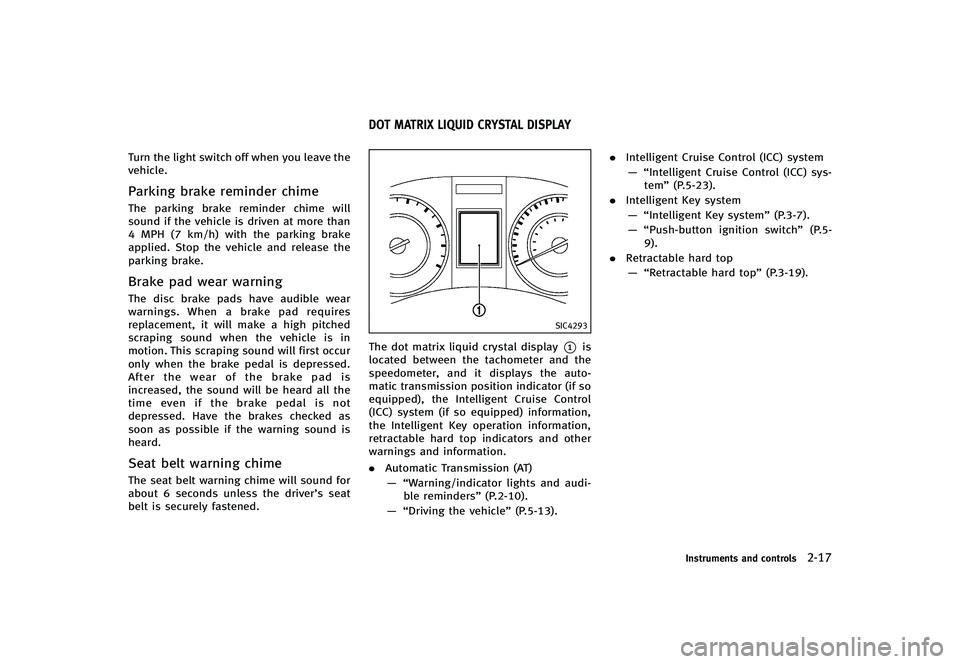
The dot matrix liquid crystal display*1is
located between the tachometer and the
speedometer, and it displays the auto-
matic transmission position indicator (if so
equipped), the Intelligent Cruise Control
(ICC) system (if so equipped) information,
the Intelligent Key operation information,
retractable hard top indicators and other
warnings and information.
. Automatic Transmission (AT)
— “Warning/indicator lights and audi- ble reminders” (P.2-10).
— “Driving the vehicle” (P.5-13)..
Intelligent Cruise Control (ICC) system
— “Intelligent Cruise Control (ICC) sys- tem” (P.5-23).
. Intelligent Key system
— “Intelligent Key system” (P.3-7).
— “Push-button ignition switch” (P.5-
9).
. Retractable hard top
— “Retractable hard top” (P.3-19).
Instruments and controls2-17
DOT MATRIX LIQUID CRYSTAL DISPLAY
Page 99 of 474

2-28Instruments and controls
SIC2045
How to arm the vehicle security
system
GUID-CE9139D0-6229-4D12-B5B7-B83BCD0085811. Close all windows.The system can be armed even if the
windows are open.
2. Push the ignition switch to the OFF position.
3. Remove the Intelligent Key from the vehicle.
4. Close all doors, hood and trunk. Lock all doors. The doors can be locked with
the Intelligent Key, door handle request
switch, power door lock switch or
mechanical key. 5. Confirm that the security indicator light
comes on. The security indicator light
stays on for about 30 seconds. The
vehicle security system is now pre-
armed. After about 30 seconds the
vehicle security system automatically
shifts into the armed phase. The
security light begins to flash once every
approximately 3 seconds. If, during this
30-second pre-arm time period, the
door is unlocked, or the ignition switch
is pushed to ACC or ON, the system will
not arm.
Even when the driver and/or passengers
are in the vehicle, the system will activate
with all doors, hood, and trunk lid locked
with the ignition switch in the LOCK
position. When pushing the ignition switch
to the ACC or ON position, the system will
be released.
Vehicle security system activationGUID-54D57BB8-9F18-4163-B041-408144181E15The vehicle security system will give the
following alarm:
. The headlights blink and the horn
sounds intermittently.
. The alarm automatically turns off after
approximately 1 minute. However, the
alarm reactivates if the vehicle is tampered with again.
The alarm is activated by:
. Unlocking the door or opening the trunk
lid without using the button on the
Intelligent Key, the door handle request
switch or the mechanical key. (Even if
the door is opened by releasing the
door inside lock knob, the alarm will
activate.)
. Opening the hood.
How to stop an activated alarmGUID-C1AF44C3-20AE-4AC5-8638-2FC58DC203BFThe alarm will stop by unlocking a door by
pushing the unlock button on the Intelli-
gent Key, the door handle request switch
or using the mechanical key, or when the
ignition switch is pushed to the ACC or ON
position.
If the system does not operate as de-
scribed above, have it checked by an
INFINITI retailer.
Page 104 of 474

GUID-7DBA5951-7A07-431B-9E38-2EEF2D178DF7
SIC3239
To defog/defrost the rear window glass
and outside mirrors, start the engine and
push the switch
*1on. The indicator light
*2will come on. Push the switch again to
turn the defroster off.
It will automatically turn off in approxi-
mately 15 minutes.
CAUTION
When cleaning the inner side of the rear
window, be careful not to scratch or damage
the rear window defroster.
GUID-B880B927-0D4A-4166-BD8D-A23B5CA4EDFD
XENON HEADLIGHTSGUID-B40150F6-DD79-4915-B6F1-208ABCF3DCF8
WARNING
HIGH VOLTAGE
. When xenon headlights are on, they
produce a high voltage. To prevent an
electric shock, never attempt to modify
or disassemble. Always have your xenon
headlights replaced at an INFINITI retai-
ler.
. Xenon headlights provide considerably
more light than conventional headlights.
If they are not correctly aimed, they
might temporarily blind an oncoming
driver or the driver ahead of you and
cause a serious accident. If headlights
are not aimed correctly, immediately
take your vehicle to an INFINITI retailer
and have the headlights adjusted cor-
rectly.
When the xenon headlight is initially
turned on, its brightness or color varies
slightly. However, the color and brightness
will soon stabilize.
.The life of xenon headlights will be
shortened by frequent on-off operation. It is generally desirable not to turn off
the headlights for short intervals (for
example, when the vehicle stops at a
traffic signal). Even when the daytime
running lights are active (Canada only),
the xenon headlights do not turn on.
This way the life of the xenon head-
lights is not reduced.
. If the xenon headlight bulb is close to
burning out, the brightness will dras-
tically decrease, the light will start
blinking, or the color of the light will
become reddish. If one or more of the
above signs appear, contact an INFINITI
retailer.
Instruments and controls2-33
REAR WINDOW AND OUTSIDE MIRROR
DEFROSTER SWITCH HEADLIGHT AND TURN SIGNAL SWITCH
Page 105 of 474

2-34Instruments and controls
SIC3267
HEADLIGHT SWITCHGUID-76D80EAC-25C9-4FA9-9E51-3DD686E0F7FF
LightingGUID-DCBEA9C5-43F7-4E89-B759-FBA0A4AF7A87*1Turn the switch to theposition:
The front park, side marker, tail,
license plate and instrument lights
will come on.
*2Turn the switch to theposition:
Headlights will come on and all the
other lights remain on.
SIC3268
Autolight systemGUID-10AD22BD-6D98-4EA5-AEB9-CB66853B9602The autolight system allows the headlights
to be set so they turn on and off
automatically.
To set the autolight system:
1. Make sure the headlight switch is in the AUTO position
*1.
2. Push the ignition switch to the ON position.
3. The autolight system automatically
turns the headlights on and off.
To turn the autolight system off, turn the
switch to the OFF,
orposition. The autolight system can turn on the
headlights automatically when it is dark
and turn off the headlights when it is light.
If the ignition switch is pushed to the OFF
position and one of the doors is opened
and this condition is continued, the head-
lights remain on for 5 minutes.
Automatic headlights off delay:
GUID-D73A39BF-43C8-459F-9C24-47B7F579C407You can keep the headlights on for up to
180 seconds after you push the ignition
switch to OFF and open any door then close
all the doors.
You can adjust the period of the automatic
headlights off delay from 0 seconds (OFF)
to 180 seconds. The factory default setting
is 45 seconds.
For automatic headlights off delay setting,
see
“Light Off Delay” (P.4-19).
Page 106 of 474
SIC4192
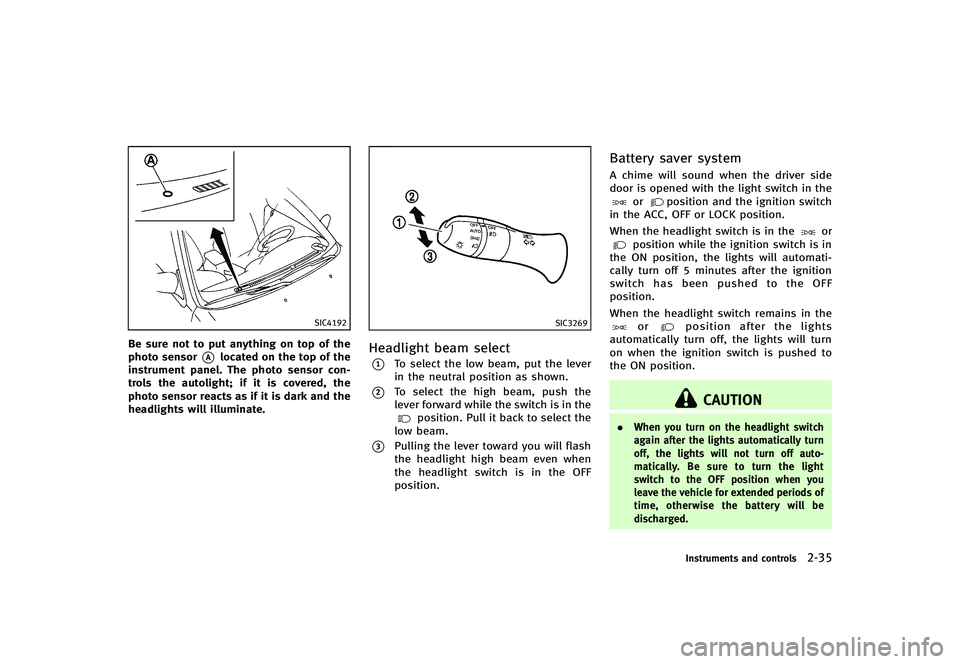
Be sure not to put anything on top of the
photo sensor
*Alocated on the top of the
instrument panel. The photo sensor con-
trols the autolight; if it is covered, the
photo sensor reacts as if it is dark and the
headlights will illuminate.
SIC3269
Headlight beam selectGUID-A356FC5F-5977-428C-9511-7C0A81EB4995*1To select the low beam, put the lever
in the neutral position as shown.
*2To select the high beam, push the
lever forward while the switch is in the
position. Pull it back to select the
low beam.
*3Pulling the lever toward you will flash
the headlight high beam even when
the headlight switch is in the OFF
position.
Battery saver systemGUID-F8729D36-FA75-4013-8DEE-B286CA93AFCAA chime will sound when the driver side
door is opened with the light switch in the
orposition and the ignition switch
in the ACC, OFF or LOCK position.
When the headlight switch is in the
orposition while the ignition switch is in
the ON position, the lights will automati-
cally turn off 5 minutes after the ignition
switch has been pushed to the OFF
position.
When the headlight switch remains in the
orposition after the lights
automatically turn off, the lights will turn
on when the ignition switch is pushed to
the ON position.
CAUTION
. When you turn on the headlight switch
again after the lights automatically turn
off, the lights will not turn off auto-
matically. Be sure to turn the light
switch to the OFF position when you
leave the vehicle for extended periods of
time, otherwise the battery will be
discharged.
Instruments and controls2-35
Page 107 of 474

2-36Instruments and controls
.Never leave the light switch on when the
engine is not running for extended
periods of time even if the headlights
turn off automatically.
Daytime running light system (Ca-
nada only)
GUID-6568CCD7-0FEB-47FA-B444-6F45312F6507The daytime running lights automatically
illuminate when the engine is started with
the parking brake released. The daytime
running lights operate with the headlight
switch in the OFF, AUTO or
position.
Turn the headlight switch to the
position for full illumination when driving
at night.
If the parking brake is applied before the
engine is started, the daytime running
lights do not illuminate. The daytime
running lights illuminate once the parking
brake is released. The daytime running
lights will remain on until the ignition
switch is pushed to the OFF position.
SIC3257
SIC3270
Page 108 of 474

Instrument brightness controlGUID-12851570-6D1E-4370-8D99-C4EDFBEA97EEThe instrument brightness control switch
can be operated when the ignition switch
is in the ON position. When the switch is
operated, the dot matrix liquid crystal
display switches to the brightness adjust-
ment mode.
Push the upper switch
*Ato brighten the
instrument panel lights. The bar
*1moves
to the + side. When reaching the maximum
brightness, “MAX”appears on the display
*2.
Push the lower switch
*Bto dim the
instrument panel lights. The bar
*1moves
to the −side. When reaching the minimum
brightness, “MIN”appears on the display
*3. However, “MIN”does not appear
during the nighttime.
The dot matrix liquid crystal display
returns to the normal display under the
following conditions:
. when the instrument brightness control
switch is not operated for more than 5
seconds.
. when the side or front of the
switch
orswitch on the right side of the
combination meter panel is pushed.
SIC3271
TURN SIGNAL SWITCHGUID-8BE38289-93AF-42A1-AF21-0183D12A80A5
*1Turn signalGUID-8ABF208E-C25E-4E7D-B7E2-6D8E91263B2DMove the lever up or down to signal the
turning direction. When the turn is com-
pleted, the turn signals cancel automati-
cally.
*2Lane change signalGUID-05BC5F28-D0F7-4935-A2B1-8907F8541DECTo indicate a lane change, move the lever
up or down to the point where lights begin
flashing.
SIC3272
FOG LIGHT SWITCHGUID-68AA7C2A-9996-4CFA-A902-0702C250C7CCTo turn the fog lights on, turn the headlight
switch to theposition, then turn the
switch to theposition. To turn them
off, turn the switch to the OFF position.
The headlights must be on for the fog
lights to operate.
When the headlight switch is in the AUTO
position and the fog light switch is in the
position, the headlights and fog lights
turn ON at night.
Instruments and controls2-37