Page 369 of 506
5-50Starting and driving
To reset at a slower cruising speed,use
one of the following methods:
. Lightly tap the brake pedal. When the
vehicle attains the desired speed, push
the SET/COAST switch and release it.
. Push and hold the SET/COAST switch.
The set vehicle speed will decrease by
approximately 5 MPH (5 km/h for
Canada).
. Push, then quickly release the SET/
COAST switch. Each time you do this,
the set speed will decrease by approxi-
mately 1 MPH (1 km/h for Canada).
To resume the preset speed, push and
release the RESUME/ACCELERATE switch.
The vehicle will resume the last set
cruising speed when the vehicle speed is
over 20 MPH (32 km/h).
SSD0903
How to change the set distance to
the vehicle ahead
GUID-C1D816C2-003C-435C-A882-A6EADCEF9169
Page 376 of 506

CAUTION
To avoid accidentally engaging cruise con-
trol, make sure to turn the ON/OFF switch off
when not using the Intelligent Cruise Con-
trol.
SSD0906
To set cruising speed,accelerate your
vehicle to the desired speed, push the
SET/COAST switch and release it. (The SET
indicator will come on in the display.) Take
your foot off the accelerator pedal. Your
vehicle will maintain the set speed.
. To pass another vehicle, depress the
accelerator pedal. When you release
the pedal, the vehicle will return to the
previously set speed.
. The vehicle may not maintain the set
speed when going up or down steep
hills. If this happens, manually main-
tain vehicle speed.
To cancel the preset speed, use any of thefollowing methods:
.
Push the CANCEL button. The SET
indicator will go out.
. Tap the brake pedal. The SET indicator
will go out.
. Turn the MAIN switch off. Both the
CRUISE indicator and SET indicator will
go out.
To reset at a faster cruising speed, use one
of the following three methods:
. Depress the accelerator pedal. When
the vehicle attains the desired speed,
push and release the SET/COAST
switch.
. Push and hold the RESUME/ACCELER-
ATE set switch. When the vehicle attains
the speed you desire, release the
switch.
. Push, then quickly release the RESUME/
ACCELERATE switch. Each time you do
this, the set speed will increase by
about 1 MPH (1.6 km/h).
To reset at a slower cruising speed, use
one of the following three methods:
. Lightly tap the brake pedal. When the
vehicle attains the desired speed, push
the SET/COAST switch and release it.
Starting and driving5-57
Page 378 of 506
GUID-AAD93081-BC7C-48D7-8AB6-56C3A6C02B1E
WARNING
.Always drive carefully and attentively
when using the Distance Control Assist
system. Read and understand the Own-
er’s Manual thoroughly before using the
DCA system. To avoid serious injury or
death, do not rely on the system to
prevent accidents or to control the
vehicle’s speed in emergency situations.
Do not use the Distance Control Assist
system except in appropriate road and
traffic conditions.
. If the vehicle ahead comes to a stop, the
vehicle decelerates to a standstill within
the limitations of the system. The
system will cancel once it judges that
the vehicle has come to a standstill with
a warning chime. To prevent the vehicle
from moving, the driver must depress
the brake pedal. .
The DCA system will not apply brake
control while the driver’s foot is on the
accelerator pedal.
SSD0701
PRECAUTIONS ON DISTANCE CON-
TROL ASSIST SYSTEM
GUID-61F421B0-D63D-4859-9E08-C8EB1CDC7165
Page 379 of 506

5-60Starting and driving
WARNING
.This system is only an aid to assist the
driver and is not a collision warning or
avoidance device. It is the driver’s
responsibility to stay alert, drive safely
and be in control of the vehicle at all
times.
. This system will not adapt automatically
to road conditions. Do not use the
system on roads with sharp curves, or
on icy roads, in heavy rain or in fog.
The distance sensor will not detect the
following objects:
.Stationary and slow moving vehicles
. Pedestrians or objects in the roadway
. Oncoming vehicles in the same lane
. Motorcycles traveling offset in the travel
lane
WARNING
. As there is a performance limit to the
distance control function, never rely
solely on the Distance Control Assist
system. This system does not correct
careless, inattentive or absent-minded
driving, or overcome poor visibility in
rain, fog, or other bad weather. Decele-
rate the vehicle speed by depressing the
brake pedal, depending on the distance
to the vehicle ahead and the surround-
ing circumstances in order to maintain a
safe distance between vehicles.
. The system may not detect the vehicle in
front of you in certain road or weather
conditions. To avoid accidents, never use
the Distance Control Assist system
under the following conditions:
—On roads with sharp curves
—On slippery road surfaces such as
on ice or snow, etc.
—During bad weather (rain, fog, snow,etc.)
—When strong light (for example, atsunrise or sunset) is directly shining
on the front of the vehicle
—When rain, snow or dirt adhere tothe system sensor
—On steep downhill roads (frequentbraking may result in overheating
the brakes)
—On repeated uphill and downhill
roads
. In some road or traffic conditions, a
vehicle or object can unexpectedly come
into the sensor detection zone and cause
automatic braking. You may need to
control the distance from other vehicles
using the accelerator pedal. Always stay
alert and avoid using the DCA system
when it is not recommended in this
section.
Page 386 of 506
SSD0746
1. System set display with vehicle ahead
2. System set display without vehicleahead
System operationGUID-C6A46949-EB7A-4EF4-863E-108F23B571A5
WARNING
The Distance Control Assist system auto-
matically decelerates your vehicle to help
assist the driver to maintain a following
distance from the vehicle ahead. Manually
brake when deceleration is required to
maintain a safe distance upon sudden
braking by the vehicle ahead or when a vehicle suddenly appears in front of you.
Always stay alert when using the DCA
system.
The Distance Control Assist (DCA) system
helps assist the driver to keep a following
distance to the vehicle ahead by braking
and moving the accelerator pedal upward
in the normal driving condition.
When a vehicle is detected ahead:
GUID-4D508F5D-FA8E-49D6-A9E2-6F8E76C17033
Page 387 of 506
5-68Starting and driving
WARNING
.When the vehicle ahead detection in-
dicator light is not illuminated, system
will not control or warn the driver.
. Never place your foot under the brake
pedal. Your foot may be caught when the
system controls the brake.
. Depending on the position of the accel-
erator pedal, the system may not be able
to assist the driver to release the
accelerator pedal appropriately.
. If the vehicle ahead comes to a stand-
still, the vehicle decelerates to a stand-
still within the limitations of the system.
The system will release brake control
with a warning chime once it judges the
vehicle is at a standstill. To prevent the
vehicle from moving, the driver must
depress the brake pedal. (The system
will resume control automatically once
the system reaches 3 MPH (5 km/h)).
Overriding the system:GUID-4D508F5D-FA8E-49D6-A9E2-6F8E76C17033
Page 392 of 506
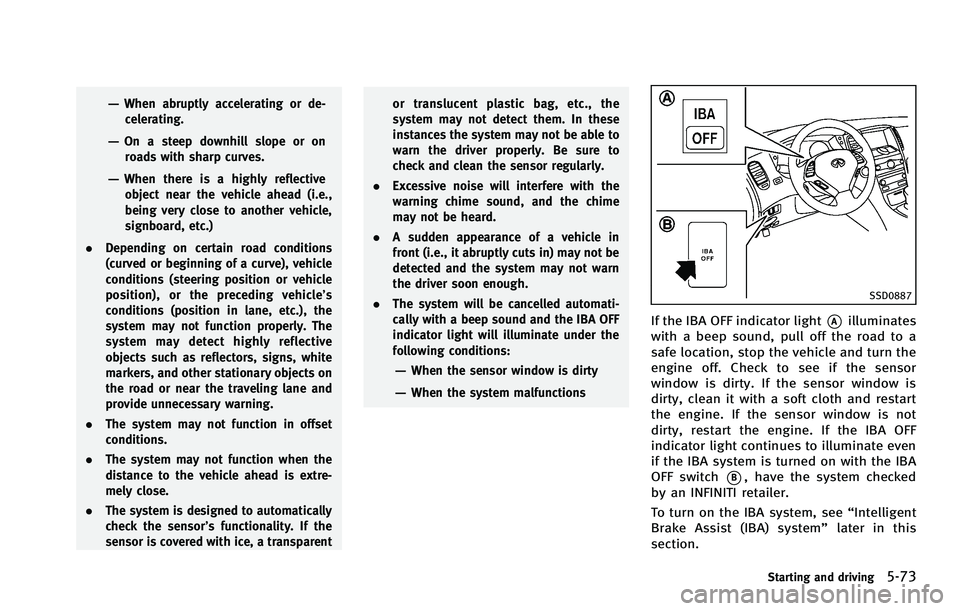
SSD0887
If the IBA OFF indicator light*Ailluminates
with a beep sound, pull off the road to a
safe location, stop the vehicle and turn the
engine off. Check to see if the sensor
window is dirty. If the sensor window is
dirty, clean it with a soft cloth and restart
the engine. If the sensor window is not
dirty, restart the engine. If the IBA OFF
indicator light continues to illuminate even
if the IBA system is turned on with the IBA
OFF switch
*B, have the system checked
by an INFINITI retailer.
To turn on the IBA system, see “Intelligent
Brake Assist (IBA) system” later in this
section.
Starting and driving5-73
Page 399 of 506
5-80Starting and driving
SD1006MA
WARNING
.Do not stop or park the vehicle over
flammable materials such as dry grass,
waste paper or rags. They may ignite and
cause a fire.
. Never leave the engine running while the
vehicle is unattended.
. Do not leave children unattended inside
the vehicle. They could unknowingly
activate switches or controls. Unat-
tended children could become involved
in serious accidents. .
Safe parking procedures require that
both the parking brake be applied and
the transmission be placed in the P
(Park) position. Failure to do so could
cause the vehicle to move unexpectedly
or roll away and result in an accident.
. Make sure the automatic transmission
selector lever has been pushed as far
forward as it can go and cannot be
moved without depressing the foot
brake pedal.
1. Firmly apply the parking brake.
PARKING/PARKING ON HILLS