2012 INFINITI EX ECU
[x] Cancel search: ECUPage 53 of 506

1-34Safety—Seats, seat belts and supplemental restraint system
SSS0641
Forward-facing —step 8
8. After attaching the child restraint, test
it before you place the child in it. Push
it from side to side while holding the
child restraint near the seat belt path.
The child restraint should not move
more than 1 inch (25 mm), from side to
side. Try to tug it forward and check to
see if the belt holds the restraint in
place. If the restraint is not secure,
tighten the seat belt as necessary, or
put the restraint in another seat and
test it again. You may need to try a
different child restraint. Not all child
restraints fit in all types of vehicles. 9. Check to make sure the child restraint
is properly secured prior to each use. If
the seat belt is not locked, repeat steps
2 through 8.
SSS0676
Forward-facing —step 10
10. If the child restraint is installed in the
front passenger seat, place the ignition
switch in the ON position. The front
passenger air bag status light
should illuminate. If this light is not
illuminated, see “Front passenger air
bag and status light” in this section.
Move the child restraint to another
seating position. Have the system
checked by an INFINITI retailer.
After the child restraint is removed and the
seat belt is fully retracted, the ALR mode
(child restraint mode) is canceled.
Page 54 of 506

WARNING
.If the cargo cover contacts the top tether
strap when it is attached to the top
tether anchor, remove the cargo cover
from the vehicle or secure it on the cargo
floor below its attachment location. If
the cargo cover is not removed, it may
damage the top tether strap during a
collision. Your child could be seriously
injured or killed in a collision if the child
restraint top tether strap is damaged.
. Do not allow cargo to contact the top
tether strap when it is attached to the
top tether anchor. Properly secure the
cargo so it does not contact the top
tether strap. Cargo that is not properly
secured or cargo that contacts the top
tether strap may damage the top tether
strap during a collision. Your child could
be seriously injured or killed in a
collision if the child restraint top tether
strap is damaged.
SSS0841
First, secure the child restraint with the
LATCH lower anchors (rear outboard seat-
ing positions only) or the seat belt, as
applicable.
1. If necessary, raise or remove the head-
rest to position the top tether strap
over the top of the seatback. If the
headrest is removed, store it in a
secure place. Be sure to reinstall the
headrest when the child restraint is
removed. See “Adjustable headrest”
earlier in this section for headrest
adjustment, removal and installation
information. 2. Secure the top tether strap to the tether
anchor point on the back of seatback
behind the child restraint.
If necessary, raise or remove the head-
rest to position the top tether strap
over the top of the seatback. If the
headrest is removed, store it in a
secure place. Be sure to reinstall the
headrest when the child restraint is
removed. See “Adjustable headrest” for
headrest adjustment, removal and in-
stallation information.
3. Refer to the appropriate child restraint installation procedure steps in this
section before tightening the tether
strap.
If you have any questions when installing
a top tether strap, consult your INFINITI
retailer for details.
Safety —Seats, seat belts and supplemental restraint system1-35
Page 57 of 506
1-38Safety—Seats, seat belts and supplemental restraint system
LRS0454
Front passenger position
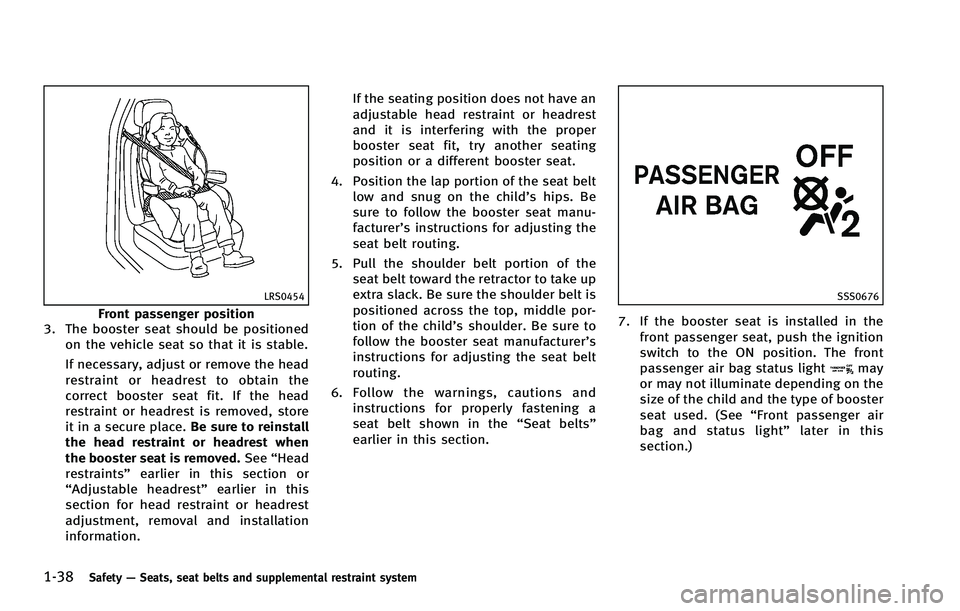
3. The booster seat should be positioned
on the vehicle seat so that it is stable.
If necessary, adjust or remove the head
restraint or headrest to obtain the
correct booster seat fit. If the head
restraint or headrest is removed, store
it in a secure place. Be sure to reinstall
the head restraint or headrest when
the booster seat is removed. See“Head
restraints” earlier in this section or
“Adjustable headrest” earlier in this
section for head restraint or headrest
adjustment, removal and installation
information. If the seating position does not have an
adjustable head restraint or headrest
and it is interfering with the proper
booster seat fit, try another seating
position or a different booster seat.
4. Position the lap portion of the seat belt low and snug on the child’s hips. Be
sure to follow the booster seat manu-
facturer’s instructions for adjusting the
seat belt routing.
5. Pull the shoulder belt portion of the seat belt toward the retractor to take up
extra slack. Be sure the shoulder belt is
positioned across the top, middle por-
tion of the child’s shoulder. Be sure to
follow the booster seat manufacturer’s
instructions for adjusting the seat belt
routing.
6. Follow the warnings, cautions and
instructions for properly fastening a
seat belt shown in the “Seat belts”
earlier in this section.
SSS0676
7. If the booster seat is installed in the
front passenger seat, push the ignition
switch to the ON position. The front
passenger air bag status light
may
or may not illuminate depending on the
size of the child and the type of booster
seat used. (See “Front passenger air
bag and status light” later in this
section.)
Page 66 of 506

may be turned OFF, however, if the
occupant does not sit in the seat properly
(for example, by not sitting upright, by
sitting on an edge of the seat, or by
otherwise being out of position), this could
cause the sensor to turn the air bag OFF.
Always be sure to be seated and wearing
the seat belt properly for the most effective
protection by the seat belt and supple-
mental air bag.
INFINITI recommends that pre-teens and
children be properly restrained in a rear
seat. INFINITI also recommends that appro-
priate child restraints and booster seats be
properly installed in a rear seat. If this is
not possible, the occupant classification
sensor is designed to operate as described
above to turn the front passenger air bag
OFF for specified child restraints. Failing to
properly secure child restrains and to use
the ALR mode (child restraint mode) may
allow the restraint to tip or move in an
accident or sudden stop. This can also
result in the passenger air bag inflating in
a crash instead of being OFF. (See“Child
restraints” earlier in this section for proper
use and installation.)
If the front passenger seat is not occupied,
the passenger air bag is designed not to inflate in a crash. However, heavy objects
placed on the seat could result in air bag
inflation, because of the object being
detected by the occupant classification
sensor. Other conditions could also result
in air bag inflation, such as if a child is
standing on the seat, or if two children are
on the seat, contrary to the instructions in
this manual. Always be sure that you and
all vehicle occupants are seated and
restrained properly.
Using the passenger air bag status light,
you can monitor when the front passenger
air bag is automatically turned OFF with the
seat occupied. The light will not illuminate
when the front passenger seat is unoccu-
pied.
If an adult occupant is in the seat but the
passenger air bag status light is illumi-
nated (indicating that the air bag is OFF), it
could be that the person is a small adult,
or is not sitting on the seat properly.
If a child restraint must be used in the front
seat, the passenger air bag status light
may or may not be illuminated, depending
on the size of the child and the type of
child restraint being used. If the passenger
air bag status light is not illuminated
(indicating that the air bag might inflatein a crash), it could be that the child
restraint or seat belt is not being used
properly. Make sure that the child restraint
is installed properly, the seat belt is used
properly and the occupant is positioned
properly. If the passenger air bag status
light is still not illuminated, reposition the
occupant or child restraint in a rear seat.
If the passenger air bag status light will not
illuminate even though you believe that the
child restraint, the seat belts and the
occupant are properly positioned, the
system may be sensing an unoccupied
seat (in which case the air bag is OFF). Your
INFINITI retailer can check that the system
is OFF by using a special tool. However,
until you have confirmed with your retailer
that your air bag is working properly,
reposition the occupant or child restraint
in a rear seat.
The INFINITI Advanced Air Bag System and
passenger air bag status light will take a
few seconds to register a change in the
passenger seat status. However, if the seat
becomes unoccupied, the air bag status
light will remain off.
If a malfunction occurs in the front
passenger air bag system, the supplemen-
tal air bag warning light
, located in the
Safety
—Seats, seat belts and supplemental restraint system1-47
Page 85 of 506
2-12Instruments and controls
GUID-6AAEFF3D-0DD3-4C79-B5F3-C17FD9AE3F5E
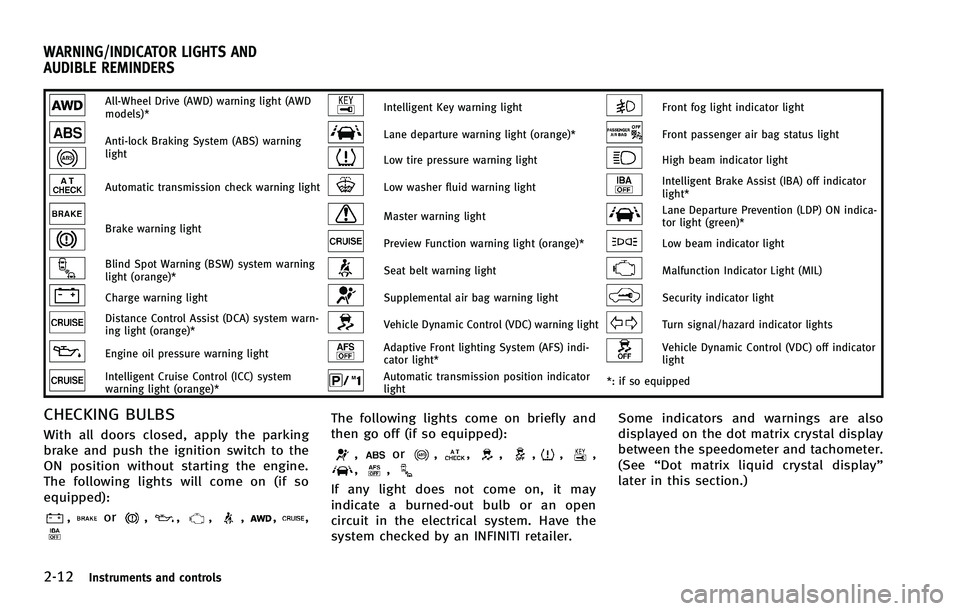
All-Wheel Drive (AWD) warning light (AWD
models)*Intelligent Key warning lightFront fog light indicator light
Anti-lock Braking System (ABS) warning
lightLane departure warning light (orange)*Front passenger air bag status light
Low tire pressure warning lightHigh beam indicator light
Automatic transmission check warning lightLow washer fluid warning lightIntelligent Brake Assist (IBA) off indicator
light*
Brake warning lightMaster warning lightLane Departure Prevention (LDP) ON indica-
tor light (green)*
Preview Function warning light (orange)*Low beam indicator light
Blind Spot Warning (BSW) system warning
light (orange)*Seat belt warning lightMalfunction Indicator Light (MIL)
Charge warning lightSupplemental air bag warning lightSecurity indicator light
Distance Control Assist (DCA) system warn-
ing light (orange)*Vehicle Dynamic Control (VDC) warning lightTurn signal/hazard indicator lights
Engine oil pressure warning lightAdaptive Front lighting System (AFS) indi-
cator light*Vehicle Dynamic Control (VDC) off indicator
light
Intelligent Cruise Control (ICC) system
warning light (orange)*Automatic transmission position indicator
light*: if so equipped
CHECKING BULBSGUID-38FC5737-A834-4040-96EA-92B7DF1FF61D
,or,,,,,,
The following lights come on briefly and
then go off (if so equipped):
,or,,,,,,,,
If any light does not come on, it may
indicate a burned-out bulb or an open
circuit in the electrical system. Have the
system checked by an INFINITI retailer. Some indicators and warnings are also
displayed on the dot matrix crystal display
between the speedometer and tachometer.
(See
“Dot matrix liquid crystal display”
later in this section.)
WARNING/INDICATOR LIGHTS AND
AUDIBLE REMINDERS
Page 93 of 506

2-20Instruments and controls
light should turn off
after a few driving trips. If thelight
does not turn off after a few driving
trips, have the vehicle inspected by an
INFINITI retailer. You do not need to
have your vehicle towed to the retailer.
. Malfunction indicator light blinking —
An engine misfire has been detected
which may damage the emission con-
trol system.
To reduce or avoid emission control system damage:
1) Do not drive at speeds above 45
MPH (72 km/h).
2) Avoid hard acceleration or decelera- tion.
3) Avoid steep uphill grades.
4) If possible, reduce the amount of cargo being hauled or towed.
The malfunction indicator light may
stop blinking and remain on.
Have the vehicle inspected by an
INFINITI retailer. You do not need to
have your vehicle towed to the retailer.
CAUTION
Continued vehicle operation without having
the emission control system checked and
repaired as necessary could lead to poor
driveability, reduced fuel economy, and
possible damage to the emission control
system.
Security indicator lightGUID-F283CFB3-5490-40E8-A11A-48F8F334CA30
Turn signal/hazard indicator
lights
GUID-03F65A59-AF9A-4CAE-937B-1BFA717FB4C0
Vehicle Dynamic Control (VDC)
off indicator light
GUID-FD6F2BFB-B634-4CE2-B8F8-10BADA39BBF3
Page 103 of 506

2-30Instruments and controls
button.
DISPLAY:
GUID-4D508F5D-FA8E-49D6-A9E2-6F8E76C17033
switch*Ato move to the
warning check mode.
Push the
switch*Bto select other
menus.
DETAIL:
GUID-4D508F5D-FA8E-49D6-A9E2-6F8E76C17033
SIC2133
Your vehicle has two types of security
systems, as follows:
. Vehicle security system
. INFINITI Vehicle Immobilizer System
The security condition will be shown by the
security indicator light.
VEHICLE SECURITY SYSTEMGUID-87DD9A1C-A96A-4B80-97F8-9699DF2B983A
Page 104 of 506

SIC2045
How to arm the vehicle security
system
GUID-5E5C6DAA-6740-4FFE-929A-6618CEF9669E