2012 Hyundai Sonata turn signal light
[x] Cancel search: turn signal lightPage 14 of 411

17
Introduction
INDICATOR SYMBOLS ON THE INSTRUMENT CLUSTER
Seat belt warning lightHigh beam indicatorTurn signal indicatorABS warning light Parking brake & Brake fluid
warning lightEngine oil pressure warning light
Malfunction indicator lightAir bag warning light Cruise indicatorCruise SET indicator Immobilizer indicator Low fuel level warning light
* For more detailed explanations, refer to “Instrument cluster” in section 4.Charging system warning light
Tail light indicator Trunk ajar warning light
Front fog light indicator
(if equipped)
Automatic transaxle shift
indicator (if equipped)Manual transaxle shift
indicator (if equipped)Door open position indicator (if equipped)
Low tire pressure telltale
(TPMS malfunction indicator)ECO indicator (if equipped)
ECO
Electric power steering (EPS)
system warning light
(if equipped)
EPS
ESC indicator
(ESC malfunction indicator)ESC OFF indicator
Page 17 of 411

23
Your vehicle at a glance
INSTRUMENT PANEL OVERVIEW
OYF019002N
1. Instrument cluster.............................4-50
2. Light control/Turn signals .................4-73
3. Audio controls ................................4-111
4. Horn .................................................4-40
5. Driver’s front air bag .........................3-49
6. Wiper/Washer ...................................4-77
7. Ignition switch* ...................................5-4
8. Engine start/stop button*....................5-7
9. Hazard warning flasherswitch ........................................4-72, 6-2
10. Audio* ...........................................4-111
11. Climate control system ...................4-83
12. Shift lever ..............................5-11, 5-14
13. AUX, USB, iPod............................4-109
14. Power outlet .................................4-107
15. Passenger’s front air bag ...............3-49
16. Glove box .....................................4-104
* : if equipped
Page 127 of 411
445
Features of your vehicle
Programming HomeLink
®
✽
✽NOTICE• When programming a garage door
opener, it is advised to park the vehi-
cle outside of the garage.
• It is recommended that a new battery be placed in the hand-held transmit-
ter of the device being programmed to
HomeLink
®for quicker training and
accurate transaxle of the radio-fre-
quency signal.
• Some vehicles may require the igni- tion switch to be turned to the second
(or "accessories") position for pro-
gramming and/or operation of
HomeLink.
• In the event that there are still pro- gramming difficulties or questions
after following the programming steps
listed below, contact HomeLink
®at:
www.homelink.com or 1-800-355-
3515.
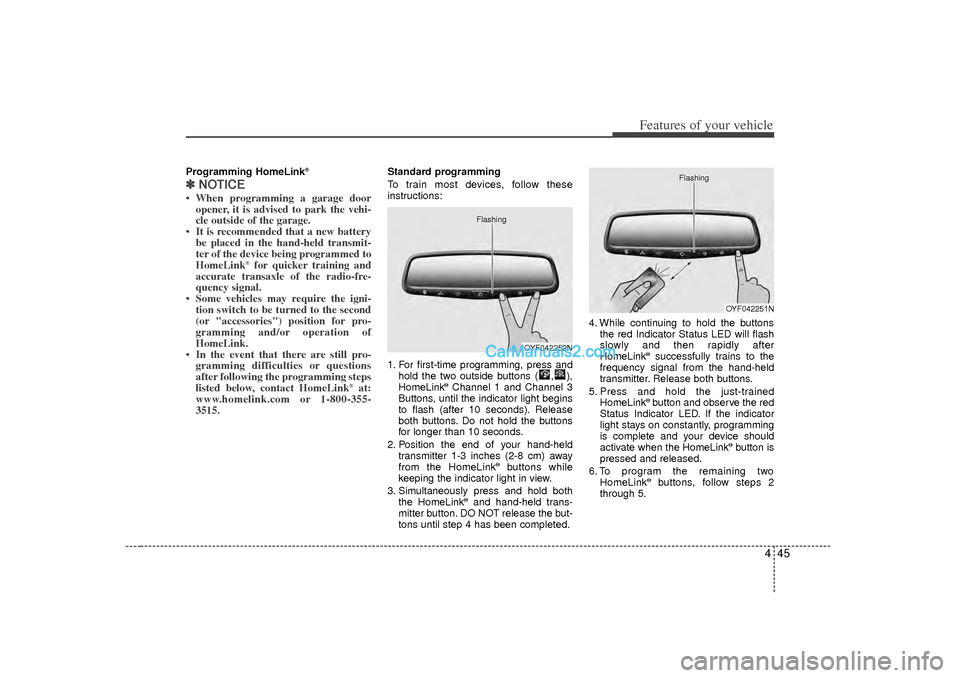
Standard programming
To train most devices, follow these
instructions:
1. For first-time programming, press and
hold the two outside buttons ( , ),
HomeLink
®Channel 1 and Channel 3
Buttons, until the indicator light begins
to flash (after 10 seconds). Release
both buttons. Do not hold the buttons
for longer than 10 seconds.
2. Position the end of your hand-held transmitter 1-3 inches (2-8 cm) away
from the HomeLink
®buttons while
keeping the indicator light in view.
3. Simultaneously press and hold both the HomeLink
®and hand-held trans-
mitter button. DO NOT release the but-
tons until step 4 has been completed. 4. While continuing to hold the buttons
the red Indicator Status LED will flash
slowly and then rapidly after
HomeLink
®successfully trains to the
frequency signal from the hand-held
transmitter. Release both buttons.
5. Press and hold the just-trained HomeLink®button and observe the red
Status Indicator LED. If the indicator
light stays on constantly, programming
is complete and your device should
activate when the HomeLink
®button is
pressed and released.
6. To program the remaining two HomeLink
®buttons, follow steps 2
through 5.
OYF042252N
Flashing
OYF042251N
Flashing
Page 128 of 411
Features of your vehicle46
4Rolling code programming
Rolling code devices which are "code-
protected" and manufactured after 1996
may be determined by the following:
Reference the device owner's manual
for verification.
The handheld transmitter appears to program the HomeLink
®
Universal
Transceiver but does not activate the
device.
Press and hold the trained HomeLink button. The device has the rolling code
feature if the indicator light flashes rap-
idly and then turns solid after 2 sec-
onds.
To train rolling code devices, follow these
instructions:
1. At the garage door opener receiver (motor-head unit) in the garage, locate
the "learn" or "smart" button. This can
usually be found where the hanging
antenna wire is attached to the motor-
head unit. Exact location and color of
the button may vary by garage door
opener brand.
If there is difficulty locating the training
button, reference the device owner's
manual or please visit our Web site at
www.homelink.com. 2. Firmly press and release the "learn" or
"smart" button (which activates the
"training light").
✽ ✽NOTICEThere are 30 seconds in which to initiate
step3.3. Return to the vehicle, firmly press and
hold for two seconds the desired
HomeLink
®
button then release.
Repeat the "press/hold/release"
sequence a second time to complete
the programming. (Some devices may
require you to repeat this sequence a
third time to complete the program-
ming.)
4. Press and hold the just-trained HomeLink
®button and observe the red
Status Indicator LED. If the indicator
light stays on constantly, programming
is complete and your device should
activate.
5. To program the remaining two HomeLink®buttons, follow either steps
1 through 4 above for other Rolling
Code devices or steps 2 through 5 in
Standard Programming for standard
devices. Gate operator & Canadian program-
ming
During programming, your handheld
transmitter may automatically stop trans-
mitting. Continue to press the Integrated
HomeLink
®Wireless Control System but-
ton (note steps 2 through 4 in the
Standard Programming portion of this
document) while you press and re-press
("cycle") your handheld transmitter every
two seconds until the frequency signal
has been learned. The indicator light will
flash slowly and then rapidly after sever-
al seconds upon successful training.
Operating HomeLink
®
To operate, simply press and release the
programmed HomeLink
®
button.
Activation will now occur for the trained
device (i.e. garage door opener, gate
operator, security system, entry door
lock, home/office lighting, etc.). For con-
venience, the hand-held transmitter of
the device may also be used at any time.
Page 132 of 411
Features of your vehicle50
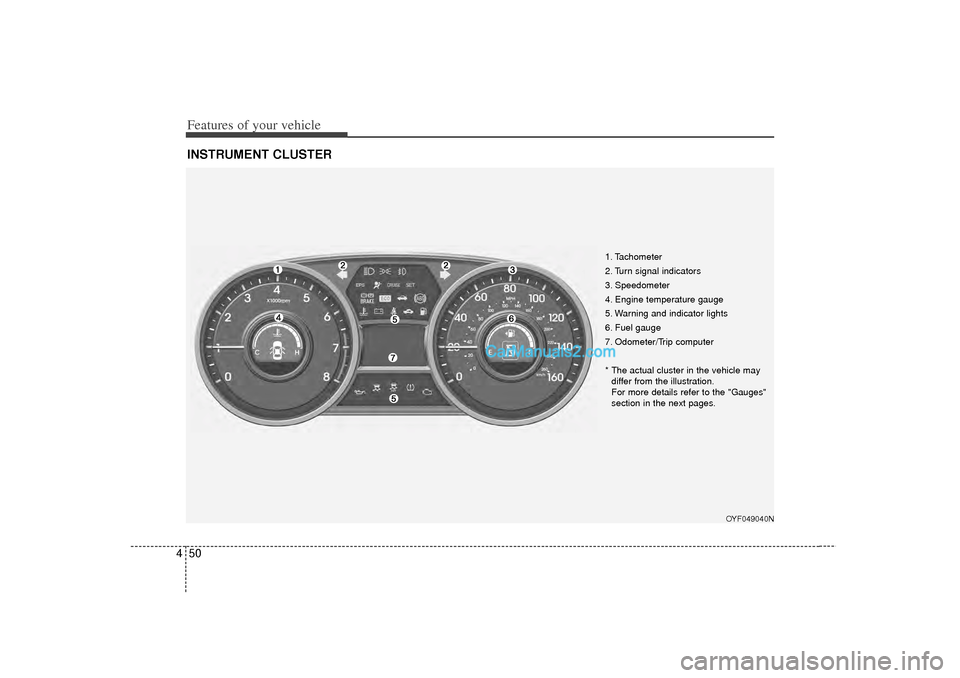
4INSTRUMENT CLUSTER
1. Tachometer
2. Turn signal indicators
3. Speedometer
4. Engine temperature gauge
5. Warning and indicator lights
6. Fuel gauge
7. Odometer/Trip computer
* The actual cluster in the vehicle may
differ from the illustration.
For more details refer to the "Gauges"
section in the next pages.
OYF049040N
Page 143 of 411
461
Features of your vehicle
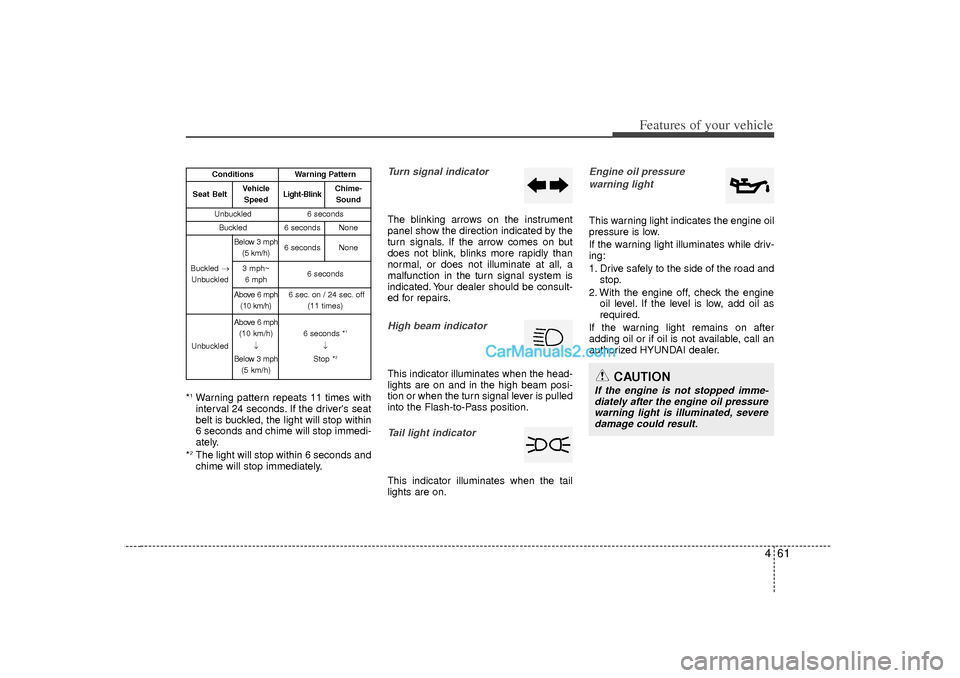
*1Warning pattern repeats 11 times with
interval 24 seconds. If the driver's seat
belt is buckled, the light will stop within
6 seconds and chime will stop immedi-
ately.
*2The light will stop within 6 seconds and
chime will stop immediately.
Turn signal indicatorThe blinking arrows on the instrument
panel show the direction indicated by the
turn signals. If the arrow comes on but
does not blink, blinks more rapidly than
normal, or does not illuminate at all, a
malfunction in the turn signal system is
indicated. Your dealer should be consult-
ed for repairs.High beam indicator This indicator illuminates when the head-
lights are on and in the high beam posi-
tion or when the turn signal lever is pulled
into the Flash-to-Pass position.Tail light indicator This indicator illuminates when the tail
lights are on.
Engine oil pressure warning lightThis warning light indicates the engine oil
pressure is low.
If the warning light illuminates while driv-
ing:
1. Drive safely to the side of the road and stop.
2. With the engine off, check the engine oil level. If the level is low, add oil as
required.
If the warning light remains on after
adding oil or if oil is not available, call an
authorized HYUNDAI dealer.
CAUTION
If the engine is not stopped imme- diately after the engine oil pressurewarning light is illuminated, severe damage could result.
Conditions
Warning Pattern
Seat Belt
Vehicle
Speed
Light-Blink
Chime-Sound
Unbuckled
6 seconds
Buckled
6 seconds
None
Buckled →
Unbuckled
Below 3 mph (5 km/h)
6 seconds
None
3 mph~6 mph
6 seconds
Above 6 mph (10 km/h)
6 sec. on / 24 sec. off (11 times)
Unbuckled
Above 6 mph(10 km/h)
↓
Below 3 mph (5 km/h)
6 seconds *
1
↓
Stop *
2
Page 154 of 411

Features of your vehicle72
4The hazard warning flasher should be
used whenever you find it necessary to
stop the car in a hazardous location.
When you must make such an emer-
gency stop, always pull off the road as far
as possible.
The hazard warning lights are turned on
by pushing in the hazard switch. This
causes all turn signal lights to blink. The
hazard warning lights will operate even
though the key is not in the ignition
switch.
To turn the hazard warning lights off,
push the switch a second time.
Battery saver function The purpose of this feature is to pre-
vent the battery from being dis-
charged. The system automatically
turns off the parking lights when the
driver removes the ignition key (smart
key : turns off the engine) and opens
the driver-side door.
With this feature, the parking lights will be turned off automatically if the driver
parks on the side of road at night.
If necessary, to keep the lights on
when the ignition key is removed
(smart key : turns off the engine), per-
form the following:
1) Open the driver-side door.
2) Turn the parking lights OFF and ON again using the light switch on the
steering column.
Headlamp delay (if equipped)If you turn the ignition switch to the ACC
or OFF position with the headlights ON,
the headlights (and/or tail lights) remain
on for about 20 minutes. However, if the
driver’s door is opened and closed, the
headlights are turned off after 30 sec-
onds.
The headlights can be turned off by
pressing the lock button on the transmit-
ter (or smart key) twice or turning the
light switch to the OFF or Auto position.
However, if you turn the light switch to the
Auto position when it is dark outside, the
headlights will not be turned off.
HAZARD WARNING FLASHER LIGHTING
OYF049084N
CAUTION
If the driver gets out of the vehicle
through other doors (except dri- ver's door), the battery saver func-tion does not operate and the head- lamp delay does not turn off auto-matically. Therefore, it causes thebattery to be discharged. In thiscase, make sure to turn off the lamp before getting out of the vehicle.
Page 157 of 411
475
Features of your vehicle
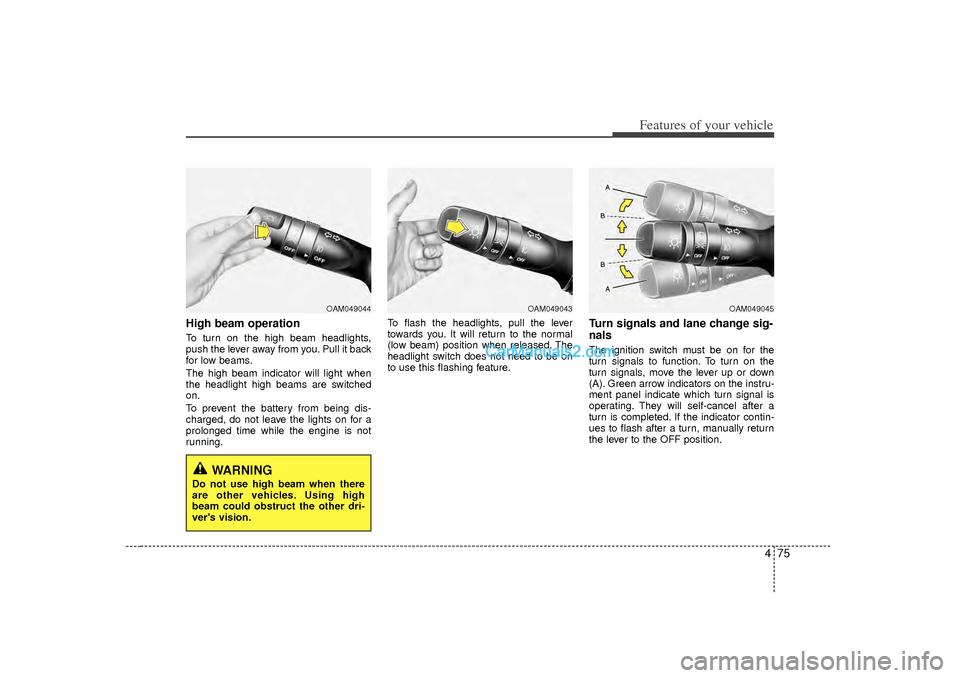
High beam operation To turn on the high beam headlights,
push the lever away from you. Pull it back
for low beams.
The high beam indicator will light when
the headlight high beams are switched
on.
To prevent the battery from being dis-
charged, do not leave the lights on for a
prolonged time while the engine is not
running.To flash the headlights, pull the lever
towards you. It will return to the normal
(low beam) position when released. The
headlight switch does not need to be on
to use this flashing feature.
Turn signals and lane change sig-
nalsThe ignition switch must be on for the
turn signals to function. To turn on the
turn signals, move the lever up or down
(A). Green arrow indicators on the instru-
ment panel indicate which turn signal is
operating. They will self-cancel after a
turn is completed. If the indicator contin-
ues to flash after a turn, manually return
the lever to the OFF position.
OAM049044
OAM049043
OAM049045
WARNING
Do not use high beam when there
are other vehicles. Using high
beam could obstruct the other dri-
ver's vision.