2012 Hyundai Sonata ignition
[x] Cancel search: ignitionPage 182 of 411
Features of your vehicle100
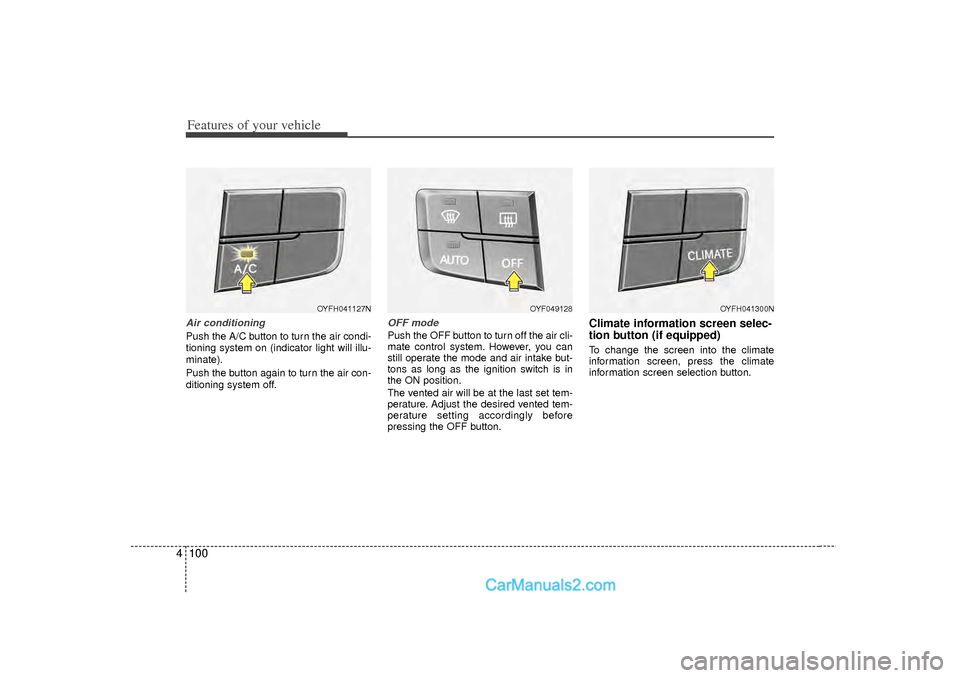
4Air conditioningPush the A/C button to turn the air condi-
tioning system on (indicator light will illu-
minate).
Push the button again to turn the air con-
ditioning system off.
OFF modePush the OFF button to turn off the air cli-
mate control system. However, you can
still operate the mode and air intake but-
tons as long as the ignition switch is in
the ON position.
The vented air will be at the last set tem-
perature. Adjust the desired vented tem-
perature setting accordingly before
pressing the OFF button.
Climate information screen selec-
tion button (if equipped)To change the screen into the climate
information screen, press the climate
information screen selection button.
OYFH041127N
OYF049128
OYFH041300N
Page 186 of 411
Features of your vehicle104
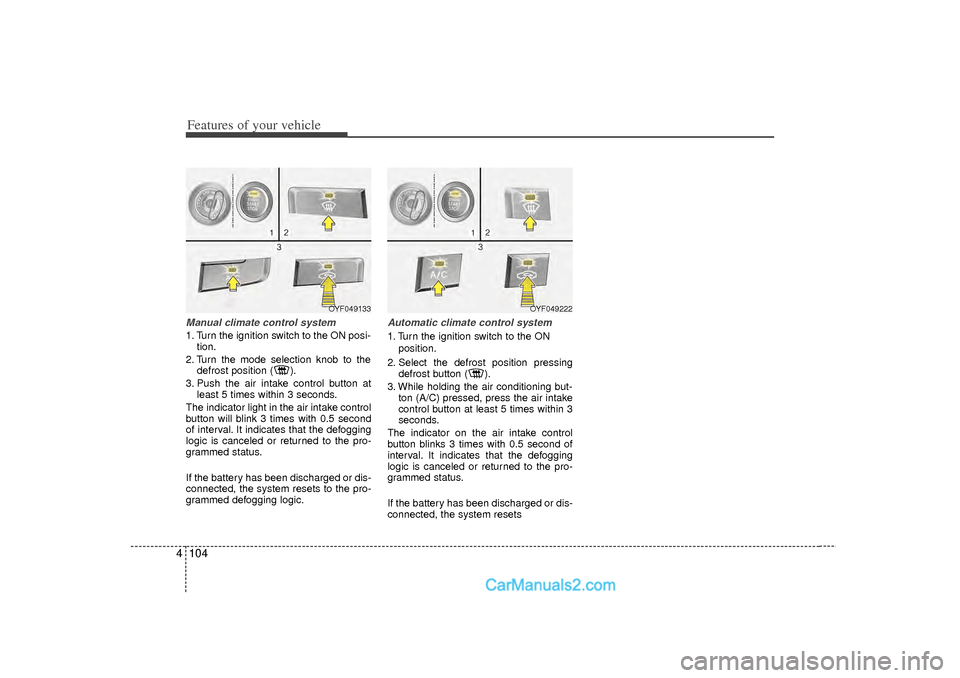
4Manual climate control system1. Turn the ignition switch to the ON posi-
tion.
2. Turn the mode selection knob to the defrost position ( ).
3. Push the air intake control button at least 5 times within 3 seconds.
The indicator light in the air intake control
button will blink 3 times with 0.5 second
of interval. It indicates that the defogging
logic is canceled or returned to the pro-
grammed status.
If the battery has been discharged or dis-
connected, the system resets to the pro-
grammed defogging logic.
Automatic climate control system1. Turn the ignition switch to the ON position.
2. Select the defrost position pressing defrost button ( ).
3. While holding the air conditioning but- ton (A/C) pressed, press the air intake
control button at least 5 times within 3
seconds.
The indicator on the air intake control
button blinks 3 times with 0.5 second of
interval. It indicates that the defogging
logic is canceled or returned to the pro-
grammed status.
If the battery has been discharged or dis-
connected, the system resets
OYF049222
OYF049133
Page 191 of 411
4 109
Features of your vehicle
Digital clock (if equipped)Whenever the battery terminals or relat-
ed fuses are disconnected, you must
reset the time.
When the ignition switch is in the ACC or
ON position, the clock buttons operate as
follows:
Hour (1)Pressing the H button with your finger, a
pencil or similar object will advance the
time displayed by one hour.Minute (2)Pressing the M button with your finger, a
pencil or similar object will advance the
time displayed by one minute.Display conversionTo change the 12 hour format to the 24
hour format, press the “H” and “M” but-
tons at the same time for more than 3
seconds.
For example, if the “H” and “M” buttons
are pressed for more than 3 seconds
while the time is 10:15 p.m., the display
will be changed to 22:15.
❈For the type of the clock built in the
audio or navigation, refer to a separately supplied manual.
Clothes hanger (if equipped)To use the hanger, pull down the upper
portion of hanger.
OYF049224
WARNING
Do not adjust the clock while driv-
ing. You may lose your steering
control and cause an accident that
results in severe personal injury or
death.
OUN026348
CAUTION
Do not hang heavy clothes, because it may damage the hook.
Page 228 of 411

Features of your vehicle146
4NOTE:Bluetooth
®
phone compatibility can
be checked by visiting
www.hyundaiusa.com and under the
SERVICE & PARTS - BLUETOOTH
COMPATIBILITY menu.
The website provides 9 types of infor-
mation, including information on
Pairing, Connection, Handsfree
Calling, Streaming, and more.What is Bluetooth
®?
Bluetooth
®is a wireless technology that
allows multiple devices to be connected
in a short range, low-powered devices
like hands-free, stereo headset, wireless
remote controller, etc. For more information,
visit
the Bluetooth
®
website at
www
.Bluetooth.com
CAUTION
Bluetooth
®features can be used
only when the mobile phone has been paired and connected with the device. For more informationon pairing and connectingBluetooth®mobile phones, refer
to the “Phone Setup” section.
When a Bluetooth
®mobile phone
is connected, a ( ) icon will appear at the top of the screen. Ifa ( ) icon is not displayed, this indicates that a Bluetooth
®device
has not been connected. Your must connect the device beforeuse. For more information onBluetooth
®mobile phones, refer
to the “Phone Setup” section.
Pairing and connecting a Bluetooth®
mobile phone will
work only when the Bluetooth
®
option within your mobile phone has been turned on. (Methods ofturning on the Bluetooth
®feature
may differ depending on the mobile phone.)
(Continued)
(Continued) In some mobile phones, starting the ignition while talking throughBluetooth
®
handsfree call will
result in the call becoming dis- connected. (Switch the call backto your mobile phone when start- ing the ignition.)
Some features may not be sup- ported in some Bluetooth
®mobile
phone and devices.
Bluetooth
®
operation may be
unstable depending on the com- munication state.
Page 230 of 411

Features of your vehicle148
4PHONEBefore using the Bluetooth
®
phone
features
In order to use Bluetooth
®phone, you
must first pair and connect the
Bluetooth
®mobile phone.
If the mobile phone is not paired or con- nected, it is not possible to enter Phone
mode. Once a phone is paired or con-
nected, the guidance screen will be dis-
played.
If Priority is set upon vehicle ignition (IGN/ACC ON), the Bluetooth
®phone
will be automatically connected. Even if
you are outside, the Bluetooth®phone
will be automatically connected once
you are in the vicinity of the vehicle. If
you do not want automatic Bluetooth
®
phone connection, set the Bluetooth
®
power to OFF.
Making a call using the steering
wheel remote controller Check call history and making call➀
Shortly press (under 0.8 seconds) the key on the steering remote con-
troller .
➁
The call history list will be displayed
on the screen.
➂
Press the key again to connect a
call to the selected number.
Redialing the most recently called num- ber
➀
Press and hold (over 0.8 seconds) the key on the steering remote con-
troller.
➁
The most recently called number is
redialed. ❈
If call history does not exist, a screen
asking whether to download call histo-
ry is displayed. (The download feature
may not be supported in some mobile
phones)
Page 243 of 411
4 161
Features of your vehicle
Eco Coach What is Eco Coach?
Every 2.5 minutes, Eco Coach compares
your fuel economy against the govern-
ment tested average (EPA) or other simi-
lar Hyundai models (community), based
on your preference. Each month, or after
every tank fill up, Eco Coach rates your
extended average and gives you a
reward star if you best the average.
See your My Hyundai web page for more
information.
What does the bar graph and horizontalline mean?
The horizontal line is adjusted once per
month or at each tank full, based on your
preference; it represents the EPA com-
bined average or community average
fuel economy target. What is My Eco MPG?
Your actual fuel economy average over
2.5 minutes.
This value is also shown in bar graph as
your “now” rating.
What are Eco Rewards?
If you beat the average (the EPA or com-
munity), you will receive an Eco Reward
point.
See your my Hyundai web page for more
information.
[Eco Driving] will not operate if the vehi-
cle ignition is not turned on. Please oper-
ate with the ignition turned on.
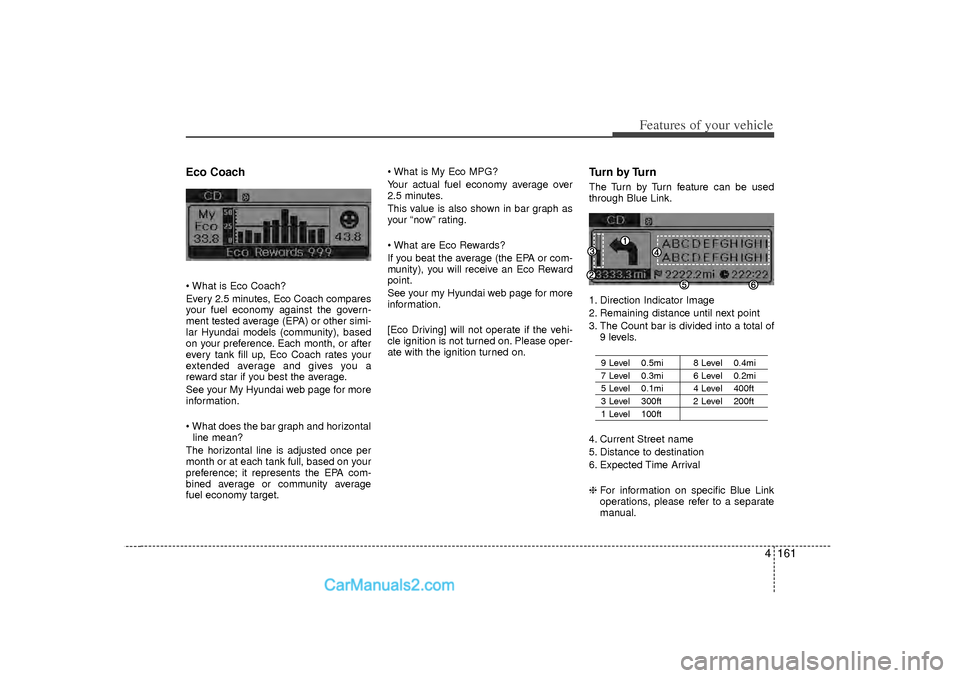
Turn by TurnThe Turn by Turn feature can be used
through Blue Link.
1. Direction Indicator Image
2. Remaining distance until next point
3. The Count bar is divided into a total of
9 levels.
9 Level 0.5mi 8 Level 0.4mi7 Level 0.3mi 6 Level 0.2mi5 Level 0.1mi 4 Level 400ft 3 Level 300ft 2 Level 200ft1 Level 100ft
4. Current Street name
5. Distance to destination
6. Expected Time Arrival
❈ For information on specific Blue Link
operations, please refer to a separate
manual.
Page 246 of 411
53
Driving your vehicle
Before entering vehicle• Be sure that all windows, outside mir-ror(s), and outside lights are clean.
Check the condition of the tires.
Check under the vehicle for any sign of leaks.
Be sure there are no obstacles behind you if you intend to back up.Necessary inspections Fluid levels, such as engine oil, engine
coolant, brake fluid, and washer fluid
should be checked on a regular basis,
with the exact interval depending on the
fluid. Further details are provided in sec-
tion 7, “Maintenance”.
Before starting Close and lock all doors.
Position the seat so that all controls are
easily reached.
Adjust the inside and outside rearview mirrors.
Be sure that all lights work.
Check all gauges.
Check the operation of warning lights when the ignition switch is turned to
the ON position.
Release the parking brake and make sure the brake warning light goes out.
For safe operation, be sure you are famil-
iar with your vehicle and its equipment.
BEFORE DRIVING
WARNING
Driving while distracted can result in
a loss of vehicle control, that may
lead to an accident, severe personal
injury, and death. The driver's pri-
mary responsibility is in the safe and
legal operation of a vehicle, and use
of any handheld devices, other
equipment, or vehicle systems which
take the driver's eyes, attention and
focus away from the safe operation
of a vehicle or which are not permis-
sible by law should never be used
during operation of the vehicle.
CALIFORNIA PROPOSI-
TION 65 WARNING
Engine exhaust and a wide variety
of automobile components and
parts, including components found
in the interior furnishings in a vehi-
cle, contain or emit chemicals
known to the State of California to
cause cancer and birth defects and
reproductive harm. In addition, cer-
tain fluids contained in vehicles
and certain products of component
wear contain or emit chemicals
known to the State of California to
cause cancer and birth defects or
other reproductive harm.
WARNING
All passengers must be properly
belted whenever the vehicle is mov-
ing. Refer to “Seat belts” in section
3 for more information on their
proper use.
Page 247 of 411
Driving your vehicle45
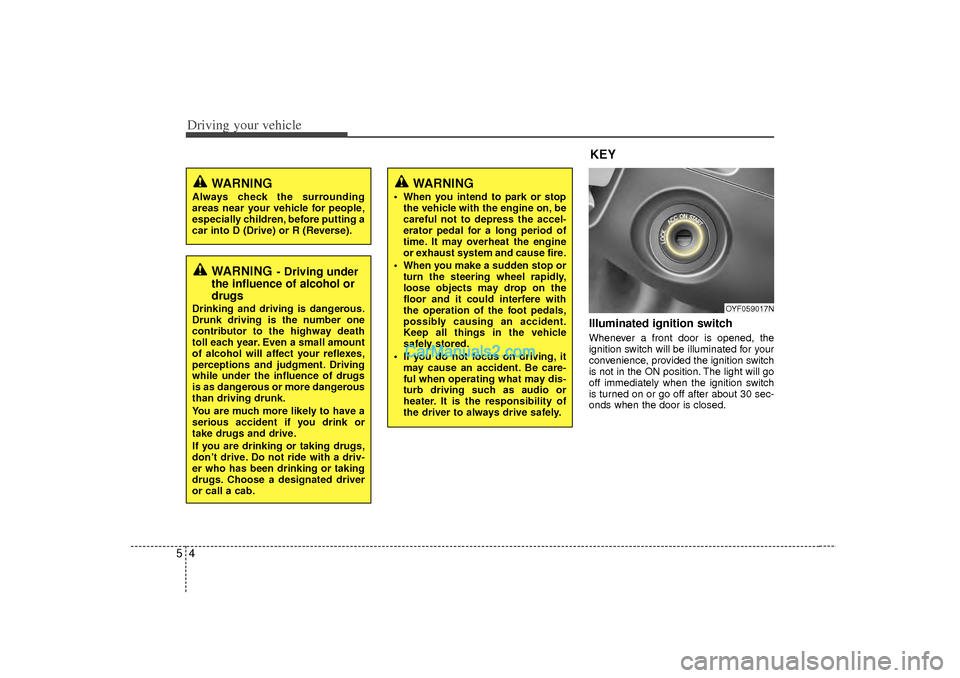
Illuminated ignition switch Whenever a front door is opened, the
ignition switch will be illuminated for your
convenience, provided the ignition switch
is not in the ON position. The light will go
off immediately when the ignition switch
is turned on or go off after about 30 sec-
onds when the door is closed.
OYF059017N
WARNING
Always check the surrounding
areas near your vehicle for people,
especially children, before putting a
car into D (Drive) or R (Reverse).
WARNING
- Driving under
the influence of alcohol or
drugs
Drinking and driving is dangerous.
Drunk driving is the number one
contributor to the highway death
toll each year. Even a small amount
of alcohol will affect your reflexes,
perceptions and judgment. Driving
while under the influence of drugs
is as dangerous or more dangerous
than driving drunk.
You are much more likely to have a
serious accident if you drink or
take drugs and drive.
If you are drinking or taking drugs,
don’t drive. Do not ride with a driv-
er who has been drinking or taking
drugs. Choose a designated driver
or call a cab.
KEY
WARNING
When you intend to park or stop
the vehicle with the engine on, be
careful not to depress the accel-
erator pedal for a long period of
time. It may overheat the engine
or exhaust system and cause fire.
When you make a sudden stop or turn the steering wheel rapidly,
loose objects may drop on the
floor and it could interfere with
the operation of the foot pedals,
possibly causing an accident.
Keep all things in the vehicle
safely stored.
If you do not focus on driving, it may cause an accident. Be care-
ful when operating what may dis-
turb driving such as audio or
heater. It is the responsibility of
the driver to always drive safely.