2012 Hyundai Sonata change
[x] Cancel search: changePage 87 of 411

45
Features of your vehicle
Immobilizer system (if equipped)Your vehicle is equipped with an elec-
tronic engine immobilizer system to
reduce the risk of unauthorized vehicle
use.
Your immobilizer system is comprised of
a small transponder in the ignition key
and electronic devices inside the vehicle.
With the immobilizer system, whenever
you insert your ignition key into the igni-
tion switch and turn it to ON, it checks
and determines and verifies if the ignition
key is valid.
If the key is determined to be valid, the
engine will start.
If the key is determined to be invalid, the
engine will not start.To activate the immobilizer system:Turn the ignition key to the OFF position.
The immobilizer system activates auto-
matically. Without a valid ignition key for
your vehicle, the engine will not start.To deactivate the immobilizer sys-tem:Insert the ignition key into the key cylin-
der and turn it to the ON position.
✽ ✽ NOTICEWhen starting the engine, do not use the
key with other immobilizer keys around.
Otherwise the engine may not start or
may stop soon after it starts. Keep each
key separate in order to avoid a starting
malfunction.
✽ ✽NOTICEIf you need additional keys or lose your
keys, consult an authorized HYUNDAI
dealer.
CAUTION
The transponder in your ignition
key is an important part of the immobilizer system. It is designedto give years of trouble-free service, however you should avoid expo-sure to moisture, static electricity and rough handling. Immobilizersystem malfunction could occur.
WARNING
In order to prevent theft of your
vehicle, do not leave spare keys
anywhere in your vehicle. Your
Immobilizer password is a cus-
tomer unique password and should
be kept confidential. Do not leave
this number anywhere in your vehi-
cle.
CAUTION
Do not change, alter or adjust the immobilizer system because itcould cause the immobilizer sys- tem to malfunction and should onlybe serviced by an authorized HYUNDAI dealer.
Malfunctions caused by improperalterations, adjustments or modifi-cations to the immobilizer system are not covered by your vehiclemanufacturer warranty.
CAUTION
Do not put metal accessories nearthe ignition switch.
Metal accessories may interrupt thetransponder signal and may pre- vent the engine from being started.
Page 88 of 411

Features of your vehicle64This device complies with Part 15 of
the FCC rules.
Operation is subject to the following two
conditions:
1. This device may not cause harmfulinterference, and
2. This device must accept any interfer- ence received, including interference
that may cause undesired operation.
With a smart key, you can lock or unlock
a door (and trunk) and even start the
engine without inserting the key.
The functions of buttons on a smart key
are similar to the remote keyless entry.
(Refer to the “Remote keyless entry” in
this section.)
Smart key functionsCarrying the smart key, you may lock and
unlock the vehicle doors. Also, you may
start the engine. Refer to the following,
for more details.
OYF049211
SMART KEY (IF EQUIPPED)
WARNING
Changes or modifications not
expressly approved by the party
responsible for compliance could
void the user’s authority to operate
the equipment.
Page 92 of 411

Features of your vehicle10
4This device complies with Part 15 of
the FCC rules.
Operation is subject to the following two
conditions:
1. This device may not cause harmful
interference, and
2. This device must accept any interfer- ence received, including interference
that may cause undesired operation.
Restrictions in handling keys When leaving keys with parking lot and
valet attendants, the following proce-
dures will ensure that your vehicle’s trunk
and glove box compartment can only be
opened with the mechanical key.
LockWhen leaving the key with a parking lot
attendant or valet, perform the following.
Remove the mechanical key from the
smart key and leave the smart key with
the attendant. In this manner the smart
key can only be used to start the engine
and operate door locks.
Trunk
1. Open the trunk lid.
2. Set the trunk lid control switch toLOCK position ( ).
3. Close the trunk lid.
Glove box
1. Press and hold the release button(1) and remove the mechanical key (2).
To reinstall the mechanical key, put the
key into the hole and push it until a
click sound is heard.
2. Close and lock the glove box using the mechanical key.
WARNING
Changes or modifications not
expressly approved by the party
responsible for compliance could
void the user’s authority to operate
the equipment. If the keyless entry
system is inoperative due to
changes or modifications not
expressly approved by the party
responsible for compliance, it will
not be covered by your manufactur-
er’s vehicle warranty.
OYF049004OYF049212
Page 95 of 411

413
Features of your vehicle
Transmitter precautions✽
✽NOTICEThe transmitter will not work if any of
following occur:
• The ignition key is in ignition switch.
• You exceed the operating distance
limit (about 90 feet [30 m]).
• The battery in the transmitter is weak.
• Other vehicles or objects may be blocking the signal.
• The weather is extremely cold.
• The transmitter is close to a radio transmitter such as a radio station or
an airport which can interfere with
normal operation of the transmitter.
When the transmitter does not work
correctly, open and close the door with
the ignition key. If you have a problem
with the transmitter, contact an author-
ized HYUNDAI dealer.
This device complies with Part 15 of
the FCC rules.
Operation is subject to the following two
conditions:
1. This device may not cause harmful interference, and
2. This device must accept any interfer- ence received, including interference
that may cause undesired operation.
Battery replacementThe transmitter uses a 3 volt lithium bat-
tery which will normally last for several
years. When replacement is necessary,
use the following procedure.
1. Insert a slim tool into the slot and gen-tly pry open the transmitter center
cover.
2. Replace the battery with a new battery (CR2032). When replacing the battery,
make sure the battery positive “+” sym-
bol faces up.
3. Install the battery in the reverse order of removal.
For replacement transmitters, see an
authorized HYUNDAI dealer for transmit-
ter reprogramming.
CAUTION
Keep the transmitter away from water or any liquid. If the keylessentry system is inoperative due toexposure to water or liquids, it willnot be covered by your manufactur- er’s vehicle warranty.
WARNING
Changes or modifications not
expressly approved by the party
responsible for compliance could
void the user’s authority to operate
the equipment. If the keyless entry
system is inoperative due to
changes or modifications not
expressly approved by the party
responsible for compliance, it will
not be covered by your manufactur-
er’s vehicle warranty.
ONF048120
Page 99 of 411
417
Features of your vehicle
Disarmed stageUsing the smart keyThe system will be disarmed when the
doors are unlocked by pressing the
unlock button on the smart key or press-
ing the lock/unlock button of the front out-
side door handle with the smart key in
your possession.
After unlocking the doors, the hazard
warning lights and chime will operate
twice to indicate that the system is dis-
armed.
After unlocking the doors, if any door is
not opened within 30 seconds, the sys-
tem will be rearmed.Using the transmitterThe system will be disarmed when the
doors are unlocked with by pressing the
unlock button on the transmitter.
After unlocking the doors, the hazard
warning lights will blink twice to indicate
that the system is disarmed.
After unlocking the doors, if any door is
not opened within 30 seconds, the sys-
tem will be rearmed.
Using the mechanical keyThe system will be disarmed when the
doors are unlocked with the mechanical
key.✽ ✽NOTICEIf you lock or unlock the doors by
using the mechanical key, the hazard
warning light and chime sound won't
operate.✽ ✽NOTICE -
Non-immobilizer
system
• Avoid trying to start the engine while
the alarm is activated. The vehicle
starting motor is disabled during the
theft-alarm stage.
If the system is not disarmed with the
transmitter, insert the key into the
ignition switch, turn the ignition
switch to the ON position and wait for
30 seconds. Then the system will be
disarmed.
• If you lose your keys, consult your authorized HYUNDAI dealer.
✽ ✽ NOTICE
- Immobilizer system
or smart key system
• If the system is not disarmed with the transmitter or smart key, insert the
key into the ignition switch and start
the engine or start the engine with the
smart key. Then the system will be
disarmed.
• If you lose your keys, consult your authorized HYUNDAI dealer.
CAUTION
Do not change, alter or adjust the
theft-alarm system because it couldcause the theft-alarm system tomalfunction and should only beserviced by an authorized HYUNDAIdealer.
Malfunctions caused by improperalterations, adjustments or modifi-cations to the theft-alarm system are not covered by your vehiclemanufacturer warranty.
Page 121 of 411

439
Features of your vehicle
Electric power steering (EPS)The power steering uses a motor to
assist you in steering the vehicle. If the
engine is off or if the power steering sys-
tem becomes inoperative, the vehicle
may still be steered, but it will require
increased steering effort.
The motor driven power steering is con-
trolled by a power steering control unit
which senses the steering wheel torque
and vehicle speed to command the
motor.
The steering becomes heavier as the
vehicle’s speed increases and becomes
lighter as the vehicle’s speed decreases
for optimum steering control.
Should you notice any change in the
effort required to steer during normal
vehicle operation, have the power steer-
ing checked by an authorized HYUNDAI
dealer.
✽ ✽NOTICEThe following symptoms may occur dur-
ing normal vehicle operation:
• The EPS warning light does not illumi-
nate.
• The steering effort is high immediately after turning the ignition switch on.
This happens as the system performs
the EPS system diagnostics. When the
diagnostics is completed, the steering
wheel will return to its normal condi-
tion.
• A click noise may be heard from the EPS relay after the ignition switch is
turned to the ON or LOCK position.
• A motor noise may be heard when the vehicle is at a stop or at a low driving
speed.
• If the Electric Power Steering System does not operate normally, the warn-
ing light will illuminate on the instru-
ment cluster. The steering wheel may
become difficult to control or operate
abnormally. Take your vehicle to an
authorized HYUNDAI dealer and
have the vehicle checked as soon as
possible.
• When you operate the steering wheel in low temperature, abnormal noise
could occur. If temperature rises, the
noise will disappear. This is a normal
condition.
STEERING WHEEL
CAUTION
If the Electric Power Steering
System does not operate normal-ly, the warning light will illuminate on the instrument cluster. Thesteering wheel may become diffi-cult to control or operate abnor- mally. Take your vehicle to anauthorized HYUNDAI dealer and have the vehicle checked as soonas possible.
When you operate the steering wheel in low temperature, abnor-mal noise could occur. If tempera- ture rises, the noise will disap-pear. This is a normal condition.
Page 122 of 411
Features of your vehicle40
4Tilt steering Tilt steering allows you to adjust the
steering wheel before you drive. You can
also raise it to give your legs more room
when you exit and enter the vehicle.
The steering wheel should be positioned
so that it is comfortable for you to drive,
while permitting you to see the instru-
ment panel warning lights and gauges.
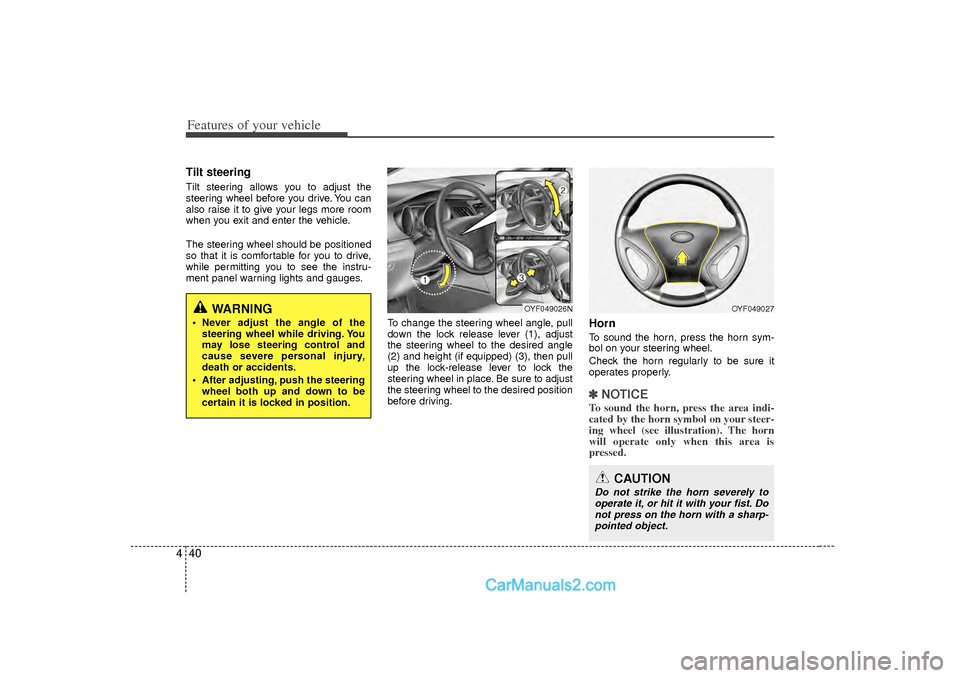
To change the steering wheel angle, pull
down the lock release lever (1), adjust
the steering wheel to the desired angle
(2) and height (if equipped) (3), then pull
up the lock-release lever to lock the
steering wheel in place. Be sure to adjust
the steering wheel to the desired position
before driving.
HornTo sound the horn, press the horn sym-
bol on your steering wheel.
Check the horn regularly to be sure it
operates properly.✽ ✽NOTICETo sound the horn, press the area indi-
cated by the horn symbol on your steer-
ing wheel (see illustration). The horn
will operate only when this area is
pressed.
OYF049026N
OYF049027
CAUTION
Do not strike the horn severely to
operate it, or hit it with your fist. Do not press on the horn with a sharp-pointed object.
WARNING
Never adjust the angle of the steering wheel while driving. You
may lose steering control and
cause severe personal injury,
death or accidents.
After adjusting, push the steering wheel both up and down to be
certain it is locked in position.
Page 126 of 411

Features of your vehicle44
4To adjust the Zone setting:
1. Determine the desired Zone Number
based upon your current location on
the Zone Map.
2. Press and hold the button for 6 sec- onds, the current Zone Number will
appear on the display.
3. Pressing and holding the button again will cause the numbers to incre-
ment (Note: they will repeat …13, 14,
15, 1, 2, …). Releasing the button
when the desired Zone Number
appears on the display will set the new
Zone.
4. Within about 5 seconds the compass will start displaying a compass head-
ing again.
There are some conditions that can
cause changes to the vehicle magnets,
such as installing a ski rack or a CB
antenna. Body repair work on the vehicle
can also cause changes to the vehicle's
magnetic field. In these situations, the
compass will need to be re-calibrated to
quickly correct for these changes. To re-
calibrate the compass: 1. Press and hold the button for more
than 9 seconds. When the compass
memory is cleared a "C" will appear in
the display.
2. To calibrate the compass, drive the vehicle in 2 complete circles at less
than 5 mph (8 km/h).
Integrated HomeLink
®Wireless Control
System
The HomeLink
®Wireless Control System
provides a convenient way to replace up
to three hand-held radio-frequency (RF)
transmitters with a single built-in device.
This innovative feature will learn the
radio frequency codes of most current
transmitters to operate devices such as
gate operators, garage door openers,
entry door locks, security systems, even
home lighting. Both standard and rolling
code-equipped transmitters can be pro-
grammed by following the outlined proce-
dures. Additional HomeLink
®information
can be found at: www.homelink.com or
by calling 1-800-355-3515. Retain the original transmitter of the RF
device you are programming for use in
other vehicles as well as for future
HomeLink
®programming. It is also sug-
gested that upon the sale of the vehicle,
the programmed HomeLink
®buttons be
erased for security purposes.
CAUTION
Before programming HomeLink
®to
a garage door opener or gate oper- ator, make sure that people andobjects are out of the way of thedevice to prevent potential harm or damage. Do not use HomeLink®
with any garage door opener thatlacks the safety stop and reversefeatures required by U.S. federal safety standards (this includes anygarage door opener model manu- factured before April 1, 1982). Agarage door that cannot detect anobject - signaling the door to stop and reverse - does not meet currentU.S. federal safety standards. Usinga garage door opener without these features increases the risk of seri-ous injury or death.