Page 110 of 354
431
Features of your vehicle
INSTRUMENT CLUSTER
1. Tachometer*
2. Turn signal indicators
3. Speedometer
4. Shift position indicator
5. Warning and indicator lights
6. Odometer/Tripmeter
7. Fuel gauge
* : if equippedOPA041131/OPA041133
D150000APA
Type A
* The actual cluster in the vehicle may differ
from the illustration.
For more details refer to the "Gauges" in
the next pages.
Type B
Page 119 of 354
Features of your vehicle
40
4
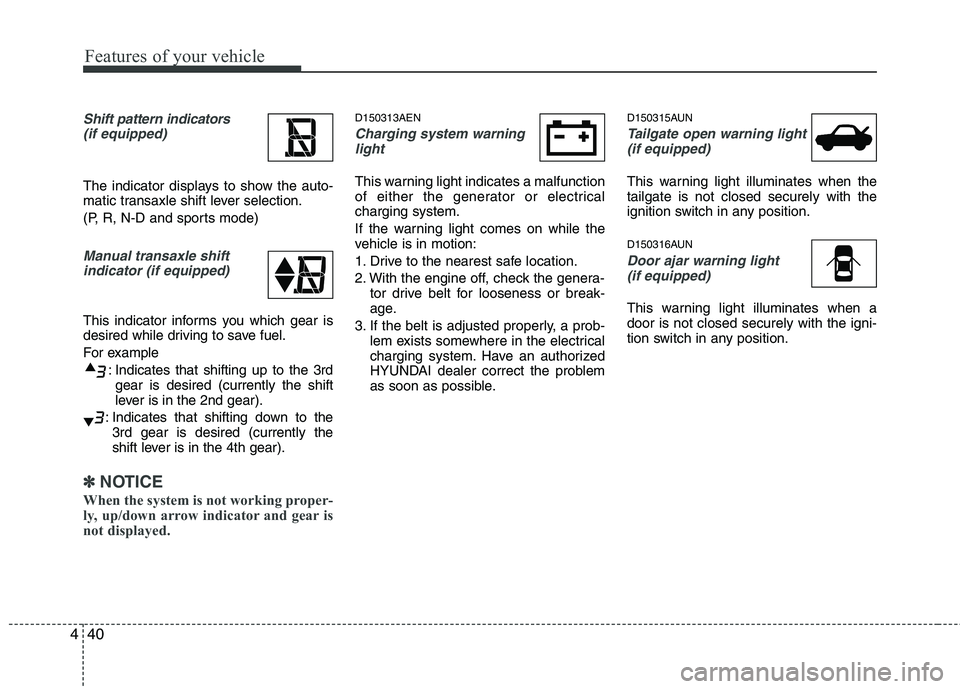
Shift pattern indicators
(if equipped)
The indicator displays to show the auto-
matic transaxle shift lever selection.
(P, R, N-D and sports mode)
Manual transaxle shiftindicator (if equipped)
This indicator informs you which gear is
desired while driving to save fuel.
For example
: Indicates that shifting up to the 3rdgear is desired (currently the shift
lever is in the 2nd gear).
: Indicates that shifting down to the 3rd gear is desired (currently the
shift lever is in the 4th gear).
✽✽
NOTICE
When the system is not working proper-
ly, up/down arrow indicator and gear is
not displayed.
D150313AEN
Charging system warning light
This warning light indicates a malfunction
of either the generator or electricalcharging system.
If the warning light comes on while the
vehicle is in motion:
1. Drive to the nearest safe location.
2. With the engine off, check the genera- tor drive belt for looseness or break-
age.
3. If the belt is adjusted properly, a prob- lem exists somewhere in the electrical
charging system. Have an authorized
HYUNDAI dealer correct the problem
as soon as possible. D150315AUN
Tailgate open warning light
(if equipped)
This warning light illuminates when the tailgate is not closed securely with the
ignition switch in any position.
D150316AUN
Door ajar warning light(if equipped)
This warning light illuminates when a door is not closed securely with the igni-
tion switch in any position.
Page 121 of 354

Features of your vehicle
42
4
AUTO STOP indicator
(if equipped)
This indicator will illuminate when the engine enters the Idle Stop mode of theISG (Idle Stop and Go) system.
When the automatic starting occurs, the
" " indicator on the cluster will blink for
5 seconds.
For more details, refer to section 5, “ISG (Idle Stop and Go) system”.
✽✽ NOTICE
When the engine automatically starts by
the ISG system, some warning lights
(ABS, ESP, ESP OFF or Parking brake
warning light) may turn on for a few
seconds. This happens because of the
low battery voltage. It does not mean the
system is malfunctioning.
ESP (Electronic Stability Program) indicator(if equipped)
The ESP indicator will illuminate when
the ignition switch is turned ON, but
should go off after approximately 3 sec-
onds. When the ESP is on, it monitors the
driving conditions. Under normal driving
conditions, the ESP indicator will remain
off. When a slippery or low traction con-dition is encountered, the ESP will oper-
ate, and the ESP indicator will blink to
indicate the ESP is operating. But, if the ESP system malfunctions the
indicator illuminates and stays on. Take
your vehicle to an authorized HYUNDAI
dealer and have the system checked.
ESP OFF indicator (if equipped)
The ESP OFF indicator will illuminate
when the ignition switch is turned ON,
but should go off after approximately 3
seconds. To switch to ESP OFF mode,
press the ESP OFF button. The ESPOFF indicator will illuminate indicating
the ESP is deactivated. D150334APA
Electronic power steering
(EPS) system warning light
(if equipped)
This light comes on when the ignition
switch is turned to the ON position and
then it will go out with the engine started. This light also comes on if the EPS has a
malfunction. If it comes on while driving,
have your vehicle inspected by an
authorized HYUNDAI dealer.
EPS
Page 127 of 354

Features of your vehicle
48
4
D190100AUN
Battery saver function (if equipped)
The purpose of this feature is to pre-
vent the battery from being dis-
charged. The system automatically
turns off the exterior lights when the
driver removes the ignition key and
opens the driver-side door.
With this feature, the parking lights will be turned off automatically if the driver
parks on the side of road at night.
If necessary, to keep the lights on
when the ignition key is removed, per-
form the following:
1) Open the driver-side door.
2) Turn the parking lights OFF and ON again using the light switch on the
steering column. D190400AUN
Lighting control
The light switch has a Headlight and a
Parking light position.
To operate the lights, turn the knob at the
end of the control lever to one of the fol-
lowing positions:
(1) OFF position
(2) Parking light position
(3) Headlight position D190401AEN
Parking light position ( )
When the light switch is in the parking
light position, the tail, license and instru-ment panel lights are ON.
LIGHTING
OPA041060OPA041061
CAUTION
If the driver gets out of the vehicle
through other doors (except dri-ver's door), the battery saver func-tion does not operate. Therefore, Itcauses the battery to be dis-
charged. In this case, make sure toturn off the lamp before getting out of the vehicle.
Page 128 of 354
449
Features of your vehicle
D190402AEN
Headlight position ( )
When the light switch is in the headlight
position the head, tail, license and instru-ment panel lights are ON.
✽✽NOTICE
The ignition switch must be in the ON
position to turn on the headlights.
D190500AUN High beam operation
To turn on the high beam headlights,
push the lever away from you. Pull it back
for low beams. The high beam indicator will light when
the headlight high beams are switchedon.
To prevent the battery from being dis-
charged, do not leave the lights on for aprolonged time while the engine is not
running. To flash the headlights, pull the lever
towards you. It will return to the normal
(low beam) position when released. The
headlight switch does not need to be on
to use this flashing feature.
OPA041062OPA041063OPA041064
Page 134 of 354
455
Features of your vehicle
D210000AEN
D210200APA Room lamp
Type A
: Push the switch to turn the roomlamp on or off.
: The light comes on when a door is opened.
Type B
In the ON position, the light stays on at all times.
In the DOOR position, the light comes on when any door is opened regardless of the igni-
tion switch position.
In the OFF position, the light stays off at all times even whena door is open. D210300APA
Luggage lamp (if equipped) The light comes on when the tailgate is opened.
INTERIOR LIGHT
CAUTION
Do not use the interior lights for
extended periods when the engineis not running.
It may cause battery discharge.
OPA047072OPA047073OFD047068
Page 158 of 354

479
Features of your vehicle
If the SEEK button is pressed for less
than 0.8 second, it will work as follows in
each mode.
RADIO mode
It will function as the PRESET STATION
select buttons.
CD/USB/iPod mode
It will function as the TRACK UP/DOWN
button.
Detailed information for audio control
buttons is described in the followingpages in this section.
MODE (3)
Press the button to change audio source. FM1 ➠FM2 ➠AM ➠CD ➠USB ➠FM...
MUTE (4, if equipped)
Press the MUTE button to cancel the
sound.
Press the MUTE button again to acti- vate the sound. D300800AHM
How vehicle audio works
AM and FM radio signals are broadcast
from transmitter towers located around
your city. They are intercepted by the
radio antenna on your vehicle. This signal
is then received by the radio and sent to
your vehicle speakers.
When a strong radio signal has reached
your vehicle, the precise engineering of
your audio system ensures the best pos-
sible quality reproduction. However, in
some cases the signal coming to your
vehicle may not be strong and clear. This
can be due to factors such as the dis-
tance from the radio station, closeness of
other strong radio stations or the pres-
ence of buildings, bridges or other large
obstructions in the area. AM broadcasts can be received at
greater distances than FM broadcasts.
This is because AM radio waves are
transmitted at low frequencies. These
long, low frequency radio waves can fol-
low the curvature of the earth rather than
travelling straight out into the atmos-
phere. In addition, they curve around
obstructions so that they can provide bet-
ter signal coverage.
JBM002
AM(MW, LW) receptionJBM001
FM reception
Page 168 of 354

489
Features of your vehicle
Select this item to enter the BASS, MID-
DLE, TREBLE, FADER and BALANCE
TUNE mode. The mode selected is
shown on the display. After selecting
each mode, rotate the Audio control knob
clockwise or counterclockwise.
- BASS Control
To increase the BASS, rotate the knob
clockwise, while to decrease the BASS,
rotate the knob counterclockwise.
- MIDDLE Control
To increase the MIDDLE, rotate the knob
clockwise, while to decrease the MID-
DLE, rotate the knob counterclockwise.
- TREBLE Control
To increase the TREBLE, rotate the knob
clockwise, while to decrease the TRE-
BLE, rotate the knob counterclockwise.
- FADER Control
Turn the control knob clockwise to
emphasize rear speaker sound (front
speaker sound will be attenuated). When
the control knob is turned counterclock-
wise, front speaker sound will be empha-
sized (rear speaker sound will be attenu-ated).- BALANCE Control
Rotate the knob clockwise to emphasize
right speaker sound (left speaker sound
will be attenuated). When the control
knob is turned counter clockwise, left
speaker sound will be emphasized (right
speaker sound will be attenuated).
This function creates virtual sound
effects and allows adjustments to the
Bass level. Off
➟Low ➟Mid ➟High ➟Off...
❈ AM Mode is not supported.
❈ CD Changer model is not supported.
Select this item to enter BLUETOOTH
setup mode. Refer to “BLUETOOTH
PHONE OPERATION” section for
detailed information.
Select this item to enter Clock setup
mode. Adjust the hour and press the
button to set. Adjust the minute
and press te button to complete
and exit from clock adjustment mode.
Pressing the button while in
power off, screen will allow the user to
make immediately adjustments to the
clock.
RDS menuancludesAF/News/REGION/
TA Vol/ Time menu sequentially.
- AF (AF MENU indication is possible with RDS MENU)
Select this item to turn the AF (Alternate
Frequency) feature ON or OFF.
- NEWS (NEWS MENU indication is pos- sible with RDS MENU)
Turns the automatic NEWS reception
feature ON or OFF.
SETUP
ENTER
ENTER


