2012 Hyundai Genesis malfunction
[x] Cancel search: malfunctionPage 186 of 393

4113
Features of your vehicle
D280600AEN
Digital clock
Whenever the battery terminals or relat-
ed fuses are disconnected, you must
reset the time.
When the ignition switch is in the ACC or
ON position, the clock buttons operate as
follows:
CAUTION
• Use the power outlet only when
the engine is running and remove
the accessory plug after use.
Using the accessory plug for pro-
longed periods of time with the
engine off could cause the bat-
tery to discharge.
• Only use 12V electric accessories
which are less than 10A in elec-
tric capacity.
• Adjust the air-conditioner or
heater to the lowest operating
level when using the power outlet.
• Close the cover when not in use.
• Some electronic devices can
cause electronic interference
when plugged into a vehicle’s
power outlet. These devices may
cause excessive audio static and
malfunctions in other electronic
systems or devices used in your
vehicle.
WARNING
Do not adjust the clock while driv-
ing. You may lose your steering
control and cause an accident that
results in severe personal injury or
death.
WARNING
Do not put a finger or a foreign ele-
ment (pin, etc.) into a power outlet
and do not touch with a wet hand.
You may get an electric shock.
Page 192 of 393

4119
Features of your vehicle
✽NOTICE
If you install an aftermarket HID head-
lamp, your vehicle’s audio and electron-
ic device may malfunction.
D300102ABH
Glass antenna (if equipped)
When the radio power switch is turned on
while the ignition switch is in either the
“ON” or “ACC” position, your car will
receive both AM and FM broadcast sig-
nals through the antenna in the rear win-
dow glass.
AUDIO SYSTEM
OBH048136
CAUTION
• Do not clean the inside of the rear
window glass with a cleaner or
use a scraper to remove foreign
deposits as this may cause dam-
age to the antenna elements.
• Avoid adding metallic coatings
such as Ni, Cd, and so on. These
can disturb receiving AM and FM
broadcast signals.
Page 202 of 393

4129
Features of your vehicle
CAUTION IN USING
USB DEVICE
• To use the external USB device,
make sure the device is not
mounted when starting up the
vehicle and mount the device
after starting up.
• If you start the vehicle when the
USB device is mounted, it may
damage the USB device. (USB is
not ESA)
• If the vehicle is started up or
turned off while the external USB
device is connected, the external
USB device may not work.
• It may not play inauthentic MP3 or
WMA files.
1) It can only play MP3 files with
the compression rate between
8Kbps~320Kbps.
2) It can only play WMA music
files with the compression rate
between 8Kbps~320Kbps.
• Take cautions for static electricity
when mounting or dismounting
the external USB device.
• Encoded MP3 PLAYER is not rec-
ognizable.
(Continued)
(Continued)
• Depending on the condition of
the external USB device, the con-
nected external USB device can
be unrecognizable.
• When the formatted byte/sector
setting of External USB devices is
not either 512BYTE or 2048BYTE,
then the device will not be recog-
nized.
• Only the USB device formatted to
FAT 12/16/32.
• USB device without USB IF authen-
tication may not be recognizable.
• Make sure the USB connection
terminal does not come in contact
with human body or any object.
• If you repeat mounting or dis-
mounting USB device in a short
period of time, it may break the
device.
• You might hear strange noise
when mounting or dismounting a
USB device.
(Continued)(Continued)
• If you dismount the external USB
device during playback in USB
mode, the external USB device can
be damaged or malfunction.
Therefore, mount the external USB
device when the engine is turned
off or in another mode.
• Depending on the type and capac-
ity of the external USB device or
the type of the files stored in the
device, there is a difference in the
time taken for recognition of the
device, but this is not a trouble
and you only have to wait.
• Do not use the USB device for other
purposes than playing music files.
• Use of USB accessories such as
the recharger or heater using
USB I/F may lower the perform-
ance or cause trouble.
• If you use devices such as the
USB hub you purchased sepa-
rately, the vehicle’s audio system
may not recognize the USB
device. Connect the USB device
directly to the multimedia termi-
nal of the vehicle.
(Continued)
Page 215 of 393

Features of your vehicle
142 4
CAUTION IN USING USB
DEVICE
• To use the external USB device,
make sure the device is not
mounted when starting up the
vehicle and mount the device
after starting up.
• If you start the vehicle when the
USB device is mounted, it may
damage the USB device. (USB is
not ESA)
• If the vehicle is started up or
turned off while the external USB
device is connected, the external
USB device may not work.
• It may not play inauthentic MP3 or
WMA files.
1) It can only play MP3 files with
the compression rate between
8Kbps~320Kbps.
2) It can only play WMA music
files with the compression rate
between 8Kbps~320Kbps.
• Take cautions for static electricity
when mounting or dismounting
the external USB device.
• Encoded MP3 PLAYER is not rec-
ognizable.
(Continued)
(Continued)
• Depending on the condition of
the external USB device, the con-
nected external USB device can
be unrecognizable.
• When the formatted byte/sector
setting of External USB devices is
not either 512BYTE or 2048BYTE,
then the device will not be recog-
nized.
• Only the USB device formatted to
FAT 12/16/32.
• USB device without USB IF authen-
tication may not be recognizable.
• Make sure the USB connection
terminal does not come in contact
with human body or any object.
• If you repeat mounting or dis-
mounting USB device in a short
period of time, it may break the
device.
• You might hear strange noise
when mounting or dismounting a
USB device.
(Continued)(Continued)
• If you dismount the external USB
device during playback in USB
mode, the external USB device
can be damaged or malfunction.
Therefore, mount the external
USB device when the engine is
turned off or in another mode.
• Depending on the type and capac-
ity of the external USB device or
the type of the files stored in the
device, there is a difference in the
time taken for recognition of the
device, but this is not a trouble
and you only have to wait.
• Do not use the USB device for other
purposes than playing music files.
• Use of USB accessories such as
the recharger or heater using
USB I/F may lower the perform-
ance or cause trouble.
• If you use devices such as the
USB hub you purchased sepa-
rately, the vehicle’s audio system
may not recognize the USB
device. Connect the USB device
directly to the multimedia termi-
nal of the vehicle.
(Continued)
Page 244 of 393
Driving your vehicle
22 5
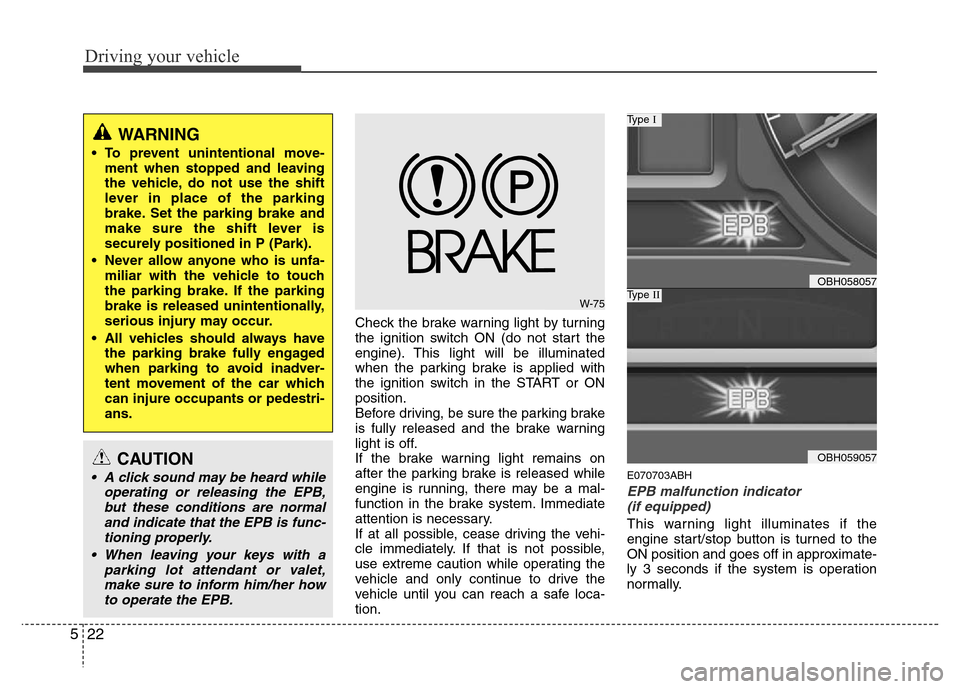
Check the brake warning light by turning
the ignition switch ON (do not start the
engine). This light will be illuminated
when the parking brake is applied with
the ignition switch in the START or ON
position.
Before driving, be sure the parking brake
is fully released and the brake warning
light is off.
If the brake warning light remains on
after the parking brake is released while
engine is running, there may be a mal-
function in the brake system. Immediate
attention is necessary.
If at all possible, cease driving the vehi-
cle immediately. If that is not possible,
use extreme caution while operating the
vehicle and only continue to drive the
vehicle until you can reach a safe loca-
tion.
E070703ABH
EPB malfunction indicator
(if equipped)
This warning light illuminates if the
engine start/stop button is turned to the
ON position and goes off in approximate-
ly 3 seconds if the system is operation
normally.
WARNING
• To prevent unintentional move-
ment when stopped and leaving
the vehicle, do not use the shift
lever in place of the parking
brake. Set the parking brake and
make sure the shift lever is
securely positioned in P (Park).
• Never allow anyone who is unfa-
miliar with the vehicle to touch
the parking brake. If the parking
brake is released unintentionally,
serious injury may occur.
• All vehicles should always have
the parking brake fully engaged
when parking to avoid inadver-
tent movement of the car which
can injure occupants or pedestri-
ans.
W-75
OBH058057
Type I
OBH059057
Type II
CAUTION
• A click sound may be heard while
operating or releasing the EPB,
but these conditions are normal
and indicate that the EPB is func-
tioning properly.
• When leaving your keys with a
parking lot attendant or valet,
make sure to inform him/her how
to operate the EPB.
Page 245 of 393

523
Driving your vehicle
If the EPB malfunction indicator remains
on, comes on while driving, or does not
come on when the ignition switch or the
engine start/stop button is turned to the
ON position, this indicates that the EPB
may have malfunctioned.
If this occurs, have your vehicle checked
by an authorized HYUNDAI dealer as
soon as possible.
The EPB malfunction indicator may illu-
minate when the ESP indicator comes on
to indicate that the ESP is not working
properly, but it does not indicate a mal-
function of the EPB.E070704BBH
Emergency braking
If there is a problem with the brake pedal
while driving, emergency braking is pos-
sible by pulling and holding the EPB
switch.
✽NOTICE
During emergency braking by the EPB,
the parking brake warning light will
illuminate to indicate that the system is
operating.
E070706BBH
EPB emergency release
If the EPB does not release properly, do
as follows:
1. Shift the shift lever into P (Park).
2. Install the stopper to the wheel.
3. Open the trunk and remove the cover.
4. Remove the emergency release han-
dle from the tool case.
5. Remove the emergency release cable
cover.
6. Install the emergency release handle
into the threaded end of the emer-
gency release cable by turning it clock-
wise.
7. Pull up the handle until sounded a
"took".
The EPB warning light blinks.
OBH058058
WARNING
Do not operate the parking brake
while the vehicle is moving except
in an emergency situation.
Page 249 of 393

527
Driving your vehicle
- the hood is open with transmission
in D (Drive).
- the trunk lid is open with transmis-
sion in R (Reverse).
- the driver's seat belt is unbuckled
and the driver's door is open.
- AUTO HOLD is operating for a long
period of time.
- the vehicle is standing on a steep
slope.
In these cases, the brake warning light
comes on, the AUTO HOLD indicator
changes from green to white, and a
warning sounds and a message will
appear to inform you that EPB has
been automatically engaged.
Before driving off again, press foot
brake pedal, check the surrounding
area near your vehicle and release
parking brake manually with the EPB
switch.
• When AUTO HOLD is ON and the
vehicle comes to a stop on a steep
slope (about 25% gradient or more),
the EPB will be automatically
engaged. In this case, when you
release EPB manually by pressing the
EPB switch with foot brake pedal
pressed, AUTO HOLD will hold the
vehicle for 3 seconds in order to pre-
vent the vehicle from rolling back
during the launch.• If the AUTO HOLD malfunction indi-
cator lights up yellow on the LCD
screen, the AUTO HOLD is not work-
ing properly. Take your vehicle to an
authorized HYUNDAI dealer and
have the system checked.
• While operating Auto Hold, you may
hear mechanical noise. However, it is
normal operating noise.E070300AEN-EE
Anti-lock brake system (ABS)
WARNING
ABS (or ESP) will not prevent acci-
dents due to improper or danger-
ous driving maneuvers. Even
though vehicle control is improved
during emergency braking, always
maintain a safe distance between
you and objects ahead. Vehicle
speeds should always be reduced
during extreme road conditions.
The braking distance for cars
equipped with an anti-lock braking
system (or Electronic Stability
Program system) may be longer
than for those without it in the fol-
lowing road conditions.
During these conditions the vehicle
should be driven at reduced
speeds:
• Rough, gravel or snow-covered
roads.
• With tire chains installed.
(Continued)
WARNING
• Press the accelerator pedal slow-
ly when you start the vehicle.
• For your safety, cancel the AUTO
HOLD when you drive downhill or
back up the vehicle or park the
vehicle.
CAUTION
If there is a malfunction with the dri-
ver’s door, hood or trunk open
detection system, the AUTO HOLD
may not work properly.
Take your vehicle to an authorized
HYUNDAI dealer and have the sys-
tem checked.
Page 251 of 393

529
Driving your vehicle
✽NOTICE
When you jump start your vehicle
because of a drained battery, the engine
may not run as smoothly and the ABS
warning light may turn on at the same
time. This happens because of the low
battery voltage. It does not mean your
ABS is malfunctioning.
• Do not pump your brakes!
• Have the battery recharged before
driving the vehicle.
E070500AUN-EE
Electronic stability program (ESP)
(if equipped)
The Electronic Stability Program (ESP)
system is designed to stabilize the vehicle
during cornering maneuvers. ESP checks
where you are steering and where the
vehicle is actually going. ESP applies the
brakes at individual wheels and
intervenes in the engine management
system to stabilize the vehicle.
W-78
CAUTION
• If the ABS warning light is on and
stays on, you may have a problem
with the ABS. In this case, howev-
er, your regular brakes will work
normally.
• The ABS warning light will stay on
for approximately 3 seconds after
the ignition switch is ON. During
that time, the ABS will go through
self-diagnosis and the light will go
off if everything is normal. If the
light stays on, you may have a
problem with your ABS. Contact
an authorized HYUNDAI dealer as
soon as possible.
CAUTION
• When you drive on a road having
poor traction, such as an icy road,
and operate your brakes continu-
ously, the ABS will be active con-
tinuously and the ABS warning
light may illuminate. Pull your car
over to a safe place and stop the
engine.
• Restart the engine. If the ABS
warning light is off, then your
ABS system is normal.
Otherwise, you may have a prob-
lem with the ABS. Contact an
authorized HYUNDAI dealer as
soon as possible.
OBH058062E
Type A
Type B