2012 Hyundai Equus Eco
[x] Cancel search: EcoPage 67 of 385
Safety features of your vehicle
48 3
Air bag warning light
The purpose of the air bag warning light
in your instrument panel is to alert you of
a potential problem with your air bag -
Supplemental Restraint System (SRS).
When the ignition switch is turned ON,
the warning light should illuminate for
approximately 6 seconds, then go off.
Have the system checked if:
• The light does not turn on briefly when
you turn the engine start/stop button to
the ON position.
• The light stays on after illuminating for
approximately 6 seconds.
• The light comes on while the vehicle is
in motion.
• The light blinks when the engine
start/stop button is in ON position.
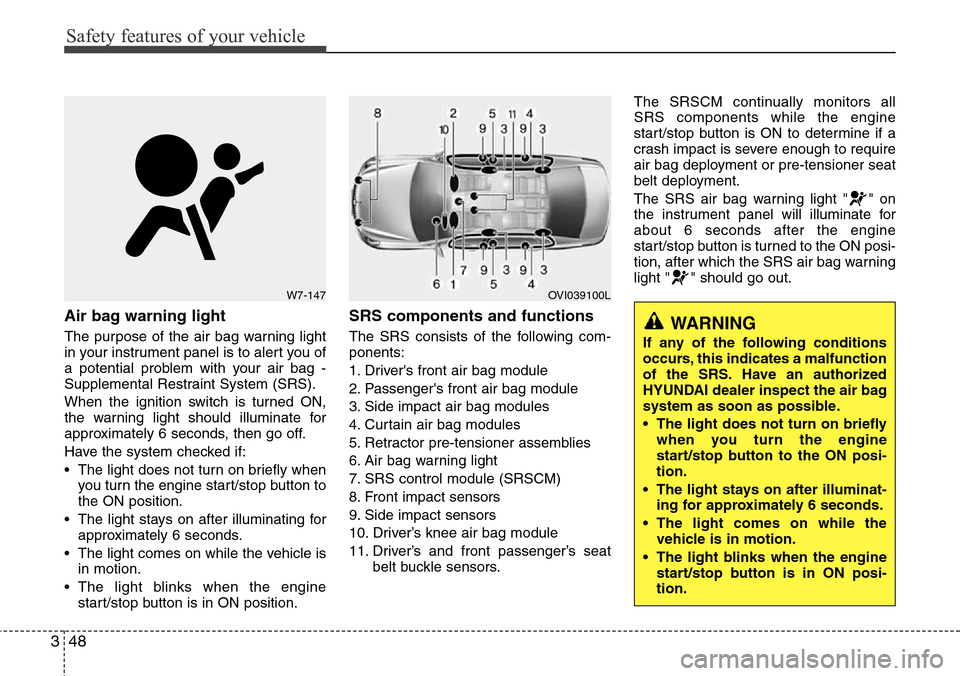
SRS components and functions
The SRS consists of the following com-
ponents:
1. Driver's front air bag module
2. Passenger's front air bag module
3. Side impact air bag modules
4. Curtain air bag modules
5. Retractor pre-tensioner assemblies
6. Air bag warning light
7. SRS control module (SRSCM)
8. Front impact sensors
9. Side impact sensors
10. Driver’s knee air bag module
11. Driver’s and front passenger’s seat
belt buckle sensors.The SRSCM continually monitors all
SRS components while the engine
start/stop button is ON to determine if a
crash impact is severe enough to require
air bag deployment or pre-tensioner seat
belt deployment.
The SRS air bag warning light " " on
the instrument panel will illuminate for
about 6 seconds after the engine
start/stop button is turned to the ON posi-
tion, after which the SRS air bag warning
light " " should go out.
W7-147OVI039100L
WARNING
If any of the following conditions
occurs, this indicates a malfunction
of the SRS. Have an authorized
HYUNDAI dealer inspect the air bag
system as soon as possible.
• The light does not turn on briefly
when you turn the engine
start/stop button to the ON posi-
tion.
• The light stays on after illuminat-
ing for approximately 6 seconds.
• The light comes on while the
vehicle is in motion.
• The light blinks when the engine
start/stop button is in ON posi-
tion.
Page 69 of 385

Safety features of your vehicle
50 3
WARNING
• Do not install or place any acces-
sories (drink holder, cassette
holder, sticker, etc.) on the front
passenger's panel above the
glove box in a vehicle with a pas-
senger's air bag. Such objects
may become dangerous projec-
tiles and cause injury if the pas-
senger's air bag inflates.
• When installing a container of liq-
uid air freshener inside the vehi-
cle, do not place it near the
instrument cluster nor on the
instrument panel surface.
It may become a dangerous pro-
jectile and cause injury if the pas-
senger's air bag inflates.
B240B05L
Passenger’s front air bag
WARNING
• If an air bag deploys, there may
be a loud noise followed by a fine
dust released in the vehicle.
These conditions are normal and
are not hazardous - the air bags
are packed in this fine powder.
The dust generated during air
bag deployment may cause skin
or eye irritation as well as aggra-
vate asthma for some persons.
Always wash all exposed skin
areas thoroughly with lukewarm
water and a mild soap after an
accident in which the air bags
were deployed.
• The SRS can function only when
the engine start/stop button is in
the ON position. If the SRS " "
warning light does not illuminate,
or continuously remains on after
illuminating for about 6 seconds
when the engine start/stop but-
ton is turned to the ON position,
or after the engine is started,
comes on while driving, the SRS
is not working properly. If this
occurs, have your vehicle imme-
diately inspected by an author-
ized HYUNDAI dealer.
(Continued)
(Continued)
• Before you replace a fuse or dis-
connect a battery terminal, turn
the engine start/stop button to
the OFF position. Never remove
or replace the air bag related
fuse(s) when the engine
start/stop button is in the ON
position. Failure to heed this
warning will cause the SRS “ ”
warning light to illuminate.
Page 73 of 385

Safety features of your vehicle
54 3
(Continued)
• Use of seat covers could reduce
or prevent the effectiveness of
the system.
• Do not install any accessories on
the side or near the side impact
air bag.
• Do not place any objects over the
air bag or between the air bag
and yourself.
• Do not place any objects (an
umbrella, bag, etc.) between the
door and the seat. Such objects
may become dangerous projec-
tiles and cause injury if the sup-
plemental side impact air bag
inflates.
• To prevent unexpected deploy-
ment of the side impact air bag
that may result in personal injury,
avoid impact to the side impact
sensor when the ignition switch
is on.
• If the seat or seat cover is dam-
aged, have the vehicle checked
and repaired by an authorized
HYUNDAI dealer because your
vehicle is equipped with side
impact air bags.Your vehicle is equipped with a side
impact air bag in each front and outboard
rear seat. The purpose of the air bag is to
provide the vehicle's driver and/or the
front and outboard rear passengers with
additional protection than that offered by
the seat belt alone.
• The side impact air bags are designed
to deploy during certain side-impact
collisions, depending on the crash
severity, angle, speed and point of
impact.
• The side impact air bags are not
designed to deploy in all side impact.
WARNING
• The side impact air bag is sup-
plemental to the driver’s and the
passengers seat belt systems
and is not a substitute for them.
Therefore your seat belts must be
worn at all times while the vehicle
is in motion. The air bags deploy
only in certain side impact condi-
tions severe enough to cause
significant injury to the vehicle
occupants.
• For best protection from the side
impact air bag system and to
avoid being injured by the
deploying side impact air bag,
both front and all rear (if
equipped) seat occupants should
sit in an upright position with the
seat belt properly fastened. The
driver's hands should be placed
on the steering wheel at the 9:00
and 3:00 positions. The passen-
ger’ arms and hands should be
placed on their laps.
• Do not use any accessory seat
covers.
(Continued)
WARNING
Do not allow the passengers to lean
their heads or bodies onto doors,
put their arms on the doors, stretch
their arms out of the window, or
place objects between the doors
and passengers when they are
seated on seats equipped with side
and/or curtain air bags.
Page 75 of 385

Safety features of your vehicle
56 3
Why didn’t my air bag go off in a
collision? (Inflation and non-infla-
tion conditions of the air bag)
There are many types of accidents in
which the air bag would not be expect-
ed to provide additional protection.
These include rear impacts, second or
third collisions in multiple impact
accidents, as well as low speed
impacts.
Air bag collision sensors
(1) SRS control module
(2) Front impact sensor(3) Side impact sensor (front)
(4) Side impact sensor (rear)
OVI039044/OVI039045/OVI039046/OVI039047/OVI039048
1234
Page 85 of 385

43
Features of your vehicle
With a smart key, you can lock or unlock
a door (and trunk) and even start the
engine without inserting the key.
Smart key functions
Carrying the smart key, you can lock and
unlock the vehicle doors (and trunk).
Also, you may start the engine. Refer to
the following for more details.
Locking
Pressing the button of the outside door
handles with all doors (and trunk) closed
and any door unlocked, locks all the
doors (and trunk). The hazard warning
lights blink once to indicate that all doors
(and trunk) are locked. The button will
only operate when the smart key is with-
in 0.7~1 m (28~40 in.) from the outside
door handle. If you put your hand in the
outside door handle to check that the
doors lock, doors may open.
If you want to make sure that a door has
locked or not, you should check the door
lock button inside the vehicle or check
that the hazard warning lights blink once.Even though you press the outside door
handle buttons, the doors will not lock
and the chime will sound for 3 seconds if
any of following occur:
• The smart key is in the vehicle.
• The engine start/stop button is in ACC
or ON position.
• Any door except the trunk is open.
Unlocking
Carrying the smart key with you while all
doors locked and if you put your hand in
the outside door handle for approximate-
ly 0.5 second, all doors will unlock. The
hazard warning lights blink twice to indi-
cate that all doors (and trunk) are
unlocked. You can open the door by
pulling the outside door handle. The
smart key is only recognized in the area
0.7~1 m (28~40 in.) from the outside
door handle.
When the smart key is recognized in the
area of 0.7~1 m (28~40 in.) from the out-
side door handle, other people can also
open the door without possession of the
smart key.
SMART KEY
OVI049001OVI049005
UnlockLock
Page 86 of 385

Features of your vehicle
4 4
Trunk unlocking (if equipped)
When all doors are locked, if you are
within 0.7~1 m (28~40 in.) from the out-
side trunk handle with your smart key in
your possession, the trunk will unlock
and open when you press the trunk han-
dle switch.
Also, once the trunk is opened and then
closed, the trunk will be locked automati-
cally.
If you close the trunk when the smart key
is in the trunk, the chime will sound for 5
seconds. The trunk will unlock and open
when you press the trunk handle switch.
Start-up
You can start the engine without inserting
the key. For detailed information refer to
“Engine start/stop button” in section 5.
Buttons on the smart key
Lock (1)
All doors (and trunk) are locked if the lock
button is pressed while all doors are
closed.
If all doors (and trunk) are closed, the
hazard warning lights blink once to indi-
cate that all doors (and trunk) are locked.However, if any door (or trunk) remains
open, the hazard warning lights will not
operate. If all doors (and trunk) are
closed after the lock button is pressed,
the hazard warning lights blink.
If you press the lock button one more
time within 4 seconds after all doors are
locked by pressing the lock button, the
outside rearview mirror will be folded.
(if equipped)
Unlock (2)
All doors (and trunk) are unlocked if the
unlock button is pressed.
The hazard warning lights will blink twice
to indicate that all doors (and trunk) are
unlocked.
However, after pressing this button, the
doors (and trunk) will lock automatically
unless you open any door within 30 sec-
onds.
If you press the unlock button one more
time within 4 seconds after all doors are
unlocked by pressing the unlock button,
the outside rearview mirror will be unfold-
ed. (if equipped)OVI049004
Page 87 of 385

45
Features of your vehicle
Trunk unlock (3)
Without power trunk
The trunk is unlocked if the button is
pressed for more than 1 second when all
doors are locked.
The hazard warning lights will blink twice
to indicate that the trunk is unlocked.
Once the trunk is opened and then
closed with all doors locked, the trunk will
be locked automatically.
With power trunk
The trunk is opened automatically if the
button is pressed for more than 1 sec-
ond.
The hazard warning lights will blink twice
to indicate that the trunk will swing
upward.
Alarm (4)
The horn sounds and the hazard warning
lights blink for about 30 seconds if this
button is pressed for more than 0.5 sec-
ond. To stop the horn and lights, press
any button on the transmitter.
Smart key precautions
✽NOTICE
• If, for some reason, you happen to lose
your smart key, you will not be able to
start the engine. Tow the vehicle, if
necessary, and contact an authorized
HYUNDAI dealer.
• A maximum of 2 smart keys can be
registered to a single vehicle. If you
lose a smart key, you should immedi-
ately take the vehicle and key to your
authorized HYUNDAI dealer to pro-
tect it from potential theft.
• The smart key will not work if any of
following occur:
- The smart key is close to a radio
transmitter such as a radio station or
an airport which can interfere with
normal operation of the smart key.
- You keep the smart key near a
mobile two-way radio system or a
cellular phone.
- Another vehicle’s smart key is being
operated close to your vehicle.
When the smart key does not work
correctly, open and close the door with
the mechanical key. If you have a
problem with the smart key, contact
an authorized HYUNDAI dealer.
(Continued)
CAUTION
The power trunk can be operated
when the engine is not running.
However, the power trunk con-
sumes large amounts of vehicle
electric power. To prevent the bat-
tery from being discharged, do not
operate them consecutively (more
than approximately 10 times).
Page 91 of 385

49
Features of your vehicle
THEFT-ALARM SYSTEM
This system is designed to provide pro-
tection from unauthorized entry into the
vehicle. This system is operated in three
stages: the first is the "Armed" stage, the
second is the "Theft-alarm" stage, and
the third is the "Disarmed" stage. If trig-
gered, the system provides an audible
alarm with blinking of the hazard warning
lights.
Armed stage
Park the vehicle and stop the engine.
Arm the system as described below.
1. Turn off the engine.
2. Make sure that all doors, the engine
hood and trunk lid are closed and
latched.
3. • Lock the doors by depressing the
door lock button on the smart key.
After completion of the steps above,
the hazard warning lights will blink
once to indicate that the system is
armed.
If any door, trunk lid or engine hood
remains open, the hazard warning
lights won’t operate and theft-alarm
will not arm. If all doors, trunk lid and
engine hood are closed, the hazard
warning lights blink once.
• Lock the doors by pressing the button
of the front outside door handles with
the smart key in your possession.
After completion of the steps above,
the hazard warning lights will blink
once to indicate that the system is
armed.If any door, trunk lid or engine hood
remains open, the hazard warning
lights won’t operate and theft-alarm
will not arm. To arm the system, close
all the doors, trunk lid and engine
hood, and try again to lock the doors.
• Do not arm the system until all pas-
sengers have left the vehicle. If the
system is armed while a passen-
ger(s) remains in the vehicle, the
alarm may be activated when the
remaining passenger(s) leave the
vehicle. If any door, trunk lid or
engine hood is opened within 30
seconds after entering the armed
stage, the system is disarmed to
prevent unnecessary alarm.
Armed
stage
Theft-alarm
stageDisarmed
stage