2012 Hyundai Elantra seconds
[x] Cancel search: secondsPage 184 of 383

Features of your vehicle
106 4
6. Button & Knob
Turns the audio system on/off when
the ignition switch is on ACC or ON.
If the knob is turned clockwise/counter-
clockwise, the volume will increase
/decrease.
7. Button
Press this button to enter SETUP mode,
If no action is taken for 8 seconds, it will
return to previous mode.
In “SETUP” mode, rotate the
knob to move the cursor between items,
and push the button to select.
Select this item to enter the Scroll and
SDVC setup.
SCROLL
Select whether long file names are scrolled
continuously (On) or just once (Off).SDVC
(Speed Dependent Volume Control)
Select this item to turn the SDVC feature
On or Off. If it is turned ON, volume level
is adjusted automatically according to
the vehicle speed.
Select default display of MP3 play infor-
mation. “Folder/File” or “Artist/Title” can
be selected.
ENTER
VOL
SETUP
VOL
MD_USA_RADIO
Page 186 of 383

Features of your vehicle
108 4
Using CD Player
1. Button (CD)
If the CD is loaded, turns to CD mode. If
no CD, it displays “No Media” for 3 sec-
onds and returns to the previous mode.
2. Button (RANDOM)
Press this button for less than 0.8 sec-
onds to activate ‘RDM’ mode and more
than 0.8 seconds to activate ‘ALL RDM’
mode.
RDM : Only files/tracks in a folder/disc
are played back in a random sequence.
ALL RDM (MP3/WMA Only) : All files in
a disc are played back in the random
sequence.
3. Button (REPEAT)
Press this button for less than 0.8 seconds
to activate 'RPT' mode and more than 0.8
seconds to activate 'FLD RPT' mode.
RPT : Only a track (file) is repeatedly
played back.
FLD RPT (MP3/WMA Only) : Only files
in a folder are repeatedly played back.
4. Button
Press button for less than 0.8
seconds to play from the beginning of
current song.
Press button for less than
0.8 seconds and press again within
1 second to play the previous song.
Press button for 0.8 seconds or
longer to initiate reverse direction high
speed sound search of current song.
Press button for less than 0.8
seconds to play the next song.
Press button for 0.8 seconds or
longer to initiate forward direction high
speed sound search of current song.
5. CD Eject Button
Press button to eject the CD.
This button works regardless of ignition
switch status.
6. CD Slot
Insert a CD label side up and gently push
in while ignition switch is on ACC or ON.
The audio automatically switches to CD
mode and begins to play the CD.
If the audio was turned off, audio power
will automatically turned on as the CD is
inserted.
This audio only recognizes 12cm-size,
CD-DA (Audio CD) or ISO data-CD
(MP3 CD).
If UDF data-CD or non-CD (e.g. DVD)
is inserted, "Reading Error" message
will be displayed and the disc will be
ejected.
SEEK
SEEK
TRACK
TRACK
TRACK
TRACK
2
1
CD/AUX
CAUTION
Do not insert a CD if CD indicator is
lit.
MD_USA_CD
Page 187 of 383

4109
Features of your vehicle
7. Button
Play each song in the CD for 10 seconds. To
cancel SCAN Play, press this button again.
8. Button
Displays the information of the current song.
Audio CD : Disc Title/Artist, Track Title
/Artist, Total Track.
MP3 CD : File Name, Title, Artist,
Album, Folder, Total Files (Not dis-
played if the information is unavailable
on the CD or file.)
9. Button (FOLDER)
Press button to move to child
folder of the current folder and display
the first song in the folder.
Press /buttons
to move
to the folder displayed. It will play the
first song in the folder.
Press button to move to parent
folder of the current folder and display
the first song in the folder.
Press
/buttons to move
to the folder displayed.
10.Search Button
Press the button to display the
songs next to the currently played song.
press the button to display the
songs before to the currently played
song.
11.Button
Press the button to play the
select song.ENTER
ENTER
FILE
TUNE
FLDRCAT
FLDR
FLDRCAT
CAT
FLDR
INFO
SCAN
MD_USA_CDMD_USA_CD
Page 191 of 383

4113
Features of your vehicle
Using USB device
1. Button (USB or AUX)
If the auxiliary device is connected, it
switches to AUX or USB mode to play the
sound from the auxiliary player. If there is
no auxiliary device, then the message
“No Media” will become displayed on the
LCD for 3 seconds and returns to previ-
ous mode.
2. Button (RANDOM)
Press this button for less than 0.8 seconds
to play songs randomly in current folder.
Press this button for 0.8 seconds or
longer to play songs randomly in entire
USB device.
To cancel RANDOM play, press this
button again.
3. Button (REPEAT)
Press this button for less than 0.8 sec-
onds to repeat current song.
Press this button for 0.8 seconds or longer
to repeat all songs in current folder.
To cancel REPEAT, press this button
again.
4. Button
Press the button for less than
0.8 seconds to play from the beginning
of the current song.
Press the button for less than 0.8 sec
onds and press it again within 1 sec-
ond to move to and play the previous
song.
Press the button for 0.8 seconds or
longer to play the song in reverse
direction in fast speed.
Press the button for less than
0.8 seconds to move to the next song.
Press the button for 0.8 seconds or
longer to play the song in forward
direction in fast speed.
5. Button
Plays each song in the USB device for 10
seconds. To cancel SCAN Play, press
this button again.
6. Button
Displays the information of the file cur-
rently played in the order of FILE NAME
➟ TITLE ➟ ARTIST ➟ ALBUM ➟ FOLDER➟ TOTAL FILE ➟NORMAL DISPLAY ➟FILE NAME… (Displays no information if
the file has no song information.)
7. Button (CATEGORY)
Press button to move to child
folder of the current folder and display
the first song in the folder. Press
button.
Press button to move to parent
folder display the first song in the fold-
er. Press button.
ENTER
FLDR
ENTER
CAT
CAT
INFO
SCAN
SEEK
TRACK
TRACK
2
1
CD/AUX
MD_USA_USB
MD_USA_USB
Page 194 of 383

Features of your vehicle
116 4
Using iPod®
❋
iPod®is a trademark of Apple Inc.
1. Button (iPod)
If iPod is connected, it switches to the
iPod mode from the previous mode to
play the song files stored in the iPod.
If there is no iPod connected, then it dis-
plays the message "No Media" for 3 sec-
onds and returns to the previous mode.
2. Button
Press the button for less than
0.8 seconds to play from the beginning
of the song currently played.
Press the button for less than 0.8 sec-
onds and press it again within 1 second
to move to and play the previous track.
Press the button for 0.8 seconds or
longer to play the song in reverse
direction in fast speed. Press the button for less than
0.8 seconds to move to the next track.
Press the button for 0.8 seconds or
longer to play the song in forward direc-
tion in fast speed.
3. Button (RANDOM)
Press this button for less than 0.8 sec-
onds to shuffle order of all songs in
current category. (Song Random)
Press this button for 0.8 seconds or
longer to shuffle order of albums in cur-
rent category. (Album Random)
To cancel RANDOM Play, press this
button again.
4. Button (REPEAT)
Repeats the song currently played.
5. Button (CATEGORY)
Moves to the upper category from cur-
rently played category of the iPod.
To move to (play) the category (song)
displayed, Press button.
You will be able to search through the
lower category of the selected category.
6. Button
Displays the information of the file cur-
rently played in the order of TITLE ➟ARTIST ➟ALBUM ➟NORMAL DISPLAY➟TITLE... (Displays no information if the
file has no song information.)
INFO
ENTER
3
2
1
SEEK
TRACK
TRACK
CD/AUX
MD_USA_iPod
MD_USA_iPod
Page 204 of 383

Features of your vehicle
126 4
■Making a Phone Call
➀Press button.
➁Say the following command.
- Call
- Call
the call to John’s mobile phone number.
- Call
the call to john’s home number.
- Call
the call to John’s office number.
Note:
Calls can be immediately connected
to contacts who name or voice tag are
saved in the phonebook(or contacts).
A phone call can be made by speaking
names registered in the audio system.
➀Press button.
➁Say “Call”.
➂Say “By name” when prompted.
➃Say desired name (in Phonebook or
voice tag).
➄Say desired location (phone number
type). Only stored locations can be
selected.
➅ Say “Yes” to confirm and make a call.✽ ✽
Tip
A shortcut to each of the following func-
tions is available:
1. Say “Call Name”
A phone call can be made by dialing the
spoken numbers. The system can recog-
nize single digits from zero to nine.
➀Press button.
➁Say “Call”.
➂Say “By number” when prompted.
➃Say desired phone numbers.
➄Say “Dial” to complete the number and
make a call.
✽ ✽
Tip
A shortcut to each of the following func-
tions is available:
➀Say “Dial Number”
➁Say “Dial
✽ ✽
Tip
■Voice Operation
To get the best performance out of the
Voice Recognition System, observe the
followings:
- Keep the interior of the vehicle as
quiet as possible. Close the window
to eliminate surrounding noise
(traffic noise, vibration sounds,
etc), which may disturb recogniz-
ing the voice command correctly.
- Speak a command after a beep
sound within 5 seconds. Otherwise
the command will not be received
properly.
- Speak in a natural voice without
pausing between words.
- While receiving voice commands,
press the button on the steer-
ing wheel remote controller to ter-
minate guidance. Voice command
will convert back to waiting mode
to allow the user to say a new voice
command.
Page 214 of 383
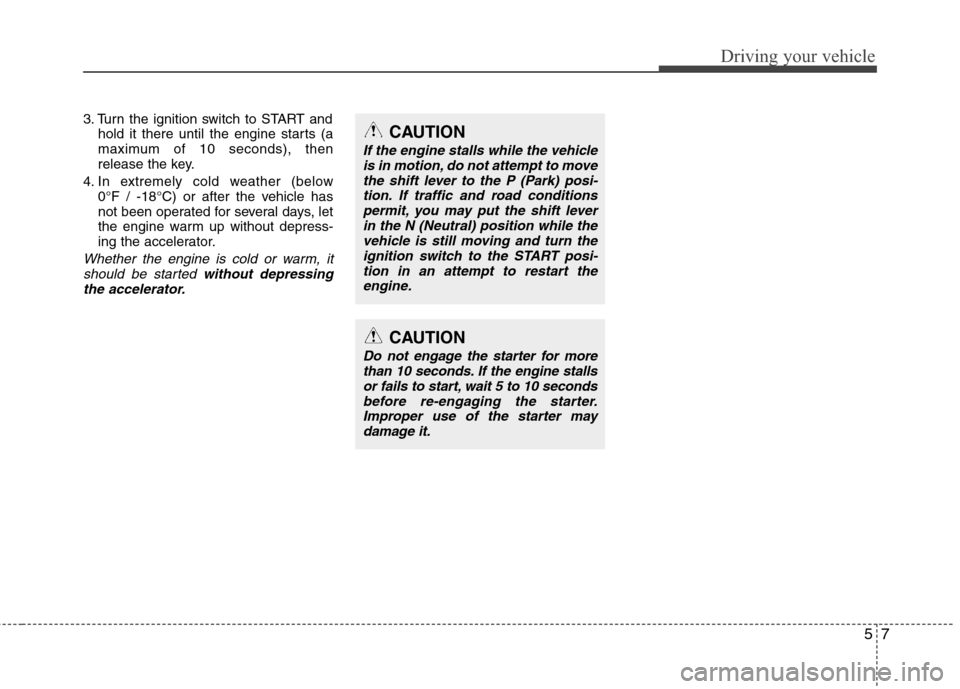
57
Driving your vehicle
3. Turn the ignition switch to START and
hold it there until the engine starts (a
maximum of 10 seconds), then
release the key.
4. In extremely cold weather (below
0°F / -18°C) or after the vehicle has
not been operated for several days, let
the engine warm up without depress-
ing the accelerator.
Whether the engine is cold or warm, it
should be started without depressing
the accelerator.
CAUTION
If the engine stalls while the vehicle
is in motion, do not attempt to move
the shift lever to the P (Park) posi-
tion. If traffic and road conditions
permit, you may put the shift lever
in the N (Neutral) position while the
vehicle is still moving and turn the
ignition switch to the START posi-
tion in an attempt to restart the
engine.
CAUTION
Do not engage the starter for more
than 10 seconds. If the engine stalls
or fails to start, wait 5 to 10 seconds
before re-engaging the starter.
Improper use of the starter may
damage it.
Page 215 of 383

Driving your vehicle
8 5
Illuminated engine start/stop but-
ton (if equipped)
Whenever the front door is opened, the
engine start/stop button will illuminate for
your convenience. The light will go off
immediately when the engine start/stop
button is turned on or go off after about
30 seconds when the door is closed.
Engine start/stop button position
OFF
• with manual transaxle
To turn off the engine, stop the vehicle
then press the engine start/stop button
with the engine start/stop button ON.
• with automatic transaxle
To turn off the engine, press the engine
start/stop button with the engine
start/stop button ON and the shift lever in
P(Park). When you press the engine
start/stop button without the shift lever in
P(Park), the engine start/stop button
does not turn to the OFF position but to
the ACC position.
✽ ✽
NOTICE
When you turn off the engine, the vehi-
cle should be stopped.
ENGINE START/STOP BUTTON (IF EQUIPPED)
OMD050005
WARNING
In an emergency situation while the
vehicle is moving, you can turn off
the engine and turn the engine
start/stop button to the ACC posi-
tion by pressing the engine
start/stop button for more than 2
seconds or 3 times successively
within 3 seconds. If the vehicle is
moving, you can restart the engine
without pressing the brake pedal by
pressing the engine start/stop but-
ton with the shift lever in N(Neutral).