2012 Hyundai Azera head light
[x] Cancel search: head lightPage 258 of 403
535
Driving your vehicle
• Check to be sure the parking brake is
not engaged and that the parking
brake indicator light is out before driv-
ing away.
• Driving through water may get the
brakes wet. They can also get wet
when the car is washed. Wet brakes
can be dangerous! Your car will not
stop as quickly if the brakes are wet.
Wet brakes may cause the car to pull
to one side.
To dry the brakes, apply the brakes
lightly until the braking action returns to
normal, taking care to keep the car
under control at all times. If the braking
action does not return to normal, stop
as soon as it is safe to do so and call
an authorized HYUNDAI dealer for
assistance.
• Do not coast down hills with the car out
of gear. This is extremely hazardous.
Keep the car in gear at all times, use
the brakes to slow down, then shift to a
lower gear so that engine braking will
help you maintain a safe speed.
• Do not "ride" the brake pedal. Resting
your foot on the brake pedal while driv-
ing can be dangerous because the
brakes might overheat and lose their
effectiveness. It also increases the
wear of the brake components.• If a tire goes flat while you are driving,
apply the brakes gently and keep the
car pointed straight ahead while you
slow down. When you are moving
slowly enough for it to be safe to do so,
pull off the road and stop in a safe
place.
• If your car is equipped with an auto-
matic transaxle, don't let your car
creep forward. To avoid creeping for-
ward, keep your foot firmly on the
brake pedal when the car is stopped.
• Be cautious when parking on a hill.
Firmly engage the parking brake and
place the shift lever in P (Park). If your
car is facing downhill, turn the front
wheels into the curb to help keep the
car from rolling. If your car is facing
uphill, turn the front wheels away from
the curb to help keep the car from
rolling. If there is no curb or if it is
required by other conditions to keep
the car from rolling, block the wheels.• Under some conditions your parking
brake can freeze in the engaged posi-
tion. This is most likely to happen when
there is an accumulation of snow or ice
around or near the rear brakes or if the
brakes are wet. If there is a risk that the
parking brake may freeze, apply it only
temporarily while you put the shift lever
in P (Park) and block the rear wheels
so the car cannot roll. Then release the
parking brake.
• Do not hold the vehicle on the upgrade
with the accelerator pedal. This can
cause the transaxle to overheat.
Always use the brake pedal or parking
brake.
Page 263 of 403
Driving your vehicle
40 5
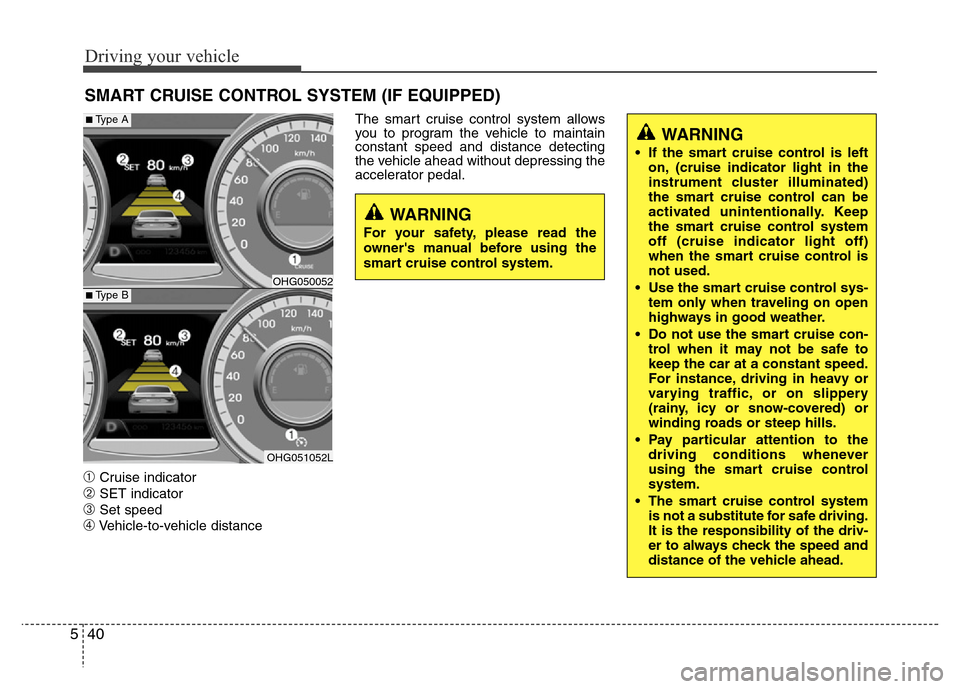
➀Cruise indicator
➁SET indicator
➂Set speed
➃Vehicle-to-vehicle distanceThe smart cruise control system allows
you to program the vehicle to maintain
constant speed and distance detecting
the vehicle ahead without depressing the
accelerator pedal.
SMART CRUISE CONTROL SYSTEM (IF EQUIPPED)
WARNING
• If the smart cruise control is left
on, (cruise indicator light in the
instrument cluster illuminated)
the smart cruise control can be
activated unintentionally. Keep
the smart cruise control system
off (cruise indicator light off)
when the smart cruise control is
not used.
• Use the smart cruise control sys-
tem only when traveling on open
highways in good weather.
• Do not use the smart cruise con-
trol when it may not be safe to
keep the car at a constant speed.
For instance, driving in heavy or
varying traffic, or on slippery
(rainy, icy or snow-covered) or
winding roads or steep hills.
• Pay particular attention to the
driving conditions whenever
using the smart cruise control
system.
• The smart cruise control system
is not a substitute for safe driving.
It is the responsibility of the driv-
er to always check the speed and
distance of the vehicle ahead.
WARNING
For your safety, please read the
owner's manual before using the
smart cruise control system.
OHG050052
OHG051052L
■Type A
■Type B
Page 264 of 403
541
Driving your vehicle
Smart cruise control speed
To set cruise control speed:
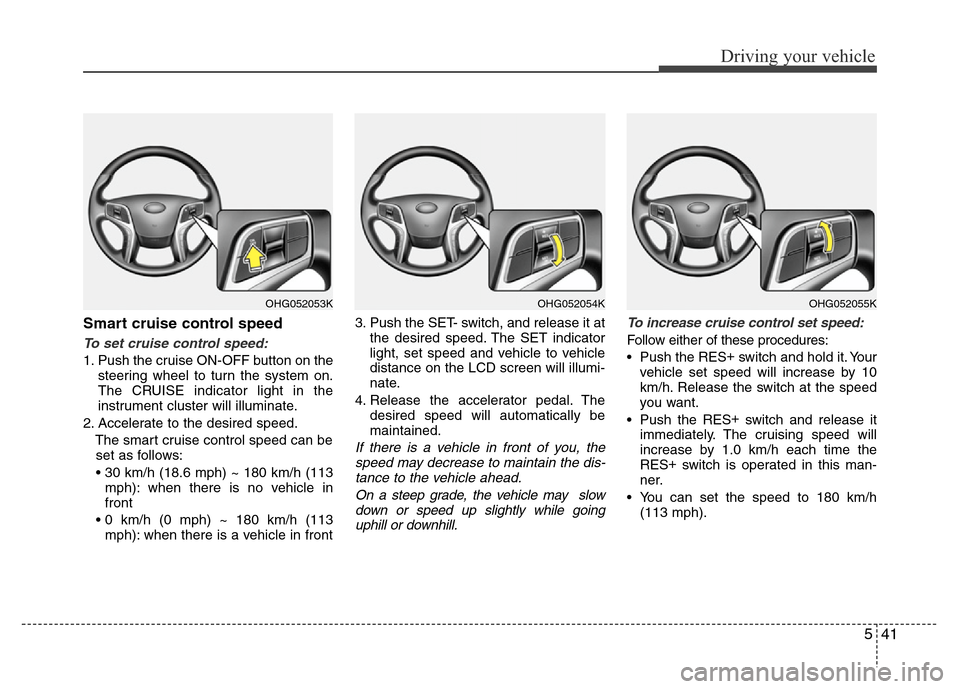
1. Push the cruise ON-OFF button on the
steering wheel to turn the system on.
The CRUISE indicator light in the
instrument cluster will illuminate.
2. Accelerate to the desired speed.
The smart cruise control speed can be
set as follows:
• 30 km/h (18.6 mph) ~ 180 km/h (113
mph): when there is no vehicle in
front
• 0 km/h (0 mph) ~ 180 km/h (113
mph): when there is a vehicle in front3. Push the SET- switch, and release it at
the desired speed. The SET indicator
light, set speed and vehicle to vehicle
distance on the LCD screen will illumi-
nate.
4. Release the accelerator pedal. The
desired speed will automatically be
maintained.
If there is a vehicle in front of you, the
speed may decrease to maintain the dis-
tance to the vehicle ahead.
On a steep grade, the vehicle may slow
down or speed up slightly while going
uphill or downhill.To increase cruise control set speed:
Follow either of these procedures:
• Push the RES+
switch and hold it. Your
vehicle set speed will increase by 10
km/h. Release the switch at the speed
you want.
• Push the RES+
switch and release it
immediately. The cruising speed will
increase by 1.0 km/h each time the
RES+
switch is operated in this man-
ner.
• You can set the speed to 180 km/h
(113 mph).
OHG052054KOHG052053KOHG052055K
Page 267 of 403
Driving your vehicle
44 5
To resume cruise control set
speed:
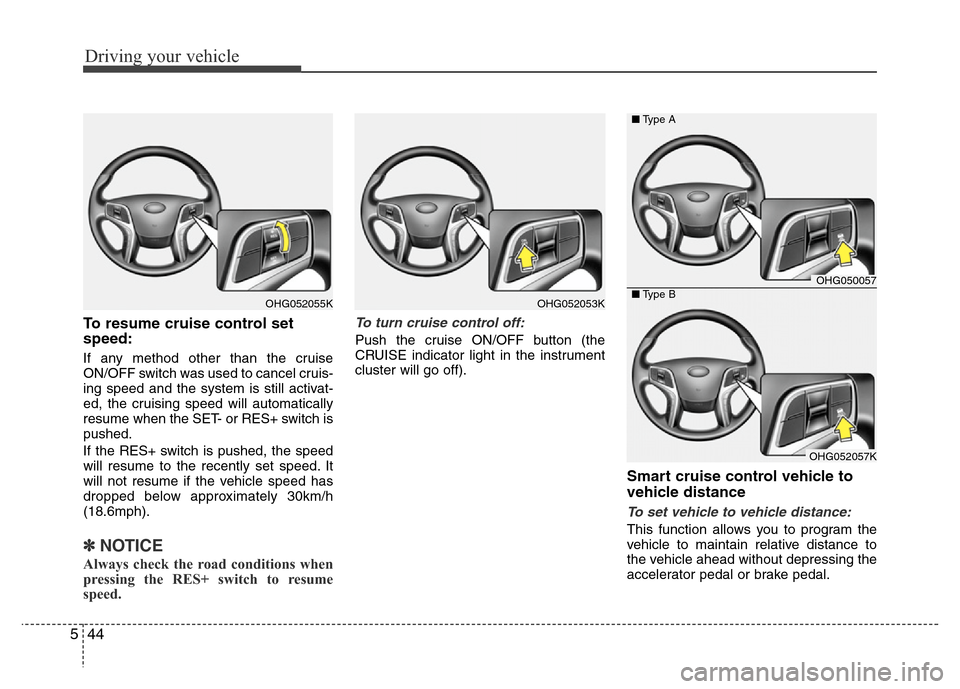
If any method other than the cruise
ON/OFF switch was used to cancel cruis-
ing speed and the system is still activat-
ed, the cruising speed will automatically
resume when the SET- or RES+ switch is
pushed.
If the RES+ switch is pushed, the speed
will resume to the recently set speed. It
will not resume if the vehicle speed has
dropped below approximately 30km/h
(18.6mph).
✽NOTICE
Always check the road conditions when
pressing the RES+ switch to resume
speed.
To turn cruise control off:
Push the cruise ON/OFF button (the
CRUISE indicator light in the instrument
cluster will go off).
Smart cruise control vehicle to
vehicle distance
To set vehicle to vehicle distance:
This function allows you to program the
vehicle to maintain relative distance to
the vehicle ahead without depressing the
accelerator pedal or brake pedal.
OHG052053KOHG052055K
OHG050057
OHG052057K ■Type A
■Type B
Page 270 of 403

547
Driving your vehicle
Distance to distance vehicle sen-
sor
The sensor detects the distance to the
vehicle ahead.
If the sensor is covered with dirt or other
foreign matter, the vehicle to vehicle dis-
tance control may not operate correctly.
Always keep the area in front of the sen-
sor clean.
Sensor malfunction indicator
If the sensor or cover is
dirty or obscured with for-
eign matter such as snow,
the indicator will illuminate.
Clean the sensor by using
a soft cloth.
SCC (Smart cruise control) malfunc-
tion indicator
The warning light illumi-
nates when the vehicle to
vehicle distance control
system is not functioning
normally.
Take your vehicle to an
authorized HYUNDAI deal-
er and have the system
checked.
OHG050059
CAUTION
• Do not install accessories around
the sensor and do not replace the
bumper by yourself. It may inter-
fere with the sensor performance.
• Always keep the sensor and
bumper clean.
• To prevent sensor cover damage
from occurring, wash the car with
a soft cloth.
• Do not damage the sensor or sen-
sor area by a strong impact. If the
sensor moves slightly off posi-
tion, the smart cruise control sys-
tem will not operate correctly.
If this occurs, have your vehicle
checked by an authorized
HYUNDAI dealer as soon as pos-
sible.
• Use only a genuine HYUNDAI
sensor cover for your vehicle.
Page 271 of 403
Driving your vehicle
48 5
To convert to cruise control mode:
The driver may choose to only use the
cruise control mode (speed control func-
tion) by doing as follows:
1. Turn the smart cruise control system
on (the cruise indicator light will be on
but the system will not be activated).
2. Push the distance to distance switch
for more than 2 seconds.
3. Choose between "Smart cruise con-
trol(SCC) mode" and "Cruise con-
trol(CC) mode".
Limitations of the system
The smart cruise control system may
have limits to its ability to detect distance
to the vehicle ahead due to road and traf-
fic conditions.
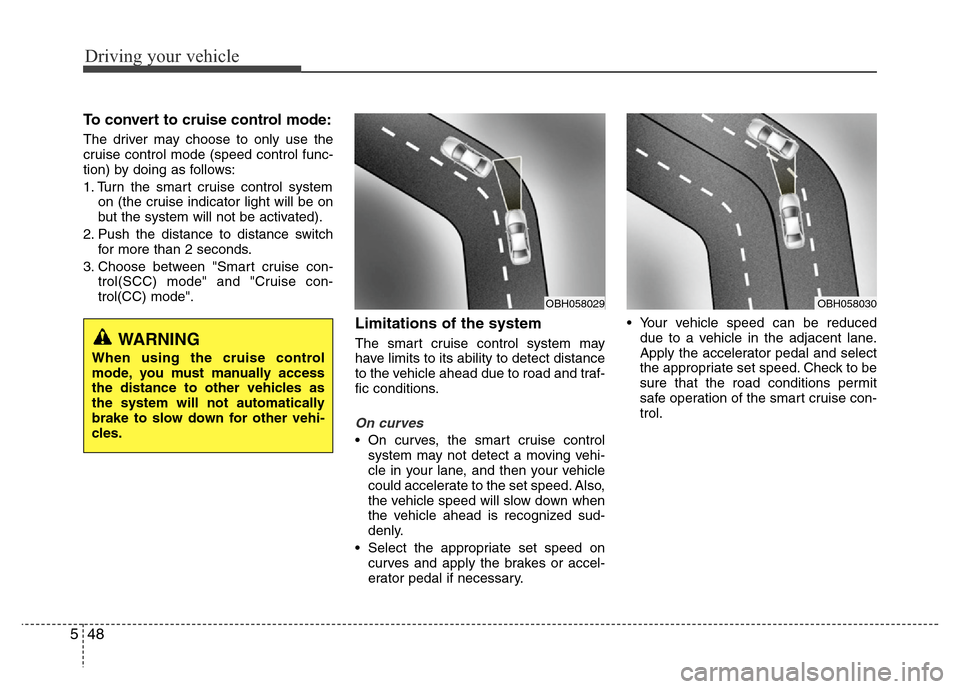
On curves
• On curves, the smart cruise control
system may not detect a moving vehi-
cle in your lane, and then your vehicle
could accelerate to the set speed. Also,
the vehicle speed will slow down when
the vehicle ahead is recognized sud-
denly.
• Select the appropriate set speed on
curves and apply the brakes or accel-
erator pedal if necessary.• Your vehicle speed can be reduced
due to a vehicle in the adjacent lane.
Apply the accelerator pedal and select
the appropriate set speed. Check to be
sure that the road conditions permit
safe operation of the smart cruise con-
trol.
WARNING
When using the cruise control
mode, you must manually access
the distance to other vehicles as
the system will not automatically
brake to slow down for other vehi-
cles.
OBH058030OBH058029
Page 277 of 403
Driving your vehicle
54 5
• Remember, your vehicle does not
require extended warm-up. After the
engine has started, allow the engine to
run for 10 to 20 seconds prior to plac-
ing the vehicle in gear. In very cold
weather, however, give your engine a
slightly longer warm-up period.
• Do not "lug" or "over-rev" the engine.
Lugging is driving very slowly in too
high a gear resulting in engine bucking.
If this happens, shift to a lower gear.
Over-revving is racing the engine
beyond its safe limit. This can be avoid-
ed by shifting at the recommended
speeds.• Use your air conditioning sparingly.
The air conditioning system is operat-
ed by engine power so your fuel econ-
omy is reduced when you use it.
• Open windows at high speeds can
reduce fuel economy.
• Fuel economy is less in crosswinds
and headwinds. To help offset some of
this loss, slow down when driving in
these conditions.
Keeping a vehicle in good operating con-
dition is important both for economy and
safety. Therefore, have an authorized
HYUNDAI dealer perform scheduled
inspections and maintenance.
WARNING - Engine off dur-
ing motion
Never turn the engine off to coast
down hills or anytime the vehicle is
in motion. The power steering and
power brakes will not function
properly without the engine run-
ning. Instead, keep the engine on
and downshift to an appropriate
gear for engine braking effect. In
addition, turning off the ignition
while driving could engage the
steering wheel lock resulting in
loss of vehicle steering which
could cause serious injury or
death.
Page 280 of 403
557
Driving your vehicle
• Adjust your mirrors to reduce the glare
from other driver's headlights.
• Keep your headlights clean and prop-
erly aimed on vehicles not equipped
with the automatic headlight aiming
feature. Dirty or improperly aimed
headlights will make it much more diffi-
cult to see at night.
• Avoid staring directly at the headlights
of oncoming vehicles. You could be
temporarily blinded, and it will take
several seconds for your eyes to read-
just to the darkness.Driving in the rain
Rain and wet roads can make driving
dangerous, especially if you’re not pre-
pared for the slick pavement. Here are a
few things to consider when driving in the
rain:
• A heavy rainfall will make it harder to
see and will increase the distance
needed to stop your vehicle, so slow
down.
• Keep your windshield wiping equip-
ment in good shape. Replace your
windshield wiper blades when they
show signs of streaking or missing
areas on the windshield.
• If your tires are not in good condition,
making a quick stop on wet pavement
can cause a skid and possibly lead to
an accident. Be sure your tires are in
good shape.
• Turn on your headlights to make it eas-
ier for others to see you.
• Driving too fast through large puddles
can affect your brakes. If you must go
through puddles, try to drive through
them slowly.
• If you believe you may have gotten
your brakes wet, apply them lightly
while driving until normal braking oper-
ation returns.
Driving in flooded areas
Avoid driving through flooded areas
unless you are sure the water is no high-
er than the bottom of the wheel hub.
Drive through any water slowly. Allow
adequate stopping distance because
brake performance may be affected.
After driving through water, dry the
brakes by gently applying them several
times while the vehicle is moving slowly.
Driving off-road
Drive carefully off-road because your
vehicle may be damaged by rocks or
roots of trees. Become familiar with the
off-road conditions where you are going
to drive before you begin driving.