Page 10 of 429
�Î
�Î
�Î
CONT INUED: If equipped
Your Vehicle at a Glance
Your Vehicle at a Glance
3
POWER WINDOW
SWITCHES
HOOD RELEASE
HANDLE
MIRROR CONTROLS
ACCESSORY POWER SOCKETS
FUEL FILL DOOR
RELEASE HANDLE
POWER DOOR LOCK
MASTER SWITCH
(P.134)
(P.103)
(P.128)
INSTRUMENT PANEL INDICATORS
GAUGES
(P.62)
(P.76)
PARKING BRAKE
RELEASE HANDLE
(P.132)
(P.139)
Vehicle with navigation system is shown. PARKING BRAKE PEDAL
(P.132) (P.136)
CENTER CONSOLE AUXILIARY INPUT JACK
AUDIO SYSTEM
(P.159)
PASSENGER’S FRONT
AIRBAG
HEATING/COOLING
CONTROLS
CLIMATE CONTROL
SYSTEM
GLOVE BOX
(P.138) (P.9, 25)
(P.146)
(P.152)
(P.205)
DRIVER’S FRONT
AIRBAG
(P.9, 25)
(P.213)
(P.254)
(P.250) REARVIEW MIRROR WITH
COMPASS
Main Menu
Page 67 of 429
�Î
�Î
�Î
: If equipped
Control L ocations
60
Vehicle with navigation system is shown. (P.103)
POWER DOOR LOCK
MASTER SWITCH
MIRROR CONTROLS
ACCESSORY POWER SOCKETS
(P.134)
(P.139)
(P.132)
PARKING BRAKE
RELEASE HANDLE
INSTRUMENT PANEL INDICATORS
GAUGES (P.76)
(P.62)
POWER WINDOW
SWITCHES
(P.128) PARKING BRAKE PEDAL
(P.132) (P.136) CENTER CONSOLE
HOOD RELEASE HANDLE
FUEL FILL DOOR RELEASE
HANDLE AUXILIARY INPUT JACK
(P.205)
AUDIO SYSTEM
HEATING/COOLING
CONTROLS
CLIMATE CONTROL
SYSTEM
GLOVE BOX
(P.138) (P.146)
(P.152)
(P.159)
(P.254)
(P.250) REARVIEW MIRROR WITH COMPASS
(P.213)
Main MenuTable of Contents
Page 152 of 429

The heating and air conditioning
system in your vehicle provides a
comf ortable driving environment in
all weather conditions.
The standard audio system has
many f eatures. This section
describes those f eatures and how to
use them.
Your vehicle has an anti-theft audio
system that requires a code number
to enable it.
The security system helps to dis-
courage vandalism and thef t of your
vehicle.
Theclimatecontrolsystemandthe
audio system have a voice control
feature. Refer to the navigation
system manual f or more inf ormation..............
Vents, Heating, and A/C . 146
...............
Climate Control System . 152
..........
Playing the AM/FM Radio . 159
............
AM/FM Radio Reception . 165
................
Playing the XM
Radio . 167
...................................
Playing CDs . 174
.......................................
CD Player . 175
CD Changer
(Models without navigation
..................................
system) . 181
CD Changer (Models with navigation
..................................
system) . 189
....................
Protecting Your CDs . 198
CD Player/Changer Error
...................................
Messages . 202
................
Remote Audio Controls . 203
......................
Auxiliary Input Jack . 205
.................
Radio Thef t Protection . 205
..........................
Setting the Clock . 207
............................
Security System . 208
...............................
Cruise Control . 210
.........................................
Compass . 213
HomeLink
Universal
................................
Transceiver . 217
........
HandsFreeLink. 221 ...
Rearview Camera and Monitor . 246Bluetooth
On models with navigation system
On RTS, RTL, and Touring models
Features
Features
145
Main MenuINDEX
Page 187 of 429
�µ�´
You can also eject the disc when the
ignition switch is of f .
Press the eject button ( ) to
remove the disc. If you eject the disc,
but do not remove it f rom the slot,
the system will automatically reload
the disc af ter 10 seconds. To begin
playing, press the CD button.
To play the radio when a disc is
playing, press the AM/FM button.
Press the CD button again to switch
back to the CD player. If you turn the system of f while a
disc is playing, either with the PWR
button or by turning of f the ignition
switch, the disc will stay in the drive.
When you turn the system back on,
the disc will begin playing where it
left off.
To select the CD changer, press the
AUX button. The disc and track
numbers will be displayed. To select
a dif f erent disc, use the preset 5
(DISC ) side f or a previous disc or
the preset 6 (DISC ) side to select
the next disc in sequence.
If you select an empty slot in the
magazine, the changer will search
f or the next available CD to load and
play.
For inf ormation on how to handle
and protect compact discs, see page
.
198
To Stop Playing a Disc
Protecting Discs
CD Player
180
Main MenuTable of Contents
Page 188 of 429
CONT INUED
CD Changer (Models without navigation system)
Features
181
AM/FM
BUTTONPRESET BARS
SCAN
BUTTON
TUNE/FOLDER BAR
CD SLOT
CD BUTTON
SEEK/SKIP BAR CD/AUX BUTTON
TUNE/FOLDER BAR
AM/FM
BUTTON
LOAD BUTTON
LOAD BUTTON
PWR BUTTON
SCAN
BUTTON
PWR BUTTON
EJECT BUTTON
EJECT BUTTON
SEEK/SKIP BAR PRESET BARS CD SLOT
RTS model
RTL and Touring models without navigation system
DISP
BUTTON RPT
BUTTON
RDM BUTTON RDM BUTTONRPT
BUTTON
DISP
BUTTON
Main MenuTable of Contents
Page 195 of 429

To remove the disc currently in play,
press the eject button ( ). When
a disc is removed f rom a slot, the
system automatically begins the load
sequence so you can load another
disc in that position. If you do not
remove the disc f rom the changer
within 10 seconds, the disc will
reload into the slot. Then the system
returns to the previous mode [AM,
FM, or XM (if equipped)].
To remove a different disc from the
changer,firstselectitwiththe
appropriate preset bar. When that
disc begins playing, press the eject
button. Continue pressing the eject
button to remove all the discs from
the changer.
Press the eject button ( ) to
remove the disc. If you eject the disc,
but do not remove it f rom the slot,
the system will automatically reload
the disc af ter 10 seconds. To begin
playing, press the CD or CD/AUX
button.
You can also eject the disc when the
ignition switch is of f .
To play the radio when a disc is
playing, press the AM/FM or XM (if
equipped) button. Press the CD
(CD/AUX on models with XM
satellite radio) button again to switch
back to the CD changer.
If you turn the system of f while a
disc is playing, either with the PWR
button or by turning of f the ignition
switch, the disc will stay in the drive.
When you turn the system back on,
the disc will begin playing where it
left off.
For inf ormation on how to handle
and protect compact discs, see page
.
You can also eject discs when the
ignition switch is on or of f :
To eject one disc, press and release
the eject button.
To eject all discs, press and hold the
eject button until the LOAD
indicator begins to blink.
198
Removing Discs f rom t he In-dashDisc ChangerTo Stop Playing a Disc
Protecting Discs
CD Changer (Models without navigation system)
188
Main MenuTable of Contents
Page 210 of 429
�´
�µ �´�µ
�Û�Ý
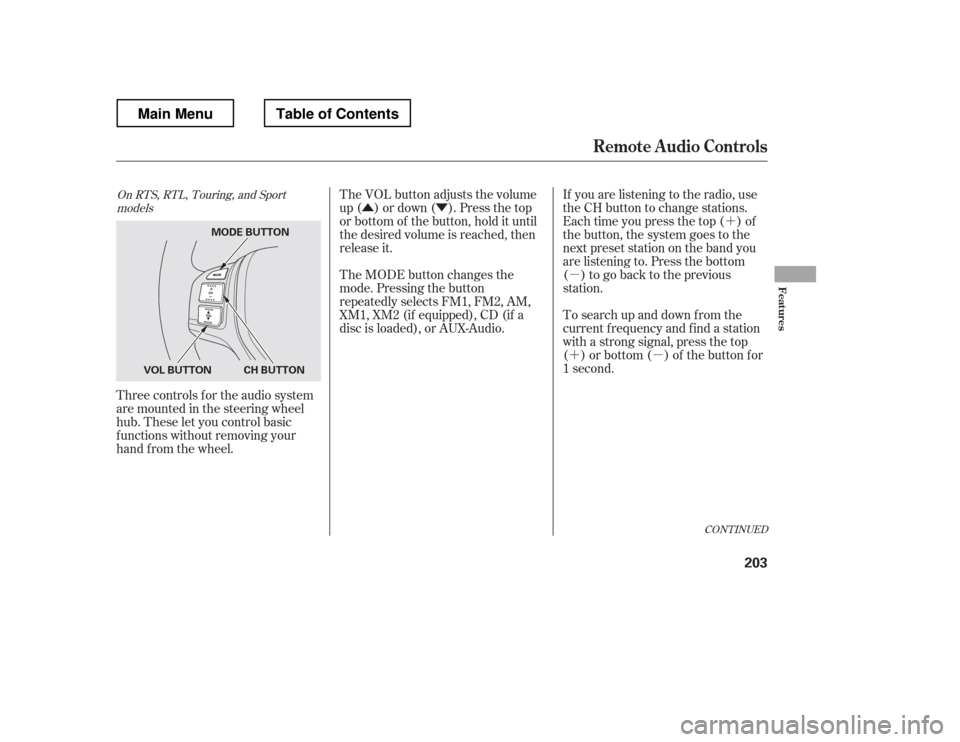
Three controls f or the audio system
are mounted in the steering wheel
hub. These let you control basic
f unctions without removing your
hand f rom the wheel. If you are listening to the radio, use
the CH button to change stations.
Each time you press the top ( ) of
the button, the system goes to the
next preset station on the band you
are listening to. Press the bottom
( ) to go back to the previous
station.
To search up and down f rom the
current f requency and f ind a station
with a strong signal, press the top
( ) or bottom ( ) of the button for
1 second.
The VOL button adjusts the volume
up ( ) or down ( ). Press the top
or bottom of the button, hold it until
the desired volume is reached, then
release it.
The MODE button changes the
mode. Pressing the button
repeatedly selects FM1, FM2, AM,
XM1, XM2 (if equipped), CD (if a
disc is loaded), or AUX-Audio.
CONT INUED
On RTS, RTL, Touring, and Sport
models
Remote Audio Controls
Features
203
MODE BUTTON
CH BUTTON
VOL BUTTON
Main MenuTable of Contents
Page 212 of 429
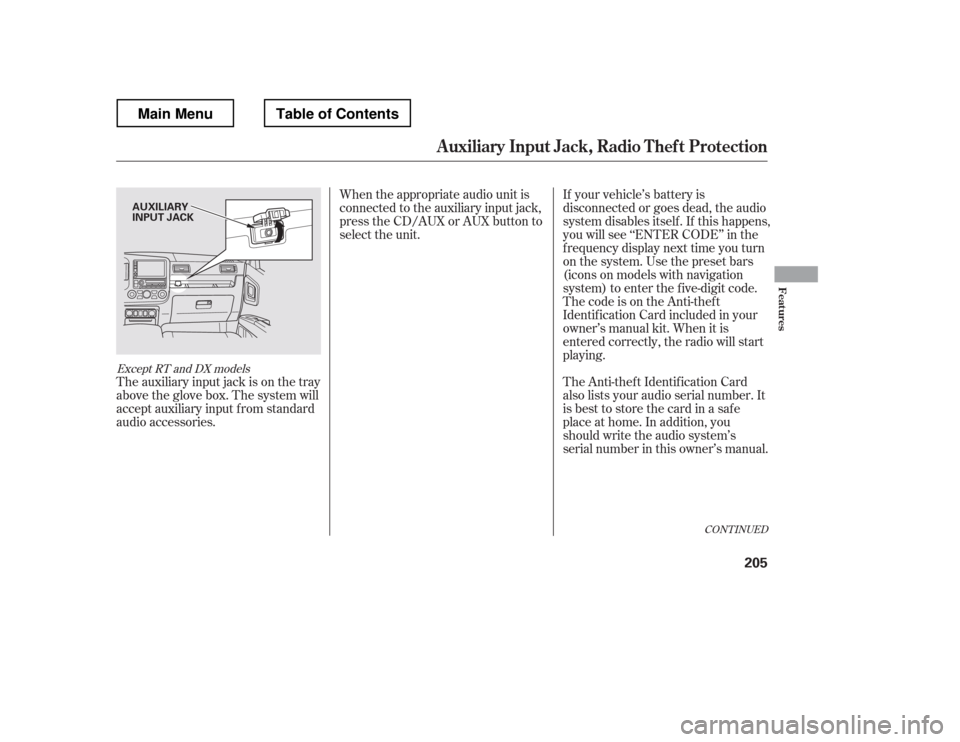
The auxiliary input jack is on the tray
above the glove box. The system will
accept auxiliary input f rom standard
audio accessories.When the appropriate audio unit is
connected to the auxiliary input jack,
press the CD/AUX or AUX button to
select the unit.
If your vehicle