Page 187 of 429
�µ�´
You can also eject the disc when the
ignition switch is of f .
Press the eject button ( ) to
remove the disc. If you eject the disc,
but do not remove it f rom the slot,
the system will automatically reload
the disc af ter 10 seconds. To begin
playing, press the CD button.
To play the radio when a disc is
playing, press the AM/FM button.
Press the CD button again to switch
back to the CD player. If you turn the system of f while a
disc is playing, either with the PWR
button or by turning of f the ignition
switch, the disc will stay in the drive.
When you turn the system back on,
the disc will begin playing where it
left off.
To select the CD changer, press the
AUX button. The disc and track
numbers will be displayed. To select
a dif f erent disc, use the preset 5
(DISC ) side f or a previous disc or
the preset 6 (DISC ) side to select
the next disc in sequence.
If you select an empty slot in the
magazine, the changer will search
f or the next available CD to load and
play.
For inf ormation on how to handle
and protect compact discs, see page
.
198
To Stop Playing a Disc
Protecting Discs
CD Player
180
Main MenuTable of Contents
Page 195 of 429

To remove the disc currently in play,
press the eject button ( ). When
a disc is removed f rom a slot, the
system automatically begins the load
sequence so you can load another
disc in that position. If you do not
remove the disc f rom the changer
within 10 seconds, the disc will
reload into the slot. Then the system
returns to the previous mode [AM,
FM, or XM (if equipped)].
To remove a different disc from the
changer,firstselectitwiththe
appropriate preset bar. When that
disc begins playing, press the eject
button. Continue pressing the eject
button to remove all the discs from
the changer.
Press the eject button ( ) to
remove the disc. If you eject the disc,
but do not remove it f rom the slot,
the system will automatically reload
the disc af ter 10 seconds. To begin
playing, press the CD or CD/AUX
button.
You can also eject the disc when the
ignition switch is of f .
To play the radio when a disc is
playing, press the AM/FM or XM (if
equipped) button. Press the CD
(CD/AUX on models with XM
satellite radio) button again to switch
back to the CD changer.
If you turn the system of f while a
disc is playing, either with the PWR
button or by turning of f the ignition
switch, the disc will stay in the drive.
When you turn the system back on,
the disc will begin playing where it
left off.
For inf ormation on how to handle
and protect compact discs, see page
.
You can also eject discs when the
ignition switch is on or of f :
To eject one disc, press and release
the eject button.
To eject all discs, press and hold the
eject button until the LOAD
indicator begins to blink.
198
Removing Discs f rom t he In-dashDisc ChangerTo Stop Playing a Disc
Protecting Discs
CD Changer (Models without navigation system)
188
Main MenuTable of Contents
Page 196 of 429
Your audio system has an in-dash
CD changer that holds up to six CDs,
providing several hours of
continuous entertainment. You
operate this CD changer with the
same controls used f or the radio.
To load CDs or operate the CD
changer, the ignition switch must be
in the ACCESSORY (I) or ON (II)
position.
CONT INUED
On RTL and Touring models withnavigation system
CD Changer (Models with navigation system)
To Play a Disc
Features
189
SEEK/SKIP BAR AM/FM BUTTON
SCAN
BUTTON
LOAD INDICATOR
LOAD BUTTON EJECT BUTTON CD SLOT
PRESET BARS
RTL and Touring models with navigation system
DISP BUTTONRPT
BUTTON
RDM BUTTON
Do not use CDs with adhesive labels.
The label can curl up and cause the CD
to jam in the unit.
Main MenuTable of Contents
Page 204 of 429
When you press the eject button
while listening to the radio, or with
the audio system turned of f , the disc
that was last selected is ejected.
Af ter that disc is ejected, pressing
the eject button again will eject the
next disc in numerical order. By
doing this six times, you can remove
all the discs f rom the changer.
To eject one disc, press and release
the eject button.
You can also eject discs when the
ignition switch is on or of f :
To eject all discs, press and hold the
eject button until the LOAD
indicator begins to blink. For inf ormation on how to handle
and protect discs, see page .
198
CD Changer (Models with navigation system)
Protecting Discs
Features
197
Main MenuTable of Contents
Page 210 of 429
�´
�µ �´�µ
�Û�Ý
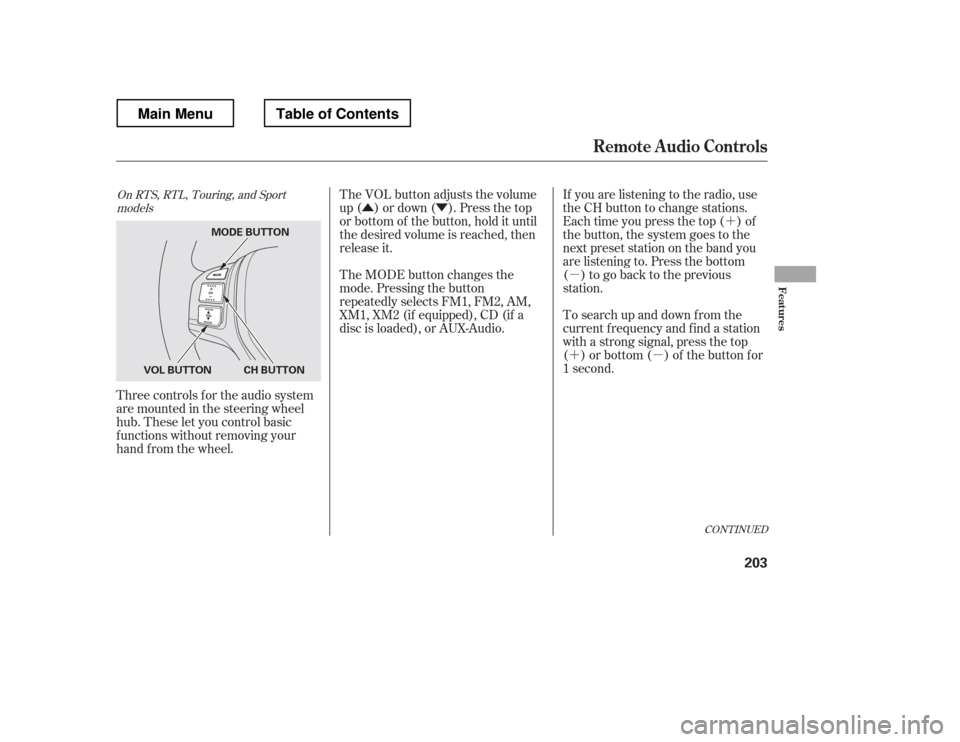
Three controls f or the audio system
are mounted in the steering wheel
hub. These let you control basic
f unctions without removing your
hand f rom the wheel. If you are listening to the radio, use
the CH button to change stations.
Each time you press the top ( ) of
the button, the system goes to the
next preset station on the band you
are listening to. Press the bottom
( ) to go back to the previous
station.
To search up and down f rom the
current f requency and f ind a station
with a strong signal, press the top
( ) or bottom ( ) of the button for
1 second.
The VOL button adjusts the volume
up ( ) or down ( ). Press the top
or bottom of the button, hold it until
the desired volume is reached, then
release it.
The MODE button changes the
mode. Pressing the button
repeatedly selects FM1, FM2, AM,
XM1, XM2 (if equipped), CD (if a
disc is loaded), or AUX-Audio.
CONT INUED
On RTS, RTL, Touring, and Sport
models
Remote Audio Controls
Features
203
MODE BUTTON
CH BUTTON
VOL BUTTON
Main MenuTable of Contents
Page 211 of 429

�´�µ �´
�µ
�´
�µ �´
�µ
�´ �µ
If you are playing a disc, the system
skips to the beginning of the next
track each time you press the top
( ) of the CH button. Press the
bottom ( ) to return to the
beginning of the current track. Press
it again to return to the previous
track. You will see the disc and track
numbers in the upper display.
To go to the next disc, press the top
( ) of the button for 1 second.
Press the bottom ( ) f or 1 second
to go back to the previous disc.
When you play an MP3/WMA disc,
press the top ( ) of the button for 1
second to go to the next folder. Press
the bottom ( ) for 1 second to go
back to the previous folder. If you are listening to XM Radio, use
the CH button to change channels.
Each time you press the top ( ) of
the button, the system goes to the
next preset channel. Press the
bottom( )togobacktothe
previous preset channel.
To go to the next channel of the
category you are listening to, press
the top ( ) of the button for 1
second. Press the bottom ( ) f or 1
second to go back to the previous
channel.
On models without navigation system
Remote Audio Controls
204
Main MenuTable of Contents
Page 391 of 429
�µ �µ �µ
�Î �Î
�Î
�Î
No. No.
No. Amps.
Amps. Amps.
Circuits Protected
Circuits Protected Circuits Protected
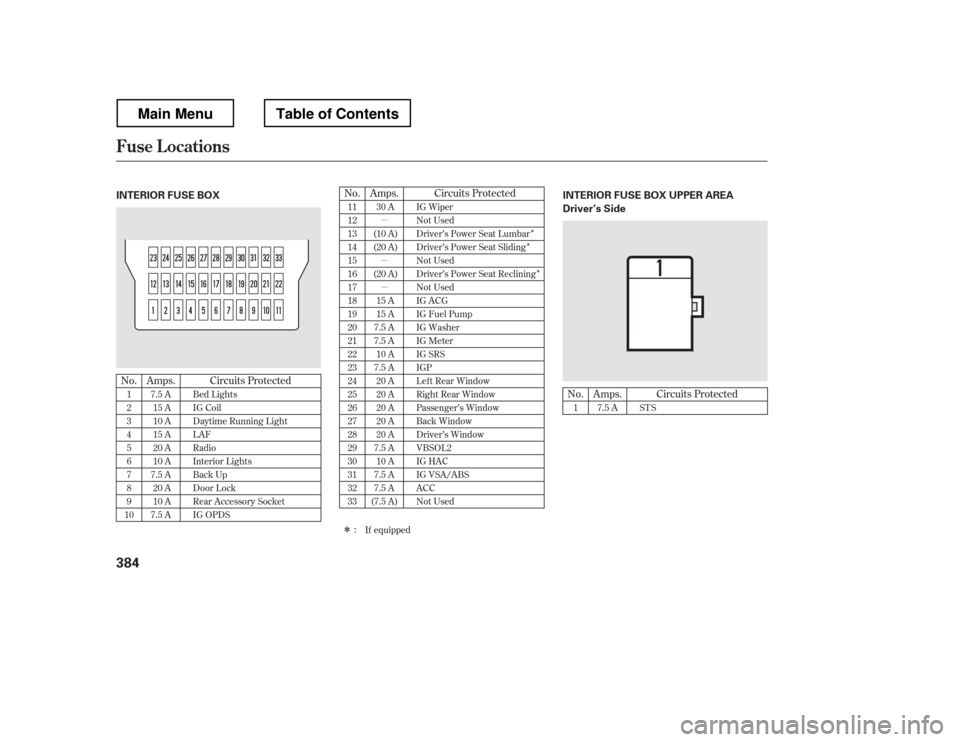
1 23 4 5 6 78 9
10
If equipped
11 12 13 14 15 1617 18 19 20 2122 23 24 25 2627 28 29 30 3132 33
1 7.5 A
7.5 A
15 A
10 A
15 A
20 A
10 A
7.5 A 20 A
10 A
7.5 A 30 A
(10 A)
(20 A)
(20 A) 15 A
15 A
7.5 A
7.5 A 10 A
7.5 A 20 A
20 A
20 A
20 A
20 A
7.5 A 10 A
7.5 A
7.5 A
(7.5 A) STS
Bed Lights
IG Coil
Daytime Running Light LAF
Radio
Interior Lights
Back Up
Door Lock
Rear Accessory Socket
IG OPDS IG Wiper
Not Used
Driver
Page 421 of 429

....................
Filling the Fuel Tank . 250
Filters
.........................
Dust and Pollen . 346
...............................................
Oil . 330
.............
Flashers, Hazard Warning . 99
...................
Flat Tire, Changing a . 363
.....................................
Floor Mats . 346
Fluids
..........
Automatic Transmission . 333
..........................................
Brake . 335
..........................
Power Steering . 336
.......................
Rear Differential . 390
...................
Transf er Assembly . 391
..................
Windshield Washer . 332
FM Stereo Radio ...................................
Reception . 165
.................
Folding the Rear Seats . 125
........................................
Fog Lights . 97
..........................
Four-way Flashers . 99
..............................
Front Seat . 119, 121
............................
Adjusting . 119, 121
.....................................
Airbags . 9, 25
.......................................
Heaters . 126
.................................................
Fuel . 248
......................
Fill Door and Cap . 250
...........................................
Gauge . 76 ................
Octane Requirement . 248
...............................
Oxygenated . 249
........................
Reserve Indicator . 68
........................
Tank, Filling the . 250
...............................
Fuel Economy . 256
Actual Mileage and EPA Fuel Economy Estimates .......................
Comparison . 256
......
Calculating Fuel Economy . 258
.............
Fuel Economy Factors . 257
........
Improving Fuel Economy . 257
.....................
Fuses, Checking the . 380
....
Halogen Headlight Bulbs . 337, 340
...........................
HandsFreeLink
. 221
..............................
HFL Buttons . 221
..............
Hazard Warning Flashers . 99
...............
Gas Mileage, Improving . 256
Gasoline
...............
Fuel Reserve Indicator . 68
...........................................
Gauge . 76
................
Octane Requirement . 248
........................
Tank, Filling the . 250
................
Gas Station Procedures . 250
Gauges
...
Engine Coolant Temperature . 76
...............................................
Fuel . 76
...............................
Speedometer . 76 .................................
Tachometer . 76
GAWR (Gross Axle Weight .......................................
Rating) . 296
GCWR (Gross Combined
.................
Weight Rating) . 296, 390
............
Gearshif t Lever Positions . 274
......................................
Glove Box . 138
GVWR (Gross Vehicle
.................
Weight Rating) . 296, 390
Index
G H
IV
Main Menu