Page 120 of 681
�Û
�Ý
�Û�Ý
CONT INUED
AUTO DOOR LOCK
AUTO DOOR UNLOCK
KEY AND REMOTE UNLOCKMODE
SECURITY RELOCK TIMER
KEYLESS LOCK
ACKNOWLEDGMENT
PTG (POWER TAILGATE)
KEYLESS OPEN MODE
Each time you press the INFO ( / ) button, the screen changes as
shown in the illustration. Press the
INFO ( / ) button until you see
the setting you want to customize,
then press the SEL/RESET button
to enter your selection.
While ‘‘DOOR/WINDOW SETUP
Page 121 of 681
�µ
�µ �Û
�Ý �Û�Ý
�µ
Auto Door Lock
There are three settings you can
choose f rom:
SHIFT FROM P
The doors lock whenever you move
the shift lever out of Park.
OFF
The auto door lock mode is
deactivated all the time.
You can choose this item to
customize f rom ‘‘DOOR/WINDOW
SETUP
Page 122 of 681
�Û
�Ý
�µ �µ�µ
CONT INUED
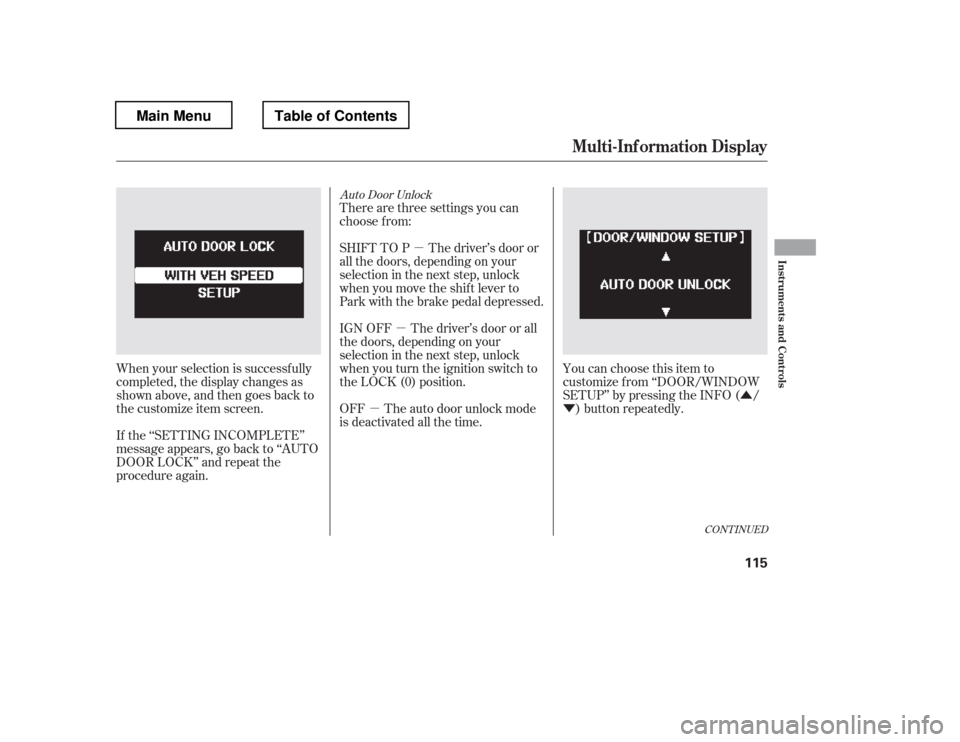
Auto Door Unlock
There are three settings you can
choose f rom:
You can choose this item to
customize f rom ‘‘DOOR/WINDOW
SETUP
Page 124 of 681
�Û�Ý
�Û
�Ý
Key and Remote Unlock Mode
Press the SEL/RESET button to see
the selections. When your selection is successf ully
completed, the display changes as
shown above, and then goes back to
the customize item screen.
If the ‘‘SETTING INCOMPLETE
Page 125 of 681
�Û
�Ý
�Û�Ý
Keyless Lock Acknowledgment
When you push the LOCK button on
the remote transmitter, some
exterior lights f lash, and a beeper
sounds when you push the LOCK
button again within 5 seconds to
verify that the doors and the tailgate
arelockedandthesecuritysystem
has set (see page ). You can
customize the exterior lights not to
f lash and the beeper not to sound.
You can choose this item to
customize f rom ‘‘DOOR/WINDOW
SETUP
Page 126 of 681
�Û
�Ý
Security Relock Timer
If you unlock the doors and the
tailgate with the remote transmitter,
but do not open any of the doors or
thetailgatewithin30seconds,the
doors and the tailgate automatically
relock and the security system sets.
You can change this relock time
f rom 30 seconds to 60 or 90 seconds.
You can choose this item to
customize f rom ‘‘DOOR/WINDOW
SETUP
Page 129 of 681
�Î
�Î
�Î
�Î �Î
�Î
�Î �Î
�Î
�Î
�Î
�Î
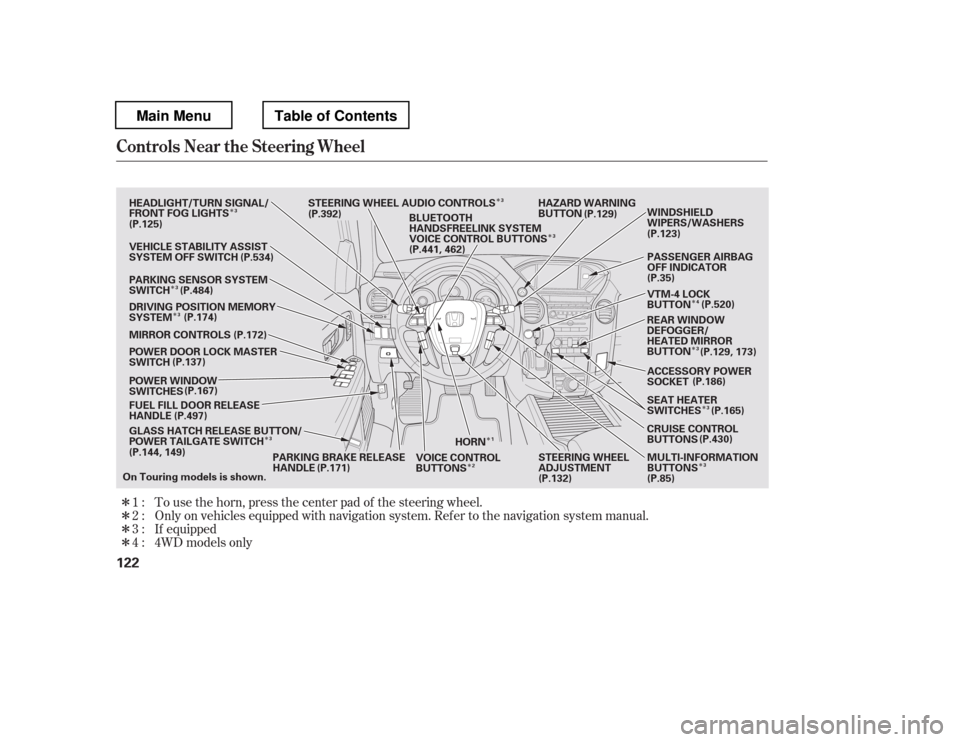
�Î �Î�Î�ÎTo use the horn, press the center pad of the steering wheel.
Only on vehicles equipped with navigation system. Ref er to the navigati
on system manual.
If equipped
1:2: 3:
4 : 4WD models only
Controls Near the Steering Wheel
122
HORN HAZARD WARNING
BUTTON
GLASS HATCH RELEASE BUTTON/
POWER TAILGATE SWITCH
FUEL FILL DOOR RELEASE
HANDLE
POWER WINDOW
SWITCHES
POWER DOOR LOCK MASTER
SWITCH
MIRROR CONTROLS
DRIVING POSITION MEMORY
SYSTEM
VEHICLE STABILITY ASSIST
SYSTEM OFF SWITCH
PARKING SENSOR SYSTEM
SWITCH
HEADLIGHT/TURN SIGNAL/
FRONT FOG LIGHTS
STEERING WHEEL AUDIO CONTROLS
PARKING BRAKE RELEASE
HANDLE STEERING WHEEL
ADJUSTMENT
VOICE CONTROL
BUTTONS PASSENGER AIRBAG
OFF INDICATOR
VTM-4 LOCK
BUTTON
ACCESSORY POWER
SOCKET
SEAT HEATER
SWITCHES
CRUISE CONTROL
BUTTONS MULTI-INFORMATION
BUTTONS (P.186)
BLUETOOTH
HANDSFREELINK SYSTEM
VOICE CONTROL BUTTONS
REAR WINDOW
DEFOGGER/
HEATED MIRROR
BUTTONWINDSHIELD
WIPERS/WASHERS
On Touring models is shown. (P.125)
(P.137)
(P.144, 149) (P.129)
(P.123)
(P.35)
(P.85)
(P.132)
(P.534)
(P.484) (P.174) (P.172)
(P.167)
(P.497)
(P.171) (P.430)
(P.165)
(P.129, 173)
(P.520)
(P.392)
(P.441, 462)
1
3
3
3 3
3
2 4
3
3
3
3
Main MenuTable of Contents
Page 139 of 681
Make any steering wheel adjustment
bef ore you start driving.Push the lever under the steering
column all the way down.Push the lever up to lock the
steering wheel in position.
Make sure you have securely
locked the steering wheel in place
by trying to move it up, down, in,
and out.
Move the steering wheel up or
down, and in or out, so it points
toward your chest, not toward
your f ace. Make sure you can see
the instrument panel gauges and
indicators. 3. 4.
1.2.
Steering Wheel A djustment
132
Adjusting the steering wheel
position while driving may
cause you to lose control of the
vehicle and be seriously injured
inacrash.
Adjust the steering wheel only
when the vehicle is stopped.
Main MenuTable of Contents