Page 245 of 681

�µ
To listen to XM Radio, turn the
ignition switch to the ACCESSORY
(I) or ON (II) position, and press the
button. The last channel you
listened to will show in the display.
Adjust the volume by turning the
power/volume knob.
XM Radio receives signals f rom two
satellites to produce clear, high-
quality digital reception. It of f ers
many channels in several categories.
Along with a large selection of
dif f erent types of music, XM Radio
allows you to view channel and
category selections in the display.
Your vehicle is capable of receivingXM
Radio anywhere in the United
States and Canada, except Hawaii,
Alaska,andPuertoRico.XMisa
registered trademark of Sirius XM
Radio
,Inc.andXMCANADAis a
registered business name of
Canadian Satellite Radio Inc. You can also change the mode from
the setup menu. Press the SETUP
button to display the setup menu.
Turn the selector knob to select XM
Mode and press the selector knob.
You can select Channel mode or
Category mode by turning and
pressing the selector knob.
Each time you press and release the
TITLE button, the display changes
f rom artist name to song name.
You may experience periods when
XM Radio does not transmit the
artist
Page 303 of 681
�Ú
On vehicles with navigation system
The navigation system receives
signals f rom the global positioning
system (GPS), and the displayed
time is updated automatically by the
GPS. Ref er to the navigation system
manual f or how to adjust the time.
Turn the selector knob to change
the setting between 12H and 24H,
and count the numbers up or down.
To enter the clock setting, press
the selector knob repeatedly to
select ‘‘SET
Page 308 of 681
�µ
�µ
The scan f unction samples
all stations with strong signals on the
selected band. To activate it, press
the SCAN button, then release it.
The skip (seek)
f unction searches up and down f rom
the current f requency to f ind a
station with a strong signal. To
activate it, press either side ( or ) of the SKIP bar, then release
it. To scan with the interf ace dial, push
the interf ace selector down, and turn
the interf ace dial to select Scan, then
press ENTER on the interf ace
selector.
The system will scan f or a station
with a strong signal. When it f inds a
strong signal, it will stop and play
that station for about 10 seconds. If
you do nothing, the system will then
scan f or the next strong station and
play it f or 10 seconds. When it plays
a station that you want to listen to,
press the SCAN button again.
CONT INUED
SCAN
SK IP (SEEK )
Playing the FM/A M Radio (Models with navigation syst em)
Features
301
Main MenuTable of Contents
Page 312 of 681
CONT INUED
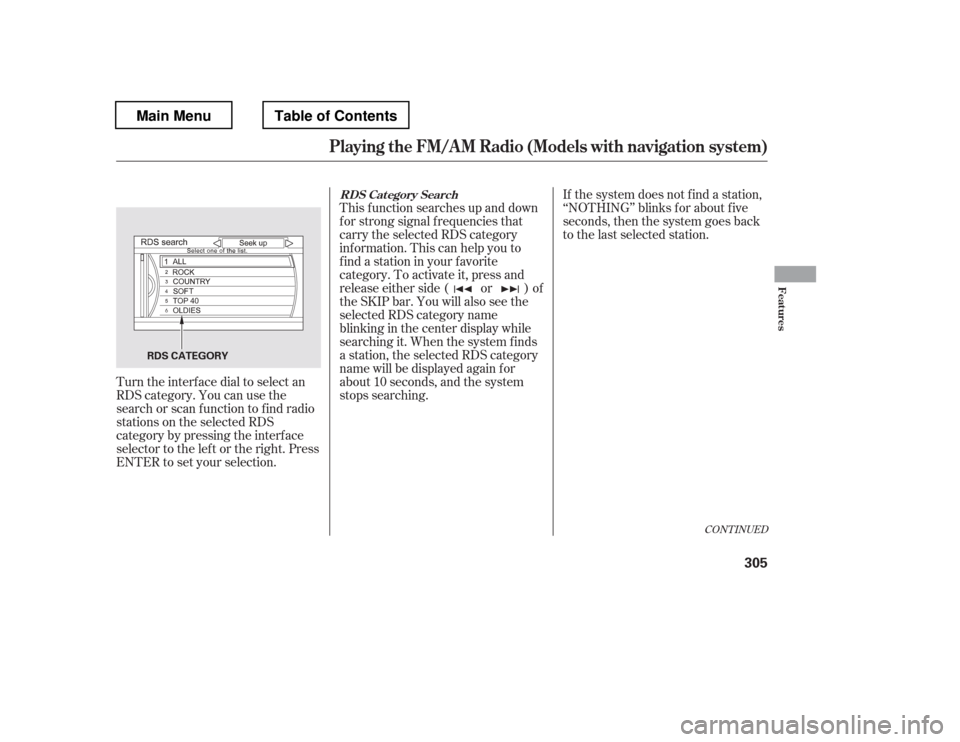
Turn the interf ace dial to select an
RDS category. You can use the
search or scan f unction to f ind radio
stations on the selected RDS
category by pressing the interf ace
selector to the left or the right. Press
ENTER to set your selection.This f unction searches up and down
f or strong signal f requencies that
carry the selected RDS category
inf ormation. This can help you to
find a station in your favorite
category. To activate it, press and
release either side ( or ) of
the SKIP bar. You will also see the
selected RDS category name
blinking in the center display while
searching it. When the system finds
a station, the selected RDS category
name will be displayed again f or
about 10 seconds, and the system
stops searching.
If the system does not find a station,
‘‘NOTHING
Page 313 of 681
To activate RDS category search
with the interf ace dial, push the
AUDIO button to display the FM
radio inf ormation on the screen.
Push the interf ace selector down,
and turn the interf ace dial to select
RDS search. Press ENTER on the
interf ace selector. The screen shows
youtheRDScategorylist.Turn the interface dial to the desired
RDS category. The scan f unction samples all
stations with strong signals on the
selected RDS category one by one.
You will also see the selected RDS
category name blinking in the
display while scanning it. When the
system f inds one, it will stop and play
that station for about 10 seconds.
If you do nothing, the system will
scan f or the next strong station and
play it f or 10 seconds. When it plays
a station that you want to listen to,
press the SCAN button again.
If the system does not find a station,
‘‘NOTHING
Page 318 of 681
�µIn some audio playing modes
(XM,AUX),whenDPLIIison,the
music coming f rom the rear
speakers may sound distorted. This
is due to compression of the music,
and it does not indicate a problem
with the setting.
The SVC mode controls the volume
based on vehicle speed. The f aster
you go, the louder the audio volume
becomes. As you slow down, the
audio volume decreases.
The SVC has f our modes: SVC OFF,
SVC LOW, SVC MID, and SVC
HIGH. To change the SVC mode,
select SVC, then press ENTER on
the interf ace selector. The current
setting is shown on the screen. Turn
the interface knob to the desired
level, and enter your selection by
pressing ENTER on the interf ace
selector. If you f eel the sound is too
loud, choose low. If you f eel the
sound is too quiet, choose high.
Dolby
PL (ProLogic) II signal processing
creates multi-channel surround
sound f rom 2 channel stereo audio
sources. Dolby ProLogic II can only
be activated when listening to DISC
(CD-DA, MP3/WMA), XM Radio,
andAUX.WhenProLogicIIisactive,
‘‘PL II
Page 320 of 681

Your vehicle is capable of receiving XM
Radio anywhere in the United
States and Canada, except Hawaii,
Alaska,andPuertoRico.XMisa
registered trademark of Sirius XM
Radio
,Inc.andXMCANADAis a
registered business name of
Canadian Satellite Radio Inc.
XM Radio receives signals f rom two
satellites to produce clear, high-
quality digital reception. It of f ers
many channels in several categories.
Along with a large selection of
dif f erent types of music, XM Radio
also allows you to view channel and
category selections in the audio
display. To listen to XM Radio, turn the
ignition switch to the ACCESSORY
(I) or ON (II) position. Push the
power/volume knob to turn on the
audio system, and press the
button. The last channel you
listened to will show in the display.
Adjust the volume by turning the
power/volume knob. Each time you push the interface
selector up, the band will change to
XM1 or XM2. Push the AUDIO
button to display XM inf ormation on
the screen. You can operate the XM
radio system with the interf ace dial.
CONT INUED
Operating the XM Radio
Playing t he XMRadio (Models with navigation system)
Features
313
Main MenuTable of Contents
Page 324 of 681

The XM satellites are in orbit over
the equator; therefore, objects south
of the vehicle may cause satellite
reception interruptions. To help
compensate f or this, ground-based
repeaters are placed in major
metropolitan areas. Satellite signals
aremorelikelytobeblockedbytall
buildings and mountains the f arther
north you travel f rom the equator.
Depending on where you drive, you
may experience reception problems.
Interf erence can be caused by any of
these conditions:Driving on the north side of an
east/west mountain road.
Driving on the north side of a
large commercial truck on an
east/west road.
Driving in tunnels. Driving on a single lane road
alongside dense trees taller than
50 ft. (15 m) to the south of you.
Driving on the lower level of a
multi-tiered road.
Driving on a road beside a vertical
wall, steep clif f , or hill to the south
of you.
When DPLII is turned on (see page
), sound coming f rom the rear
speakers may be distorted due to the
compression of the music being
broadcast. Turn DPLII of f if this
happens. 311
CONT INUED
Playing t he XMRadio (Models with navigation system)
Features
317
GROUND R
EPEATER
Signal may be blocked by
mountains or large obstacles
to the south.
Signal weaker in
these areas.
SATELLITE
Main MenuTable of Contents