�´�µ �´
�µ
�´
�µ
�´ �µIf youareplayingaDVDvideo,use
the channel button to change
chapters. Each time you press the
top ( ) of the button, the system
goes to the next chapter. Press the
bottom ( ) to return to the
beginning of the current chapter.
Press it again to return to the
previous chapter. If youareplayingaUSBflash
memory device or iPod with the USB
adapter cable, press and release the
top ( ) of the CH button to skip
f orward to the beginning of the next
file. Press the bottom ( ) to skip
backward to the beginning to the
current f ile. Press it twice to return
to the previous file.
If you are listening to XM Radio, use
the CH button to change channels.
Each time you press the top ( ) of
the button, the system goes to the
next preset channel. Press the
bottom( )togobacktothe
previous preset channel.
To go to the next channel of the
category you are listening to, press
the top ( ) of the button for 1
second. Press the bottom ( ) f or 1
second to go back to the previous
channel.
On vehicles with rear entertainment
system Except LX and U.S. EX models
Remote Audio Controls
Features
393
Main MenuTable of Contents
To operate the rear entertainment
system f rom the f ront panel, press
the REAR SOURCE button. You will
hear two beeps and the indicator in
the button comes on to show that the
control panel is enabled.
When REAR SOURCE is selected,
the f ront entertainment system
audio controls can also be used to
operate the rear entertainment
system in all modes.To play the radio, the buttons for the
f ront entertainment system have the
same f unctions.
The media that the rear passengers
are listening to will then be heard
f rom the f ront speakers.
If you do not operate the rear
entertainment system f rom the f ront
panel within 20 seconds, the
indicator in the REAR SOURCE
button will go of f and the display will
return to the front entertainment
system automatically. If an audio CD is loaded into the
upper slot, select the CD/CDL or
CD button. If a DVD or CD is loaded
into the lower slot, select the DVD
button.
The DVD player in your rear
entertainment system can play DVD
video discs, audio CDs, MP3/WMA
discs and DTS CDs.
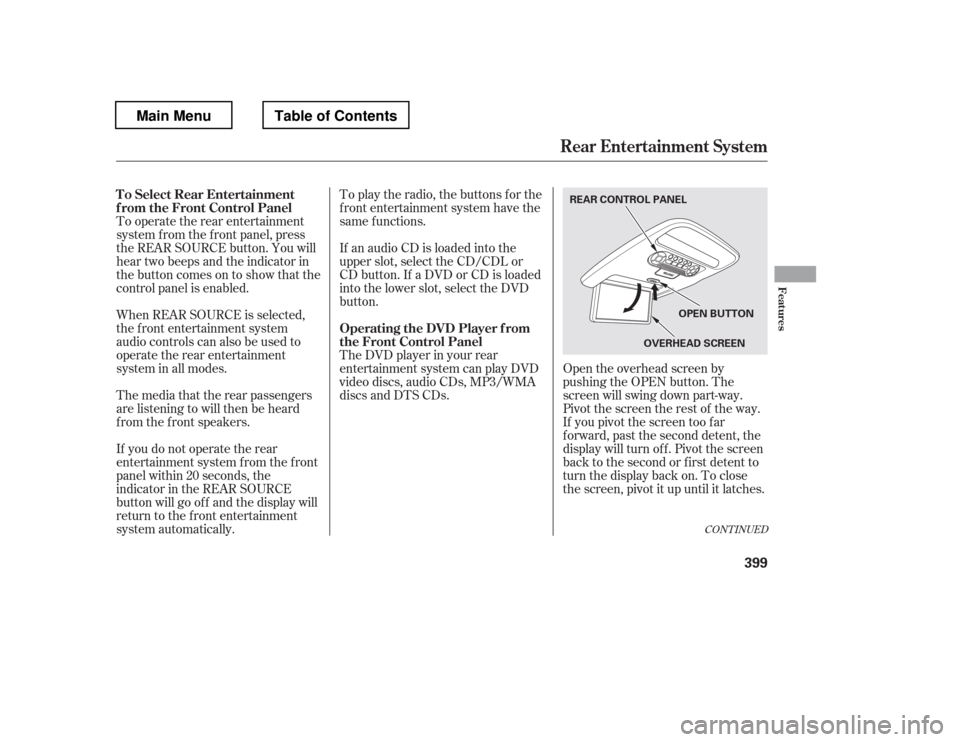
Open the overhead screen by
pushing the OPEN button. The
screen will swing down part-way.
Pivot the screen the rest of the way.
If you pivot the screen too f ar
f orward, past the second detent, the
display will turn of f . Pivot the screen
back to the second or first detent to
turn the display back on. To close
the screen, pivot it up until it latches.
CONT INUED
To Select Rear Entertainment
f rom the Front Control Panel
Operating the DVD Player f rom
the Front Control Panel
Rear Entertainment System
Features
399
REAR CONTROL PANEL
OVERHEADSCREEN
OPEN BUTTON
Main MenuTable of Contents