Page 414 of 681

When the TITLE/SCROLL button is
pressed, the title scrolls. When it is
pushed again, scrolling stops.Pressthe buttontoskiptothe
beginning of the next chapter. Press
the button to return to the
beginning of the current chapter.
Press the button again quickly
to go to the previous chapter.
To move rapidly within a chapter,
press and hold the or
button. The system will
continue to move through the
chapter. Press the button to
move forward, or the button to
move backward. Release the button
when the system reaches the point
you want.
The video screen is f or use by rear
seat passengers only. The driver and
f ront seat passenger should not try
to view the screen while driving.
U
se th e,,, or
button to highlight Repeat,
Random, or Scan on the screen. You
can enter the highlighted f unction by
pressing the ENT button. These
functions have the same features as
those of the f ront audio system.
Press the button when you
want to pause the DVD. Press this
button again to go back to PLAY. ToselectthemenuontheDVD,
press the MENU button. Use the
,,, an db utto n to
move to the desired menu selection,
then press the ENT button to enter
your selection.
Open the overhead screen by
pushing the OPEN button. The
screen will swing down part-way.
Pivot the screen the rest of the way.
If you pivot the screen too f ar
forward, past the detent, the display
will turn off. Pivot the screen back to
the second or first detent to turn the
display back on. To close the screen,
pivot it up until it latches.
To Play a Disc, CD L ibrary, HDD,
USB, or iPod
from the Rear
Control Panel To Play a DVD f rom the Rear
Control Panel
Rear Entertainment System
Features
407
Main MenuTable of Contents
Page 415 of 681
Top Menu
When you press the TITLE/
SCROLL button while a DVD is
playing, the current status of title,
chapter, elapsed time, angle, subtitle,
audio, and sound characteristics are
displayed. To return to the DVD
video screen, press the TITLE/
SCROLL button again. When you press the MENU button
while a DVD is playing, the DVD
Menu appears. The menu options
are TOP MENU, MENU, PLAY
MODE, SEARCH, NumInput and
REPEAT.
To go to your selected menu, use the
or button to highlight the
icon and press the ENT button. To
return to the DVD video screen,
select RETURN. When you select ‘‘TOP MENU,
Page 426 of 681
�Ý�Û
Audio Language
If you select ‘‘Yes,
Page 431 of 681

Insert a dif f erent disc. If the new
disc plays, there is a problem with
the f irst disc. If the error message
cycle repeats and you cannot clear it,
take your vehicle to a dealer.
Theaudiosystemwilltrytoplaythe
disc. If there is still a problem, the
error message will reappear. Press
the eject button, and pull out the disc.
If you see an error message in the
display while playing a disc, press
the eject button. After ejecting the
disc, check it for damage or
deformation. If there is no damage,
insert the disc again.
Thechartontherightexplainsthe
error messages you may see in the
display while playing a disc.
Solution
Error Message Cause
On vehicles without navigation system
Press the disc eject button, and remove the disc.
Check for an error indication. Insert the disc
again. If the code does not disappear or the disc
cannot be removed, consult your dealer.
The disc is not playable in this unit. Eject the
disc, and insert a disc compatible with this
system.
FOCUS Error
Mechanical Error
Invalid region code
DVD f ormat not
supported
DVD Player Error Messages
Rear Entertainment System
424 CHECK DISC
PUSH EJECT
CHECK REGION
UNSUPPORTED FILE
Main MenuTable of Contents
Page 435 of 681
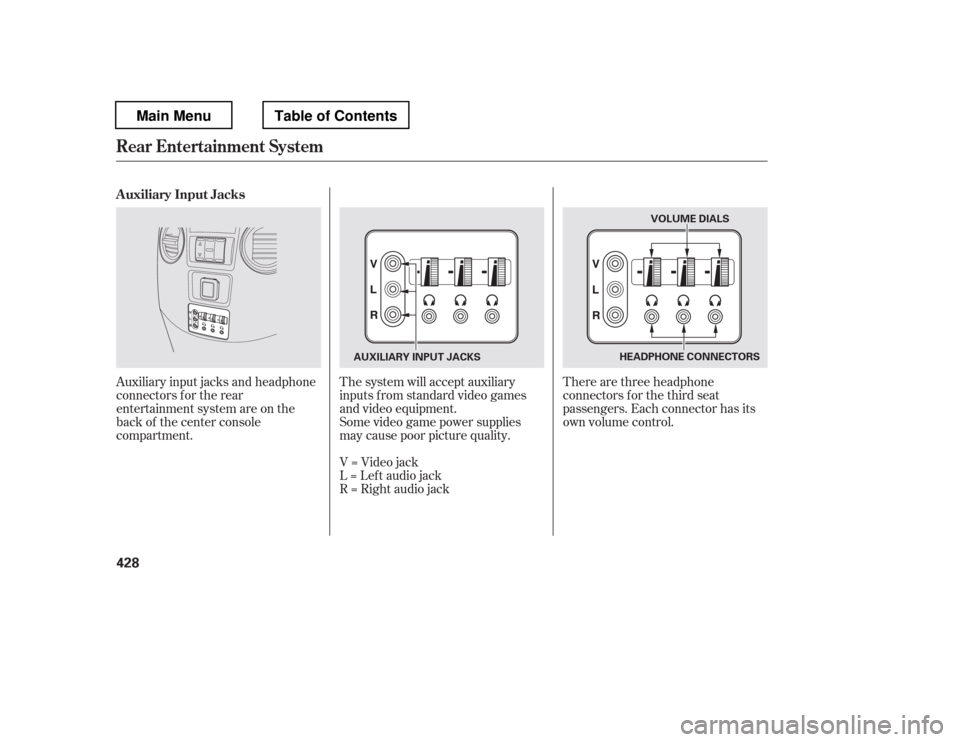
Auxiliary input jacks and headphone
connectors f or the rear
entertainment system are on the
back of the center console
compartment.The system will accept auxiliary
inputs f rom standard video games
and video equipment.
There are three headphone
connectors f or the third seat
passengers. Each connector has its
own volume control.
Some video game power supplies
may cause poor picture quality.
V=Videojack
L = Lef t audio jack
R = Right audio jack
Auxiliary Input Jacks
Rear Entertainment System
428
HEADPHONE CONNECTORS
AUXILIARY INPUT JACKS VOLUME DIALS
Main MenuTable of Contents
Page 436 of 681
The security system helps to protect
your vehicle and valuables f rom thef t.
The horn sounds and a combination
of headlights, parking lights, side
marker lights and taillights f lashes if
someone attempts to break into your
vehicle or remove the audio unit.
This alarm continues for two
minutes, then the system resets. To
deactivate the system before the two
minutes have elapsed, unlock the
driver
Page 441 of 681
When the calibration is successf ully
completed, the CAL indicator goes
of f and the compass display will stop
blinking and show an actual heading.
The audio system is not related to
the compass system. Even if the
compasssystemiscalibrating,the
display returns to the normal display
which you last selected.Drive the vehicle slowly in two
complete circles.
Press the selector knob. The
compass display is blinking and
the CAL indicator is shown.
Turn the selector knob to select
‘‘Calibration.
Page 443 of 681
The audio system is not related to
the compass system. Even if the
compasssystemisinthezone
setting mode, the display returns to
the normal display which you last
selected.
Compass
436
Zone Map
Main MenuTable of Contents