Page 1 of 441

ContentsThis owner’s manual should be considered a permanent part of the
vehicle and should remain with the vehicle when it is sold.
This owner’s manual covers all models of your vehicle. You may find
descriptions of equipment and features that are not on your
particular model.
Images throughout this owner’s manual (including the front cover)
represent features and equipment that are available on some, but
not all, models. Your particular model may not have some of these
features.
This owner’s manual is for vehicles sold in the United States and
Canada.
The information and specifications included in this publication were
in effect at the time of approval for printing. Honda Motor Co., Ltd.
reserves the right, however, to discontinue or change specifications
or design at any time without notice and without incurring any
obligation.
2Safe Driving P. 25For Safe Driving P. 26 Seat Belts P. 30 Airbags P. 392Instrument Panel P. 71Indicators P. 72 Gauges and Displays P. 862Controls P. 107Setting the Clock P. 108 Locking and Unlocking the Doors P. 110
Security System P. 134 Opening and Closing the Windows P. 137
Adjusting the Mirrors P. 152
Heating and Cooling
* P. 183
2Features P. 193Audio System P. 194 Audio System Basic Operation P. 197
Rear Entertainment System
* P. 241 HomeLink
® Universal Transceiver
* P. 257
2Driving P. 285Before Driving P. 286 Towing a Trailer P. 291
Rearview Camera
* P. 323 Refueling P. 325
2Maintenance P. 331Before Performing Maintenance P. 332 Maintenance Minder™ P. 335
Checking and Maintaining Wiper Blades P. 366
Remote Control and Wireless Headphone Care
* P. 382
2Handling the Unexpected P. 389Tools P. 390 If a Tire Goes Flat P. 391
Overheating P. 404 Indicator, Coming On/Blinking P. 406
When You Cannot Open or Close the Tailgate P. 4182Information P. 419Specifications P. 420 Identification Numbers P. 422
Warranty Coverages P. 427 Authorized Manuals P. 429
Page 3 of 441
2Quick Reference Guide
Quick Reference GuideVisual Index
❙
(Vehicle Stability Assist (VSA
®) System OFF) Button
(P306)
❙
(Blind Spot Information (BSI) System) OFF Button
* (P312)
❙Power Sliding Door Switch
* (P128)
❙Power Tailgate Switch
* (P122)
❙Parking Sensor System Switch
* (P319)
❙System Indicators
(P72)
❙Gauges
(P86)
❙Information Display
* (P87)
❙Multi-Information Display
* (P98)
❙Rear Window Defogger
(P148)
❙Heated Mirror Button
* (P148)
❙Hazard Warning Button❙Heating and Cooling System
* (P183)
❙Climate Control System
* (P187)
❙Seat Heater Switches
* (P181)
❙Audio System
(P194)
❙Rear Entertainment System
* (P241)
❙Navigation System
*
() See Navigation System Manual❙Accessory Power Sockets
(P176)
❙Cool Box Switch
* (P173)
❙Center Pocket
(P173)
❙Driving Position Memory System
Buttons
* (P149)
❙Auxiliary Input Jack
(P195)
Page 5 of 441
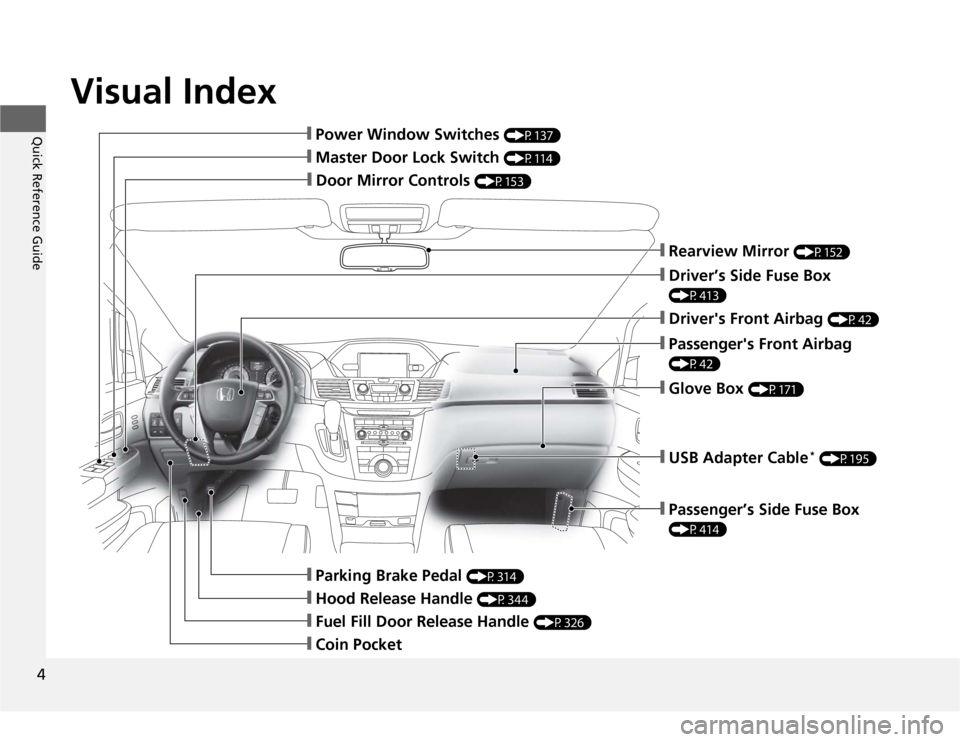
Visual Index
4Quick Reference Guide
❙Door Mirror Controls
(P153)
❙Master Door Lock Switch
(P114)
❙Hood Release Handle
(P344)
❙Fuel Fill Door Release Handle
(P326)
❙Coin Pocket❙Parking Brake Pedal
(P314)
❙Power Window Switches
(P137)
❙Rearview Mirror
(P152)
❙Driver’s Side Fuse Box (P413)❙Passenger's Front Airbag (P42)❙Glove Box
(P171)
❙Driver's Front Airbag
(P42)
❙USB Adapter Cable
* (P195)
❙Passenger’s Side Fuse Box (P414)
Page 7 of 441
Visual Index
6Quick Reference Guide
❙Maintenance Under the Hood
(P343)
❙Windshield Wipers
(P145, 366)
❙Door Lock/Unlock Control
(P112)
❙Power Door Mirrors
(P153)
❙Headlights
(P142, 355)
❙Front Turn Signal/Parking/Side Marker Lights
(P142, 360)
❙Tires
(P370, 391)
❙Fog Lights
* (P144, 359)
❙How to Refuel
(P326)
❙High-Mount Brake Light
(P365)
❙Rearview Camera
* (P323)
❙Opening/Closing the Tailgate
(P120)
❙Back-Up/Taillights
(P363)
❙Brake/Taillights
(P361)
❙Rear Turn Signal Lights
(P361)
❙Rear Side Marker Lights
(P361)
❙Opening/Closing the Sliding Doors (P126)
Page 8 of 441
7Quick Reference Guide
Safe Driving
(P25)
Airbags
(P39)
●Your vehicle is fitted with airbags to help protect you and
your passengers during a moderate-to-severe collision.
Child Safety
(P54)
●All children 12 and younger should be seated in the rear seat.
●Smaller children should be properly restrained in a forward-facing child seat.
●Infants must be properly restrained in a rear-facing child seat.
Exhaust Gas Hazard
(P68)
●Your vehicle emits dangerous exhaust gases that contain
carbon monoxide. Do not run the engine in confined
spaces where carbon monoxide gas can accumulate.
Before Driving Checklist
(P29)
●Before driving, check that the front seats, head restraints,
steering wheel, and mirrors have been properly adjusted.
Seat Belts
(P30)
●Fasten your seat belt and sit upright well
back in the seat.
●Check that your passengers are wearing
their seat belts correctly.
Fasten your lap belt as
low as possible.* Not available on all models
Page 12 of 441
11Quick Reference Guide
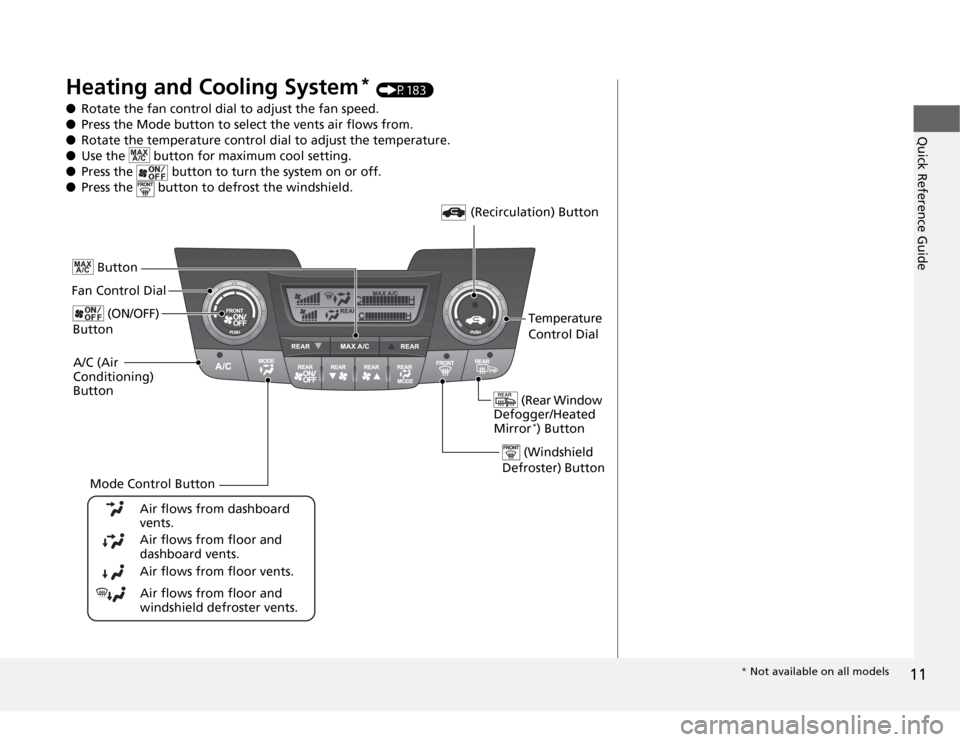
Heating and Cooling System
* (P183)
●Rotate the fan control dial to adjust the fan speed.
●Press the Mode button to select the vents air flows from.
●Rotate the temperature control dial to adjust the temperature.
●Use the button for maximum cool setting.
●Press the button to turn the system on or off.
●Press the button to defrost the windshield.
Fan Control Dial
(Rear Window
Defogger/Heated
Mirror
*) Button
(Windshield
Defroster) Button
A/C (Air
Conditioning)
Button
Air flows from floor and
windshield defroster vents. Air flows from floor vents. Air flows from floor and
dashboard vents. Air flows from dashboard
vents.
Button
(Recirculation) Button
Temperature
Control Dial (ON/OFF)
Button
Mode Control Button
* Not available on all models
Page 13 of 441

12Quick Reference Guide
Climate Control System
* (P187)
●Press the AUTO button to activate the climate control system.
●Press the button to turn the system on or off.
●Press the button to defrost the windshield.
The climate control system is voice operable. See the navigation system manual for complete
details.
Models with navigation system
Fan Control
Button (Rear Window
Defogger/Heated
Mirror) Button
(Windshield
Defroster) Button
A/C (Air
Conditioning)
Button Air flows from floor and
windshield defroster vents.
Air flows from floor vents.
Air flows from floor and
dashboard vents.
Air flows from dashboard
vents.
(Recirculation)
ButtonPassenger’s
Side
Temperature
Control Dial AUTO Button
Driver’s Side
Temperature
Control Dial
Mode Control Button SYNC
(Synchronized) Button
(ON/OFF) Button
Rear Climate Control
●Press the AUTO button to activate the
rear climate control system.
●Press the button to turn the system
on or off.Rear Passenger
Compartment
Temperature
Control Buttons (Fan Control)
ButtonAirflows
from the
rear floor
ventsAirflow is
divided
between the
rear floor
vents and
rear ceiling
vents.Airflows
from the
rear ceiling
vents (ON/OFF)
ButtonAUTO Button
Page 16 of 441
15Quick Reference Guide
Models with audio/information screen
Models without rear entertainment system
(XM
®)
Button
*
AM/FM Button
VOL/ (Power/
Volume) Knob
(CD Eject)
Button
TITLE Button
Selector KnobPreset Buttons USB/AUX ButtonCD/CDL ButtonCD Slot
SCAN Button
SKIP Bar
RETURN ButtonCATEGORY
(FOLDER) Bar
SETUP Button
(XM
®)
Button
*
AM/FM Button
VOL/ (Power/
Volume) Knob
(CD Eject)
Button
TITLE Button
Selector KnobPreset ButtonsDVD Button USB/AUX ButtonCD/CDL Button
SCAN ButtonSKIP Bar
REAR POWER
ButtonCATEGORY
(FOLDER) Bar
SETUP Button
Models with rear entertainment system
Button
RETURN ButtonPHONE Button
CD Slot
DISPLAY Button
REAR SOURCE
Button
(DVD Eject) Button
DVD Slot
DISPLAY Button
PHONE Button
* Not available on all models