Page 78 of 441

77
uuIndicatorsu
Instrument Panel
Door and Tailgate
Open Indicator
●
Comes on for a few seconds when
you turn the ignition switch to ON (w
, then goes off.
●
Comes on if any door or the tailgate
is not completely closed.
●
The beeper sounds and the indicator
comes on if any door or the tailgate
is opened while driving.
●
Goes off when all doors and tailgate are
closed.
Parking Sensor
Indicator
*
●
Comes on for a few seconds when
you turn the ignition switch to ON (w
, then goes off.
●
A corresponding indicator comes on
when an obstacle is detected while
parking.
●
Comes on if there is a problem with
the parking sensor system. The
beeper sounds.
●
Comes on without any obstacles or
when you are not parking - Check if
the area around the sensor(s) is covered
with mud, ice, snow, etc. If the
indicator(s) stays on even after you
clean the area, have the system checked
by a dealer.
—
Daytime Running
Lights Indicator
*
●
Comes on for a few seconds when
you turn the ignition switch to ON (w
, then goes off.
●
Comes on if there is a problem with
the DRL system.
●
Have your vehicle checked by a dealer.
2Daytime Running Lights P. 144
Indicator
Name
On/Blinking
Explanation
Message
*
* Not available on all models
Page 80 of 441

79
uuIndicatorsu
Instrument Panel
System Message
Indicator
*
●
Comes on for a few seconds when
you turn the ignition switch to ON (w
, then goes off.
●
Comes on along with a beep when a
problem is detected. A system
message on the multi-information
display appears at the same time.
●
While the indicator is on, press the
/ (information) button to see the
message again.
●
Refer to the Indicators information in
this chapter when a system message
appears on the multi-information
display. Take the appropriate action for
the message.
●
The multi-information display does not return
to the normal screen unless the warning is
canceled, or the / (information)
button is pressed.
—
Turn Signal
Indicators
●
The turn signal indicators blink when
you operate the turn signal lever.
●
If you press the hazard warning
button, both indicators and all turn
signals blink at the same time.
●
Does not blink or blinks rapidly - A
turn signal light bulb has blown.
Change the bulb immediately.
2Replacing Light Bulbs
P. 360, 361
—
High Beam
Indicator
●
Comes on when the high beam
headlights are on.
—
—
Lights On
Indicator
●
Comes on whenever the light switch
is on, or in AUTO
* when the exterior
lights are on.
●
If you remove the key from the ignition
switch while the lights are on, a chime
sounds when the driver's door is
opened.
—
Indicator
Name
On/Blinking
Explanation
Message
*
* Not available on all models
Page 84 of 441
83
uuIndicatorsu
Instrument Panel
Power Sliding
Door Indicator
*
●
Comes on for a few seconds when
you turn the ignition switch to ON (w
, then goes off.
●
Comes on if there is a problem with
the power sliding door system.
●
Stays on constantly or does not
come on at all - Turn off the main
switch and manually operate the power
sliding doors. Have the vehicle checked
by a dealer.
2Opening/Closing the Power
Sliding Doors
* P. 128
BSI (Blind Spot
Information)
Indicator
*
●
Comes on for a few seconds when
you turn the ignition switch to ON (w
, then goes off.
●
Stays on while BSI is turned off.
●
Comes on when mud, snow, or ice
accumulates in the vicinity of sensor.
●
Comes on if there is a problem with
the system.
—
●
Comes on while driving - Remove the
obstacle in the vicinity of sensor.
●
Comes on while driving - Have the
vehicle checked by a dealer.
Indicator
Name
On/Blinking
Explanation
Message
*
U.S.
Canada
U.S.
Canada
* Not available on all models
Page 85 of 441
84
uuIndicatorsuMulti-Information Display Warning and Information Messages
*
Instrument Panel
Multi-Information Display Warning and Information Messages
*
The following messages appear only on the multi-information display. Press the / (information) button to see the message again
with the system message indicator on.
Message
Condition
Explanation
●
Appears when the fuel fill cap is loose or is not
installed.
2Check/Tighten Fuel Cap Message P. 407
●
Appears when the scheduled maintenance is due
soon.
●
Consequently, SERVICE DUE NOW and SERVICE
PAST DUE follow.
2Maintenance Minder Messages on the Multi-
Information Display P. 340
●
Appears when the ignition key is turned to
ACCESSORY
(q
from ON
(w
. (The driver’s door is
closed.)
—
●
Appears when you open the driver's door while the
ignition key is in LOCK
(0
.
●
Remove the key from the ignition switch.
●
Appears when the engine coolant temperature gets
abnormally high.
2Overheating P. 404
* Not available on all models
Page 102 of 441
Continued
101
uuGauges and DisplaysuMulti-Information Display
*
Instrument Panel
Use the multi-information display to customize certain features.■
How to customize
Select the CUSTOMIZE SETTINGS by pressing the / button while the
ignition switch is in ON
(w
. Press the SEL/RESET button to change the display to the
CHANGE SETTINGS.
■
Customized Features
1Customized Features
To customize other features, press the /
button.
2List of customizable options P. 103
2Example of customization settings P. 105
Customization is possible when you see the driver’s
ID (DRIVER 1 or DRIVER 2) on the CHANGE
SETTINGS screen.
The driver’s ID indicates which remote transmitter
you have used to unlock the driver’s door.
The customized settings are recalled every time you
unlock the driver’s door with that remote.
When you customize settings:
Shift to
(P
.
SEL/RESET Button
Enters the selected item. / Button
Changes the customize
menu and items.
Page 103 of 441
102
uuGauges and DisplaysuMulti-Information Display
*
Instrument Panel
■
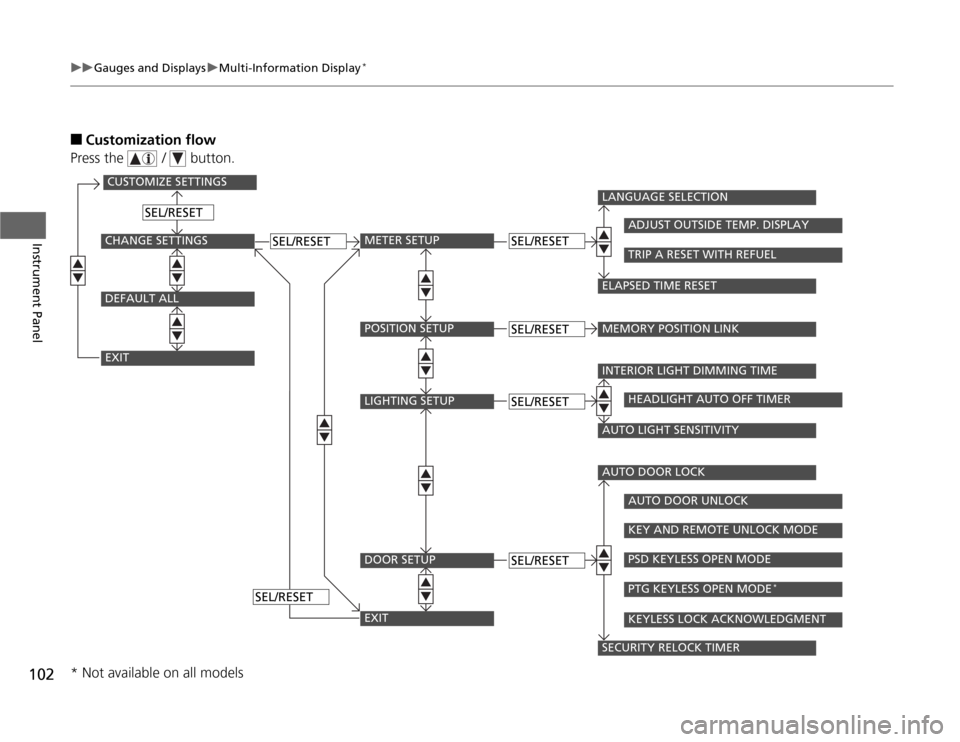
Customization flow
Press the / button.
CUSTOMIZE SETTINGSCHANGE SETTINGSEXITDEFAULT ALL
METER SETUP
SEL/RESET
SEL/RESET
SEL/RESET
SEL/RESET
POSITION SETUPLIGHTING SETUPDOOR SETUPEXIT
SEL/RESETSEL/RESETSEL/RESET
LANGUAGE SELECTIONMEMORY POSITION LINK
ADJUST OUTSIDE TEMP. DISPLAYTRIP A RESET WITH REFUEL
ELAPSED TIME RESETINTERIOR LIGHT DIMMING TIME
HEADLIGHT AUTO OFF TIMER
AUTO LIGHT SENSITIVITYAUTO DOOR LOCK
AUTO DOOR UNLOCKKEY AND REMOTE UNLOCK MODEPSD KEYLESS OPEN MODEPTG KEYLESS OPEN MODE
*
KEYLESS LOCK ACKNOWLEDGMENT
SECURITY RELOCK TIMER
* Not available on all models
Page 104 of 441

103
uuGauges and DisplaysuMulti-Information Display
*
Continued
Instrument Panel
■
List of customizable options
*1: Default SettingSetup Group Customizable Features Description Selectable settings
Meter SetupLanguage Selection Changes the displayed language. English
*1/French/Spanish
Adjust Outside Temp.
DisplayAdjust the temperature reading by a few degrees.-5°F ~ ±0°F
*1 ~ +5°F (U.S.)
-3°C ~ ±0°C*1 ~ +3°C (Canada)
Trip A Reset with RefuelSets Trip A and the average fuel economy to reset
when you refuel.ON/OFF
*1
Elapsed Time Reset Changes the resetting conditions of the elapsed time. IGN OFF
*1/Trip A/Trip B
Position Setup
Memory Position Link
Changes the driver’s seat position to a stored setting.
ON
*1/OFF
Lighting SetupInterior Light Dimming
TimeChanges the length of time the interior lights stay on
after you close the doors.60sec/30sec
*1/15sec
Headlight Auto Off TimerChanges the length of time the exterior lights stay on
after you close the driver’s door.60sec/30sec/15sec
*1/0sec
Auto Light Sensitivity Changes the timing for the headlights to come on. Max/High/Mid
*1/Low/Min
Page 105 of 441
104
uuGauges and DisplaysuMulti-Information Display
*
Instrument Panel
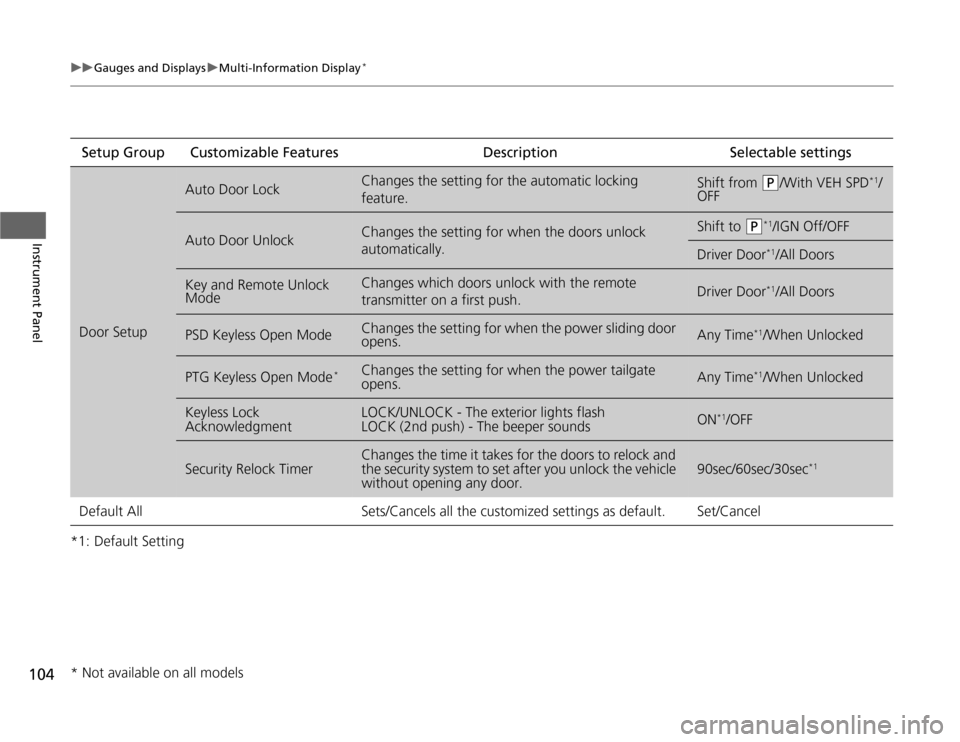
*1: Default SettingSetup Group Customizable Features Description Selectable settingsDoor Setup
Auto Door Lock
Changes the setting for the automatic locking
feature.
Shift from
(P
/With VEH SPD
*1/
OFF
Auto Door Unlock
Changes the setting for when the doors unlock
automatically.
Shift to
(P
*1/IGN Off/OFF
Driver Door
*1/All Doors
Key and Remote Unlock
Mode
Changes which doors unlock with the remote
transmitter on a first push.
Driver Door
*1/All Doors
PSD Keyless Open Mode
Changes the setting for when the power sliding door
opens.
Any Time
*1/When Unlocked
PTG Keyless Open Mode
*
Changes the setting for when the power tailgate
opens.
Any Time
*1/When Unlocked
Keyless Lock
Acknowledgment
LOCK/UNLOCK - The exterior lights flash
LOCK (2nd push) - The beeper sounds
ON
*1/OFF
Security Relock Timer
Changes the time it takes for the doors to relock and
the security system to set after you unlock the vehicle
without opening any door.
90sec/60sec/30sec
*1
Default All Sets/Cancels all the customized settings as default. Set/Cancel* Not available on all models